BT.RedirectManager
1.3.1
See the version list below for details.
dotnet add package BT.RedirectManager --version 1.3.1
NuGet\Install-Package BT.RedirectManager -Version 1.3.1
<PackageReference Include="BT.RedirectManager" Version="1.3.1" />
<PackageVersion Include="BT.RedirectManager" Version="1.3.1" />
<PackageReference Include="BT.RedirectManager" />
paket add BT.RedirectManager --version 1.3.1
#r "nuget: BT.RedirectManager, 1.3.1"
#:package BT.RedirectManager@1.3.1
#addin nuget:?package=BT.RedirectManager&version=1.3.1
#tool nuget:?package=BT.RedirectManager&version=1.3.1
BT Redirect Manager
A URL redirect manager plugin for Umbraco CMS 13, 17, and 18. Manage 301, 302, 404, and 410 redirects directly from the Umbraco backoffice with a modern dashboard, CSV import/export, regex support, and a built-in test tool.
Screenshots
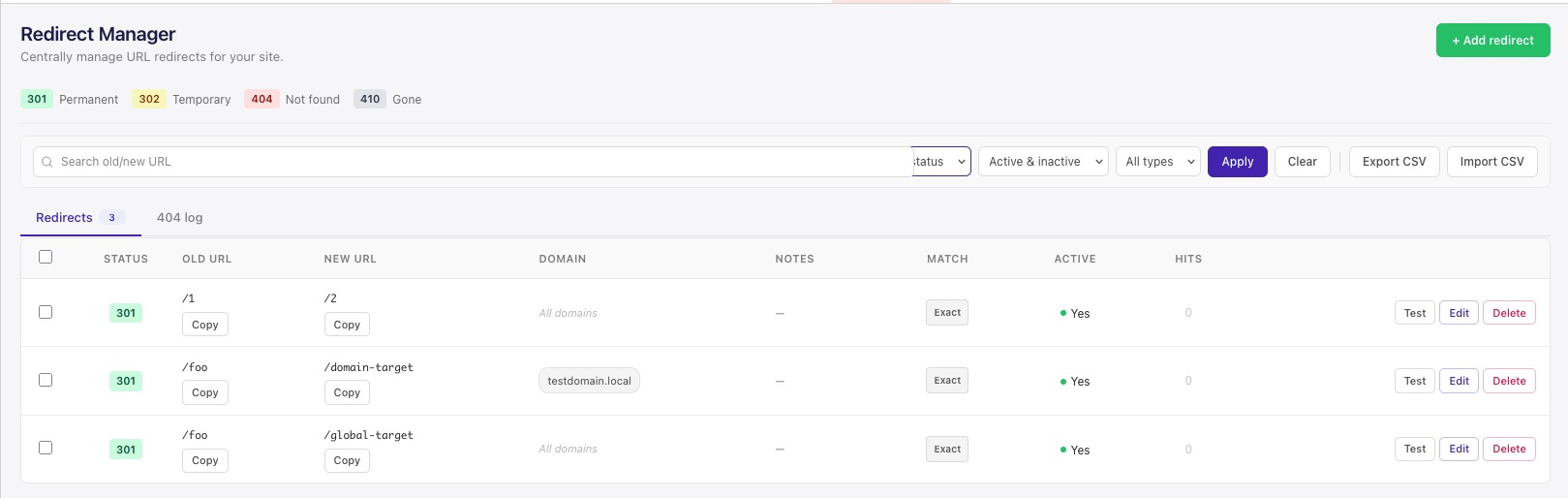
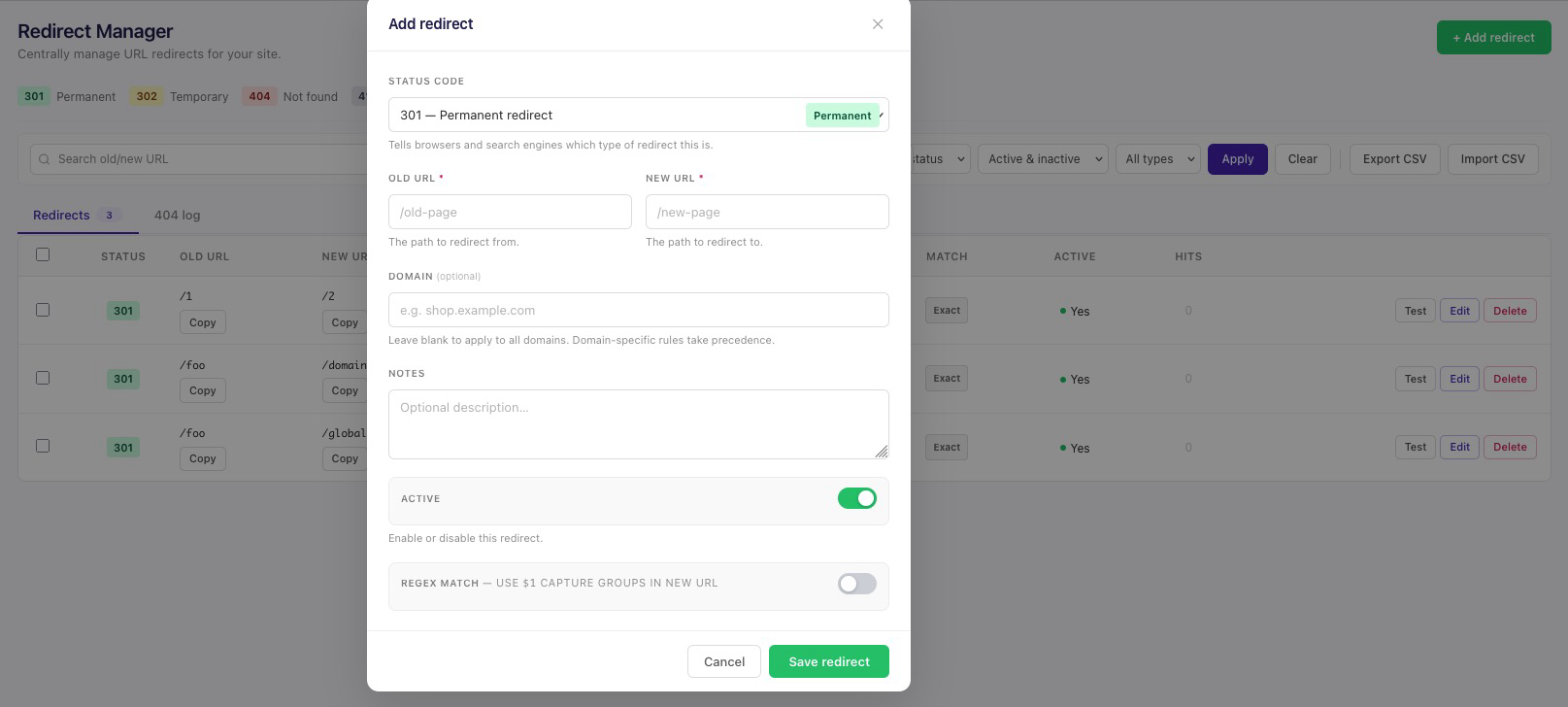
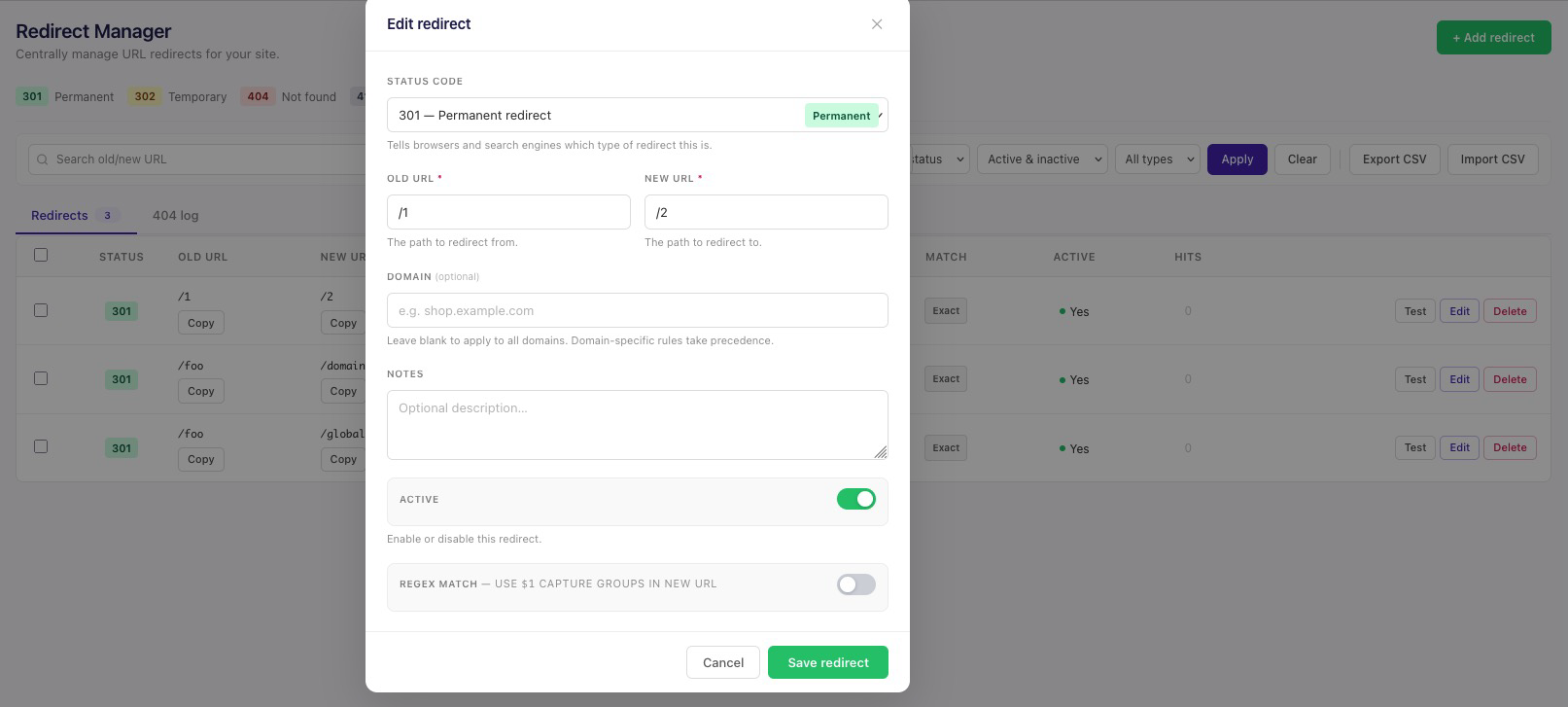
Features
- Multiple status codes: 301 (Permanent), 302 (Temporary), 404 (Not Found), and 410 (Gone).
- Modern backoffice dashboard: Clean Umbraco 17 dashboard built with Lit; search, filter, and bulk actions.
- Regex and exact match: Support for both exact path redirects and regex rules with capture groups.
- Domain-scoped redirects: Optionally scope a redirect to a specific hostname for multi-site installs — the same Old URL can point to a different New URL per domain, with domain-specific rules taking precedence over "all domains" ones. Leave the Domain field blank to apply a redirect everywhere.
- Hit-count analytics: Every redirect tracks how many times it's fired and when it was last hit, visible right in the dashboard.
- 404 log with one-click redirect creation: Genuine 404s are logged automatically (not just unmatched lookups), with a "Create Redirect" action to turn a frequent 404 into a redirect in one click.
- CSV import/export: Quickly migrate or bulk edit redirects via CSV.
- Test tool: Test a path before saving to see which redirect will match.
- Backoffice-secured API: All redirect-management endpoints require an authenticated Umbraco backoffice session.
- Database storage: Redirects stored in a dedicated table, fully controlled from the backoffice.
- Automatic migration: Database tables created/updated automatically on installation.
- Auto-update App_Plugins: App_Plugins assets are copied on build via the included MSBuild targets.
Installation
From NuGet.org
dotnet add package BT.RedirectManager
Or via the NuGet Package Manager:
Install-Package BT.RedirectManager
Self-hosted NuGet feed (Docker, optional)
If you'd rather run your own feed instead of nuget.org, this repo includes a Docker Compose setup for BaGet:
- Start the feed:
docker compose -f docker/docker-compose.yml up -d - Push this package to it:
./scripts/push-to-feed.sh(Windows:.\scripts\push-to-feed.ps1) - Add the feed to the
nuget.configof the solution where you want to install the package (feed:http://localhost:5555/v3/index.json) - Install:
dotnet add package BT.RedirectManagerthendotnet build
Local Installation (Development)
- Clone the repository:
git clone https://github.com/batuhanilgarr/Umbraco-RedirectManager.git
- Build the package:
cd Umbraco-RedirectManager
dotnet build
- Add
nuget.configto your solution folder:
<?xml version="1.0" encoding="utf-8"?>
<configuration>
  <packageSources>
    <add key="nuget.org" value="https://api.nuget.org/v3/index.json" />
    <add key="LocalFeed" value="/path/to/Umbraco-RedirectManager/bin/Debug/" />
  </packageSources>
</configuration>
- Add the package to your project:
dotnet add package BT.RedirectManager
- Build your project (App_Plugins files will be copied automatically):
dotnet build
Usage
- Install the package.
- Restart your Umbraco application.
- Navigate to the Settings section in the Umbraco backoffice.
- Open the Redirect Manager dashboard.
- Add, edit, test, or delete redirects as needed, or import/export CSV files for bulk changes.
Status Codes
| Code | Description |
|---|---|
| 301 | Permanent Redirect - Use when a page has permanently moved |
| 302 | Temporary Redirect - Use when a page has temporarily moved |
| 404 | Not Found - Returns a 404 error for the URL |
| 410 | Gone - Indicates the resource is permanently gone |
Configuration
No additional configuration required. The plugin works out of the box.
Database
The plugin creates a table called RedirectManagerEntries with the following structure:
Id(int, PK)OldUrl(nvarchar)NewUrl(nvarchar, nullable)Domain(nvarchar, nullable — blank/null means the redirect applies to all domains)Description(nvarchar, nullable)StatusCode(int)CreatedDate(datetime)UpdatedDate(datetime)IsActive(bit)IsRegex(bit)HitCount(int)LastHitDate(datetime, nullable)
It also creates a RedirectManagerMissedRequests table that logs genuine
404 responses (path, hit count, first/last seen) so they can be turned into
redirects from the dashboard's "404 Log" tab. Entries older than 90 days are
cleaned up automatically.
License
MIT License
Contributing
Contributions are welcome! Please feel free to submit a Pull Request.
Optional: To avoid Co-authored-by: Cursor in commit messages (e.g. when using Cursor IDE), install the prepare-commit-msg hook:
cp scripts/prepare-commit-msg.sample .git/hooks/prepare-commit-msg && chmod +x .git/hooks/prepare-commit-msg
| Product | Versions Compatible and additional computed target framework versions. |
|---|---|
| .NET | net8.0 is compatible. net8.0-android was computed. net8.0-browser was computed. net8.0-ios was computed. net8.0-maccatalyst was computed. net8.0-macos was computed. net8.0-tvos was computed. net8.0-windows was computed. net9.0 was computed. net9.0-android was computed. net9.0-browser was computed. net9.0-ios was computed. net9.0-maccatalyst was computed. net9.0-macos was computed. net9.0-tvos was computed. net9.0-windows was computed. net10.0 is compatible. net10.0-android was computed. net10.0-browser was computed. net10.0-ios was computed. net10.0-maccatalyst was computed. net10.0-macos was computed. net10.0-tvos was computed. net10.0-windows was computed. |
-
net10.0
- Umbraco.Cms (>= 17.1.0)
- Umbraco.Cms.Infrastructure (>= 17.1.0)
-
net8.0
- Umbraco.Cms (>= 13.9.2)
- Umbraco.Cms.Infrastructure (>= 13.9.2)
NuGet packages
This package is not used by any NuGet packages.
GitHub repositories
This package is not used by any popular GitHub repositories.
| Version | Downloads | Last Updated |
|---|---|---|
| 1.10.2 | 89 | 8/21/2026 |
| 1.10.1 | 97 | 8/17/2026 |
| 1.10.0 | 92 | 8/17/2026 |
| 1.9.1 | 137 | 7/28/2026 |
| 1.9.0 | 185 | 7/22/2026 |
| 1.8.1 | 125 | 7/13/2026 |
| 1.8.0 | 100 | 7/13/2026 |
| 1.7.0 | 105 | 7/9/2026 |
| 1.6.0 | 109 | 7/9/2026 |
| 1.5.0 | 113 | 7/8/2026 |
| 1.4.0 | 111 | 7/8/2026 |
| 1.3.1 | 124 | 7/2/2026 |
| 1.2.33 | 117 | 7/1/2026 |
| 1.2.32 | 154 | 6/10/2026 |
| 1.2.31 | 126 | 6/10/2026 |