BT.RedirectManager
1.10.0
See the version list below for details.
dotnet add package BT.RedirectManager --version 1.10.0
NuGet\Install-Package BT.RedirectManager -Version 1.10.0
<PackageReference Include="BT.RedirectManager" Version="1.10.0" />
<PackageVersion Include="BT.RedirectManager" Version="1.10.0" />
<PackageReference Include="BT.RedirectManager" />
paket add BT.RedirectManager --version 1.10.0
#r "nuget: BT.RedirectManager, 1.10.0"
#:package BT.RedirectManager@1.10.0
#addin nuget:?package=BT.RedirectManager&version=1.10.0
#tool nuget:?package=BT.RedirectManager&version=1.10.0
BT Redirect Manager
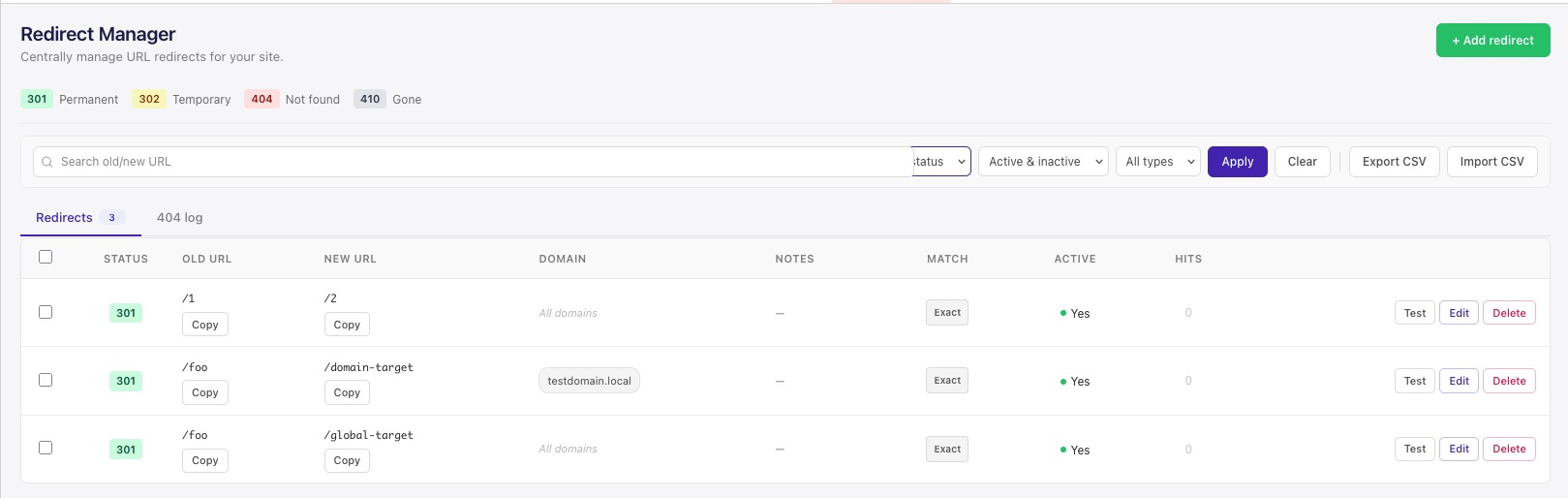
A URL redirect manager plugin for Umbraco CMS 13, 17, and 18. Manage 301, 302, 404, and 410 redirects directly from the Umbraco backoffice with a redesigned modern dashboard, CSV import/export, regex and wildcard support, domain/culture scoping, scheduled (valid from/until) redirects, windowed (7d/30d) hit-count analytics, A/B testing, scheduled backups, per-IP rate limiting, and a built-in test tool.
Screenshots
Features
- Multiple status codes: 301 (Permanent), 302 (Temporary), 404 (Not Found), and 410 (Gone) — each with a distinct soft-color badge in the dashboard.
- Redesigned backoffice dashboard: Clean, modern UI built with Lit (Umbraco 17/18) and AngularJS (Umbraco 13). Compact status legend, search bar, filters, bulk selection, tab-based navigation, frozen table headers, and click-to-sort columns all in one view. Validation and save errors are shown inside the Add/Edit redirect modal itself, so they're never hidden behind it.
- Domain-scoped redirects: Scope a redirect to a specific hostname for multi-site installs. The same Old URL can point to a different New URL per domain, with domain-specific rules taking precedence over global ones. Leave the Domain field blank to apply a redirect to all domains.
- Culture-scoped redirects: Scope a redirect to a specific culture (e.g.
tr-TR) for multilingual/multi-site installs — resolved automatically from Umbraco's own Culture and Hostnames configuration for the request's domain, no extra setup needed. Leave the Culture field blank to apply to all cultures. - Regex and wildcard match: Support for exact path redirects,
*wildcard patterns (e.g./blog/*), and full regex rules with$1capture groups. Regex and wildcard rules are each highlighted with their own pill in the dashboard. - Scheduled redirects: Optional Valid from / Valid until dates — a rule only matches within its active window, with a Scheduled/Expired badge shown in the dashboard outside that window.
- Preserve query string: Optionally append the incoming request's query string (e.g.
?utm_source=...) to the redirect target on 301/302 rules. - Duplicate/overlap warnings: Creating or updating a rule flags when it overlaps an existing broader wildcard/regex rule already in place, so conflicting redirects don't silently shadow each other.
- Audit trail: Each redirect records who created and who last modified it (the authenticated backoffice user), shown as a tooltip on its row.
- Per-IP rate limiting (opt-in): Protect the redirect middleware from abusive traffic with a configurable per-IP request cap, in either log-only or block mode.
- Health check integration: A check under Umbraco's Settings → Health Check dashboard confirms the plugin's database table is reachable.
- Hit-count analytics: Every redirect tracks how many times it has fired and when it was last hit, plus rolling 7-day and 30-day totals, visible directly in the redirect list — useful for spotting stale redirects to retire or rules that aren't firing when they should.
- 404 log with one-click redirect creation: Genuine 404s are logged automatically with hit count, first seen, and last seen dates. Turn any frequent 404 into a redirect in a single click — the 404 row disappears from the log as soon as its redirect is created. If a redirect already covers a logged path, the row is flagged with a "Redirect exists" badge and offers an Edit shortcut instead of a duplicate Create action. The log's search box also filters its own rows now, matching the Redirects tab.
- 404 triage categories: Tag each 404 as Malicious/scanner, Missing asset, Redirect needed, Gone, Typo/malformed, Needs investigation, or Unclassified, with filter chips (showing live counts) and bulk-apply to a filtered selection. Obvious scanner probes (
.php,/wp-*,/.env,/.git/) and static-asset extensions are auto-tagged as soon as they're logged, so manual triage only touches the ambiguous rows. Replaces the old all-or-nothing "Dismiss" (which deleted the row); a category is now remembered instead. - CSV import/export: Migrate or bulk-edit redirects via CSV files.
- Scheduled CSV backup: Opt-in periodic backup of all redirects to a local folder and/or by email (
RedirectManager:Backupconfig), independent of manual export. - A/B testing: Split traffic on a 301/302 exact-match rule between two target URLs by percentage, with per-visitor sticky assignment (cookie) and separate hit counts per variant.
- Dashboard overview: Totals, active/inactive counts, top 10 most-used redirects, and active redirects with zero hits in the last 30 days — exportable as CSV, with an optional periodic summary email.
- Trailing-slash matching: An exact-match rule fires regardless of a trailing-slash mismatch between the request and the stored Old URL.
- Built-in test tool: Test a path before saving to confirm which redirect rule will match.
- Update notifications: The dashboard checks NuGet.org once every 24 hours and shows a persistent banner whenever a newer version is available — always on, no configuration, no site data sent.
- Backoffice-secured API: All redirect-management endpoints require an authenticated Umbraco backoffice session with a valid bearer token.
- Automatic database migration: Tables are created and updated automatically on first run — no manual SQL required.
- Auto-copy App_Plugins: App_Plugins assets are copied to the output directory on build via the included MSBuild targets file.
Installation
dotnet add package BT.RedirectManager
Or via the NuGet Package Manager:
Install-Package BT.RedirectManager
After installation, restart your Umbraco application and open the Redirect Manager dashboard from the Settings section in the backoffice.
Usage
- Navigate to Settings → Redirect Manager in the Umbraco backoffice.
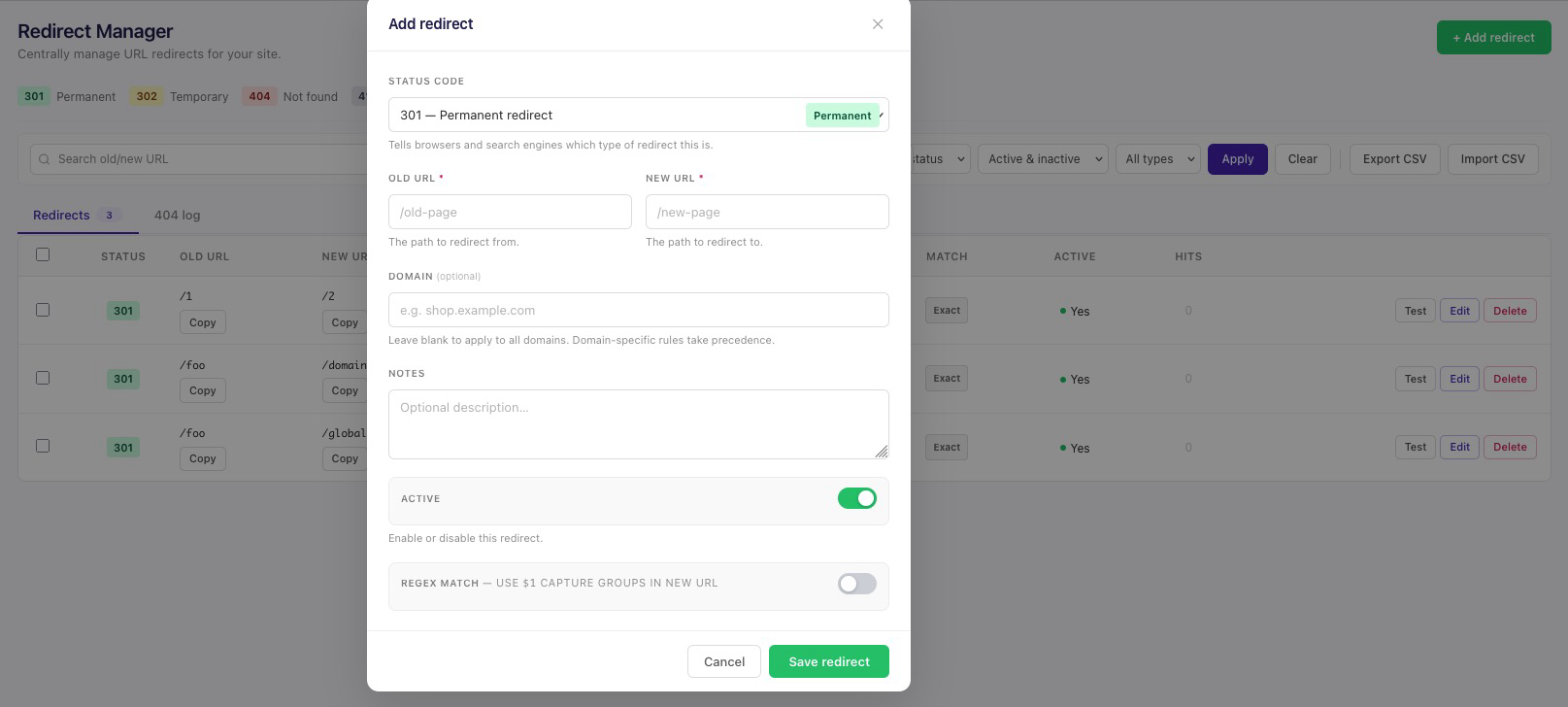
- Click + Add redirect to create a new redirect rule.
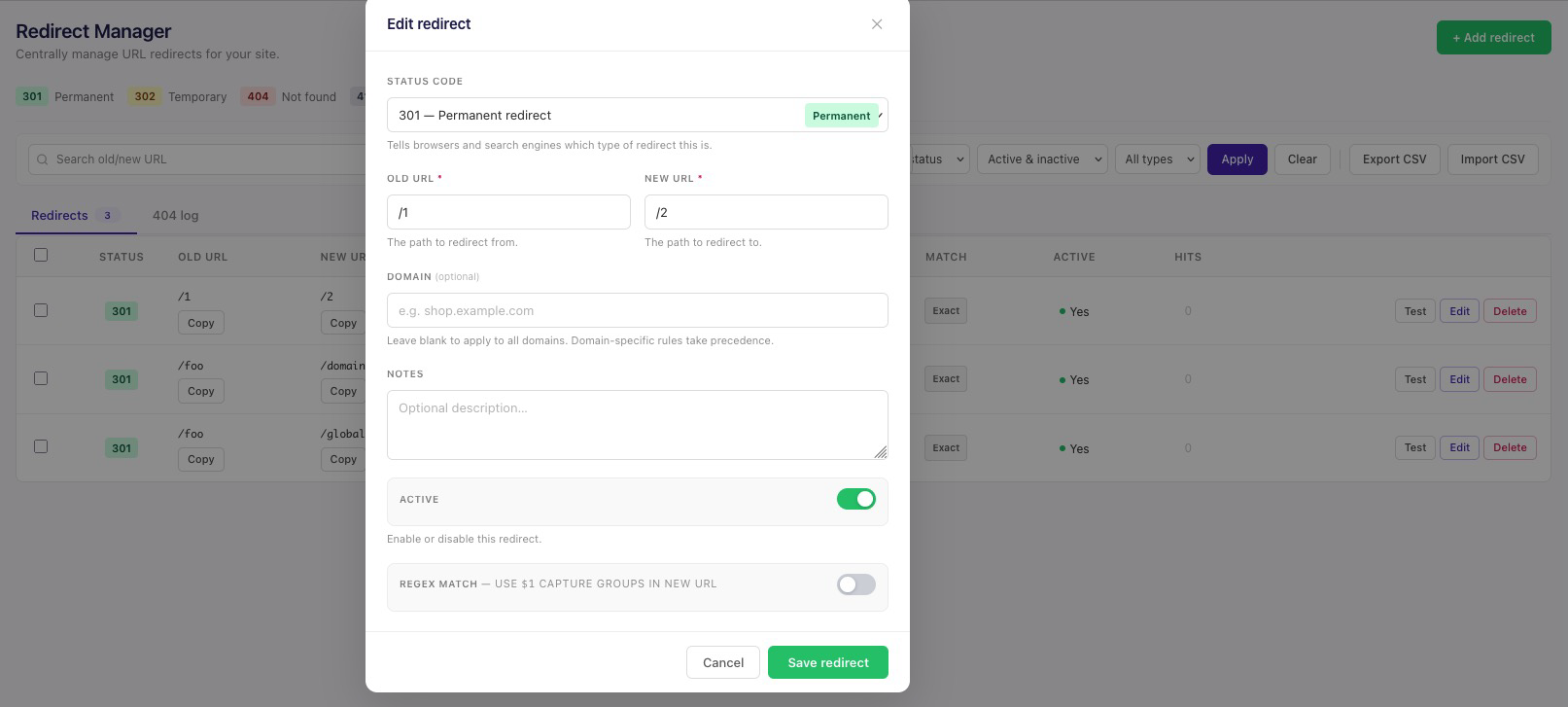
- Fill in the Old URL, New URL, status code, and optionally a domain, culture, and notes.
- Toggle Active to enable or disable the rule without deleting it.
- Enable Regex match to use regular expression patterns and
$1capture groups in the New URL, or use a*wildcard in Old URL (e.g./blog/*) for simple prefix/suffix matching without regex. - Set Valid from / Valid until to schedule when a rule is active — leave either blank for "immediately" / "indefinitely".
- Use the Test button on any row to verify a redirect resolves as expected.
- Switch to the 404 Log tab to review unmatched requests and convert them to redirects with one click.
- Use Export CSV / Import CSV for bulk operations.
- For a 301/302 exact-match rule, enable A/B test to split traffic between New URL and a second Variant B URL by percentage — visitors are assigned once and stay on their variant via a cookie.
- Switch to the Overview tab for totals, the top 10 most-used redirects, and active redirects with zero hits in the last 30 days — exportable as CSV.
Status Codes
| Code | Label | Description |
|---|---|---|
| 301 | Permanent | The resource has permanently moved to the new URL. Browsers and search engines update their records. |
| 302 | Temporary | The resource has temporarily moved. Search engines keep the original URL indexed. |
| 404 | Not Found | Returns a 404 response for the matched URL. Useful for explicitly blocking paths. |
| 410 | Gone | Signals that the resource is permanently gone with no replacement. |
Database
The plugin creates three tables automatically:
RedirectManagerEntries
| Column | Type | Notes |
|---|---|---|
| Id | int PK | Auto-increment |
| OldUrl | nvarchar | Path or regex pattern |
| NewUrl | nvarchar | Target path (nullable for 404/410) |
| Domain | nvarchar | Hostname filter — null/blank applies to all domains |
| Culture | nvarchar | Culture filter (e.g. tr-TR) — null/blank applies to all cultures |
| Description | nvarchar | Optional notes |
| StatusCode | int | 301, 302, 404, or 410 |
| IsActive | bit | Enable/disable without deleting |
| IsRegex | bit | Treat OldUrl as a regex pattern |
| HitCount | int | Total number of times this rule fired (variant A, if A/B testing) |
| LastHitDate | datetime | Timestamp of the most recent hit |
| VariantBUrl | nvarchar | A/B test target URL — null means this rule isn't an A/B test |
| VariantBWeight | int | % of visitors sent to Variant B |
| VariantBHitCount | int | Total number of times Variant B fired |
| VariantBLastHitDate | datetime | Timestamp of the most recent Variant B hit |
| PreserveQueryString | bit | Append the incoming request's query string to NewUrl on redirect |
| ValidFrom | datetime | Rule only matches at/after this UTC time — null means no lower bound |
| ValidUntil | datetime | Rule only matches before this UTC time — null means no upper bound |
| CreatedBy | nvarchar | Backoffice user who created the rule |
| ModifiedBy | nvarchar | Backoffice user who last modified the rule |
| CreatedDate | datetime | |
| UpdatedDate | datetime |
RedirectManagerHitDaily
One row per redirect per UTC day, used to compute the 7-day/30-day rolling totals shown in the dashboard. Rows older than 35 days are pruned automatically.
RedirectManagerMissedRequests
Logs genuine 404 responses (path, hit count, first seen, last seen, and a triage Category — Unclassified, MaliciousScanner, MissingAsset, RedirectNeeded, Gone, TypoMalformed, or NeedsInvestigation). Entries older than 90 days are cleaned up automatically.
Configuration
The plugin works out of the box with no configuration required. Scheduled CSV
backup and the periodic overview email are opt-in and configured via
appsettings.json, under RedirectManager:Backup:
{
  "RedirectManager": {
    "Backup": {
      "Enabled": false,
      "FolderPath": "App_Data/RedirectManagerBackups",
      "IntervalHours": 24,
      "RetentionCount": 30,
      "EmailTo": "",
      "SummaryEmailEnabled": false,
      "SummaryEmailTo": "",
      "SummaryIntervalHours": 168
    }
  }
}
| Key | Default | Description |
|---|---|---|
Enabled |
false |
Turns on the scheduled raw CSV backup (all redirects, same format as the manual export). |
FolderPath |
(none) | Folder to write timestamped backup files to. Leave blank to skip the file destination. |
IntervalHours |
24 |
How often to write a new backup. |
RetentionCount |
30 |
How many backup files to keep in FolderPath before deleting the oldest. |
EmailTo |
(none) | Comma-separated recipients for the raw CSV backup email. Leave blank to skip the email destination. |
SummaryEmailEnabled |
false |
Turns on the periodic overview report email (totals, top 10, stale redirects — the same data as the dashboard's Overview tab). |
SummaryEmailTo |
(none) | Comma-separated recipients for the overview report email. |
SummaryIntervalHours |
168 (weekly) |
How often to send the overview report email. |
Email delivery (both the raw backup and the overview report) uses Umbraco's
own SMTP configuration (Umbraco:CMS:Global:Smtp, standard for any Umbraco
site) — a From address must be set there, or email delivery is skipped
with a warning in the log.
Rate limiting (opt-in, off by default)
Per-IP rate limiting for the redirect middleware is configured under
RedirectManager:RateLimit:
{
  "RedirectManager": {
    "RateLimit": {
      "Enabled": false,
      "MaxRequestsPerWindow": 30,
      "WindowSeconds": 60,
      "Mode": "LogOnly"
    }
  }
}
| Key | Default | Description |
|---|---|---|
Enabled |
false |
Turns on per-IP rate limiting. |
MaxRequestsPerWindow |
30 |
Requests allowed per IP within WindowSeconds before the limit kicks in. |
WindowSeconds |
60 |
Length of the fixed rate-limit window, in seconds. |
Mode |
LogOnly |
LogOnly logs requests over the limit without blocking them; Block also returns a rate-limit response. |
Telemetry (opt-in, off by default)
The plugin can optionally send a small "still installed, here's the version" ping to the maintainer, so they can see which sites are actively using it. This is entirely opt-in — nothing is ever sent unless you explicitly turn it on.
The first time you open the dashboard, you'll be asked once: "Help improve Redirect Manager?" with Yes / No thanks — your answer is saved and you won't be asked again. You can change your mind anytime from the "Send anonymous usage data" toggle on the Overview tab. There is no appsettings.json configuration for this; the prompt/toggle is the only control.
What's sent, when enabled: a random ID generated once and stored
locally in App_Data/RedirectManagerTelemetry/site-id.txt (not derived
from any identifying information), this site's domain (read from the
current request automatically — never typed in), the plugin version, and
the Umbraco version — nothing else. No redirect rules, no traffic data, no
IP addresses are collected by this plugin. Sent once when you accept the
prompt (or flip the toggle on), then at most once every 24 hours — either from the dashboard being
opened or from a periodic background check, whichever happens first in a
given 24-hour window.
License
MIT
Contributing
Contributions are welcome! Feel free to open an issue or submit a pull request.
| Product | Versions Compatible and additional computed target framework versions. |
|---|---|
| .NET | net8.0 is compatible. net8.0-android was computed. net8.0-browser was computed. net8.0-ios was computed. net8.0-maccatalyst was computed. net8.0-macos was computed. net8.0-tvos was computed. net8.0-windows was computed. net9.0 was computed. net9.0-android was computed. net9.0-browser was computed. net9.0-ios was computed. net9.0-maccatalyst was computed. net9.0-macos was computed. net9.0-tvos was computed. net9.0-windows was computed. net10.0 is compatible. net10.0-android was computed. net10.0-browser was computed. net10.0-ios was computed. net10.0-maccatalyst was computed. net10.0-macos was computed. net10.0-tvos was computed. net10.0-windows was computed. |
-
net10.0
- Umbraco.Cms (>= 17.1.0)
- Umbraco.Cms.Infrastructure (>= 17.1.0)
-
net8.0
- Umbraco.Cms (>= 13.9.2)
- Umbraco.Cms.Infrastructure (>= 13.9.2)
NuGet packages
This package is not used by any NuGet packages.
GitHub repositories
This package is not used by any popular GitHub repositories.
| Version | Downloads | Last Updated |
|---|---|---|
| 1.10.2 | 88 | 8/21/2026 |
| 1.10.1 | 97 | 8/17/2026 |
| 1.10.0 | 91 | 8/17/2026 |
| 1.9.1 | 136 | 7/28/2026 |
| 1.9.0 | 180 | 7/22/2026 |
| 1.8.1 | 124 | 7/13/2026 |
| 1.8.0 | 100 | 7/13/2026 |
| 1.7.0 | 104 | 7/9/2026 |
| 1.6.0 | 108 | 7/9/2026 |
| 1.5.0 | 112 | 7/8/2026 |
| 1.4.0 | 110 | 7/8/2026 |
| 1.3.1 | 123 | 7/2/2026 |
| 1.2.33 | 116 | 7/1/2026 |
| 1.2.32 | 153 | 6/10/2026 |
| 1.2.31 | 126 | 6/10/2026 |