IronPdf.Linux
2025.12.2
Prefix Reserved
dotnet add package IronPdf.Linux --version 2025.12.2
NuGet\Install-Package IronPdf.Linux -Version 2025.12.2
<PackageReference Include="IronPdf.Linux" Version="2025.12.2" />
<PackageVersion Include="IronPdf.Linux" Version="2025.12.2" />
<PackageReference Include="IronPdf.Linux" />
paket add IronPdf.Linux --version 2025.12.2
#r "nuget: IronPdf.Linux, 2025.12.2"
#:package IronPdf.Linux@2025.12.2
#addin nuget:?package=IronPdf.Linux&version=2025.12.2
#tool nuget:?package=IronPdf.Linux&version=2025.12.2


%20-107C10?logo=visualstudio)



IronPDF - The C# PDF Library
IronPdf is a C# library for creating, converting, editing, and securing PDFs.

IronPDF is a comprehensive C# library designed for developers to programmatically create, convert, and edit PDF documents. With a user-friendly API, you can generate PDFs from HTML, sign and secure files, edit text and content, and integrate robust PDF functionality seamlessly into your .NET projects.
Get Started in 3 Steps
1. Install the NuGet Package
PM> Install-Package IronPdf
2. Create Your First PDF
using IronPdf;

// Instantiates Chrome Renderer
var Renderer = new ChromePdfRenderer();

// Render Html contents as PDF
var pdf = Renderer.RenderHtmlAsPdf("<h1>~Hello World~</h1> Made with IronPDF!");

// Saves our PdfDocument object as a PDF
pdf.SaveAs("html_saved.pdf");
3. Explore More
Dive deeper with our extensive documentation and examples:
Tutorials: Step-by-step guides to help you build your first PDF application.
Code Examples: Practical examples of executable code for common tasks.
How-To Guides: Practical, goal-oriented instructions to solve specific problems.
Demo: Demonstrating guides that showcase how IronPDF works the way it does.
API Reference: Detailed technical descriptions of the API and its components.
Key Features
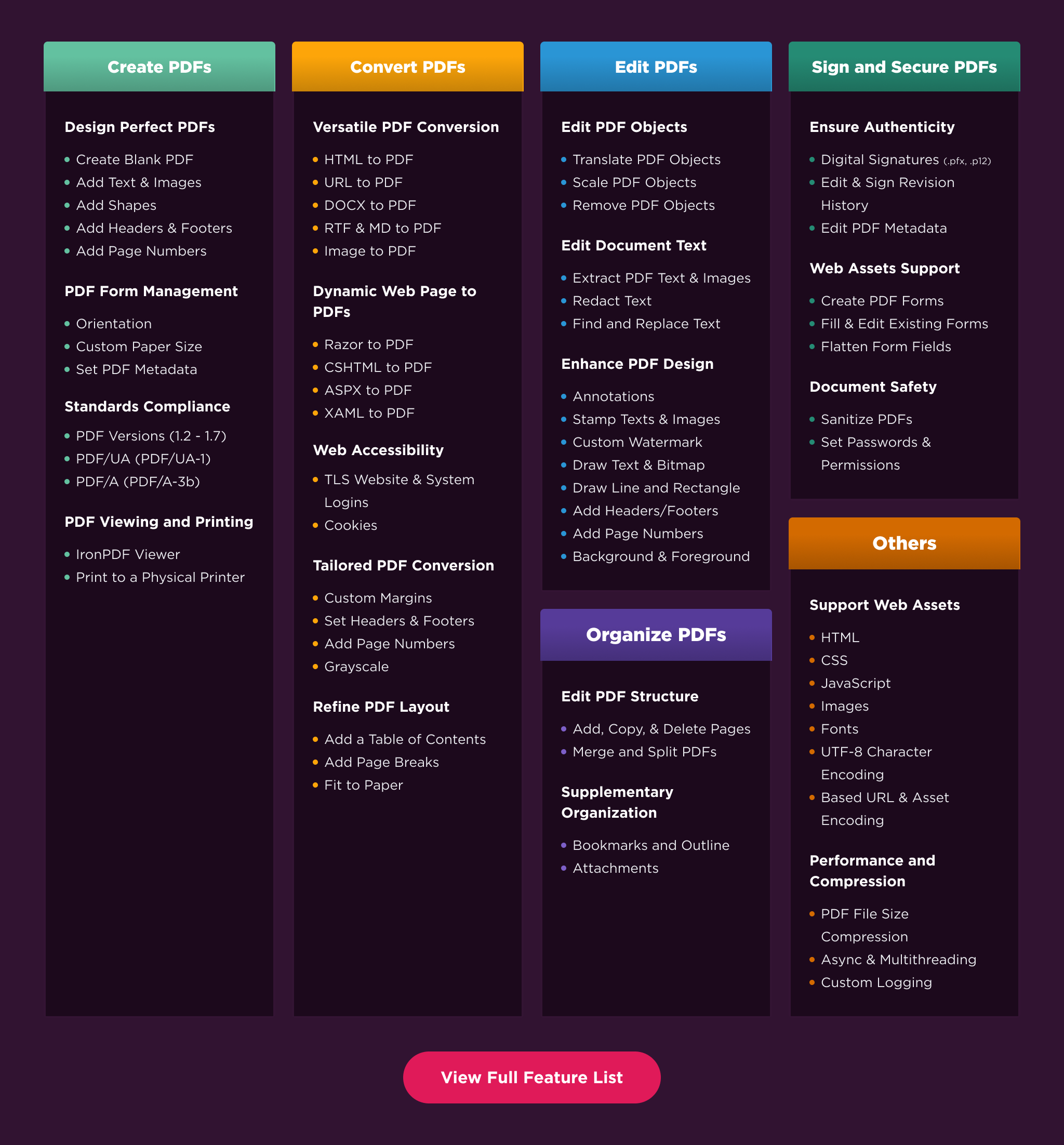
Create PDFs: Create PDFs from scratch with a simple set of codes.
Convert PDF: Convert PDFs from HTML, images, docx, and website pages.
Edit PDFs: Modify existing PDF documents. Add text, images, watermarks, and headers/footers with ease.
Organize PDFs: Merge, split, add or remove pages, and manipulate document properties.
Sign & Secure PDFs: Add digital signatures, set passwords, and manage user permissions to protect your documents.
Compatibility
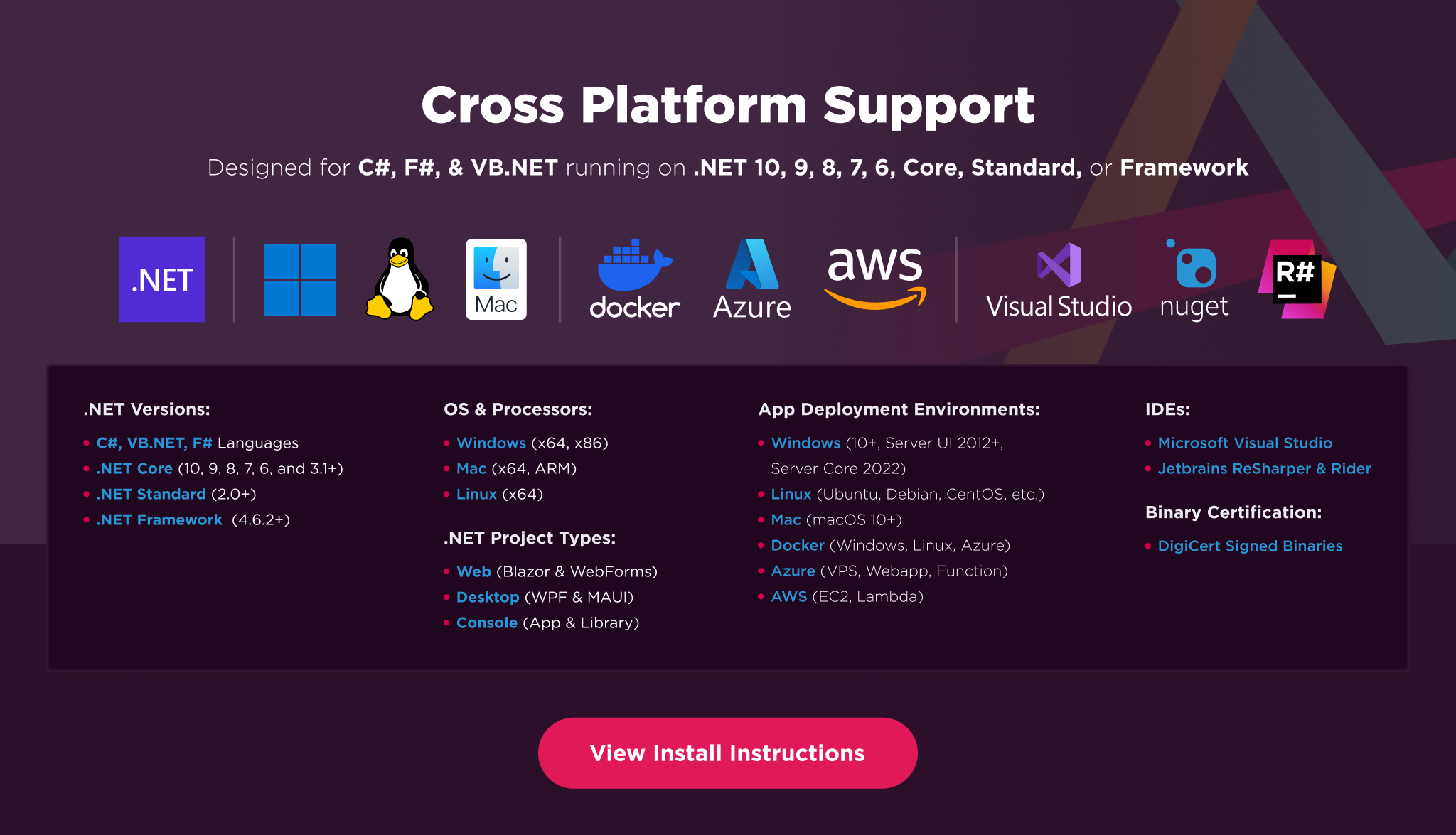
IronPDF is built for modern .NET and supports a wide range of project types and operating systems.
Platforms: .NET 10, .NET 9, .NET 8, .NET 7, .NET 6, .NET 5, Core 2x & 3x, Standard 2
Framework: .NET Framework 4.6.2 (and above)
App Models: Console, Web, and Desktop Apps, MVC, Blazor, MAUI, Razor Pages, Web Forms
Operating Systems: Windows, macOS, Linux (Debian, CentOS, Ubuntu)
IDEs: Microsoft Visual Studio or Jetbrains ReSharper & Rider
License
IronPDF is a commercially licensed product.
Trial License: Get a free developer key to evaluate the full library with no commitment. Ideal for development and testing purposes. Start your trial HERE.
Purchase a License: Unlock the library for use in commercial projects and get access to our full technical support. Purchase your license HERE.
Getting Help & Support
Have a question or running into an issue?
Email Support: Reach out to our team directly at support@ironsoftware.com.
Live Chat Support: https://ironpdf.com/#helpscout-support
Report a Bug: https://ironsoftware.com/ticket-submission/
Community: https://ironsoftware.com/company/iron-slack-community/
| Product | Versions Compatible and additional computed target framework versions. |
|---|---|
| .NET | net5.0 is compatible. net5.0-windows was computed. net6.0 is compatible. net6.0-android was computed. net6.0-ios was computed. net6.0-maccatalyst was computed. net6.0-macos was computed. net6.0-tvos was computed. net6.0-windows was computed. net7.0 was computed. net7.0-android was computed. net7.0-ios was computed. net7.0-maccatalyst was computed. net7.0-macos was computed. net7.0-tvos was computed. net7.0-windows was computed. net8.0 is compatible. net8.0-android was computed. net8.0-browser was computed. net8.0-ios was computed. net8.0-maccatalyst was computed. net8.0-macos was computed. net8.0-tvos was computed. net8.0-windows was computed. net9.0 was computed. net9.0-android was computed. net9.0-browser was computed. net9.0-ios was computed. net9.0-maccatalyst was computed. net9.0-macos was computed. net9.0-tvos was computed. net9.0-windows was computed. net10.0 was computed. net10.0-android was computed. net10.0-browser was computed. net10.0-ios was computed. net10.0-maccatalyst was computed. net10.0-macos was computed. net10.0-tvos was computed. net10.0-windows was computed. |
| .NET Core | netcoreapp2.0 is compatible. netcoreapp2.1 was computed. netcoreapp2.2 was computed. netcoreapp3.0 was computed. netcoreapp3.1 was computed. |
| .NET Standard | netstandard2.0 is compatible. netstandard2.1 was computed. |
| .NET Framework | net461 was computed. net462 was computed. net463 was computed. net47 was computed. net471 was computed. net472 was computed. net48 was computed. net481 was computed. |
| MonoAndroid | monoandroid was computed. |
| MonoMac | monomac was computed. |
| MonoTouch | monotouch was computed. |
| Tizen | tizen40 was computed. tizen60 was computed. |
| Xamarin.iOS | xamarinios was computed. |
| Xamarin.Mac | xamarinmac was computed. |
| Xamarin.TVOS | xamarintvos was computed. |
| Xamarin.WatchOS | xamarinwatchos was computed. |
-
.NETStandard 2.0
- IronPdf.Native.Chrome.Linux (>= 2025.12.2 && < 2026.1.0)
- IronPdf.Slim (= 2025.12.2)
- IronSoftware.Native.PdfModel.Linux (>= 2025.12.2 && < 2026.1.0)
NuGet packages
This package is not used by any NuGet packages.
GitHub repositories
This package is not used by any popular GitHub repositories.
| Version | Downloads | Last Updated |
|---|---|---|
| 2025.12.2 | 871 | 12/26/2025 |
| 2025.11.12 | 36,404 | 11/10/2025 |
| 2025.10.8 | 33,453 | 10/8/2025 |
| 2025.9.4 | 39,214 | 9/2/2025 |
| 2025.8.8 | 27,767 | 8/13/2025 |
| 2025.7.17 | 15,824 | 7/22/2025 |
| 2025.6.8 | 45,392 | 6/17/2025 |
| 2025.5.6 | 34,170 | 5/13/2025 |
| 2025.4.4 | 43,758 | 4/8/2025 |
| 2025.3.6 | 88,095 | 3/5/2025 |
| 2025.2.8 | 27,658 | 2/3/2025 |
| 2025.1.1 | 64,343 | 1/3/2025 |
| 2024.12.9 | 26,719 | 12/3/2024 |
| 2024.11.4 | 104,310 | 11/6/2024 |
| 2024.10.8 | 60,015 | 10/11/2024 |
| 2024.9.3 | 436,178 | 9/9/2024 |
| 2024.8.3 | 81,759 | 7/30/2024 |
| 2024.7.8 | 52,909 | 7/5/2024 |
| 2024.7.6 | 6,347 | 7/2/2024 |
| 2024.6.1 | 38,318 | 6/4/2024 |
| 2024.5.2 | 96,159 | 4/29/2024 |
| 2024.4.2 | 23,173 | 4/5/2024 |
| 2024.3.4 | 76,809 | 3/11/2024 |
| 2024.3.3 | 8,590 | 3/6/2024 |
| 2024.2.2 | 69,655 | 1/29/2024 |
| 2024.1.20 | 52,722 | 1/9/2024 |
| 2023.12.6 | 87,802 | 11/27/2023 |
| 2023.11.8 | 53,597 | 11/13/2023 |
| 2023.11.7 | 14,718 | 11/1/2023 |
| 2023.10.3 | 58,063 | 10/3/2023 |
| 2023.9.8 | 23,741 | 9/13/2023 |
| 2023.8.6 | 44,171 | 7/31/2023 |
| 2023.7.4 | 107,187 | 7/3/2023 |
| 2023.6.10 | 75,674 | 6/2/2023 |
| 2023.5.9 | 460,410 | 5/8/2023 |
| 2023.5.8 | 63,949 | 5/1/2023 |
| 2023.4.4 | 71,670 | 3/30/2023 |
| 2023.3.2 | 27,245 | 3/9/2023 |
| 2023.2.4 | 18,561 | 2/28/2023 |
| 2023.1.11416 | 162,887 | 1/9/2023 |
| 2022.12.11113 | 29,023 | 12/23/2022 |
| 2022.11.10347 | 145,500 | 11/9/2022 |
| 2022.11.10341 | 2,292 | 11/8/2022 |
| 2022.10.9622 | 86,352 | 10/10/2022 |
| 2022.10.9532 | 10,406 | 10/4/2022 |
| 2022.9.9056 | 41,015 | 9/14/2022 |
| 2022.8.8818 | 9,779 | 9/7/2022 |
| 2022.8.8138 | 71,319 | 8/16/2022 |
| 2022.8.7894 | 30,086 | 7/28/2022 |
| 2022.7.6986 | 40,417 | 6/30/2022 |
| 2022.6.6115 | 23,054 | 6/6/2022 |
| 2022.5.5629 | 20,190 | 5/12/2022 |
| 2022.5.5596 | 59,611 | 5/2/2022 |
| 2022.4.5575 | 8,262 | 4/25/2022 |
| 2022.4.5455 | 5,783 | 4/12/2022 |
| 2022.4.5250-eap | 2,325 | 3/22/2022 |
| 2022.3.5084 | 47,487 | 3/8/2022 |
| 2022.2.4887 | 42,857 | 2/17/2022 |
| 2022.1.4599 | 39,205 | 1/11/2022 |
| 2021.12.4495 | 190,433 | 12/7/2021 |
| 2021.12.4401 | 6,700 | 12/1/2021 |
| 2021.11.4257 | 12,125 | 11/15/2021 |
| 2021.11.4183 | 68,523 | 10/28/2021 |
| 2021.9.3737 | 5,459 | 9/20/2021 |
| 2021.9.3689 | 2,391 | 9/7/2021 |
| 2021.9.3678 | 10,704 | 8/26/2021 |
| 2021.9.3650 | 5,625 | 8/26/2021 |
Features
- Added support for PDF/UA-2 (ISO 14289-2:2024) Compliance
- Added new CompressAndSaveAs API which provides superior compression
- Added ToJson and SaveAsJson APIs to extract PDF content as JSON
Enhancements
- Improved documentation and examples
- Enabled local HTML file to PDF conversion in IronPdf for Java and Node.js when running local IronPdfEngine
Bug Fixes
- Fixed issue where ApplyMultipleStamps cut off the stamp content on some paper sizes
- Fixed internal deployment issue of IronPdf for Python
- Fixed QPdf operations randomly throwing exceptions