BlazorTUI 0.8.0
See the version list below for details.
dotnet add package BlazorTUI --version 0.8.0
NuGet\Install-Package BlazorTUI -Version 0.8.0
<PackageReference Include="BlazorTUI" Version="0.8.0" />
<PackageVersion Include="BlazorTUI" Version="0.8.0" />
<PackageReference Include="BlazorTUI" />
paket add BlazorTUI --version 0.8.0
#r "nuget: BlazorTUI, 0.8.0"
#:package BlazorTUI@0.8.0
#addin nuget:?package=BlazorTUI&version=0.8.0
#tool nuget:?package=BlazorTUI&version=0.8.0
BlazorTUI
BlazorTUI is a Razor Class Library for building retro text user interfaces in Blazor Server applications. It provides a fixed-size character grid with keyboard and mouse interaction, nested layouts, menus, dialogs, colors, and animated controls.


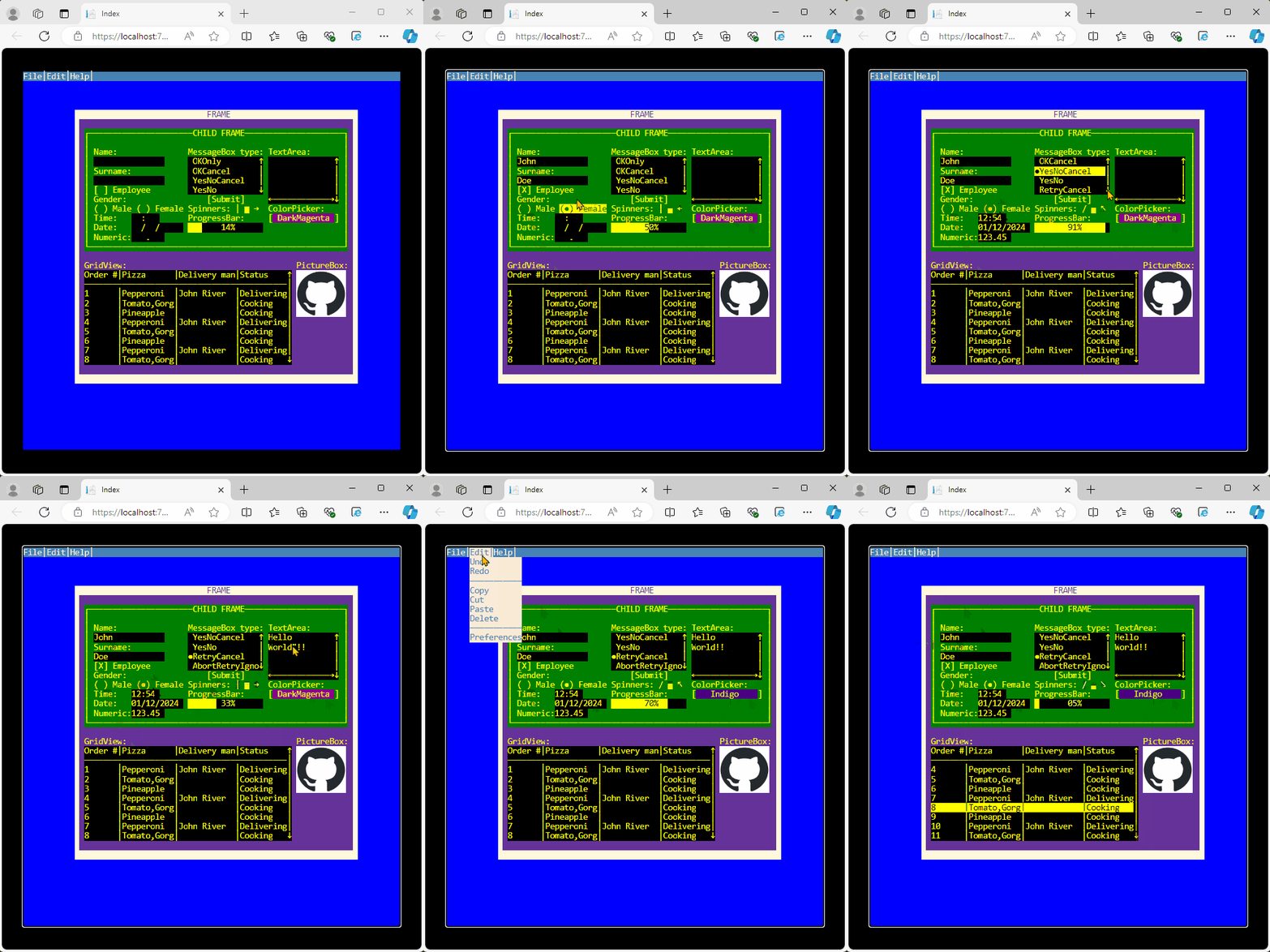
Features
- Character-cell rendering with foreground and background colors.
- Nested frames with relative coordinates and z-order.
- Keyboard focus,
Tab/Shift+Tabnavigation, and mouse interaction. - Menu bars with shortcuts and keyboard navigation.
- Modal dialogs and configurable message boxes.
- Responsive terminal scaling.
Requirements
- A Blazor Server application.
- The .NET 10 SDK.
Installation
Install BlazorTUI from NuGet:
dotnet add package BlazorTUI
Quick start
Add the BlazorTUI namespace to a Razor page, create a Screen, and render it with the component:
@page "/terminal"
@using BlazorTUI.TUI
@using Color = System.Drawing.Color

<BlazorTUI.BlazorTUI screen="@screen" />

@code {
    private readonly Screen screen = CreateScreen();

    private static Screen CreateScreen()
    {
        var screen = new Screen(80, 40);

        var frame = new Frame(
            "mainFrame",
            "CUSTOMER",
            12,
            5,
            56,
            12,
            Frame.BorderStyle.line,
            Color.Yellow,
            Color.DarkBlue);

        screen.topContainer.AddContainer(frame);

        frame.AddControl(new Label(
            "nameLabel", "Name:", 2, 2, 12, Color.White, Color.DarkBlue));

        frame.AddControl(new TextBox(
            "nameInput", "", 14, 2, 24, Color.Yellow, Color.Black));

        var saveButton = new Button(
            "saveButton", "Save", 14, 5, 10, Color.White, Color.DarkGreen);

        saveButton.OnClick = _ =>
        {
            var message = new MessageBox(
                "Saved",
                "Result",
                MessageBox.Buttons.OKOnly,
                BorderStyle.line,
                Color.White,
                Color.DarkGreen,
                screen);

            message.Show();
        };

        frame.AddControl(saveButton);
        screen.SetFocus("nameInput");

        return screen;
    }
}
Click inside the terminal before using the keyboard so the screen element receives browser focus.
Screen and layout
A Screen defines the terminal dimensions. Character cells use a 1:2 width-to-height ratio, so the screen width should be twice its height—for example, 80 × 40. The built-in responsive styles support screen heights from 1 to 40 rows.
Coordinates are zero-based. Controls use coordinates relative to their parent container, which makes it possible to move a complete group by repositioning its Frame.
Every control must have a non-empty, unique name. Add elements through:
AddContainerfor nested frames and containers.AddControlfor controls inside a container.
These methods initialize parent references, tab order, and z-order. Use screen.SetFocus("controlName") to select the initial control.
Available controls
| Category | Controls |
|---|---|
| Layout | Frame |
| Text and input | Label, TextBox, TextArea, NumericBox, DateBox, TimeBox |
| Selection | CheckBox, RadioButton, ListBox, ColorPicker |
| Actions and navigation | Button, MenuBar, Menu, MenuItem |
| Data and feedback | GridView, ProgressBar, Spinner, PictureBox |
| Modal UI | Dialog, MessageBox |
Control constructors accept System.Drawing.Color values for foreground and background colors. Interactive controls expose callbacks such as OnClick, OnFocus, and OnLostFocus.
Keyboard and mouse interaction
Tab: move to the next focusable control.Shift+Tab: move to the previous focusable control.EnterorSpace: activate buttons and selection controls.- Arrow keys: navigate text, lists, grids, color pickers, and menus where applicable.
Alt: show menu shortcut keys.- Mouse click: focus or activate the control under the selected cell.
When a dialog is open, it receives input until it is closed.
Images
PictureBox accepts encoded image bytes. The default constructor treats the data as PNG:
byte[] imageData = File.ReadAllBytes("logo.png");

var picture = new PictureBox(
    "logo",
    imageData,
    47,
    17,
    10,
    5,
    Color.White,
    Color.Black);

frame.AddControl(picture);
For another browser-supported format, provide its MIME type after the byte array:
var picture = new PictureBox(
    "photo",
    jpegData,
    "image/jpeg",
    47,
    17,
    10,
    5,
    Color.White,
    Color.Black);
BlazorTUI displays the encoded image without resizing or converting the source data. If you are upgrading from an earlier version, replace the previous System.Drawing.Image constructor with one of the byte-array constructors above.
Complete example
The sample page demonstrates all controls, nested frames, menu shortcuts, message-box variants, callbacks, and an animated progress bar.
License
BlazorTUI is available under the MIT License.
| Product | Versions Compatible and additional computed target framework versions. |
|---|---|
| .NET | net10.0 is compatible. net10.0-android was computed. net10.0-browser was computed. net10.0-ios was computed. net10.0-maccatalyst was computed. net10.0-macos was computed. net10.0-tvos was computed. net10.0-windows was computed. |
-
net10.0
- Microsoft.AspNetCore.Components.Web (>= 10.0.9)
NuGet packages
This package is not used by any NuGet packages.
GitHub repositories
This package is not used by any popular GitHub repositories.
| Version | Downloads | Last Updated |
|---|---|---|
| 1.0.1 | 175 | 7/2/2026 |
| 1.0.0 | 123 | 7/1/2026 |
| 0.8.15 | 134 | 7/1/2026 |
| 0.8.14 | 131 | 6/30/2026 |
| 0.8.13 | 136 | 6/29/2026 |
| 0.8.12 | 132 | 6/29/2026 |
| 0.8.10 | 124 | 6/28/2026 |
| 0.8.9 | 142 | 6/27/2026 |
| 0.8.8 | 128 | 6/26/2026 |
| 0.8.7 | 140 | 6/25/2026 |
| 0.8.6 | 123 | 6/24/2026 |
| 0.8.5 | 125 | 6/24/2026 |
| 0.8.4 | 119 | 6/24/2026 |
| 0.8.3 | 129 | 6/24/2026 |
| 0.8.2 | 125 | 6/23/2026 |
| 0.8.1 | 132 | 6/23/2026 |
| 0.8.0 | 132 | 6/23/2026 |
| 0.7.1 | 246 | 5/18/2025 |
| 0.7.0 | 233 | 9/2/2024 |
| 0.6.11 | 242 | 8/27/2024 |