VideoContactSheet 1.0.1
dotnet add package VideoContactSheet --version 1.0.1
NuGet\Install-Package VideoContactSheet -Version 1.0.1
<PackageReference Include="VideoContactSheet" Version="1.0.1" />
<PackageVersion Include="VideoContactSheet" Version="1.0.1" />
<PackageReference Include="VideoContactSheet" />
paket add VideoContactSheet --version 1.0.1
#r "nuget: VideoContactSheet, 1.0.1"
#:package VideoContactSheet@1.0.1
#addin nuget:?package=VideoContactSheet&version=1.0.1
#tool nuget:?package=VideoContactSheet&version=1.0.1
VideoContactSheet (.NET)


A C# port of vcs.rb — a Video Contact Sheet generator. It extracts frames from a video at regular intervals and composes them into a grid ("contact sheet") with a metadata header, optional title, per-thumbnail timestamps, drop shadows, polaroid frames, and a signature footer.
- Frame capture & metadata: FFMpegCore — wraps
ffmpeg/ffprobe; binaries can be onPATHor pointed to viaffBinaryFolder - Composition / drawing: SkiaSharp (MIT) — chosen for its native drop-shadow, text, and canvas compositing support
- Targets: .NET 10, cross-platform (Windows / Linux / macOS)
Example
A 4×4 contact sheet with a custom footer:
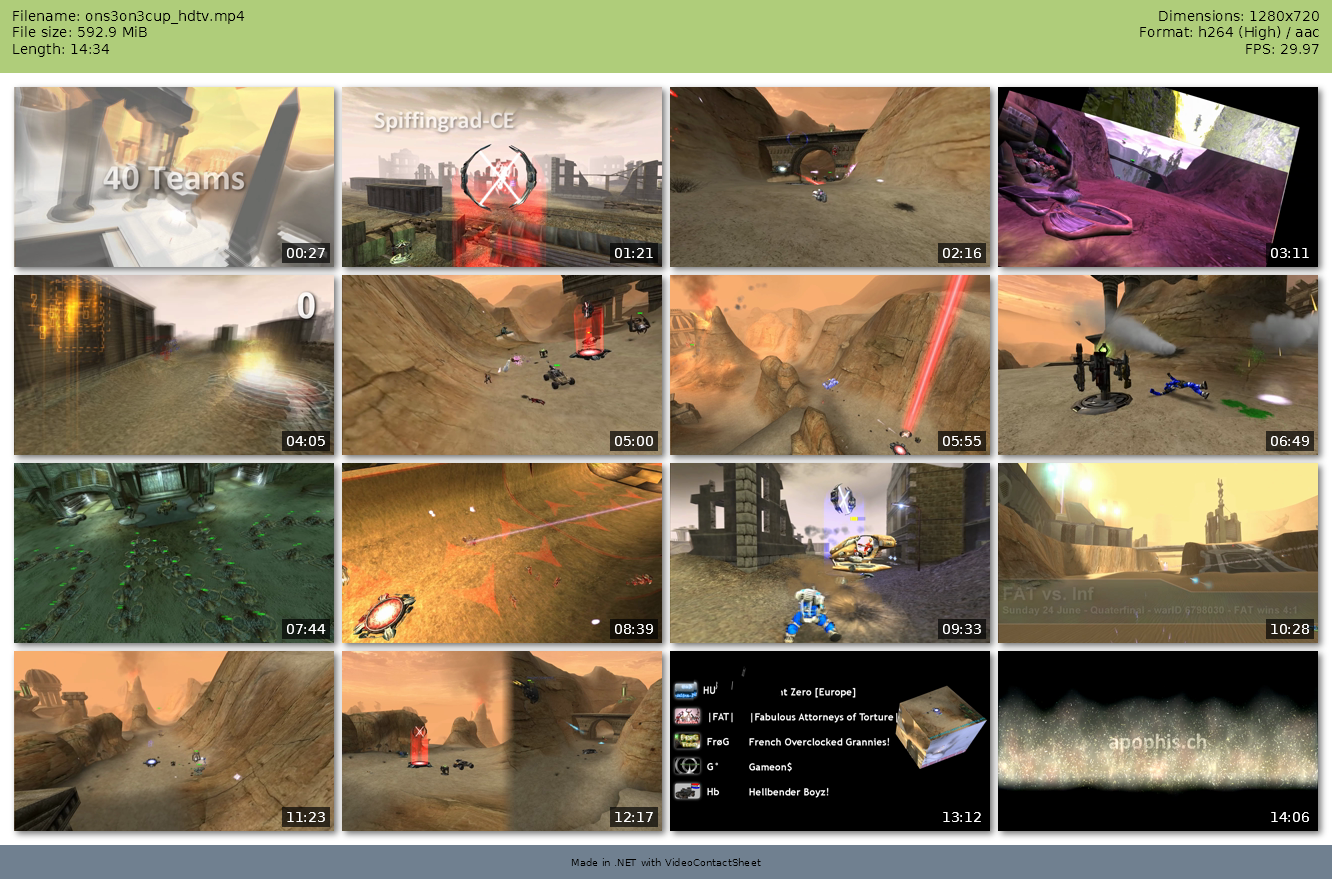
using VideoContactSheet;

var video = new Video("ons3on3cup_hdtv.mp4");

var options = new ContactSheetOptions
{
    Columns = 4,
    Rows = 4,
    Signature = "Made in .NET with VideoContactSheet",
};

await video.SaveContactSheetAsync("example-contact-sheet.png", options);
Or with the CLI:
vcs ons3on3cup_hdtv.mp4 -c 4 -r 4 -s "Made in .NET with VideoContactSheet" -o example-contact-sheet.png
Requirements
- .NET 10 SDK
ffmpegandffprobebinaries — the CLI project bundles Windows x64 binaries in its build output automatically (runtools/download-ffmpeg.ps1first if they are missing). Alternatively supplyffBinaryFolderor put them onPATH.- On headless Linux, you may also need
libfontconfig1for text rendering
Library usage
using VideoContactSheet;

// ffmpeg/ffprobe on PATH:
var video = new Video("movie.mkv");

// — or — binaries shipped next to the exe:
var video = new Video("movie.mkv", ffBinaryFolder: AppContext.BaseDirectory);

// Metadata
var info = await video.GetInfoAsync();
Console.WriteLine($"Duration: {info.Duration}, {info.Video?.Width}x{info.Video?.Height}");

// Build a 3x3 sheet
var options = new ContactSheetOptions
{
    Columns = 3,
    Rows = 3,
    ThumbnailWidth = 320,
    Format = SheetFormat.Jpg,
    Title = "My Movie",
    SoftShadow = true,
    Timestamp = true,
};
await video.SaveContactSheetAsync("out.jpg", options);

// Single frame
var bmp = await video.CaptureFrameAsync(TimeIndex.Parse("1:22"), width: 640, evadeBlank: true);
CLI
Install as a .NET global tool (requires ffmpeg/ffprobe on PATH):
dotnet tool install -g VideoContactSheet.Cli
The vcs CLI mirrors the original script's options:
vcs video.avi
vcs -i 3m30 input.wmv -o output.jpg
vcs --from 3m --to 18m -i 2m input.avi
vcs -c 4 -r 5 --polaroid --no-shadow -T "Holiday" clip.mp4
Run vcs --help for the full list. Use --ffmpeg-folder <dir> to point at a local copy of the binaries instead of relying on PATH.
Feature mapping vs. vcs.rb
| vcs.rb feature | Status | Notes |
|---|---|---|
| Grid (rows × columns) | ✅ | Columns, Rows |
| Interval-based capture | ✅ | Interval |
| From / To range | ✅ | From, To |
| Thumbnail width | ✅ | ThumbnailWidth |
| Formats png/jpg | ✅ | + webp |
| Title / header / signature | ✅ | metadata header auto-built from ffprobe |
| Timestamp overlay | ✅ | Timestamp |
| Drop shadow | ✅ | SoftShadow, ShadowSize |
| Polaroid frame | ✅ | Polaroid |
| Highlights | ✅ | Highlights (rendered in a band on top) |
| Blank-frame evasion | ✅ | BlankEvasion, BlankThreshold, alternatives |
| Single-frame capture | ✅ | CaptureFrameAsync |
| Video metadata (streams) | ✅ | GetInfoAsync → VideoInfo |
| Capturer: ffmpeg | ✅ | FfmpegCapturer via FFMpegCore (implement IFrameCapturer for libav/mplayer) |
| YAML profiles | ⬜ | configure via ContactSheetOptions in code instead |
Architecture
Video                     orchestrator (probe → capture → compose)
 ├─ FfprobeVideoInfoProvider   FFProbe.AnalyseAsync → VideoInfo
 ├─ IFrameCapturer             frame extraction abstraction
 │   └─ FfmpegCapturer         FFMpegCore pipe → PNG → SKBitmap
 ├─ TimeIndex                  flexible time parsing ("3m30", "1:22", "90")
 └─ ContactSheet               SkiaSharp grid composition + styling
     └─ ContactSheetOptions    all grid/style/filter settings
Swap in another capturer (libav, mplayer) by implementing IFrameCapturer and passing it to the
Video constructor.
License
Mirror of a GPL-3.0 project; treat this port accordingly.
| Product | Versions Compatible and additional computed target framework versions. |
|---|---|
| .NET | net10.0 is compatible. net10.0-android was computed. net10.0-browser was computed. net10.0-ios was computed. net10.0-maccatalyst was computed. net10.0-macos was computed. net10.0-tvos was computed. net10.0-windows was computed. |
-
net10.0
- FFMpegCore (>= 5.4.0)
- SkiaSharp (>= 4.148.0)
- SkiaSharp.NativeAssets.Linux (>= 4.148.0)
NuGet packages
This package is not used by any NuGet packages.
GitHub repositories
This package is not used by any popular GitHub repositories.