UPnP.Rx
4.2.0
See the version list below for details.
dotnet add package UPnP.Rx --version 4.2.0
NuGet\Install-Package UPnP.Rx -Version 4.2.0
<PackageReference Include="UPnP.Rx" Version="4.2.0" />
<PackageVersion Include="UPnP.Rx" Version="4.2.0" />
<PackageReference Include="UPnP.Rx" />
paket add UPnP.Rx --version 4.2.0
#r "nuget: UPnP.Rx, 4.2.0"
#:package UPnP.Rx@4.2.0
#addin nuget:?package=UPnP.Rx&version=4.2.0
#tool nuget:?package=UPnP.Rx&version=4.2.0
UPnP.Rx




A modern, functional, Rx-based UPnP control point for .NET 10: discover devices, browse their services, call their actions - as observables and immutable records. Includes an IGD port-mapping client with auto-renewing leases.
Discover a device, browse its services, call its actions, watch its state.
Please star this project if you find it useful. Thank you.
Overview
UPnP.Rx covers the full control-point chain of the UPnP Device Architecture 2.0:
- Discovery (UDA clause 1) - SSDP via SSDP.UPnP.PCL, exposed as observable streams of discovered devices.
- Description (clause 2) - device description documents and SCPDs fetched lazily, parsed into immutable records, cached by
LOCATION+CONFIGID. - Control (clause 3) - SOAP 1.1 action calls with typed results and typed UPnP faults.
- Port mapping - the flagship: find the internet gateway and map ports in one call, with automatic lease renewal.
- Eventing (clause 4, GENA) - subscribe to a service's evented state as an observable:
service.Events()handles SUBSCRIBE/renewal/UNSUBSCRIBE, replays last-known state to late subscribers, and recovers from failures and SEQ gaps automatically. AV services'LastChangepayloads decode viaUPnP.Rx.Eventing.Av(events.SelectAvChanges()). - Roster -
client.Roster()streams device presence as changes: arrivals, updates (reboots and healed descriptions),CACHE-CONTROL-driven expiry for devices that vanish silently, and byebye departures - with the current roster replayed to late subscribers. Bounded state, built for long-lived apps. Alongside it:Announcements()streams every parsed SSDP envelope undeduplicated (the activity-log feed), andSearchAsync()sends one M-SEARCH burst to solicit fresh responses without resetting anything.
Installing
dotnet add package UPnP.Rx
Try it in two minutes
No code needed - clone and run the browser against your own network:
git clone https://github.com/1iveowl/UPnP.rx.git
cd UPnP.rx
dotnet run --project samples/Sample.Browser
FRITZ!Box 7590  [http://192.168.178.1:49000/igddesc.xml]
urn:schemas-upnp-org:device:InternetGatewayDevice:2  (AVM FRITZ!Box 7590)
├─ · urn:schemas-upnp-org:service:WANCommonInterfaceConfig:1
└─ urn:schemas-upnp-org:device:WANDevice:2  (AVM)
   └─ ...
(colored in the terminal; glyphs chosen to render on every platform, including the legacy Windows console)
dotnet run --project samples/Sample.PortMapper finds your router and lists its
port-mapping table; add --map to hold an auto-renewing mapping. Run on the
host, not in a container - and on Windows, pause the built-in "SSDP Discovery"
service first, since it occupies UDP 1900 and keeps clients from seeing
responses (elevated prompt):
net stop SSDPSRV     &REM pause - lets UPnP.Rx receive SSDP
net start SSDPSRV    &REM resume when done
More gotchas under Troubleshooting.
Ever wondered what UPnP devices are on your network?
The dashboard sample answers it live: every device on your LAN, unfolded down to its services and actions. Watch a Sonos change state in real time, drag its volume from the browser, follow the SSDP chatter per device - or invoke any action its SCPD declares, with a form generated from the spec itself:
dotnet run --project samples/Sample.Dashboard # on the host, then open http://localhost:5287
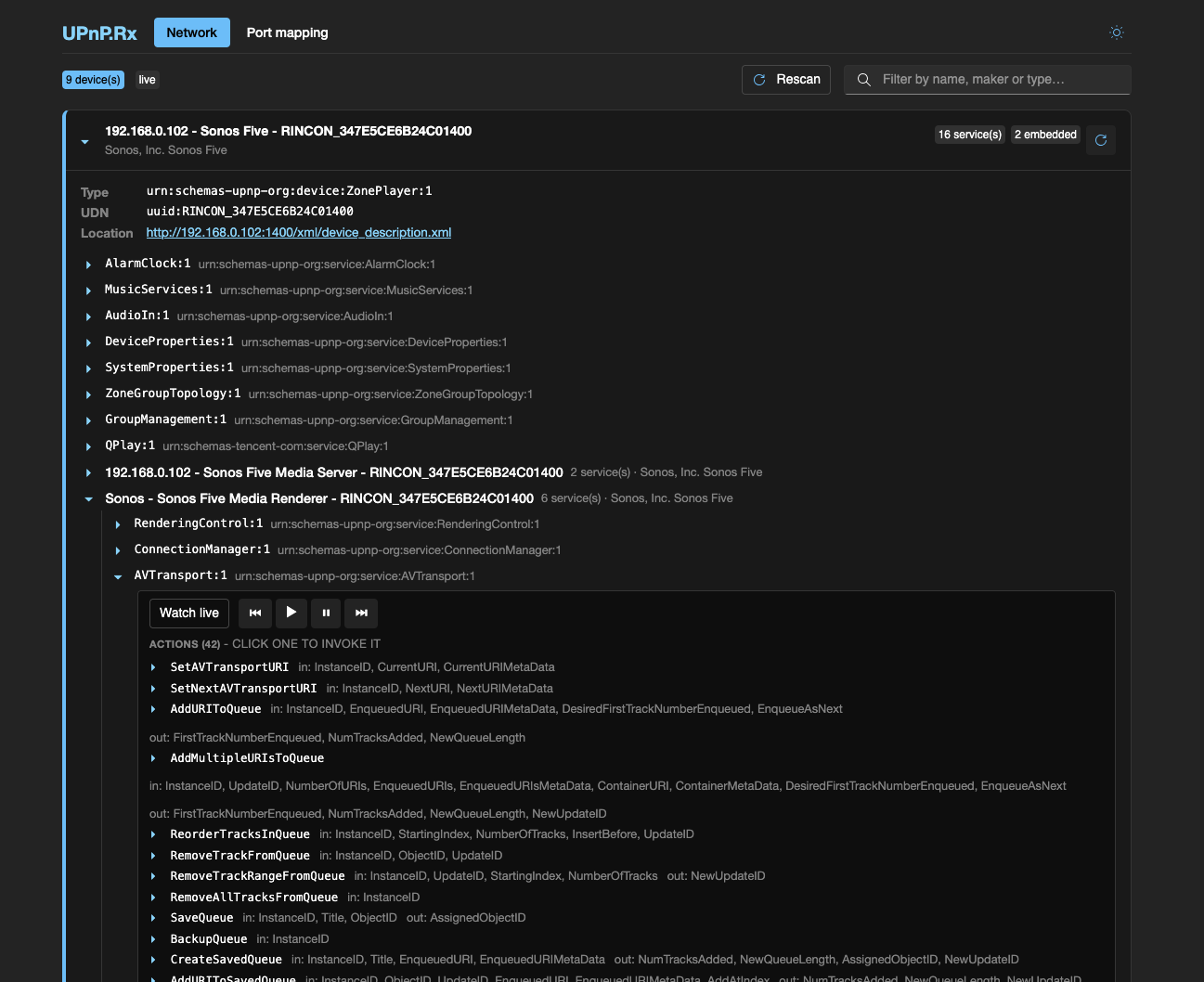
Blazor WebAssembly + FluentUI + ReactiveUI, light and dark - and everything in it is built on the library's public API.
Quick start - port mapping
using UPnP.Rx.PortMapping;

// One line: discover the gateway, map the port, auto-renew the lease.
await using var lease = await PortMapper.AddPortMappingAsync(
    externalPort: 8080, internalPort: 8080, Protocol.Tcp,
    description: "my app", lease: TimeSpan.FromHours(1));

Console.WriteLine($"Mapped external port {lease.Mapping.ExternalPort}");

// Renewal outcomes are an observable - a failed renewal retries, it never throws.
using var events = lease.Events.Subscribe(e => Console.WriteLine($"[lease] {e.Kind}"));
Disposing the lease with await using removes the mapping from the router. Sync Dispose() is the abrupt path: renewal stops and the finite lease simply expires on the router - you never leak a mapping forever.
More control:
await using var gateway = await PortMapper.DiscoverGatewayAsync();

Console.WriteLine(await gateway!.GetExternalIPAddressAsync());
Console.WriteLine((await gateway.GetStatusInfoAsync()).IsConnected);        // WAN up?

var taken = await gateway.GetSpecificPortMappingEntryAsync(8080, Protocol.Tcp);
Console.WriteLine(taken is null ? "8080 is free" : $"8080 -> {taken.InternalClient}");

await foreach (var m in gateway.GetPortMappingsAsync())
    Console.WriteLine($"{m.Protocol} {m.ExternalPort} -> {m.InternalClient}:{m.InternalPort}");
Rx-first? The scalar discovery is FirstAsync sugar over an observable - subscribe to the stream itself (multi-homed networks can have several gateways):
using var upnp = new UpnpClient(myAddresses);
using var gateways = PortMapper.DiscoverGateways(upnp).Subscribe(g =>
    Console.WriteLine(g.Device.Description.FriendlyName));
Quick start - the general client
using UPnP.Rx;

using var upnp = new UpnpClient(ipAddress);            // your local interface address(es)

using var subscription = upnp
    .DiscoverDescribedDevices()                        // SSDP + description fetch, cached
    .Where(d => d.HasService("WANIPConnection"))
    .SelectMany(async gateway =>
    {
        var wan = gateway.Service("WANIPConnection");
        return await wan.InvokeAsync("GetExternalIPAddress");
    })
    .Subscribe(result => Console.WriteLine(result["NewExternalIPAddress"]));
(DiscoverDevices() gives the raw discovery stream - SSDP envelopes with lazy
GetDescriptionAsync() - when you want control over the description step.)
DiscoverDevices(searchTarget, mx)sends an M-SEARCH on subscription and mergesssdp:aliveannouncements, deduplicated per subscription. The default target isupnp:rootdevice; configure it viaUpnpClientOptions.DefaultSearchTargetor per call (SearchTargets.All,SearchTargets.DeviceType("MediaRenderer"), …).DeviceLost()streamsssdp:byebyenotices.Service(...)matches by full service type URN, service id, or bare type name ("WANIPConnection"matches any version), across the whole embedded-device tree.InvokeAsyncthrowsUpnpActionExceptioncarrying the device'sUpnpErroron SOAP faults.
Behavior notes
- Strict in what we send, lenient in what we accept. Envelopes and headers follow the UDA 2.0 letter (including the quoted
charset="utf-8"); parsers tolerate wrong namespaces, wrong casing, whitespace inside identifiers, unescaped ampersands, and UPnP 1.0-eraURLBase(which UDA 2.0 requires control points to honor). A document only fails to parse when it identifies nothing. - Pipelines never die from one bad message. Degraded announcements are surfaced (
DiscoveredDevice.HasParsingError), unusable ones are dropped with a log note;OnErroris reserved for the source itself dying. - One clock. Every timeout and renewal runs on
UpnpClientOptions.TimeProvider(defaultTimeProvider.System) - injectFakeTimeProviderin tests and drive renewals deterministically. - Disposal.
DisposeAsyncis the graceful path: port-mapping leases delete their mappings, and a client with live event subscriptions sends UNSUBSCRIBE before releasing its resources; disposing anEvents()subscription likewise says goodbye from the engine's own teardown. SyncDisposereleases resources without network goodbyes - finite lease and subscription timeouts make that safe (the device expires them on its own). - Spec review. Clause 2/3 and clause 4 behavior was audited against the UDA 2.0 text; the findings live in plan/uda2-compliance-review.md and plan/uda2-clause4-compliance-review.md.
Where UPnP.Rx fits
The .NET ecosystem has several UPnP libraries, each with real strengths. Mono.Nat and Open.NAT made router port mapping accessible to a generation of .NET apps - and Mono.Nat also speaks NAT-PMP, which UPnP.Rx deliberately leaves to it. Rssdp is a focused, actively maintained SSDP implementation with device-side publishing. Waher.Networking.UPnP brings UPnP into a much broader IoT framework. If one of those matches your needs and target frameworks, it's a fine choice.
UPnP.Rx's place is the full control-point chain in one standalone package - discover → describe → control - for modern .NET:
- an Rx + immutable-records API (device presence and lease renewals as observables),
async/IAsyncEnumerableergonomics, one testable clock (TimeProvider) throughout,- spec-audited UDA 2.0 behavior with deliberately lenient parsing of real-world devices,
- port mapping with auto-renewing leases as the flagship, and
- near-zero dependencies on
net10.0.
At a glance:
| Library | Focus | UPnP.Rx in comparison |
|---|---|---|
| Mono.Nat | Port mapping (UPnP IGD + NAT-PMP) | UPnP only, but adds description/control beyond IGD, an Rx + async API, and auto-renewing leases |
| Open.NAT | Port mapping (UPnP IGD) | The full discover → describe → control chain, under active development |
| Rssdp | SSDP discovery + device-side publishing | Picks up where discovery ends: from the LOCATION URL to description and control |
| Waher.Networking.UPnP | UPnP within the Waher IoT framework | Standalone package, near-zero dependencies, net10.0-idiomatic |
Known boundary: UPnP.Rx speaks UPnP only - for NAT-PMP/PCP, Mono.Nat has you covered. Planned next: a live device roster with expiry (4.1).
Troubleshooting
No gateway / no devices found?
UPnP is usually disabled on gateways by default - and that only affects the port-mapping features; discovery and control of other devices (TVs, speakers, hubs) work regardless. On UniFi (UDM/UXG/Express/USG - they run
miniupnpd): Settings → Internet → your WAN → UPnP (older controllers: Settings → Services → UPnP), primary WAN only. Other routers/firewalls hide the toggle under NAT, port forwarding or "media sharing" settings. Security note: the IGD control endpoint is LAN-side only by design - nothing on the WAN can reach it - but it has no authentication, so any LAN device can open WAN ports for itself. Enable it consciously; the mapping table (dashboard orSample.PortMapper) shows exactly what has been opened, and UPnP.Rx's own mappings use finite auto-renewed leases that expire on their own.Containers can't multicast: Docker, WSL and devcontainers won't see SSDP. Run on the host.
On Windows, the built-in "SSDP Discovery" service (
SSDPSRV) occupies UDP 1900 and keeps other clients from seeing responses. Pause it while discovering (elevated prompt), and start it again afterwards:net stop SSDPSRV &REM pause - lets UPnP.Rx receive SSDP net start SSDPSRV &REM resume when doneVPNs commonly capture the default route or block multicast - try disconnected.
AP isolation / IGMP snooping on some networks filters SSDP - try wired.
Sample.Browseranswers "is anything visible from this machine?" in one command;Sample.PortMapperprints the interfaces it searched from.Pass an
ILoggerviaUpnpClientOptions.Loggerto see dropped announcements and skipped descriptions.
Eventing (Events()) trouble?
- The callback listener needs an inbound port. Subscribing starts a small
HTTP listener for the device's NOTIFYs - expect a firewall prompt on first
use and allow it. By default the port is ephemeral; set
UpnpClientOptions.EventCallbackPortto a fixed port if you need a firewall rule. SubscriptionRefusedwith HTTP 404/405/410/501: some devices advertise aneventSubURLfor services that are not actually evented - either the endpoint refuses the method (405/501, e.g. Sonos'sQPlay:1) or the URL is a placeholder that plain doesn't exist (404/410, e.g. the/ssdp/notfoundstub on Sonos'sSpeakerGroup:1pseudo-device). Such a refusal contradicts the device's own description and is permanent, so instead of retrying forever the stream reports the reason as aSubscriptionRefusedevent and then terminates withOnError. Transient failures (timeouts, 5xx during a reboot, SEQ gaps) keep the auto-recovery behavior.
Advanced
Bring your own SSDP control point (for interception, custom sockets, or tests) and/or HttpClient:
var controlPoint = new ControlPoint(myPreparedInterfaces);   // SSDP.UPnP.PCL
using var upnp = new UpnpClient(controlPoint, myHttpClient, options, addresses);
Tests fake the network at two seams: IControlPoint (drive parsed SSDP messages from a Subject) and HttpMessageHandler (serve descriptions and SOAP). Multicast is never required. For your own unit tests, the control surfaces have interfaces - IUpnpService, IInternetGateway, IPortMappingLease - so application code can be tested against fakes without any network replay.
SCPD-driven argument marshalling - validate and order in-arguments before invoking:
var scpd = await wan.GetScpdAsync();
var args = scpd.ValidateAndOrderArguments("AddPortMapping", myArguments);
// args.IsSuccess ? await wan.InvokeAsync("AddPortMapping", args.Value) : report args.Error
Samples
samples/Sample.PortMapper- discover the gateway, print the external IP and mapping table;--mapholds an auto-renewing mapping.samples/Sample.Browser- discover everything on the network and dump device trees and services.samples/Sample.Eventing- subscribe to any evented service and watchUpnpEvents live (the manual test protocol lives in the 4.0 plan).samples/Sample.Dashboard- a Blazor + FluentUI dashboard: live device cards that appear and vanish as devices join and leave the network - Rx end to end. See below.
All need a real network (multicast does not work in containers).
Running the dashboard
One command runs everything - the server hosts the WebAssembly client, so there is nothing separate to start:
dotnet run --project samples/Sample.Dashboard
Then open http://localhost:5287 (or the HTTPS URL from the console output).
How it fits together: the server process is the only thing touching the
network - it owns the UpnpClient, does the SSDP listening (which the browser
sandbox cannot), and streams DeviceUp/DeviceGone over a SignalR hub that
replays the current roster to every newly connected browser. The client runs
as WebAssembly in your browser: SignalR feeds a DynamicData cache, bound
through a ReactiveUI view model into FluentUI cards. Open the page from any
machine that can reach the server - phones included.
The usual multicast rules apply to the server process: run it on a real
host (not a container), and on Windows pause the "SSDP Discovery" service
first (net stop SSDPSRV, elevated - see Troubleshooting).
The dashboard itself repeats these hints when nothing shows up after a few
seconds of scanning.
Two pages: Network (live device browser with service drill-down) and Port mapping (gateway status, the mapping table, add/delete with auto-renewing leases and a live renewal-event feed). A word of caution: the port-mapping page lets any browser that can reach the server modify the router, and the sample has no authentication - treat it as a LAN tool.
About this project - the role of AI
The work leading to UPnP.Rx goes back more than a decade - through HttpMachine.PCL, SimpleHttpListener.Rx and SSDP.UPnP.PCL, each hand-built and refined over years of real-world use.
UPnP.Rx is the first library in the family built with AI assistance from the very first commit.
I still write code, and I review what the AI produces. For a library of this size, resting on this much prior work, AI made the building of it much easier - but it could not have created it by itself. I set the direction, settled the design decisions, and reviewing the generated code sometimes meant demanding fundamental changes; even those, though, were far faster to refactor with AI in the loop.
What did not change is the bar: the project plan, the real-life testing across various platforms, the settled policies (time model, disposal model, Rx rules), the UDA 2.0 compliance review and an adversarial pre-release code review are all in this repo - the same attention to detail and focus as the siblings over the past 10 years, applied faster.
Everything that steered the work ships with the repo, on purpose: the agent instructions (CLAUDE.md / AGENTS.md) and the full plan, decision record and reviews under plan/. For transparency and for anyone who wants to contribute.
If there is one lesson from building this way, it is that getting specs right is the key - the quality of what AI produces tracks the quality of the plan and the rules set up front. This code wasn't "vibe-coded" it was managed and directed, with the AI as a tool.
Version history
| Version | Notes |
|---|---|
| 4.2.0 | Structural release: IUpnpClient (mock/decorate the client), public-API ledger (PublicApiAnalyzers - surface changes now fail the build), the description cache extracted and directly unit-tested, engine/HTTP-exchange/test-helper dedups (EngineSource, TimedExchange, TestKit), decision ledger (plan/DECISIONS.md), CI trimmed-publish smoke and symbol packages on GitHub releases. No behavioral changes. |
| 4.1.0 | Device roster (Roster(): presence changes with replay, max-age expiry, reboot detection and lazy description self-healing), Announcements() + SearchAsync() (activity feed and solicitation), typed AV LastChange decoding (UPnP.Rx.Eventing.Av), TryService, trim/AOT-clean, memory audit with soak tests; dashboard: generic SCPD-driven action invocation with confirm-step, volume/mute/transport quick controls that follow the device live, and a per-device SSDP activity log. |
| 4.0.0 | GENA eventing: service.Events() as a shared observable with automatic renewal, SEQ-gap recovery and last-known-state replay; permanent SUBSCRIBE refusals surfaced as SubscriptionRefused (devices advertise eventSubURLs they don't honor - Sonos QPlay/SpeakerGroup); clause 4 compliance review; dashboard live-event watching and rescan; Sample.Eventing. Rides SSDP.UPnP.PCL 8.0 (lazy Rx lifecycle) and SimpleHttpListener.Rx 7.3 (packet-info local endpoints, reliable restarts). |
| 3.0.0 | First release of UPnP.Rx: discovery → description → control, IGD port mapping with auto-renewing leases, SCPD-driven argument validation, and three samples including a Blazor + FluentUI live dashboard. Versioned to reflect its lineage - it builds on years of learnings from SSDP.UPnP.PCL, SimpleHttpListener.Rx and HttpMachine.PCL rather than starting from scratch. |
Why .NET 10?
UPnP.Rx is net10.0-only, like its siblings SSDP.UPnP.PCL and SimpleHttpListener.Rx: modern C# records for the immutable model, TimeProvider throughout for testable time, and no legacy TFM baggage. If you need older targets, the underlying protocol layers remain available separately.
License
MIT - see LICENSE.
| Product | Versions Compatible and additional computed target framework versions. |
|---|---|
| .NET | net10.0 is compatible. net10.0-android was computed. net10.0-browser was computed. net10.0-ios was computed. net10.0-maccatalyst was computed. net10.0-macos was computed. net10.0-tvos was computed. net10.0-windows was computed. |
-
net10.0
- Microsoft.Extensions.Logging.Abstractions (>= 10.0.10)
- SimpleHttpListener.Rx (>= 7.3.0)
- SSDP.UPnP.PCL (>= 8.0.0)
- System.Reactive (>= 7.0.0)
NuGet packages
This package is not used by any NuGet packages.
GitHub repositories
This package is not used by any popular GitHub repositories.