Syncfusion.Blazor.Diagram
33.2.4
Prefix Reserved
dotnet add package Syncfusion.Blazor.Diagram --version 33.2.4
NuGet\Install-Package Syncfusion.Blazor.Diagram -Version 33.2.4
<PackageReference Include="Syncfusion.Blazor.Diagram" Version="33.2.4" />
<PackageVersion Include="Syncfusion.Blazor.Diagram" Version="33.2.4" />
<PackageReference Include="Syncfusion.Blazor.Diagram" />
paket add Syncfusion.Blazor.Diagram --version 33.2.4
#r "nuget: Syncfusion.Blazor.Diagram, 33.2.4"
#:package Syncfusion.Blazor.Diagram@33.2.4
#addin nuget:?package=Syncfusion.Blazor.Diagram&version=33.2.4
#tool nuget:?package=Syncfusion.Blazor.Diagram&version=33.2.4
Syncfusion® Blazor Diagram
Fast and powerful diagram visualization and creation library for Blazor applications. Create flowcharts, organizational charts, mind maps, UML diagrams, and more with interactive canvas and extensive customization.
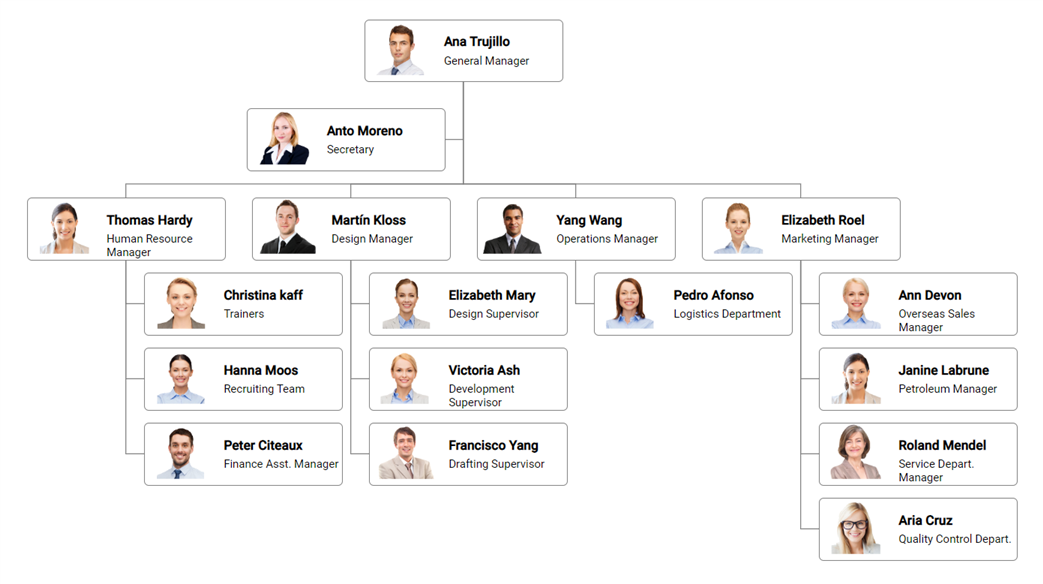
Key features
- Diagram Types: Flowcharts, organizational charts, mind maps, UML diagrams, network diagrams
- Rich Shapes: Built-in and custom shapes with templates
- Connectors: Multiple connector types (straight, orthogonal, bezier) with customizable endpoints
- Editing: Drag, resize, rotate, and delete objects seamlessly
- Layout Algorithms: Automatic arrangement (hierarchical, radial, organizational)
- Serialization: Save and load diagrams in JSON format
- Export: Export diagrams as image (PNG, SVG, PDF)
- Interactive Features: Zoom, pan, selection, undo/redo, properties panel
- Mobile Support: Touch-friendly interactions and responsive design
Add stylesheet and script references
- For Blazor Web App / Blazor Server App, add these to
Components/App.razororApp.razorfile. - For Blazor WebAssembly App, add these to
wwwroot/index.htmlfile
<link href="_content/Syncfusion.Blazor.Themes/bootstrap5.css" rel="stylesheet" />
<script src="_content/Syncfusion.Blazor.Core/scripts/syncfusion-blazor.min.js" type="text/javascript"></script>
Quick start
- Register the Syncfusion® Blazor service in the
Program.csfile.
using Syncfusion.Blazor;

builder.Services.AddSyncfusionBlazor();
- Add Blazor Diagram component to your Razor page.
@using Syncfusion.Blazor.Diagram

<SfDiagramComponent Height="600px" Nodes="@NodeCollection" Connectors="@ConnectorCollection">
</SfDiagramComponent>

@code {

    public DiagramObjectCollection<Node> NodeCollection = new DiagramObjectCollection<Node>();

    public DiagramObjectCollection<Connector> ConnectorCollection = new DiagramObjectCollection<Connector>();

    protected override void OnInitialized()
    {
        // Create nodes
        Node node1 = new Node() { Id = "node1", OffsetX = 250, OffsetY = 50, Width = 100, Height = 100, Shape = new FlowShape() { Type = FlowShapeType.Process }, Annotations = new DiagramObjectCollection<ShapeAnnotation>() { new ShapeAnnotation { Content = "Start" } } };
        Node node2 = new Node() { Id = "node2", OffsetX = 250, OffsetY = 250, Width = 100, Height = 100, Shape = new FlowShape() { Type = FlowShapeType.Decision }, Annotations = new DiagramObjectCollection<ShapeAnnotation>() { new ShapeAnnotation { Content = "Decision" } } };

        NodeCollection.Add(node1);
        NodeCollection.Add(node2);

        // Create connector
        Connector connector = new Connector() { SourceID = "node1", TargetID = "node2", Type = ConnectorSegmentType.Orthogonal };
        ConnectorCollection.Add(connector);
    }
}
Documentation
- Getting Started with Blazor Web App
- Getting Started with WebAssembly
- API Reference
- Live Demos
- Feature Overview
Support
License
This is a commercial product and requires a paid license for possession or use. Review the Syncfusion® EULA.
About Syncfusion®
Syncfusion® provides 1600+ UI components and frameworks for web, mobile, and desktop development across multiple platforms:
Web: Blazor | ASP.NET Core | ASP.NET MVC | JavaScript | Angular | React | Vue
Desktop: WinForms | WPF | WinUI
Learn more at www.syncfusion.com.
sales@syncfusion.com | Toll Free: 1-888-9-DOTNET
| Product | Versions Compatible and additional computed target framework versions. |
|---|---|
| .NET | net8.0 is compatible. net8.0-android was computed. net8.0-browser was computed. net8.0-ios was computed. net8.0-maccatalyst was computed. net8.0-macos was computed. net8.0-tvos was computed. net8.0-windows was computed. net9.0 is compatible. net9.0-android was computed. net9.0-browser was computed. net9.0-ios was computed. net9.0-maccatalyst was computed. net9.0-macos was computed. net9.0-tvos was computed. net9.0-windows was computed. net10.0 is compatible. net10.0-android was computed. net10.0-browser was computed. net10.0-ios was computed. net10.0-maccatalyst was computed. net10.0-macos was computed. net10.0-tvos was computed. net10.0-windows was computed. |
-
net10.0
- Syncfusion.Blazor.Core (>= 33.2.4)
- Syncfusion.Blazor.Data (>= 33.2.4)
- Syncfusion.Blazor.Navigations (>= 33.2.4)
- Syncfusion.Blazor.Popups (>= 33.2.4)
-
net8.0
- Syncfusion.Blazor.Core (>= 33.2.4)
- Syncfusion.Blazor.Data (>= 33.2.4)
- Syncfusion.Blazor.Navigations (>= 33.2.4)
- Syncfusion.Blazor.Popups (>= 33.2.4)
-
net9.0
- Syncfusion.Blazor.Core (>= 33.2.4)
- Syncfusion.Blazor.Data (>= 33.2.4)
- Syncfusion.Blazor.Navigations (>= 33.2.4)
- Syncfusion.Blazor.Popups (>= 33.2.4)
NuGet packages (4)
Showing the top 4 NuGet packages that depend on Syncfusion.Blazor.Diagram:
| Package | Downloads |
|---|---|
|
CyberFrameword10_V2
CyberFrameword10_V2 |
|
|
Whipstaff.Blazor.Syncfusion.Diagram
Re-usable logic for working with Syncfusion Blazor Diagram controls. |
|
|
AutoCore.Blazor
Package Description |
|
|
Jakar.Extensions.Blazor.Syncfusion
Extensions to aid in development. |
GitHub repositories
This package is not used by any popular GitHub repositories.
| Version | Downloads | Last Updated |
|---|---|---|
| 33.2.4 | 66 | 4/27/2026 |
| 33.2.3 | 1,453 | 4/21/2026 |
| 33.1.49 | 1,720 | 4/13/2026 |
| 33.1.47 | 1,347 | 4/6/2026 |
| 33.1.46 | 665 | 3/30/2026 |
| 33.1.45 | 1,177 | 3/23/2026 |
| 33.1.44 | 2,712 | 3/16/2026 |
| 32.2.9 | 3,412 | 3/9/2026 |
| 32.2.8 | 1,453 | 3/2/2026 |
| 32.2.7 | 1,739 | 2/23/2026 |
| 32.2.5 | 4,127 | 2/16/2026 |
| 32.2.4 | 4,514 | 2/10/2026 |
| 32.2.3 | 2,241 | 2/5/2026 |
| 32.1.25 | 2,670 | 1/26/2026 |
| 32.1.24 | 3,158 | 1/19/2026 |
| 32.1.23 | 1,551 | 1/13/2026 |
| 32.1.22 | 2,085 | 1/5/2026 |
| 32.1.21 | 1,411 | 12/29/2025 |
| 32.1.20 | 941 | 12/23/2025 |
| 32.1.19 | 3,022 | 12/16/2025 |