StreamDeckSharp 11.0.0-beta.1
dotnet add package StreamDeckSharp --version 11.0.0-beta.1
NuGet\Install-Package StreamDeckSharp -Version 11.0.0-beta.1
<PackageReference Include="StreamDeckSharp" Version="11.0.0-beta.1" />
<PackageVersion Include="StreamDeckSharp" Version="11.0.0-beta.1" />
<PackageReference Include="StreamDeckSharp" />
paket add StreamDeckSharp --version 11.0.0-beta.1
#r "nuget: StreamDeckSharp, 11.0.0-beta.1"
#:package StreamDeckSharp@11.0.0-beta.1
#addin nuget:?package=StreamDeckSharp&version=11.0.0-beta.1&prerelease
#tool nuget:?package=StreamDeckSharp&version=11.0.0-beta.1&prerelease

StreamDeckSharp is a simple (unofficial) library (.NET 10+) for the Elgato Stream Deck family


First things first, StreamDeckSharp is not official software by Elgato, nor is it endorsed by them.
StreamDeckSharp is a device provider implementation for OpenMacroBoard.SDK.
The SDK itself is device-neutral: it defines the common types for macro boards, and other boards can be supported by writing a provider for it.
Both live in this repository, see What is in this repository.
AI Disclosure
I recently started to use AI to help me maintain this project. For more about that, see AI-DISCLOSURE.md.
Quick Start
Create a new console project in Visual Studio (.NET 10+), add OpenMacroBoard.SDK as a reference and at least one device provider.
In this example we use
OpenMacroBoard.SocketIOto support theVirtualMacroBoardStreamDeckSharpto support the Elgato Stream Deck family
<sub>Note: Neither OpenMacroBoard nor StreamDeckSharp are made or endorsed by Elgato</sub>
Once you added the NuGet packages copy-paste the following lines:
using OpenMacroBoard.SDK;
using OpenMacroBoard.SocketIO;  // for VirtualMacroBoard
using StreamDeckSharp;          // for StreamDeck

// create a device context (fluent API)
// and add listener for devices (device provider)
using var ctx = DeviceContext.Create()
    .AddListener<SocketIOBoardListener>()   // VirtualMacroBoard
    .AddListener<StreamDeckListener>()      // StreamDeck
    ;

Console.WriteLine("Waiting for a device... (press Ctrl+C to cancel)");
using var board = await ctx.OpenAsync();
Console.WriteLine("Device found.");
Console.WriteLine("1) Try to press some buttons on the device.");
Console.WriteLine("2) Press any key in this console to end the demo.");

// react to key press event by setting a random color
board.KeyStateChanged += (sender, arg) => board.SetKeyBitmap(arg.Key, GetRandomColorKey());

// Wait for a key press in the console window to exit
// the application and disconnect the device.
Console.ReadKey();

// Helper function to create a random color KeyBitmap
static KeyBitmap GetRandomColorKey()
{
    var r = GetRandomByte();
    var g = GetRandomByte();
    var b = GetRandomByte();

    return KeyBitmap.Create.FromRgb(r, g, b);
}

// Helper function to get a random byte
static byte GetRandomByte()
{
    return (byte)Random.Shared.Next(255);
}
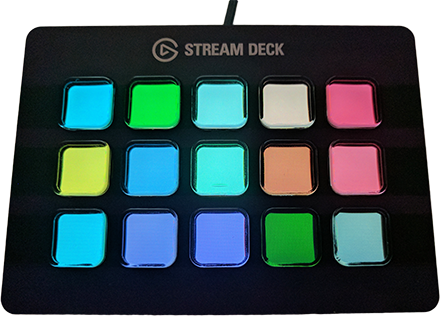
Here is what the example looks like after pressing some keys:
Supported devices
NuGet: StreamDeckSharp
| Device | Description |
|---|---|
| Stream Deck (original/legacy) | 5 x 3 |
| Stream Deck (MK2) | 5 x 3 |
| Stream Deck XL | 8 x 4 |
| Stream Deck Mini | 3 x 2 |
Keep in mind that Elgato sometimes releases new revisions of their devices with different PIDs (USB product IDs) which might break compatibility. If you have a device like that, please open an issue on GitHub with the new PID.
Examples
You can find a lot of examples in the examples folder.
Fullscreen images
<img src="https://raw.githubusercontent.com/OpenMacroBoard/StreamDeckSharp/v11.0-beta.1/doc/images/lasershow.png" width="500" />
Play games
Play games on a macro board, for example minesweeper (also part of the example projects) <img src="https://raw.githubusercontent.com/OpenMacroBoard/StreamDeckSharp/v11.0-beta.1/doc/images/minesweeper.jpg" width="500" />
Videos

*The glitches you can see are already fixed.
What is in this repository
| Folder | Content |
|---|---|
src/OpenMacroBoard.SDK |
The device-neutral base library: common types and logic for macro boards. Implements no device itself. |
src/StreamDeckSharp |
Device provider for the Elgato Stream Deck family. |
src/OpenMacroBoard.SocketIO |
Device provider for boards that are reached over the network, like the virtual board. |
src/OpenMacroBoard.VirtualBoard |
A virtual macro board, to develop without hardware. |
src/OpenMacroBoard.SDK.KeyBitmap.GDI |
Helpers to create key bitmaps with GDI+ (Windows only). |
src/OpenMacroBoard.SDK.KeyBitmap.SkiaSharp |
Helpers to create key bitmaps with SkiaSharp, for drawing text and shapes on every platform. |
examples |
Example and showcase projects. |
tests |
Test projects. |
Building
With Docker, no .NET SDK is needed. This builds everything and runs the tests:
docker build .
To create NuGet packages for local testing in output/packages (nothing is published, and the packages get a local pre-release version):
docker build --target packages --output type=local,dest=output/packages .
Without Docker you need the .NET 10 SDK:
dotnet build StreamDeckSharp.sln
dotnet test StreamDeckSharp.sln
A few projects target Windows. On Linux and macOS use the commands from the Dockerfile, which also lists more options.
This project is not related to Elgato Systems GmbH in any way
| Product | Versions Compatible and additional computed target framework versions. |
|---|---|
| .NET | net10.0 is compatible. net10.0-android was computed. net10.0-browser was computed. net10.0-ios was computed. net10.0-maccatalyst was computed. net10.0-macos was computed. net10.0-tvos was computed. net10.0-windows was computed. |
-
net10.0
- HidSharp (>= 2.6.4)
- OpenMacroBoard.SDK (>= 11.0.0-beta.1)
NuGet packages (1)
Showing the top 1 NuGet packages that depend on StreamDeckSharp:
| Package | Downloads |
|---|---|
|
VL.Devices.StreamDeck
VL Nodeset for the Elgato StreamDeck for use in VVVV Gamma. Based on StreamDeckSharp |
GitHub repositories (1)
Showing the top 1 popular GitHub repositories that depend on StreamDeckSharp:
| Repository | Stars |
|---|---|
|
jskeet/DemoCode
Demo code used in talks, blog posts etc
|
| Version | Downloads | Last Updated |
|---|---|---|
| 11.0.0-beta.1 | 381 | 11/21/2026 |
| 10.0.0 | 1,769 | 6/19/2026 |
| 6.1.0 | 5,490 | 9/17/2025 |
| 6.0.0 | 10,227 | 3/3/2024 |
| 5.0.0 | 2,463 | 8/1/2023 |
| 4.2.0-preview | 2,274 | 11/18/2022 |
| 4.1.0-preview | 1,112 | 11/17/2022 |
| 4.0.0-preview | 1,814 | 3/24/2022 |
| 3.2.0 | 7,281 | 9/24/2021 |
| 3.0.0 | 2,459 | 3/11/2021 |
| 2.2.0 | 2,977 | 8/24/2020 |
| 2.1.0 | 1,687 | 8/21/2020 |
| 2.0.0 | 1,870 | 6/5/2020 |
| 1.0.0 | 1,899 | 3/13/2020 |
| 0.3.5 | 3,148 | 11/28/2019 |
| 0.3.4 | 2,169 | 6/22/2019 |
| 0.3.2 | 1,724 | 6/19/2019 |
| 0.3.1 | 2,397 | 1/26/2019 |
| 0.3.0 | 2,241 | 1/26/2019 |