Serilog.Sinks.RichTextBox.WinForms.Colored
3.2.1
dotnet add package Serilog.Sinks.RichTextBox.WinForms.Colored --version 3.2.1
NuGet\Install-Package Serilog.Sinks.RichTextBox.WinForms.Colored -Version 3.2.1
<PackageReference Include="Serilog.Sinks.RichTextBox.WinForms.Colored" Version="3.2.1" />
<PackageVersion Include="Serilog.Sinks.RichTextBox.WinForms.Colored" Version="3.2.1" />
<PackageReference Include="Serilog.Sinks.RichTextBox.WinForms.Colored" />
paket add Serilog.Sinks.RichTextBox.WinForms.Colored --version 3.2.1
#r "nuget: Serilog.Sinks.RichTextBox.WinForms.Colored, 3.2.1"
#:package Serilog.Sinks.RichTextBox.WinForms.Colored@3.2.1
#addin nuget:?package=Serilog.Sinks.RichTextBox.WinForms.Colored&version=3.2.1
#tool nuget:?package=Serilog.Sinks.RichTextBox.WinForms.Colored&version=3.2.1
Serilog.Sinks.RichTextBox.WinForms.Colored




A Serilog sink that writes log events to a WinForms RichTextBox with support for coloring and custom themes.
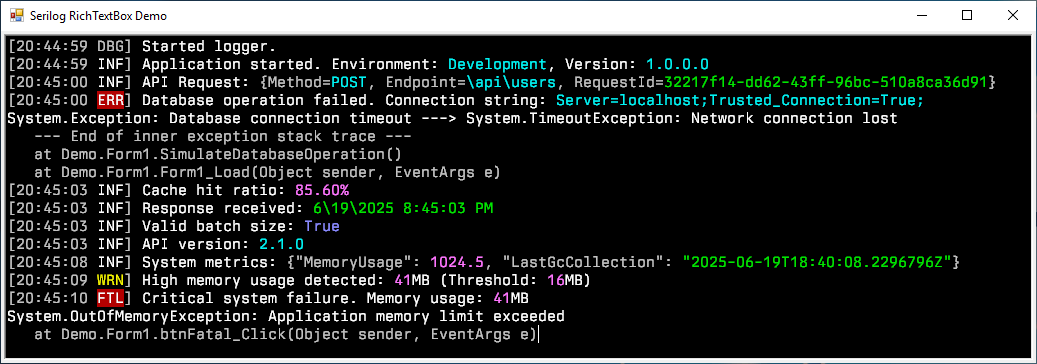
Features
- Colored log events in a WinForms RichTextBox control
- Multiple theme presets with customization options
- High-performance asynchronous processing
- Line limit to control memory usage
- Support for pretty-printing of JSON objects
- WCAG compliant color schemes based on the Serilog WPF RichTextBox sink.
Getting Started
Install the package from NuGet:
Install-Package Serilog.Sinks.RichTextBox.WinForms.Colored
Declare your RichTextBox control:
private System.Windows.Forms.RichTextBox richTextBox1;

private void InitializeComponent()
{
    this.richTextBox1.BackColor = System.Drawing.SystemColors.Window;
    this.richTextBox1.Dock = System.Windows.Forms.DockStyle.Fill;
    this.richTextBox1.Font = new System.Drawing.Font("Cascadia Mono", 10.8F, System.Drawing.FontStyle.Regular, System.Drawing.GraphicsUnit.Point);
    this.richTextBox1.Location = new System.Drawing.Point(0, 0);
    this.richTextBox1.Name = "richTextBox1";
}
Configure the logger to use the sink using the RichTextBox extension method:
Log.Logger = new LoggerConfiguration()
    .WriteTo.RichTextBox(richTextBox1, theme: ThemePresets.Literate)
    .CreateLogger();

Log.Information("Hello, world!");
See the Extension Method for more configuration options.
Configuration Options
| Option | Description | Default Value |
|---|---|---|
theme |
The color theme applied when rendering individual message tokens. | ThemePresets.Literate |
autoScroll |
When true (default) the target control scrolls automatically to the most recent log line. |
true |
maxLogLines |
Maximum number of log events retained in the in-memory circular buffer and rendered in the control. | 256 |
outputTemplate |
Serilog output template that controls textual formatting of each log event. | [{Timestamp:HH:mm:ss} {Level:u3}] {Message:lj}{NewLine}{Exception} |
formatProvider |
Optional culture-specific or custom formatting provider used when rendering scalar values; null for the invariant culture. |
CultureInfo.InvariantCulture |
prettyPrintJson |
When true, formats JSON values with indentation and line breaks for better readability. |
false |
spacesPerIndent |
Number of spaces per indentation level when pretty printing JSON. | 2 |
Themes
Available built-in themes:
| Theme | Description |
|---|---|
ThemePresets.Literate |
Styled to replicate the default theme of Serilog.Sinks.Console (default) |
ThemePresets.Grayscale |
A theme using only shades of gray, white, and black |
ThemePresets.Colored |
A theme based on the original Serilog.Sinks.ColoredConsole sink |
ThemePresets.Luminous |
A light theme with high contrast for accessibility |
The themes based on the original sinks are slightly adjusted to be WCAG compliant, ensuring that the contrast ratio between text and background colors is at least 4.5:1.
You can create your own custom themes by creating a new instance of the Theme class and passing it to the RichTextBox extension method. Look at the existing themes for examples.
Support the Project 💖
This project is still under active development.
If you find this project valuable, please consider supporting it through:
Contributing
Contributions are welcome! You may report issues, improve documentation, or submit pull requests.
See CONTRIBUTING.md for more information.
SAST Tools
PVS-Studio - static analyzer for C, C++, C#, and Java code.
License
Copyright © 2025 Simon Vonhoff & Contributors - Provided under the Apache License, Version 2.0.
| Product | Versions Compatible and additional computed target framework versions. |
|---|---|
| .NET | net5.0 was computed. net5.0-windows was computed. net6.0 was computed. net6.0-android was computed. net6.0-ios was computed. net6.0-maccatalyst was computed. net6.0-macos was computed. net6.0-tvos was computed. net6.0-windows was computed. net6.0-windows7.0 is compatible. net7.0 was computed. net7.0-android was computed. net7.0-ios was computed. net7.0-maccatalyst was computed. net7.0-macos was computed. net7.0-tvos was computed. net7.0-windows was computed. net8.0 was computed. net8.0-android was computed. net8.0-browser was computed. net8.0-ios was computed. net8.0-maccatalyst was computed. net8.0-macos was computed. net8.0-tvos was computed. net8.0-windows was computed. net8.0-windows7.0 is compatible. net9.0 was computed. net9.0-android was computed. net9.0-browser was computed. net9.0-ios was computed. net9.0-maccatalyst was computed. net9.0-macos was computed. net9.0-tvos was computed. net9.0-windows was computed. net9.0-windows7.0 is compatible. net10.0 was computed. net10.0-android was computed. net10.0-browser was computed. net10.0-ios was computed. net10.0-maccatalyst was computed. net10.0-macos was computed. net10.0-tvos was computed. net10.0-windows was computed. |
| .NET Core | netcoreapp3.0 is compatible. netcoreapp3.1 is compatible. |
| .NET Framework | net462 is compatible. net463 was computed. net47 was computed. net471 is compatible. net472 was computed. net48 was computed. net481 was computed. |
NuGet packages
This package is not used by any NuGet packages.
GitHub repositories
This package is not used by any popular GitHub repositories.
| Version | Downloads | Last Updated |
|---|---|---|
| 3.2.1 | 118 | 9/12/2026 |
| 3.2.0 | 13,135 | 11/10/2025 |
| 3.1.3 | 7,644 | 7/13/2025 |
| 3.1.2 | 413 | 7/7/2025 |
| 3.1.1 | 332 | 7/3/2025 |
| 3.1.0 | 336 | 6/30/2025 |
| 3.0.1 | 283 | 6/28/2025 |
| 3.0.0 | 343 | 6/21/2025 |
| 2.1.2 | 432 | 6/6/2025 |
| 2.1.0 | 3,758 | 3/17/2025 |
| 2.0.0 | 9,544 | 9/8/2024 |
| 1.2.2 | 5,611 | 4/15/2024 |
| 1.2.1 | 1,363 | 3/30/2024 |
| 1.2.0 | 5,415 | 9/25/2023 |
| 1.1.2 | 11,874 | 10/16/2022 |
| 1.1.1 | 1,038 | 9/9/2022 |
| 1.1.0 | 1,415 | 6/24/2022 |
| 1.0.2 | 1,081 | 6/11/2022 |
| 1.0.1 | 1,106 | 5/16/2022 |
- Fixed RichTextBox sink disposal dropping buffered log events.
- Added support for JSON pretty-printing in log messages.
See repository for more information:
https://github.com/vonhoff/Serilog.Sinks.RichTextBox.WinForms.Colored