ModernTrackBar.WinForms
1.0.2
See the version list below for details.
dotnet add package ModernTrackBar.WinForms --version 1.0.2
NuGet\Install-Package ModernTrackBar.WinForms -Version 1.0.2
<PackageReference Include="ModernTrackBar.WinForms" Version="1.0.2" />
<PackageVersion Include="ModernTrackBar.WinForms" Version="1.0.2" />
<PackageReference Include="ModernTrackBar.WinForms" />
paket add ModernTrackBar.WinForms --version 1.0.2
#r "nuget: ModernTrackBar.WinForms, 1.0.2"
#:package ModernTrackBar.WinForms@1.0.2
#addin nuget:?package=ModernTrackBar.WinForms&version=1.0.2
#tool nuget:?package=ModernTrackBar.WinForms&version=1.0.2
ModernTrackBar.WinForms





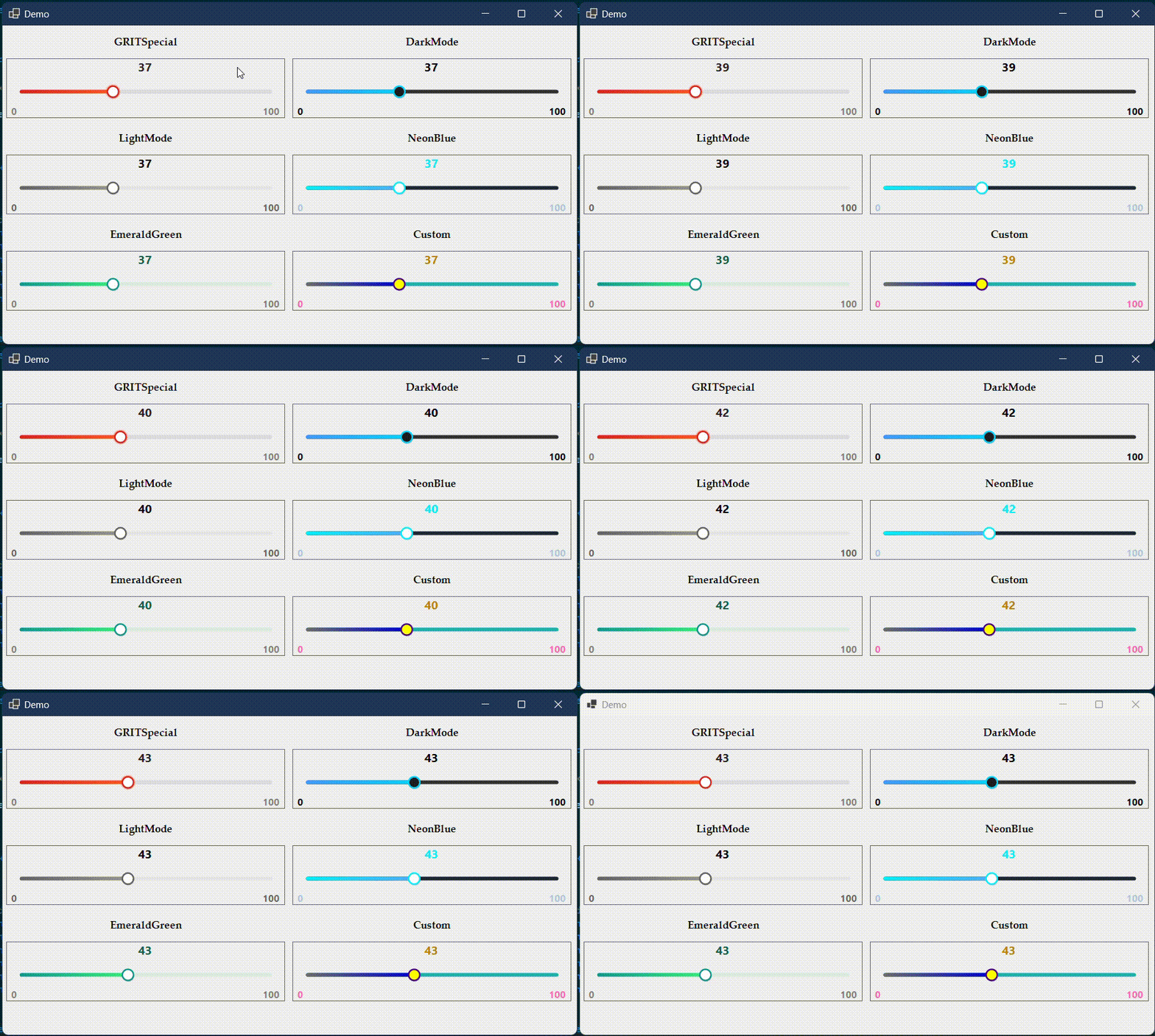
A highly polished, high-performance, and deeply customizable TrackBar / Slider control for Windows Forms applications.
ModernTrackBar.WinForms completely replaces the legacy, rigid system control with ultra-smooth, anti-aliased GDI+ vector mapping, beautiful linear gradients, hardware-friendly double buffering, dynamic value displays, and a robust theme engine built for modern desktop design ecosystems.
Themes • Installation • Quick Start • API Reference
🚀 Key Features
- ✨ Advanced GDI+ Drawing: Fully anti-aliased geometry with crisp, hardware-accelerated double-buffered painting to entirely eliminate control flicker.
- 🎨 Dynamic Linear Gradients: Create gorgeous multi-color tracks that shift visually alongside the slider's thumb.
- 💬 Live Floating Value Display: An interactive real-time text layout engine that tracks and previews numeric value changes dynamically.
- ⚡ Responsive Micro-Interactions: Polished visual feedback animations engineered for hover, focus, press, and active control states.
- 🎭 Flexible Theme Engine: Ship instantly using beautiful built-in visual profiles or unlock full custom token configurations.
- 🛠️ First-Class Designer Support: Drop it directly into the Visual Studio Forms Designer canvas with full property serialization support.
- 📦 Zero External Dependencies: Built natively using standard
.NET,System.Drawing, and WinForms APIs without heavy UI wrappers. - 🔄 Broad Target Compatibility: Native multi-targeting for classic
.NET Frameworkup through modern.NET Windowsenvironments.
🎨 Built-in Themes
| Theme Profile | Palette Concept | Recommended Context / Visual Intent |
|---|---|---|
NeonBlue |
#00F0FF / Cyan Core |
Futuristic, technical dashboards, gaming overlays, and cyber-style interfaces. |
EmeraldGreen |
#00F260 / Eco Accent |
Modern interfaces requiring crisp, vibrant energy or state configurations. |
DarkMode |
#2D2D30 / Matte Gray |
Minimalist dark layouts engineered specifically for dark-mode environments. |
LightMode |
#E0E0E0 / Soft Platinum |
Clean, accessible traditional light Windows Forms interface panels. |
GRITSpecial |
Brand Signature | Premium, luxury dark-gold accents explicitly tailored for GRIT UI designs. |
Custom |
Fully Unlocked | Manually overwrite colors, corner radii, track offsets, and custom typography. |
📦 Installation
.NET CLI
dotnet add package ModernTrackBar.WinForms
Package Manager Console
Install-Package ModernTrackBar.WinForms
Visual Studio GUI
- Right-click your project solution and select Manage NuGet Packages.
- Search for
ModernTrackBar.WinFormsunder the Browse tab. - Select the latest stable version and click Install.
⚡ Quick Start
🏎️ Designer Workflow
- Open your Windows Forms project workspace in Visual Studio.
- Open your target
FormorUserControlfile within the Design View canvas. - Open your Toolbox (
Ctrl + Alt + X) and locate ModernTrackBar. - Drag and drop the control directly onto the design interface canvas.
- Tailor performance and visual style properties live directly through the native Properties Window.
💻 Programmatic Workflow
using System;
using System.Drawing;
using System.Windows.Forms;
using GRIT.UI.Controls.WinForms;

namespace MyDashboardApp
{
    public partial class MainDashboard : Form
    {
        private ModernTrackBar _volumeSlider;

        public MainDashboard()
        {
            InitializeComponent();
            InitializeCustomControls();
        }

        private void InitializeCustomControls()
        {
            // Instantiate and configure visual parameters
            _volumeSlider = new ModernTrackBar
            {
                Location = new Point(30, 45),
                Size = new Size(350, 60),
                Minimum = 0,
                Maximum = 100,
                Value = 75,
                Theme = TrackBarTheme.NeonBlue,
                ShowValueTooltip = true
            };

            // Bind native state interactions
            _volumeSlider.ValueChanged += VolumeSlider_ValueChanged;

            // Mount directly into the form control tree hierarchy
            Controls.Add(_volumeSlider);
        }

        private void VolumeSlider_ValueChanged(object sender, EventArgs e)
        {
            Console.WriteLine($"System Volume adjusted to: {_volumeSlider.Value}%");
        }
    }
}
🔧 API Reference
Configuring the Range Matrix
Easily define control limitations, track boundaries, and baseline default offsets directly:
_volumeSlider.Minimum = 0;   // Define the lowest baseline bounds value
_volumeSlider.Maximum = 1000; // Define the absolute target peak value
_volumeSlider.Value = 500;   // Assign the active slider handle location value
Theme Engine Control
Instantly swap presets programmatic tracking behaviors seamlessly:
// Apply pre-configured visual style mappings
_volumeSlider.Theme = TrackBarTheme.EmeraldGreen;

// Explicitly unlock structural theme properties for runtime overrides
_volumeSlider.Theme = TrackBarTheme.Custom;
Floating Tooltip Interactivity
Toggle the real-time layout value indicator tracking behavior during user drag interaction steps:
_volumeSlider.ShowValueTooltip = true;  // Renders the floating tooltip on interaction
_volumeSlider.ShowValueTooltip = false; // Hides the tooltip completely
⚙️ Specifications
| Technical Metric | Underlying Architecture Profile |
|---|---|
| Package Identity | ModernTrackBar.WinForms |
| Component Type | Windows Forms UI Custom Control Framework |
| Language Target | C# (Optimized for .NET Framework 4.7.2+ & .NET 6.0+) |
| Rendering Engine | Anti-Aliased Surface Vector Paint Mapping (GDI+) |
| Target Platforms | Microsoft Windows Desktop Environment (WinForms) |
| Dependencies | None (System.Windows.Forms Base Assembly Only) |
📄 License
This framework utility is securely distributed under the MIT License. Check out the accompanying LICENSE document asset within the repository for commercial application rights and legal usage boundaries.
Developed under the GRIT Ecosystem
Growth • Resilience • Intensity • Tenacity
Building zero-dependency, ultra-performance developer workflows and premium component layouts.
| Product | Versions Compatible and additional computed target framework versions. |
|---|---|
| .NET | net6.0-windows7.0 is compatible. net7.0-windows was computed. net8.0-windows was computed. net8.0-windows7.0 is compatible. net9.0-windows was computed. net10.0-windows was computed. |
| .NET Framework | net472 is compatible. net48 is compatible. net481 was computed. |
-
.NETFramework 4.7.2
- No dependencies.
-
.NETFramework 4.8
- No dependencies.
-
net6.0-windows7.0
- No dependencies.
-
net8.0-windows7.0
- No dependencies.
NuGet packages
This package is not used by any NuGet packages.
GitHub repositories
This package is not used by any popular GitHub repositories.
v1.0.2 Release:
- Converted README to 100% pure CommonMark syntax to resolve NuGet.org raw HTML rendering issue.
- Restored native Markdown image formatting for live animated demo showcase.
- Updated documentation badge endpoints for live version and download metrics.