ModernTextBox.WinForms
1.0.2
dotnet add package ModernTextBox.WinForms --version 1.0.2
NuGet\Install-Package ModernTextBox.WinForms -Version 1.0.2
<PackageReference Include="ModernTextBox.WinForms" Version="1.0.2" />
<PackageVersion Include="ModernTextBox.WinForms" Version="1.0.2" />
<PackageReference Include="ModernTextBox.WinForms" />
paket add ModernTextBox.WinForms --version 1.0.2
#r "nuget: ModernTextBox.WinForms, 1.0.2"
#:package ModernTextBox.WinForms@1.0.2
#addin nuget:?package=ModernTextBox.WinForms&version=1.0.2
#tool nuget:?package=ModernTextBox.WinForms&version=1.0.2
ModernTextBox.WinForms





Stop using rigid, legacy inputs. Upgrade to a hardware-accelerated, highly customizable text input control for Windows Forms.
ModernTextBox Theme And Style
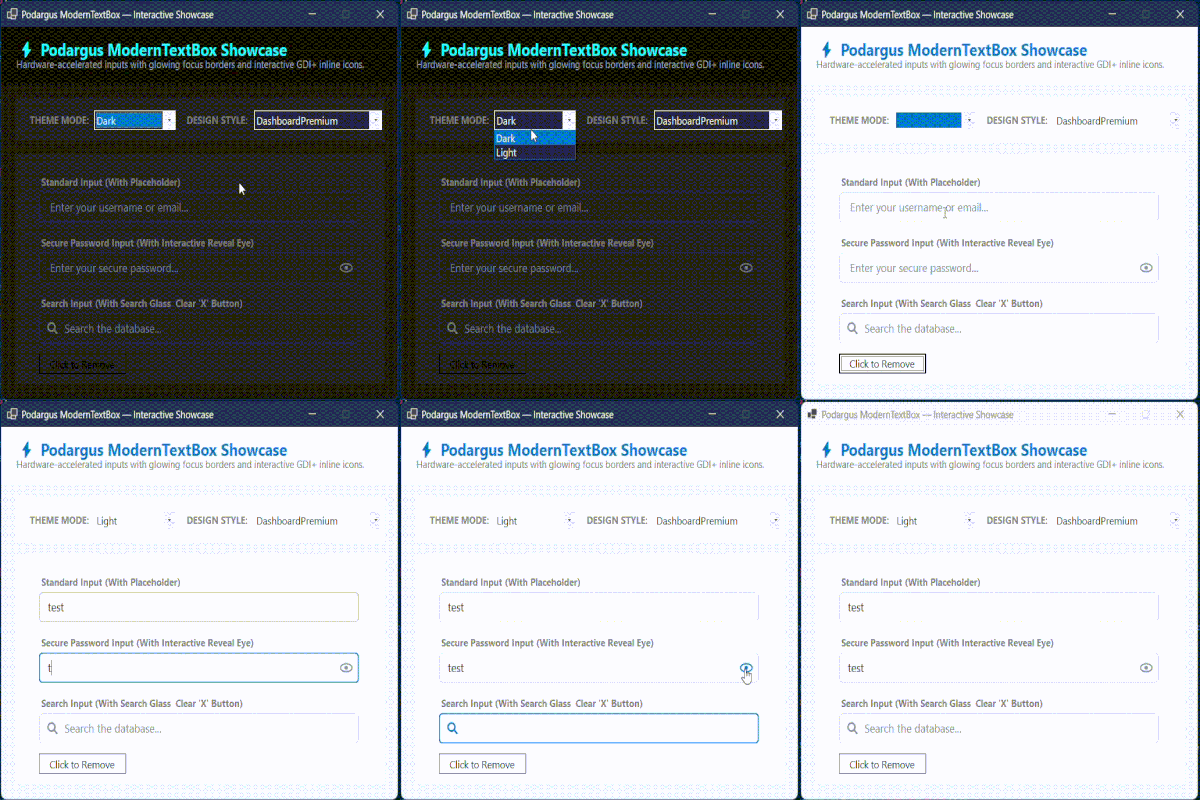
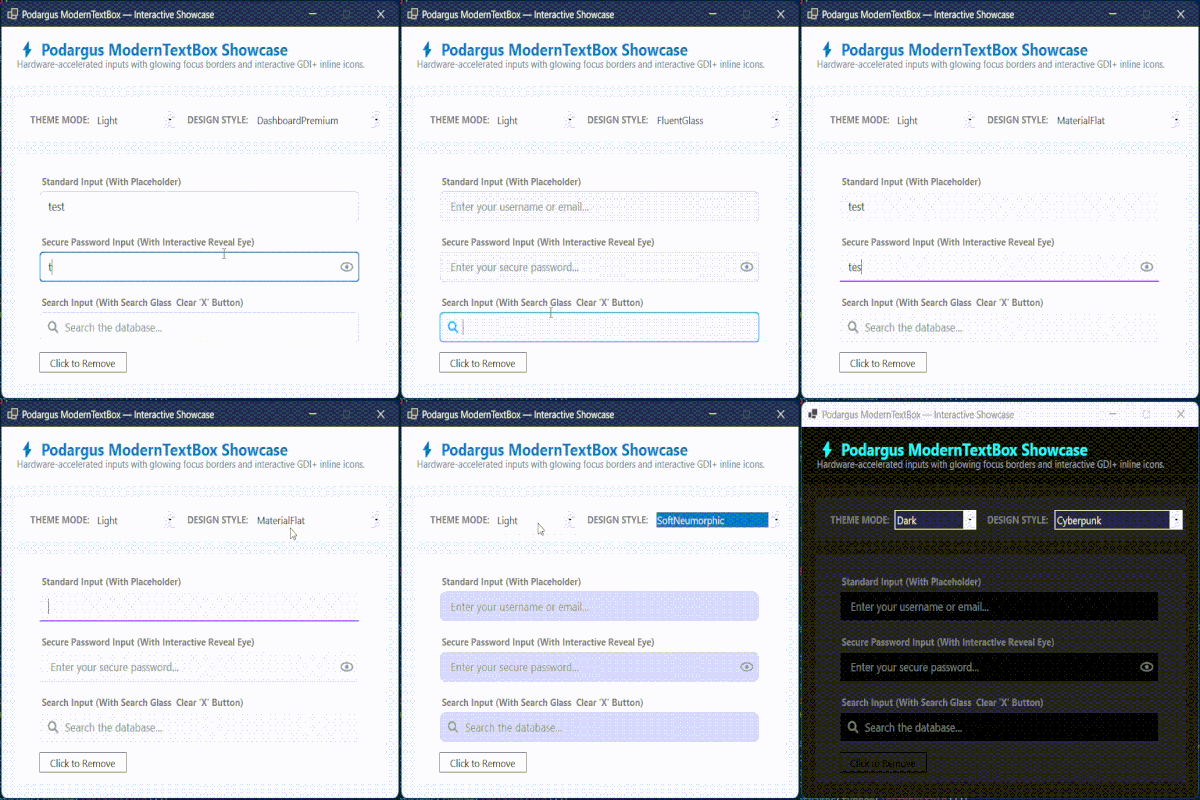
🛑 The Problem with the Standard TextBox
The default WinForms TextBox cannot have rounded corners, lacks native placeholder support without messy Win32 interop hacks, and cannot display inline icons. Trying to build a modern Search Bar or Password Box with the native control is a frustrating, broken experience.
🟢 The Podargus Solution
ModernTextBox.WinForms is a premium, zero-dependency input control. It wraps standard text entry into a beautifully rendered GDI+ container, providing glowing focus rings, built-in interactive icons, native placeholders, and flawless Dark Mode support.
🚀 Key Features
- 3 Native Modes: Easily switch between
Standard,Password, andSearchmodes via a single property. - Interactive GDI+ Icons: Features a built-in Search Glass (🔍), a dynamic Clear Text Button (✕), and an interactive Reveal Password Eye (👁).
- Native Placeholders: Built-in watermark/placeholder text that automatically handles Z-index and focus states flawlessly without Win32 hooks.
- Glowing Focus Rings: Crisp, vector-drawn borders that glow natively with your accent color when the user focuses the input.
- 🎨 2 Theme Modes & 5 Core Styles: Full support for the Podargus Design Matrix (
Dark/Light×DashboardPremium,FluentGlass,MaterialFlat,SoftNeumorphic,Cyberpunk).
📦 Installation
Package Manager Console
Install-Package ModernTextBox.WinForms
.NET CLI
dotnet add package ModernTextBox.WinForms
⚡ Quick Start & Code Examples
1. Global Theme Configuration
Instantly switch the look of your inputs to match your application's aesthetic.
using Podargus.UI.Controls.WinForms.ModernTextBox.Enums;

txtUsername.Theme = ThemeMode.Dark;
txtUsername.Style = TextBoxStyle.FluentGlass;
2. Standard Input (With Placeholder)
Creates a sleek input with floating watermark text.
using Podargus.UI.Controls.WinForms.ModernTextBox;
using Podargus.UI.Controls.WinForms.ModernTextBox.Enums;

var txtEmail = new ModernTextBox
{
    Type = TextBoxType.Standard,
    PlaceholderText = "Enter your email address...",
    Theme = ThemeMode.Dark,
    Style = TextBoxStyle.DashboardPremium,
    Size = new Size(300, 42)
};
this.Controls.Add(txtEmail);
3. Secure Password Input
Automatically masks characters and provides a clickable eye icon on the right to reveal the password.
var txtPassword = new ModernTextBox
{
    Type = TextBoxType.Password,
    PlaceholderText = "Enter your secure password...",
    Theme = ThemeMode.Dark
};
4. Interactive Search Bar
Renders a magnifying glass on the left. When the user starts typing, a clear (✕) button smoothly appears on the right to instantly clear the text.
var txtSearch = new ModernTextBox
{
    Type = TextBoxType.Search,
    PlaceholderText = "Search database...",
    Theme = ThemeMode.Light,
    Style = TextBoxStyle.MaterialFlat
};
🎨 Theme & Style Matrix
| Design Style | Aesthetic Concept | Key Visual Characteristics |
|---|---|---|
DashboardPremium |
Modern Executive Suite | Sleek rounded inputs with prominent blue/cyan focus glows (Default). |
FluentGlass |
Windows 11 Fluent | High-radius rounded inputs with electric cyan accents and smooth hover states. |
MaterialFlat |
Elevated Material Flat | Underlined inputs with animated bottom-borders and deep purple accents. |
SoftNeumorphic |
Soft Embossed Surfaces | Organic, high-radius inputs with soft inner-shadows and warm coral/orange accents. |
Cyberpunk |
High-Voltage Industrial | Stealth black 0px-radius boxes with high-contrast glowing neon emerald and cyan focus rectangles. |
⚙️ Specifications
| Technical Metric | Underlying Architecture Profile |
|---|---|
| Package Identity | ModernTextBox.WinForms |
| Component Types | Custom TextBox, PasswordBox, and SearchBar |
| Language Target | C# (Optimized for .NET Framework 4.7.2+ & .NET 6.0/8.0+) |
| Rendering Engine | Anti-Aliased Surface Vector Paint Mapping (GDI+) |
| Target Platforms | Microsoft Windows Desktop Environment (WinForms) |
| Dependencies | None (System.Windows.Forms Base Assembly Only) |
📄 License
Distributed under the MIT License. See the repository LICENSE file for details.
Maintained by Podargus
Building zero-dependency, ultra-performance developer workflows and hardware-accelerated UI components.
| Product | Versions Compatible and additional computed target framework versions. |
|---|---|
| .NET | net6.0-windows7.0 is compatible. net7.0-windows was computed. net8.0-windows was computed. net8.0-windows7.0 is compatible. net9.0-windows was computed. net10.0-windows was computed. |
| .NET Framework | net472 is compatible. net48 is compatible. net481 was computed. |
-
.NETFramework 4.7.2
- No dependencies.
-
.NETFramework 4.8
- No dependencies.
-
net6.0-windows7.0
- No dependencies.
-
net8.0-windows7.0
- No dependencies.
NuGet packages
This package is not used by any NuGet packages.
GitHub repositories
This package is not used by any popular GitHub repositories.
v1.0.2 Initial Stable Release:
- Fix Namespace issue in example code of readme.