ModernTabControl.WinForms
1.0.0
dotnet add package ModernTabControl.WinForms --version 1.0.0
NuGet\Install-Package ModernTabControl.WinForms -Version 1.0.0
<PackageReference Include="ModernTabControl.WinForms" Version="1.0.0" />
<PackageVersion Include="ModernTabControl.WinForms" Version="1.0.0" />
<PackageReference Include="ModernTabControl.WinForms" />
paket add ModernTabControl.WinForms --version 1.0.0
#r "nuget: ModernTabControl.WinForms, 1.0.0"
#:package ModernTabControl.WinForms@1.0.0
#addin nuget:?package=ModernTabControl.WinForms&version=1.0.0
#tool nuget:?package=ModernTabControl.WinForms&version=1.0.0
ModernTabControl.WinForms





Stop using the ugly 3D gray WinForms TabControl. Upgrade to a hardware-accelerated, animated routing control with built-in Sidebar Navigation support.
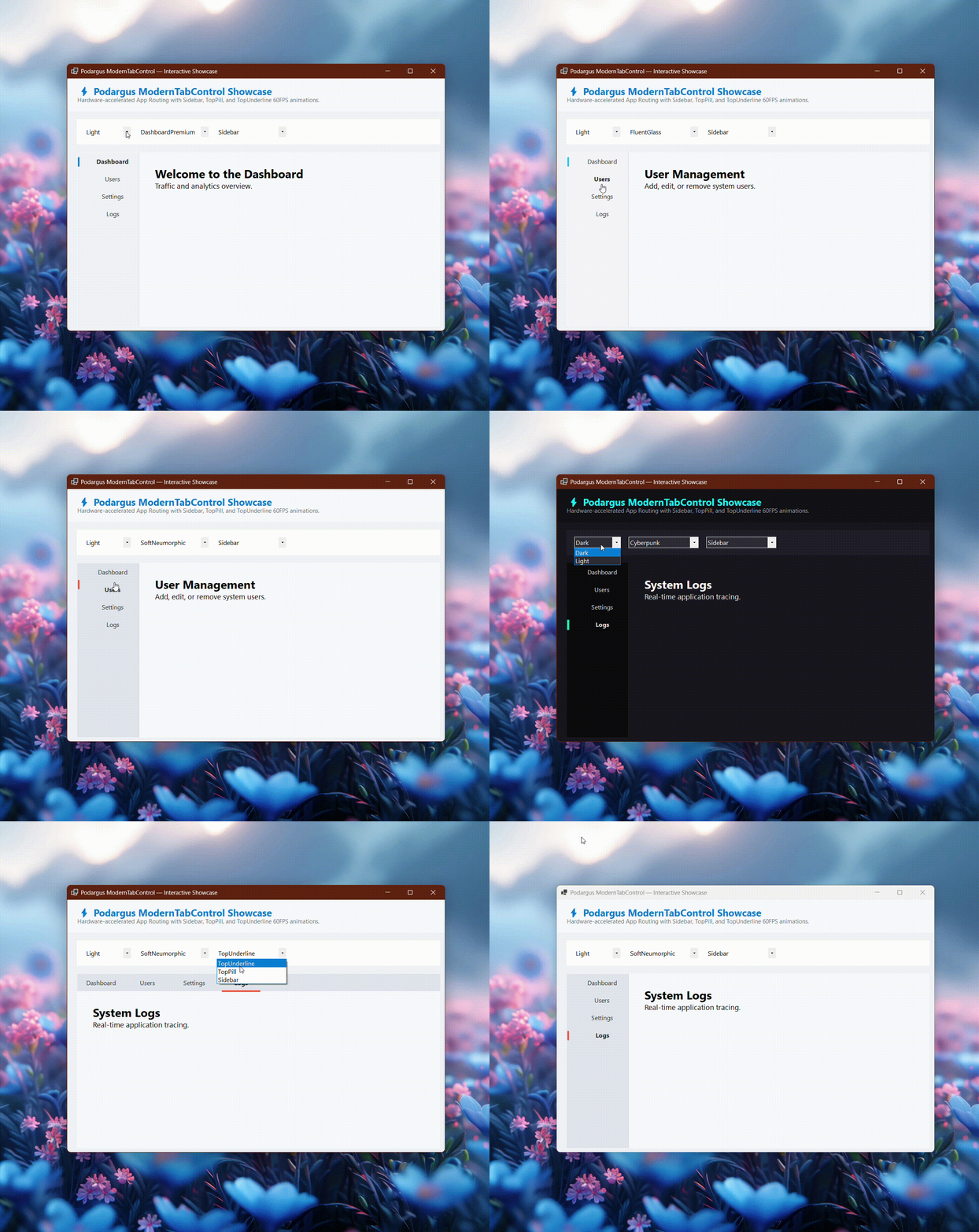
🛑 The Problem with the Standard WinForms TabControl
The default TabControl is hardcoded to use Windows 95 3D borders. Even if you set it to OwnerDrawFixed, the ugly gray borders cannot be removed, and creating a modern Left-Hand Sidebar menu is virtually impossible without breaking the designer.
🟢 The Podargus Solution
ModernTabControl.WinForms completely hijacks the native painting pipeline. It visually destroys the legacy 3D borders and replaces the tab headers with a gorgeous, 60 FPS animated GDI+ rendering engine.
Because it still inherits from TabControl, it fully supports the Visual Studio Designer! You can drag and drop controls into your tabs just like you always do.
🚀 Key Features
- 3 Application Layout Modes: Instantly switch your entire app's navigation layout between
TopUnderline,TopPill, andSidebarmode. - 60 FPS Kinetic Animations: The active tab indicator doesn't just snap—it smoothly glides across the screen using ease-out math.
- Flawless Visual Studio Designer: Click through your tabs in the designer and drag-and-drop components seamlessly.
- Native Dark Mode: Fills the ugly gray
TabPagebackgrounds with your app's actual background color automatically. - 🎨 2 Theme Modes & 5 Core Styles: Full support for the Podargus Design Matrix (
Dark/Light×DashboardPremium,FluentGlass,MaterialFlat,SoftNeumorphic,Cyberpunk).
📦 Installation
Package Manager Console
Install-Package ModernTabControl.WinForms
.NET CLI
dotnet add package ModernTabControl.WinForms
⚡ Quick Start & Code Examples
1. Designer Workflow (Easiest)
- Open your Form in the Visual Studio Designer.
- Locate ModernTabControl in the Toolbox.
- Drag it onto the canvas, right-click it, and select Add Tab just like the standard control.
- Set the
LayoutStyleproperty to Sidebar to instantly create a left-hand navigation menu.
2. Programmatic Setup
Configure your application's routing layout via code:
using Podargus.UI.Controls.WinForms.ModernTabControl;
using Podargus.UI.Controls.WinForms.ModernTabControl.Enums;

var tabMenu = new ModernTabControl
{
    Dock = DockStyle.Fill,
    Theme = ThemeMode.Dark,
    Style = TabDesignStyle.FluentGlass,

    // Switch between Sidebar, TopPill, or TopUnderline
    LayoutStyle = TabLayoutStyle.Sidebar
};

// Add standard WinForms TabPages
tabMenu.TabPages.Add(new TabPage("Dashboard"));
tabMenu.TabPages.Add(new TabPage("Settings"));
tabMenu.TabPages.Add(new TabPage("Users"));

this.Controls.Add(tabMenu);
🎨 Layout Matrix Explained
| Layout Style | Description | Best For |
|---|---|---|
Sidebar |
Transforms tabs into a vertical left-hand navigation menu. | Enterprise Dashboards, Admin Panels, Settings Menus. |
TopUnderline |
Minimalist flat text tabs with a glowing animated accent line underneath the active tab. | Web browsers, modern minimalist forms. |
TopPill |
Renders tabs as floating, rounded pill buttons with hover shadows. | Standalone tool windows, wizards, step-by-step forms. |
📄 License
Distributed under the MIT License. See the repository LICENSE file for details.
Maintained by Podargus
Building zero-dependency, ultra-performance developer workflows and hardware-accelerated UI components.
| Product | Versions Compatible and additional computed target framework versions. |
|---|---|
| .NET | net6.0-windows7.0 is compatible. net7.0-windows was computed. net8.0-windows was computed. net8.0-windows7.0 is compatible. net9.0-windows was computed. net10.0-windows was computed. |
| .NET Framework | net472 is compatible. net48 is compatible. net481 was computed. |
-
.NETFramework 4.7.2
- No dependencies.
-
.NETFramework 4.8
- No dependencies.
-
net6.0-windows7.0
- No dependencies.
-
net8.0-windows7.0
- No dependencies.
NuGet packages
This package is not used by any NuGet packages.
GitHub repositories
This package is not used by any popular GitHub repositories.
| Version | Downloads | Last Updated |
|---|---|---|
| 1.0.0 | 34 | 9/23/2026 |
v1.0.0 Initial Stable Release:
- Launched ModernTabControl with 3 routing modes (TopUnderline, TopPill, Sidebar).
- Integrated 60 FPS smooth ease-out kinetic animation for active tab transitions.
- Implemented native Dark/Light mode integration with 5 Podargus design styles.
- Eliminated legacy Win32 3D borders using deep UserPaint GDI+ overrides.
- Fully compatible with the Visual Studio Windows Forms Designer for dragging and dropping TabPages.