ModernProgressRing.WinForms
2.0.0
dotnet add package ModernProgressRing.WinForms --version 2.0.0
NuGet\Install-Package ModernProgressRing.WinForms -Version 2.0.0
<PackageReference Include="ModernProgressRing.WinForms" Version="2.0.0" />
<PackageVersion Include="ModernProgressRing.WinForms" Version="2.0.0" />
<PackageReference Include="ModernProgressRing.WinForms" />
paket add ModernProgressRing.WinForms --version 2.0.0
#r "nuget: ModernProgressRing.WinForms, 2.0.0"
#:package ModernProgressRing.WinForms@2.0.0
#addin nuget:?package=ModernProgressRing.WinForms&version=2.0.0
#tool nuget:?package=ModernProgressRing.WinForms&version=2.0.0
ModernProgressRing.WinForms





An ultra-smooth, hardware-accelerated circular progress bar and indeterminate loading spinner for Windows Forms.
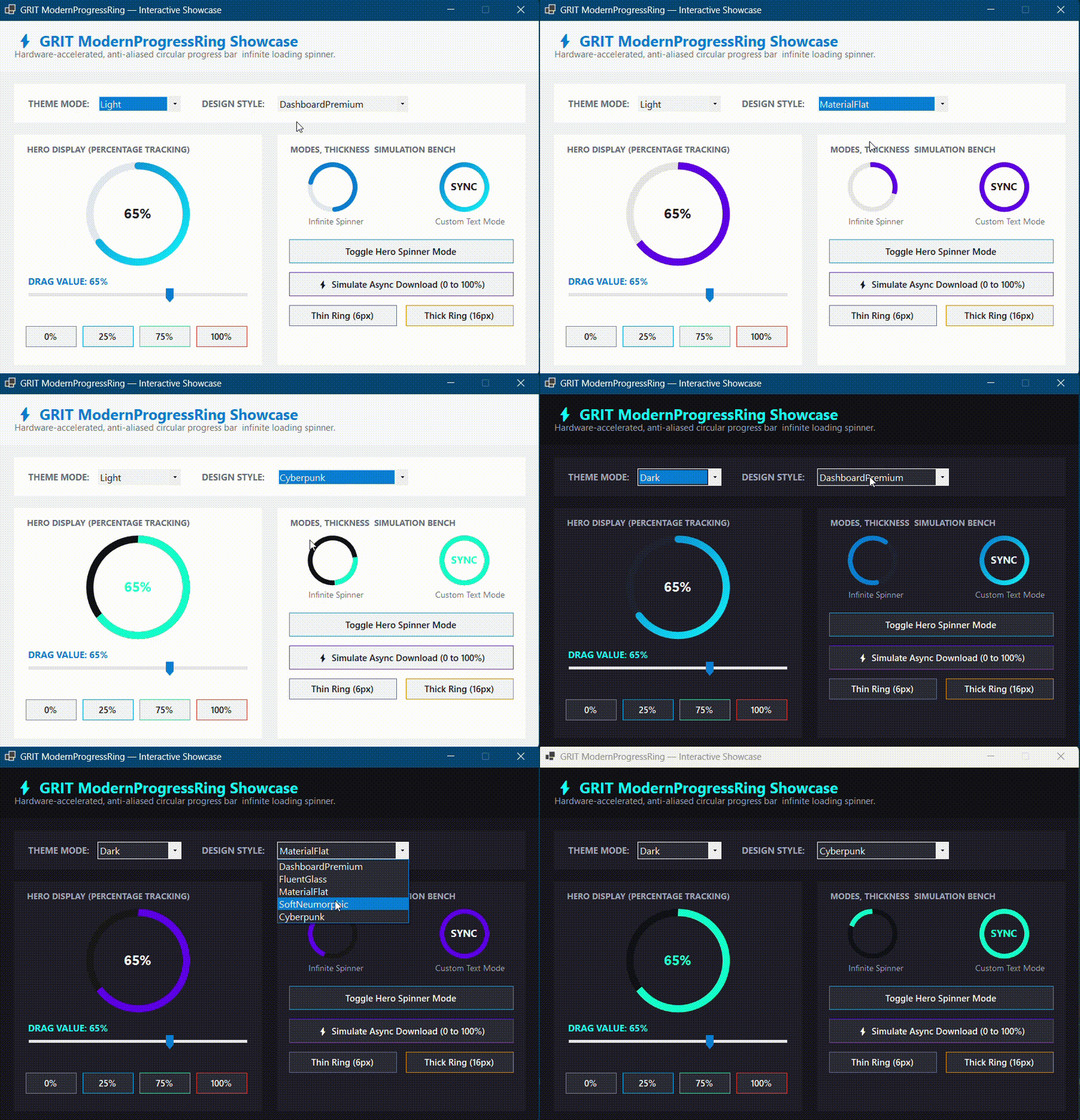
ModernProgressRing Theme Demo
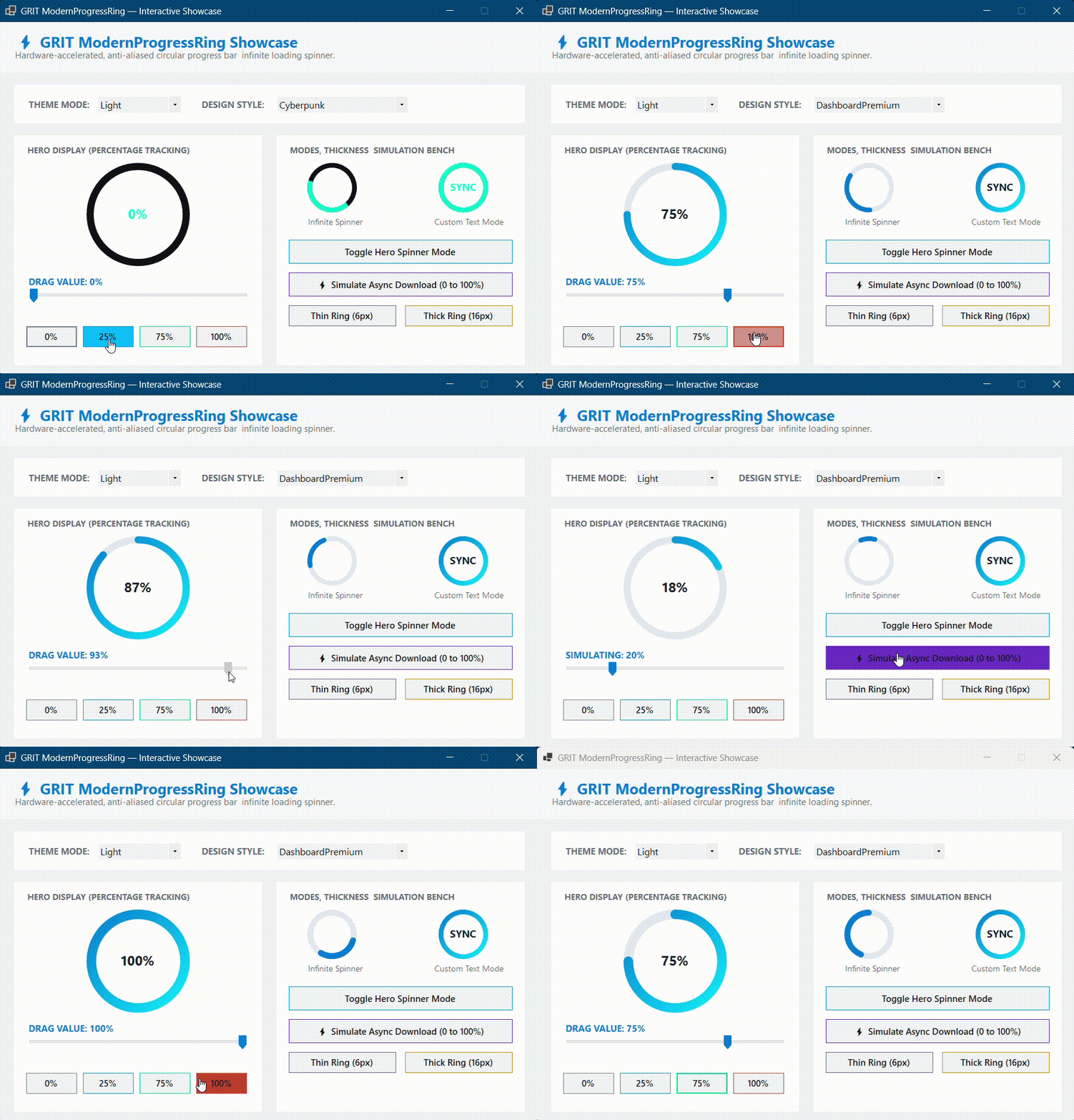
ModernProgressRing Animation Demo
Overview
ModernProgressRing.WinForms is a high-performance, modern replacement for the traditional blocky WinForms ProgressBar.
Engineered with anti-aliased GDI+ surface vector mapping, it supports both determinate tracking (with 60 FPS smooth ease-out value transitions) and indeterminate mode (an infinite rotating loading spinner with dynamic sweep arcs).
Built for:
- .NET Framework 4.7.2+
- .NET 6.0 Windows
- .NET 8.0+ Windows
🚀 Key Features
- ✨ Dual Operating Modes: Seamlessly toggle between Determinate (0–100% metric tracking) and Indeterminate (infinite loading spinner).
- 🏎️ Smooth 60 FPS Value Interpolation: Progress values animate smoothly between changes using built-in ease-out tweening.
- 🎨 2 Theme Modes & 5 Core Styles: Full support for the Podargus Design Matrix (
Dark/Light×DashboardPremium,FluentGlass,MaterialFlat,SoftNeumorphic,Cyberpunk). - 🌈 Dual-Tone Gradient Trails: Renders vivid linear gradient sweeps along active progress arcs without pixel clipping.
- 🛠️ Full Visual Studio Designer Support: Real-time design canvas preview, live property updates, and full toolbox serialization.
- 📦 Zero External Dependencies: Built with pure C# and native .NET Drawing assemblies.
🎨 Theme & Style Matrix
| Design Style | Aesthetic Concept | Key Visual Characteristics |
|---|---|---|
DashboardPremium |
Modern Executive Suite | Balanced cyan/blue gradient arc, dark slate track, rounded end-caps (Default). |
FluentGlass |
Windows 11 Fluent | Translucent glass track, electric cyan arc with neon violet gradient trail. |
MaterialFlat |
Elevated Material Flat | Flat purple/indigo arc, sharp flat end-caps, minimal track contrast. |
SoftNeumorphic |
Soft Embossed Surfaces | Thick soft-shadowed track with warm coral/orange active indicator. |
Cyberpunk |
High-Voltage Industrial | Stealth black track with high-contrast electric green/cyan arc and flat caps. |
📦 Installation
Package Manager Console
Install-Package ModernProgressRing.WinForms
.NET CLI
dotnet add package ModernProgressRing.WinForms
⚡ Quick Start
1. Designer Workflow
- Open your Form in the Visual Studio Designer.
- Locate ModernProgressRing in the Toolbox (
Ctrl + Alt + X). - Drag and drop it onto the canvas and customize colors and styles in the Properties Window.
2. Programmatic Usage
Percentage Progress Mode (Determinate)
using Podargus.UI.Controls.WinForms.ProgressRing;
using Podargus.UI.Controls.WinForms.ProgressRing.Enums;

var progressRing = new ModernProgressRing
{
    Size = new Size(140, 140),
    ThemeMode = ThemeMode.Dark,
    ControlStyle = ProgressStyle.DashboardPremium,
    RingThickness = 12f,
    Minimum = 0,
    Maximum = 100,
    Value = 75,                // Animates smoothly to 75%
    ShowPercentage = true
};

this.Controls.Add(progressRing);
Infinite Loading Spinner Mode (Indeterminate)
// Turn into an animated loading spinner
progressRing.IsIndeterminate = true;

// When the async operation completes, switch back to progress
await Task.Run(() => DoHeavyWork());

progressRing.IsIndeterminate = false;
progressRing.Value = 100;
🔧 Customization API
Appearance & Geometry
progressRing.RingThickness = 14f;    // Set ring stroke thickness
progressRing.StartAngle = -90f;      // Starting angle (-90 is 12 o'clock)
progressRing.Animated = true;        // Enable/disable smooth value interpolation
Custom Center Text
progressRing.ShowPercentage = true;
progressRing.CustomText = "SYNCING"; // Overrides percentage with custom string
⚙️ Specifications
| Technical Metric | Underlying Architecture Profile |
|---|---|
| Package Identity | ModernProgressRing.WinForms |
| Component Type | Circular Progress Bar & Loading Spinner |
| Language Target | C# (Optimized for .NET Framework 4.7.2+ & .NET 6.0+) |
| Rendering Engine | Anti-Aliased Surface Vector Paint Mapping (GDI+) |
| Target Platforms | Microsoft Windows Desktop Environment (WinForms) |
| Dependencies | None (System.Windows.Forms Base Assembly Only) |
📄 License
Distributed under the MIT License. See the repository LICENSE file for details.
📝 Release Notes
v2.0.0
- Rebrand: Transitioned under Podargus (formerly GRIT).
- Namespace: Root namespace updated to
Podargus.UI.WinForms. - Performance: Performance and rendering pipeline stability enhancements.
Developed under the Podargus
Building zero-dependency, ultra-performance developer workflows and premium component layouts.
📢 Brand Notice: This package has officially transitioned from GRIT to Podargus. All future updates, performance enhancements, and developer tooling are maintained under the official Podargus.
| Product | Versions Compatible and additional computed target framework versions. |
|---|---|
| .NET | net6.0-windows7.0 is compatible. net7.0-windows was computed. net8.0-windows was computed. net8.0-windows7.0 is compatible. net9.0-windows was computed. net10.0-windows was computed. |
| .NET Framework | net472 is compatible. net48 is compatible. net481 was computed. |
-
.NETFramework 4.7.2
- No dependencies.
-
.NETFramework 4.8
- No dependencies.
-
net6.0-windows7.0
- No dependencies.
-
net8.0-windows7.0
- No dependencies.
NuGet packages
This package is not used by any NuGet packages.
GitHub repositories
This package is not used by any popular GitHub repositories.
v2.0.0 Release:
- Rebrand:Transitioned under Podargus (formerly GRIT).
- Namespace: Root namespace updated to `Podargus.UI.WinForms`.
- Performance and rendering pipeline stability enhancements.