DigitalWonderlab.CommunityComments
1.4.0
See the version list below for details.
dotnet add package DigitalWonderlab.CommunityComments --version 1.4.0
NuGet\Install-Package DigitalWonderlab.CommunityComments -Version 1.4.0
<PackageReference Include="DigitalWonderlab.CommunityComments" Version="1.4.0" />
<PackageVersion Include="DigitalWonderlab.CommunityComments" Version="1.4.0" />
<PackageReference Include="DigitalWonderlab.CommunityComments" />
paket add DigitalWonderlab.CommunityComments --version 1.4.0
#r "nuget: DigitalWonderlab.CommunityComments, 1.4.0"
#:package DigitalWonderlab.CommunityComments@1.4.0
#addin nuget:?package=DigitalWonderlab.CommunityComments&version=1.4.0
#tool nuget:?package=DigitalWonderlab.CommunityComments&version=1.4.0
Community Comments for Umbraco
Comments for any page on your Umbraco 17 site. Signed-in members comment and reply, and every comment goes through the same moderation as Community Forum. You can use it on its own or alongside the forum.
Free to use. See Licence.
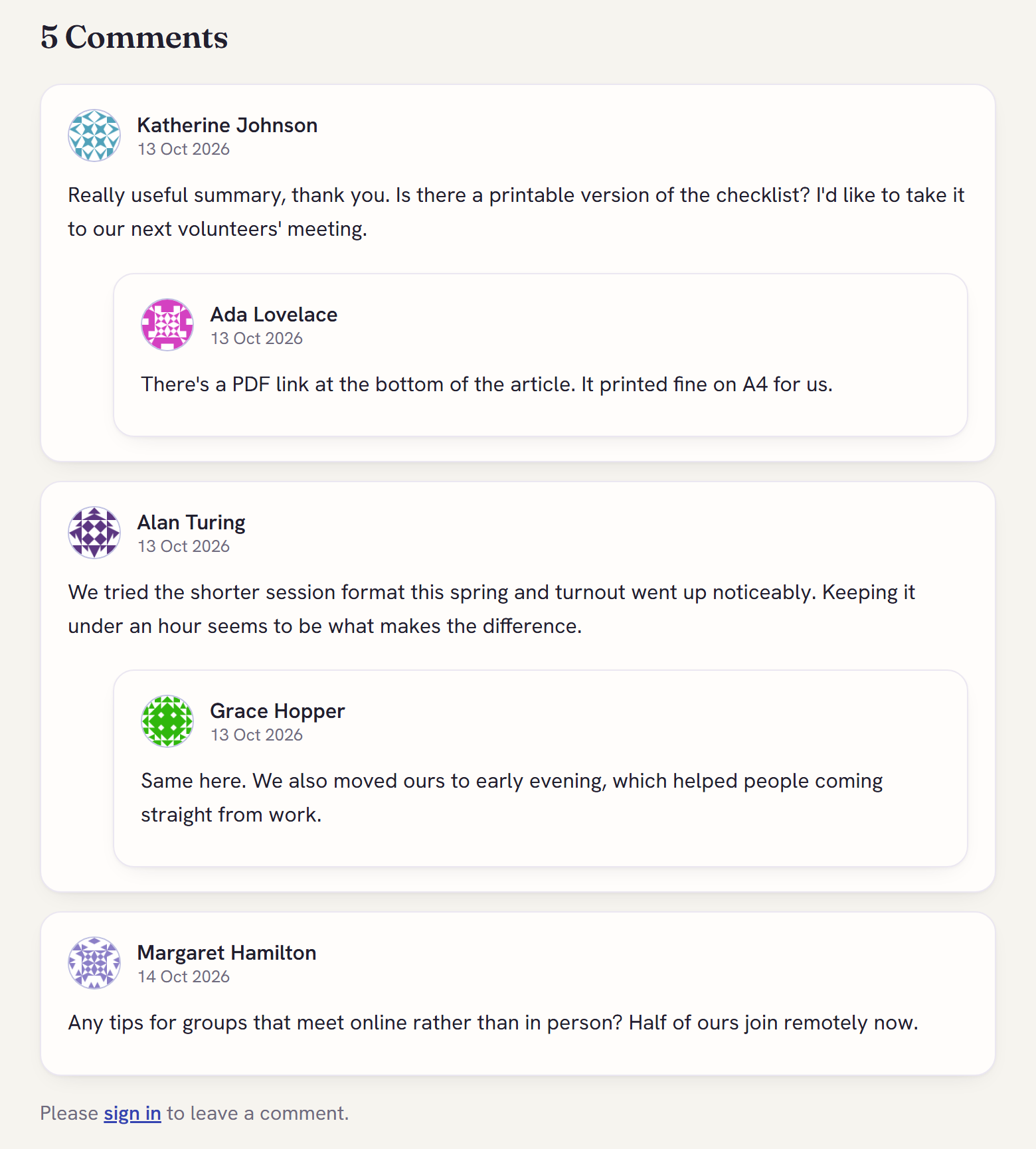
Adding comments to a page
There are two ways:
Use the block. Add the Comments block to any Block List or Block Grid. Placing the block is all it takes; there is nothing else to switch on.
Use a template. Add the Commentable composition to a document type, tick Enable comments on the page, and add this to the template:
@await Component.InvokeAsync("CommunityComments")
If comments don't appear with the second method, either Enable comments is off for that page or the document type doesn't have the Commentable composition. To show comments on every page that uses a template, whatever the setting, use:
@await Component.InvokeAsync("CommunityComments", new { ignoreToggle = true })
Moderation
Every comment is checked by a rules engine that scores it for spam, profanity, links and disguised words, plus any blocked words and phrases you add in Community > Settings. Comments that score too high are held for review or rejected.
Members of the Moderators member group can approve and remove comments on the page itself, without a backoffice account. Administrators get a queue in the backoffice Community section, which is installed automatically. If you also run Community Forum, that queue shows forum posts and comments together.
Members can report a comment, and enough reports hide it until a moderator has looked at it. You can also set a page to hold every comment for review.
For AI review on top of the rules, add the optional
DigitalWonderlab.CommunityAi
package.
Features
- One level of replies
- Emoji, and editing or deleting your own comment
- Member avatars (Gravatar, with a plain placeholder if there isn't one)
- Messages and validation shown in place, without reloading the page
- Report button, limited to one open report per member per comment
- Styling that picks up your site's
--primaryand--accentcolours - Honeypot fields, rate limiting, HTML cleaning and anti-forgery tokens on every form
- When a member deletes their account through Community Forum, their comments stay but are
shown as "[deleted user]" with personal details removed. Without the forum, call
ICommunityErasureServicefrom your own account deletion code to do the same.
Requirements
- Umbraco CMS 17 (17.6.2 or later) on .NET 10
- Umbraco Members
Install
dotnet add package DigitalWonderlab.CommunityComments
Configuration
The "sign in to comment" link goes to the built-in /community/sign-in page. To use your
own login page, set it in appsettings.json:
{
  "Community": {
    "Comments": {
      "LoginUrl": "/login"
    }
  }
}
A returnUrl is added so members come back to the page they were on. You can also set the
login page each time you call the CommunityComments component.
Umbraco Cloud
The package copies its views and backoffice files into your site when it builds. Umbraco
Cloud sees those files as changes and tries to commit them, which can block deployments.
Before your first Cloud deployment with the package, add these lines to your site's
cloud.gitignore (not .gitignore):
# Community Core (installed with comments)
**/App_Plugins/CommunityCore/
**/Views/CommunityAuth/

# Community Comments
**/Views/Shared/Components/CommunityComments/
**/Views/Partials/blockgrid/Components/communityCommentsBlock.cshtml
**/Views/Partials/blocklist/Components/communityCommentsBlock.cshtml
Limitations in this version
- Comments are not stored per language, so every language version of a page shares one set of comments.
- Commenting needs a signed-in member. Unlike the forum, it doesn't require a verified email address.
- There is no registration page of its own. Without Community Forum you need your own way
for members to register;
/community/sign-inhandles signing in and password resets only. - Comments are moderated on the page or in the backoffice. They don't appear in the forum's website moderation queue.
- All of a page's comments load at once; they are not paged.
Telemetry
Once a day the comments package sends Digital Wonderlab a small anonymous report, so we know how many sites use it and on which versions. It is on by default and easy to turn off.
Sent: a random install ID (created on first run, stored in your Umbraco database, not derived from anything about your site); the package, Umbraco and .NET versions; environment type; hosting type; database type; whether the Forum and the AI add-on are installed and AI moderation is on; and rough counts in bands such as 10-99: approved comments, pages with comments, and comments created and held for moderation in the last 24 hours.
Never sent: hostnames, URLs, post or comment content, member names, emails or IP addresses (any HTTPS request carries one; the service does not store it).
See it: Community > Settings > Anonymous telemetry > "Show exactly what is sent".
Turn it off, any of:
- the toggle in Community > Settings (covers every Community package on the site);
"Community": { "Telemetry": { "Enabled": false } }in appsettings;"DigitalWonderlab": { "Telemetry": { "Enabled": false } }for every Digital Wonderlab package.
Local development (ASPNETCORE_ENVIRONMENT=Development) never sends anything. Data is kept for 13 months.
Problems and ideas
Report bugs or suggest features at github.com/dwlgit/community-suite/issues.
Licence
Free to use on any number of sites, including sites you build for clients. You can keep the
package's files in your site's source control and hosting, and change the views and styles it
adds. Reselling or redistributing the package itself is not allowed. The full licence is in the
LICENSE file in the package.
Built by Digital Wonderlab.
| Product | Versions Compatible and additional computed target framework versions. |
|---|---|
| .NET | net10.0 is compatible. net10.0-android was computed. net10.0-browser was computed. net10.0-ios was computed. net10.0-maccatalyst was computed. net10.0-macos was computed. net10.0-tvos was computed. net10.0-windows was computed. |
-
net10.0
- DigitalWonderlab.CommunityCore (>= 1.4.0)
- Umbraco.Cms.Web.Common (>= 17.6.2 && < 18.0.0)
- Umbraco.Cms.Web.Website (>= 17.6.2 && < 18.0.0)
NuGet packages
This package is not used by any NuGet packages.
GitHub repositories
This package is not used by any popular GitHub repositories.
1.4.0 - adds an anonymous daily telemetry heartbeat: a random install ID, versions and rough usage bands, no hostnames, content or member data. On by default; turn it off in Community > Settings or with Community:Telemetry:Enabled = false. See the README "Telemetry" section and CHANGELOG.md.