ConsoleMonster 2.1.2
See the version list below for details.
dotnet add package ConsoleMonster --version 2.1.2
NuGet\Install-Package ConsoleMonster -Version 2.1.2
<PackageReference Include="ConsoleMonster" Version="2.1.2" />
<PackageVersion Include="ConsoleMonster" Version="2.1.2" />
<PackageReference Include="ConsoleMonster" />
paket add ConsoleMonster --version 2.1.2
#r "nuget: ConsoleMonster, 2.1.2"
#:package ConsoleMonster@2.1.2
#addin nuget:?package=ConsoleMonster&version=2.1.2
#tool nuget:?package=ConsoleMonster&version=2.1.2
ConsoleMonster
Everyday output in one line. The monster when you need it.
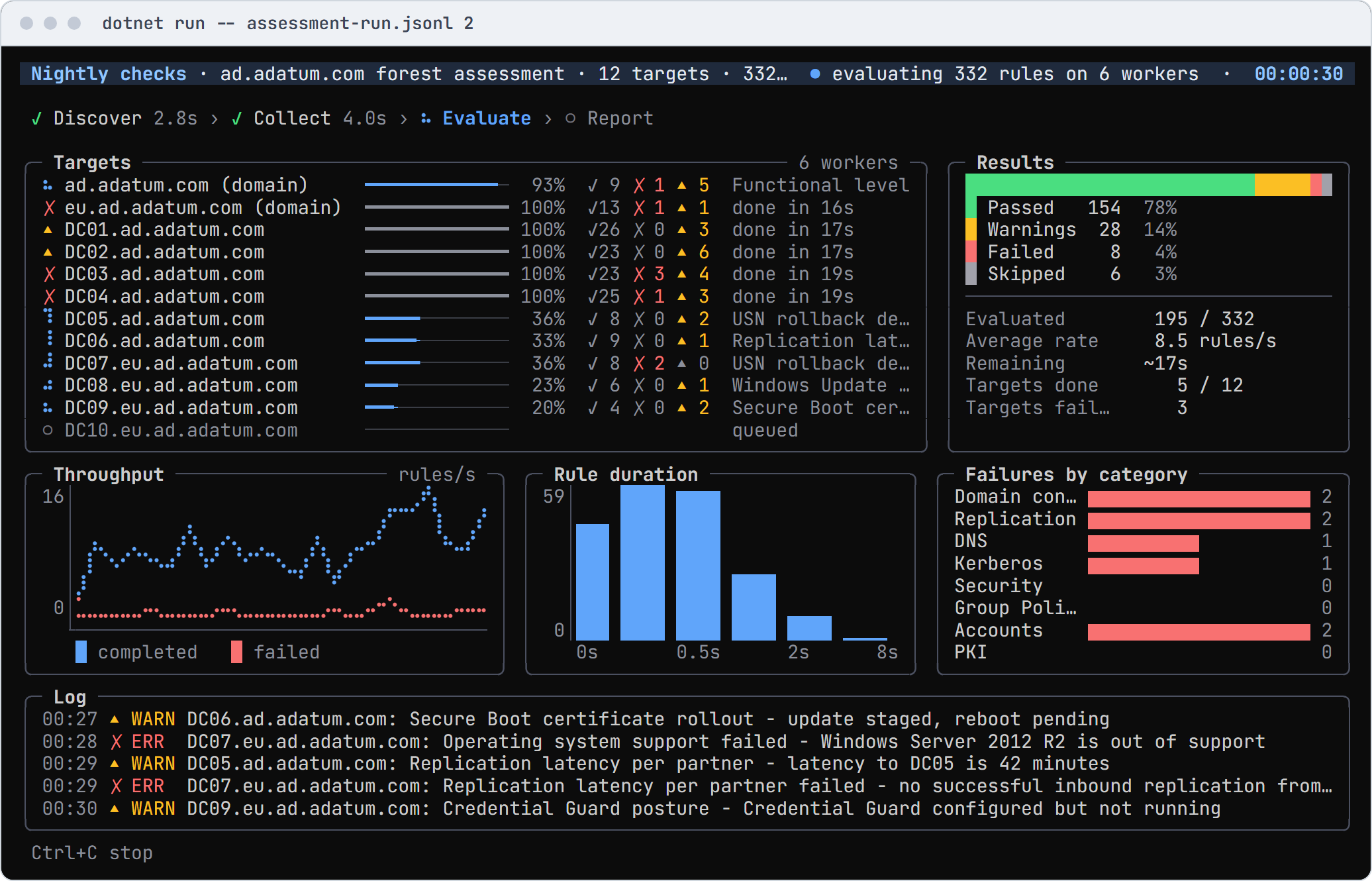
ConsoleMonster makes the output of the commands you already run readable, and draws tables, trees, charts, live
runs, dashboards, menus and forms when you need more. It is one engine for Windows PowerShell 5.1, PowerShell 7 and
.NET, with no package dependencies. A setting has one name everywhere (-Title in PowerShell, Title = and
.Title() in C#), and when the output goes to a file, a log or CI, it writes plain lines instead of escape codes.
Website · Documentation · Demos · Widgets · .NET API · PowerShell commands
Start in PowerShell
Install-Module ConsoleMonster -Scope CurrentUser
Import-Module ConsoleMonster
Get-Process | Sort-Object CPU -Descending | Select-Object -First 8 | Show-ConsoleTable
Show-ConsoleDemo lists the gallery's demos, grouped by what they are for, and runs the one you pick.
Get-Command -Module ConsoleMonster lists every command, and Get-Help <command> -Examples shows how to use it.
Start in C#
dotnet new console -n FirstTable
cd FirstTable
dotnet add package ConsoleMonster
Replace Program.cs, then dotnet run:
using ConsoleMonster;
using ConsoleMonster.Widgets;

var files = new DirectoryInfo(".").GetFiles().Select(f => new { f.Name, f.Length });
Table.For(files).Title("Files").Show();
Install ·
Three ways to write it in C# ·
The dotnet new template, which starts a project from any gallery demo
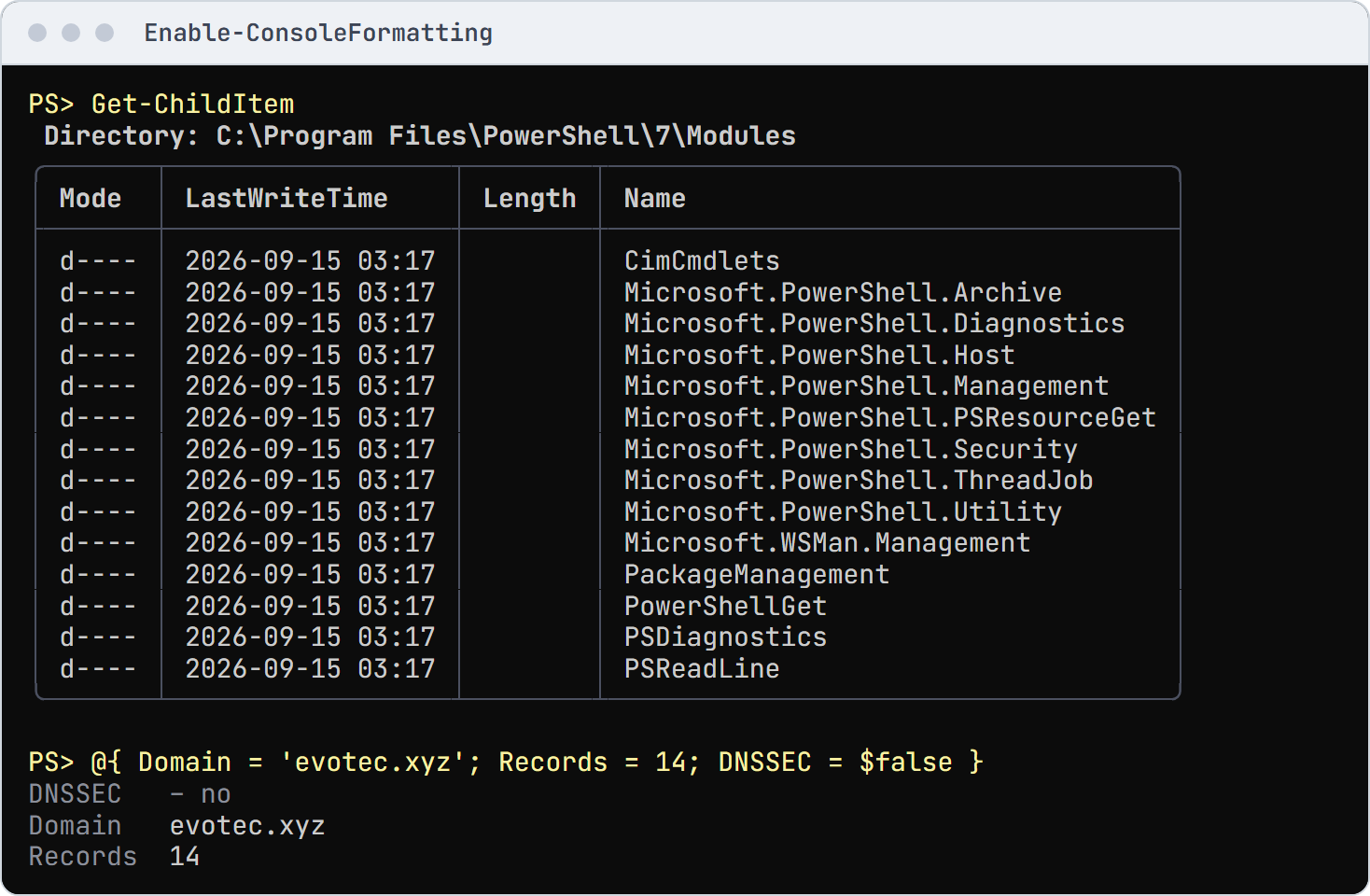
Nicer default output in one line
Files, processes, services, hashtables and more read as tables and records; the objects, pipelines, files and transcripts stay PowerShell's.
Enable-ConsoleFormatting
To keep it in every session, add the lines -ProfileSnippet prints to your profile:
if (-not (Test-Path -Path $PROFILE)) {
    $null = New-Item -ItemType File -Path $PROFILE -Force
}
Enable-ConsoleFormatting -ProfileSnippet | Add-Content -Path $PROFILE
Tables, lists and trees
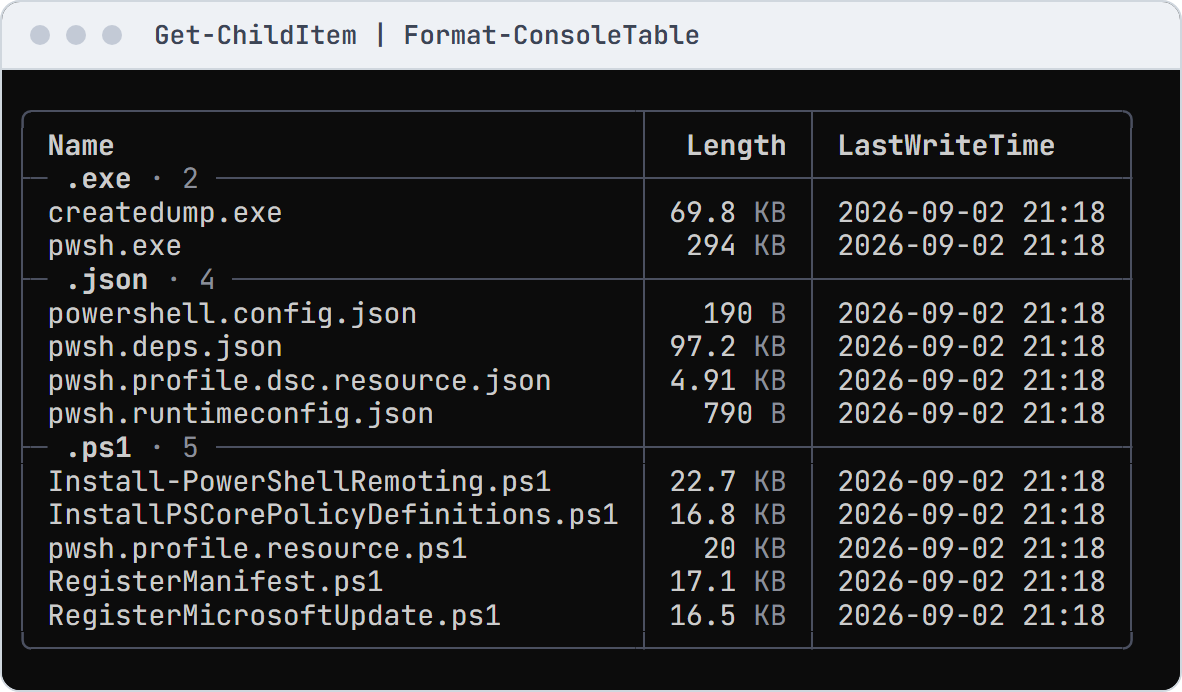
Show-ConsoleTable, Show-ConsoleList and Show-Console -View Tree take pipeline input and fit the window.
Format-Table, Format-List and Format-Wide stay PowerShell's own unless you turn on -Feature FormatCommands.
Import-Module ConsoleMonster

# Invented package artifacts with fixed sizes and UTC timestamps.
$recordedAt = [datetimeoffset] '2026-10-21T12:00:00Z'
$files = @(
    [pscustomobject] @{
        Name = 'ConsoleMonster.dll'; Length = 1048576
        LastWriteTime = $recordedAt; Extension = '.dll'
    }
    [pscustomobject] @{
        Name = 'ConsoleMonster.deps.json'; Length = 4096
        LastWriteTime = $recordedAt; Extension = '.json'
    }
    [pscustomobject] @{
        Name = 'start.ps1'; Length = 512
        LastWriteTime = $recordedAt; Extension = '.ps1'
    }
)
$files | Show-ConsoleTable -Property Name, Length, LastWriteTime `
    -GroupBy Extension -Presentation @{ TimeZone = [TimeZoneInfo]::Utc }
Coming from Format-Table · Tables at six widths
Widgets
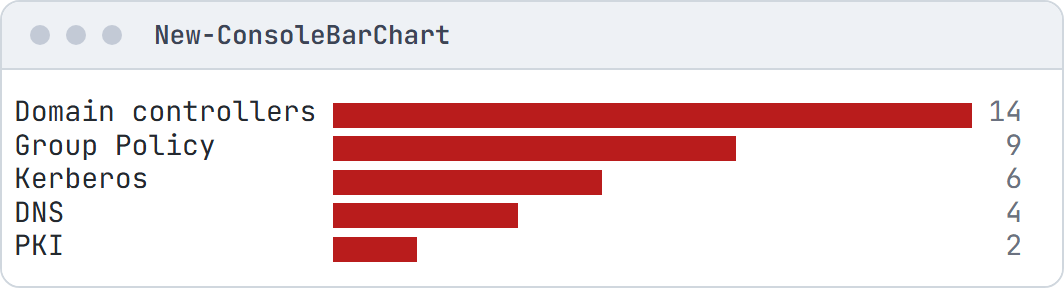
Every widget is a New-Console* command: panels, trees, charts, logs, lanes and more. Containers take a script block
of children, and items share -Status, -Detail and -Role.
Import-Module ConsoleMonster

New-ConsoleChart -Role Fail -InputObject ([ordered] @{
    'Domain controllers' = 14
    'Group Policy'       = 9
    'Kerberos'           = 6
    'DNS'                = 4
    'PKI'                = 2
}) -Type Bar | Show-Console
The widget gallery: every widget at every colour and glyph tier, in PowerShell and C#.
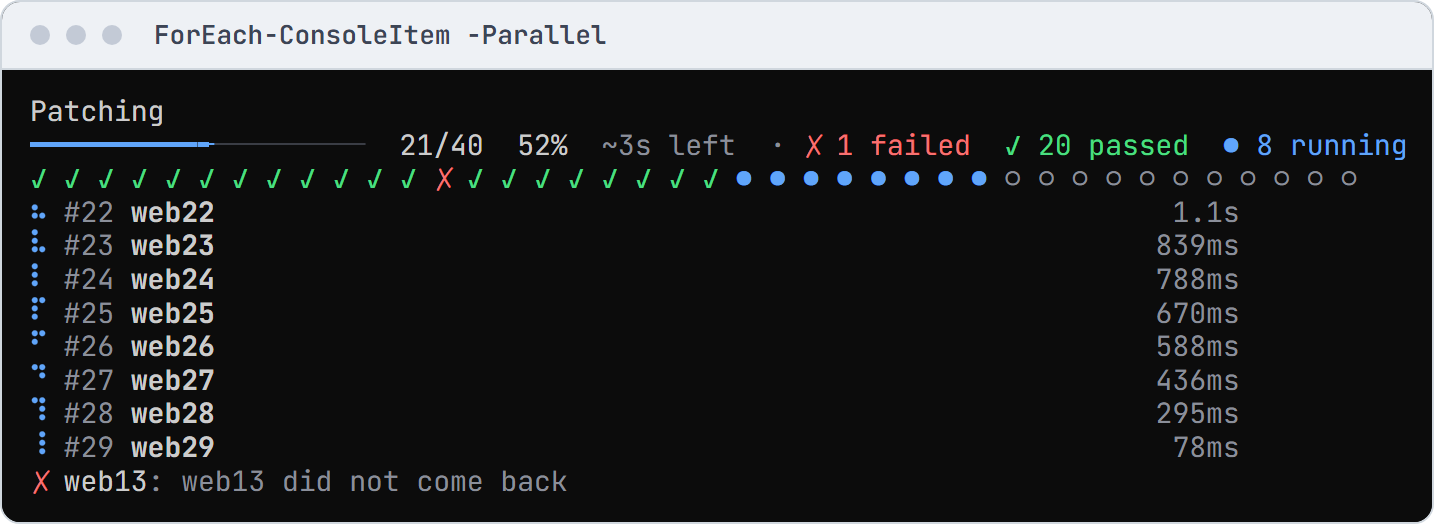
Live progress for long-running work
Import-Module ConsoleMonster

# Forty servers, eight at a time: three fail and one hangs past the four-second limit.
$servers = 1..40 | ForEach-Object { 'web{0:d2}' -f $_ }
$run = @{ Parallel = $true; ThrottleLimit = 8; TimeoutSeconds = 4; Title = 'Patching' }
$results = $servers | Invoke-ConsoleRun @run -ErrorAction SilentlyContinue {
    Start-Sleep -Milliseconds (500 + ([int] $_.Substring(3) * 137) % 900)
    if ($_ -in 'web13', 'web26', 'web39') { throw "$_ did not come back" }
    if ($_ -eq 'web22') { Start-Sleep -Seconds 10 }
    "$_ patched"
}
C# and the fluent API
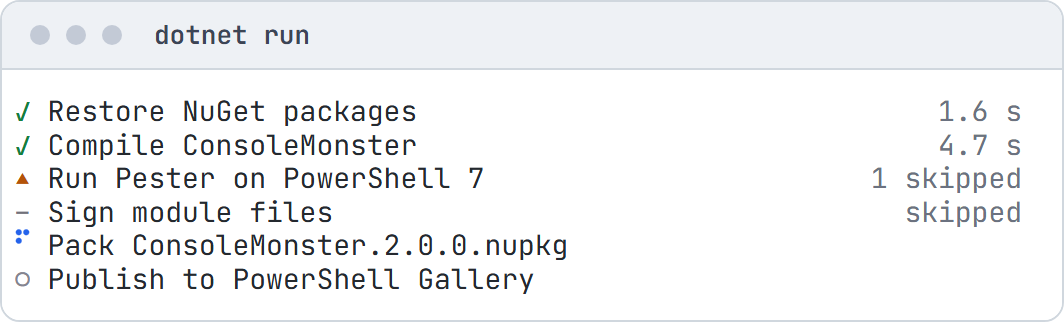
The same engine as a .NET library. Every widget takes an object initializer or fluent calls named after its
properties (.Title("Build")), and Ui.Panel(), Ui.Table() and the other Ui factories start a fluent chain.
All three draw the same cells.
using ConsoleMonster;
using ConsoleMonster.Styling;
using ConsoleMonster.Widgets;

Terminal.Write(new StatusList()
    .Add("Restore NuGet packages", StatusKind.Pass, "1.6 s")
    .Add("Compile ConsoleMonster", StatusKind.Pass, "4.7 s")
    .Add("Run Pester on PowerShell 7", StatusKind.Warn, "1 skipped")
    .Add("Sign module files", StatusKind.Skip, "skipped")
    .Add("Pack ConsoleMonster.2.0.0.nupkg", StatusKind.Running)
    .Add("Publish to PowerShell Gallery", StatusKind.Pending));
Three ways to write it in C# · Logging · Hosting dashboard · dotnet new template
Save, replay and test
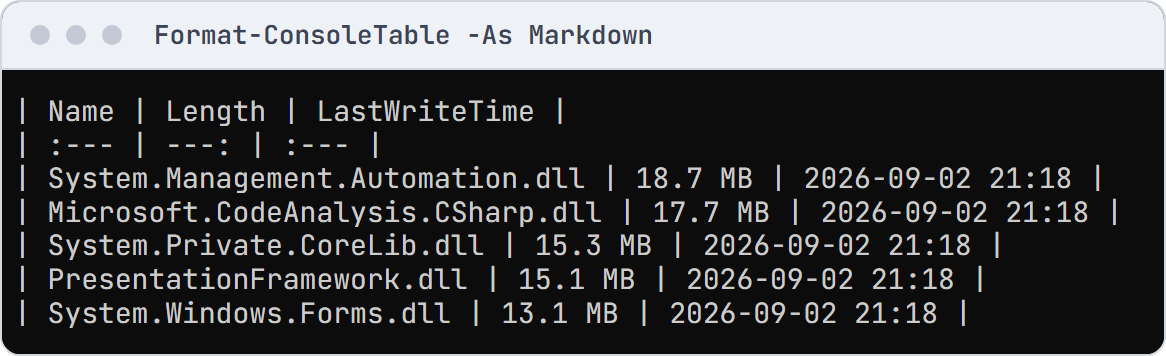
Views export to Markdown, HTML, SVG and text, live runs record and replay, and Assert-ConsoleOutput checks output in
tests.
Import-Module ConsoleMonster

# Invented package artifacts, exported as a Markdown table for a report.
$recordedAt = [datetimeoffset] '2026-10-21T12:00:00Z'
$files = @(
    [pscustomobject] @{
        Name = 'ConsoleMonster.dll'; Length = 1048576; LastWriteTime = $recordedAt
    }
    [pscustomobject] @{
        Name = 'ConsoleMonster.deps.json'; Length = 4096; LastWriteTime = $recordedAt
    }
    [pscustomobject] @{
        Name = 'start.ps1'; Length = 512; LastWriteTime = $recordedAt
    }
)
$files | Show-ConsoleTable -Property Name, Length, LastWriteTime `
    -Presentation @{ TimeZone = [TimeZoneInfo]::Utc } -AsWidget |
    Export-ConsoleFrame -Format Markdown
Recording and replay · Testing your output
Thread safety
Any thread can update the screen and one thread draws it, so parallel work never tears the view.
Import-Module ConsoleMonster

$dashboard = New-ConsoleDashboard -Title 'Workers' -Content {
    New-ConsolePanel -Title 'Log' -Fill -Content { New-ConsoleLogRegion }
}
1..8 | Invoke-ConsoleDashboard $dashboard -Parallel -ThrottleLimit 8 {
    param($Number)
    Start-Sleep -Milliseconds (Get-Random -Maximum 800)
    Write-Host "worker $Number finished"
}
Threads and concurrency: what is safe from which thread, and the stress test.
Compatibility
- PowerShell 5.1 and 7. On 5.1 one ConsoleMonster version loads per session; restart it after an upgrade.
- .NET netstandard2.0, net472, net8.0 and net10.0, no package dependencies, AOT compatible on net8.0 and net10.0 (trimming notes).
- Consoles are detected (colour, glyphs, size, CI, redirection);
NO_COLORandCONSOLEMONSTER_*override it (hosts and CI).
Benchmarks · Changelog · Contributing · MIT license · Maintained by Evotec.
| Product | Versions Compatible and additional computed target framework versions. |
|---|---|
| .NET | net5.0 was computed. net5.0-windows was computed. net6.0 was computed. net6.0-android was computed. net6.0-ios was computed. net6.0-maccatalyst was computed. net6.0-macos was computed. net6.0-tvos was computed. net6.0-windows was computed. net7.0 was computed. net7.0-android was computed. net7.0-ios was computed. net7.0-maccatalyst was computed. net7.0-macos was computed. net7.0-tvos was computed. net7.0-windows was computed. net8.0 is compatible. net8.0-android was computed. net8.0-browser was computed. net8.0-ios was computed. net8.0-maccatalyst was computed. net8.0-macos was computed. net8.0-tvos was computed. net8.0-windows was computed. net9.0 was computed. net9.0-android was computed. net9.0-browser was computed. net9.0-ios was computed. net9.0-maccatalyst was computed. net9.0-macos was computed. net9.0-tvos was computed. net9.0-windows was computed. net10.0 is compatible. net10.0-android was computed. net10.0-browser was computed. net10.0-ios was computed. net10.0-maccatalyst was computed. net10.0-macos was computed. net10.0-tvos was computed. net10.0-windows was computed. |
| .NET Core | netcoreapp2.0 was computed. netcoreapp2.1 was computed. netcoreapp2.2 was computed. netcoreapp3.0 was computed. netcoreapp3.1 was computed. |
| .NET Standard | netstandard2.0 is compatible. netstandard2.1 was computed. |
| .NET Framework | net461 was computed. net462 was computed. net463 was computed. net47 was computed. net471 was computed. net472 is compatible. net48 was computed. net481 was computed. |
| MonoAndroid | monoandroid was computed. |
| MonoMac | monomac was computed. |
| MonoTouch | monotouch was computed. |
| Tizen | tizen40 was computed. tizen60 was computed. |
| Xamarin.iOS | xamarinios was computed. |
| Xamarin.Mac | xamarinmac was computed. |
| Xamarin.TVOS | xamarintvos was computed. |
| Xamarin.WatchOS | xamarinwatchos was computed. |
-
.NETFramework 4.7.2
- No dependencies.
-
.NETStandard 2.0
- No dependencies.
-
net10.0
- No dependencies.
-
net8.0
- No dependencies.
NuGet packages (5)
Showing the top 5 NuGet packages that depend on ConsoleMonster:
| Package | Downloads |
|---|---|
|
ConsoleMonster.PowerShell.Display
Optional type-scoped, runspace-owned default display adapter for ConsoleMonster. |
|
|
ConsoleMonster.Hosting
A live ConsoleMonster dashboard for .NET generic host applications: services.AddConsoleDashboard() shows the hosted services' state (starting, running, stopped, failed), your own statuses and the log, and stays out of the way when the output is redirected or the app runs as a service. |
|
|
ConsoleMonster.Markdown
Markdown display and widget, frame and recording export for ConsoleMonster, powered by OfficeIMO.Markdown. |
|
|
ConsoleMonster.Extensions.Logging
A Microsoft.Extensions.Logging provider for ConsoleMonster: log lines with ConsoleMonster's level tags, colours and timestamps, scopes and categories, written into a running dashboard's log region when there is one and as plain lines when the output is redirected. |
|
|
ConsoleMonster.Graphics
Portable PNG, GIF and APNG exports and terminal topology diagrams for ConsoleMonster, powered by ChartForgeX. |
GitHub repositories
This package is not used by any popular GitHub repositories.
Changes in each release: https://github.com/EvotecIT/ConsoleMonster/blob/master/CHANGELOG.MD