CDS.WinFormsMenus
1.1.6
dotnet add package CDS.WinFormsMenus --version 1.1.6
NuGet\Install-Package CDS.WinFormsMenus -Version 1.1.6
<PackageReference Include="CDS.WinFormsMenus" Version="1.1.6" />
<PackageVersion Include="CDS.WinFormsMenus" Version="1.1.6" />
<PackageReference Include="CDS.WinFormsMenus" />
paket add CDS.WinFormsMenus --version 1.1.6
#r "nuget: CDS.WinFormsMenus, 1.1.6"
#:package CDS.WinFormsMenus@1.1.6
#addin nuget:?package=CDS.WinFormsMenus&version=1.1.6
#tool nuget:?package=CDS.WinFormsMenus&version=1.1.6
CDS.WinFormsMenus


CDS.WinFormsMenus is a library for creating very simple and quick tree-view based menus on WinForms apps. It is great for simple demo and test applications, where a conventional menu doesn't quite fit the pattern.
It's available for .Net 8, .Net 10 and .Net Framework 4.8 applications.
It will only save you a few minutes of coding, but that leaves more time for the fun stuff!
Usage
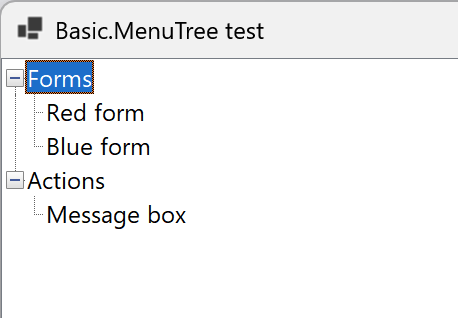
The menu consists of groups and items. Each group can contain other groups and items. Each item has an action associated with it.
After referencing the library, add a CDS.WinFormsMenus.Basic.MenuTree control to your form.
You can this create the menu like this:
var api = menuTree.API;

var formsGroup = api.AddGroup("Forms", tooltip: "A group of items for showing colourful forms!");
formsGroup.AddItem("Red form", "Opens a red form", this, () => new RedForm());
formsGroup.AddItem("Blue form", "Opens a blue form", this, () => new BlueForm());

var actionsGroup = api.AddGroup("Actions");
actionsGroup.AddItem("Message box", "Shows a message box", ShowMessageBox);

api.ExpandAllGroups();
Using menuTree.API is recommended — it exposes only the library's own methods and properties, keeping IntelliSense focused and uncluttered by the underlying UserControl surface.
By default, items are activated by double-clicking or pressing Enter. You can change this to single-click by setting the MouseActivation property:
menuTree.API.MouseActivation = MouseActivation.SingleClick;
The available values are SingleClick and DoubleClick. The Enter key always activates the selected item regardless of this setting.
Build Instructions
Follow the standard practice for building a .Net project using MinVer.
Versions are derived automatically from Git tags (e.g. V1.2.0). To publish a
new release, create and push a tag: git tag V1.2.0 && git push --tags.
Between tags, MinVer appends a pre-release suffix automatically (e.g. 1.2.0-alpha.0.3).
License
This project is licensed under the MIT License.
Attributions
Hierarchy icon created by Freepik - Flaticon.
| Product | Versions Compatible and additional computed target framework versions. |
|---|---|
| .NET | net8.0-windows7.0 is compatible. net9.0-windows was computed. net10.0-windows was computed. net10.0-windows7.0 is compatible. |
| .NET Framework | net48 is compatible. net481 was computed. |
-
.NETFramework 4.8
- No dependencies.
-
net10.0-windows7.0
- No dependencies.
-
net8.0-windows7.0
- No dependencies.
NuGet packages
This package is not used by any NuGet packages.
GitHub repositories
This package is not used by any popular GitHub repositories.