BevyCSharp 0.2.277
dotnet add package BevyCSharp --version 0.2.277
NuGet\Install-Package BevyCSharp -Version 0.2.277
<PackageReference Include="BevyCSharp" Version="0.2.277" />
<PackageVersion Include="BevyCSharp" Version="0.2.277" />
<PackageReference Include="BevyCSharp" />
paket add BevyCSharp --version 0.2.277
#r "nuget: BevyCSharp, 0.2.277"
#:package BevyCSharp@0.2.277
#addin nuget:?package=BevyCSharp&version=0.2.277
#tool nuget:?package=BevyCSharp&version=0.2.277
Bevy C#
Write Bevy games in C#.
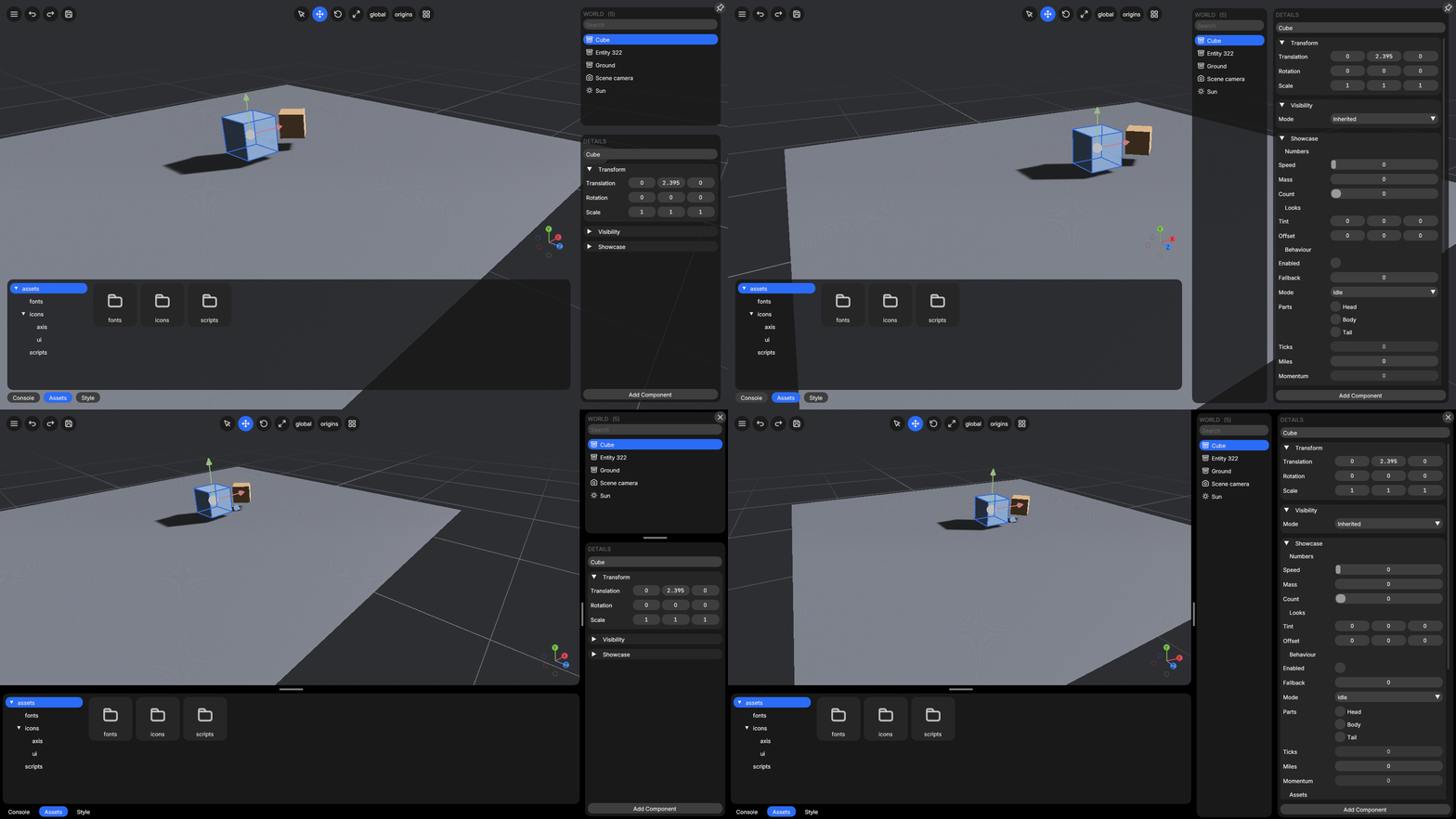
<sup>BevyCSharp.Sample, running on Bevy's PBR renderer through the bridge:
dotnet run --project BevyCSharp.Sample</sup>
Mark a struct [Behavior], give it methods with stage attributes, and a Roslyn source generator
wires it into Bevy's schedule, as a component and a system at the same time. Bevy is the engine
underneath, with its ECS, its scheduler, its timing, its input and its renderer.
using Bevy;

[Behavior]
public partial struct Spin
{
    [Range(0f, 5f)] public float Speed;
    private float _angle;

    // static: one plain system
    [OnStartup]
    public static void Scene(BehaviorContext ctx)
    {
        ctx.Ecs.Add(Render.SpawnCamera3d(), Transform.LookingAt(new Vec3(3f, 3f, 5f), Vec3.Zero, Vec3.UnitY));
        Render.SpawnLight(LightKind.Directional, 10_000f);

        var cube = ctx.Ecs.Spawn();
        ctx.Ecs.Add(cube, new Spin { Speed = 1.2f });
        Render.SetMesh(ctx.Ecs, cube, Render.CreateMesh(MeshShape.Cuboid, 1f, 1f, 1f));
        Render.SetMaterial(ctx.Ecs, cube, Render.CreateMaterial(0.25f, 0.55f, 0.85f));
    }

    // instance: once per entity that has one
    [OnUpdate]
    public void Tick(BehaviorContext ctx)
    {
        _angle += Speed * ctx.Time.Delta;
        ctx.Ecs.GetRef<Transform>(ctx.Entity).Rotation = Quat.FromAxisAngle(Vec3.UnitY, _angle);
    }
}
In Program.cs
BevyApp.Run();
Behaviors are discovered automatically, so a consuming project needs no registration code.
Contents
- What is where
- Install
- Behaviors
- The engine
- Bevy's own components
- Visibility
- Assets
- Models
- Drawing
- A mesh of your own
- Meshlets
- Materials
- A shader of your own
- The compiler
- Reloading shaders
- Passes over the picture
- Compute
- Compute on a camera
- Textures
- Cameras
- Shadows
- The picture the camera makes
- The lens
- Reflections
- The sky
- Light probes
- Ray-traced lighting
- Tracing rays of your own
- Drawing into an image
- The window
- 2D
- Gizmos
- The interface
- UI
- Audio
- Physics
- Text and touch
- Running a game
- The tools
- How it works
- Status and limitations
- Building from source
- Contributing
- License
What is where
- Install, and what the package carries.
- Behaviors: what a game writes. Systems and components, stages, the fixed timestep, filters, conditions, states, messages, the hierarchy, and what may touch the world from a worker.
- The engine: what a behavior can reach. Bevy's own components, assets and models, drawing, 2D, gizmos, the interface, audio, physics and input.
- Running a game: in a window, with no renderer, or into an image, and reloading behavior scripts while it runs.
- The tools: the editor, its console, and driving a running app from a terminal.
- How it works inside, what is still missing, and building from source.
Install
dotnet add package BevyCSharp
The package carries three things: the managed library, the source generator (in the analyzer
slot), and a prebuilt native bridge per runtime identifier under runtimes/.
Behaviors
A [Behavior] struct is both a component and the systems that act on it. This chapter covers what a
game writes: what a method runs as, when it runs, which entities it sees, and what it may touch
while it does.
Systems and components
Which one a method is depends on whether it is static.
Static methods are plain systems. They run once per frame. Use them for global logic that queries other components.
[Behavior]
public partial struct Gravity
{
    [OnUpdate]
    public static void Apply(BehaviorContext ctx)
    {
        foreach (var row in ctx.Ecs.Query<Velocity>())
            row.Component.Y -= 9.81f * ctx.Time.Delta;
    }
}
Query yields references into Bevy's table storage, so assigning to row.Component writes the
real component. There is no copy and no write-back step.
Instance methods run per entity. this is bound by reference to that entity's component. The struct's fields are per-entity state
living in Bevy's tables.
[Behavior]
public partial struct Spinner
{
    public float Angle;
    public float Speed;

    [OnUpdate]
    public void Tick(BehaviorContext ctx) =>
        Angle += Speed * ctx.Time.Delta;
}
Above ~4096 entities the per-entity loop is automatically split across the thread pool.
Any blittable struct is a component. Any blittable struct is a component. It needs no attribute and no interface, the first time a
behavior touches it, its layout is registered with Bevy and it becomes a real Bevy component
with a real ComponentId.
public struct Position { public float X, Y; }
public struct Falls;   // a zero-field tag costs nothing to store
Components sit in contiguous columns, so iteration is fast. The cost is paid on insertion and
removal, because both move the entity to another archetype and copy its other components along with
it. A tag that is added and removed far more often than it is read can opt out of that trade by
implementing ISparseComponent:
public struct Colliding : ISparseComponent; // toggled every frame, only ever filtered on
Adding or removing one costs an index write and moves nothing else. In exchange it cannot be the
component a query iterates, because Bevy exposes no way to reach a sparse set's storage in bulk, so
Query<Colliding>() is refused rather than quietly returning nothing. Everything else works,
including the thing it is for:
[OnUpdate]
[Without(typeof(Colliding))]
public void Fall(BehaviorContext ctx) { }
A sparse filter cannot be answered once per table, because two entities in one may differ, so it is answered per entity. The same rows come back, split into the contiguous runs that satisfy it.
Stages
| Attribute | When |
|---|---|
[OnStartup] |
Once, before the first frame |
[OnFirst] |
Top of every frame |
[OnPreUpdate] |
Before Update |
[OnFixedUpdate] |
Fixed timestep: zero or more times a frame |
[OnUpdate] |
Main gameplay stage |
[OnPostUpdate] |
After Update, before queued commands are applied |
[OnRender] |
Drawing and overlays, ordered before Last |
[OnLast] |
End of every frame |
[OnCleanup] |
Once, on the way out |
The fixed timestep
Every stage above except one runs exactly once a frame, so anything integrated in them advances by however long the frame happened to take. That ties the result to the machine, because the same inputs give a different fall on a slow frame, and a long enough one steps straight through the floor.
[OnFixedUpdate] runs on Bevy's fixed timestep instead, as many times per frame as the elapsed
time allows: twice after a slow frame, not at all after a fast one. Each run covers the same
slice of time, so the simulation is reproducible.
[OnFixedUpdate]
public void Step(BehaviorContext ctx)
{
    Velocity.Y -= 9.81f * ctx.Time.FixedDelta;
}
Integrate with ctx.Time.FixedDelta, not ctx.Time.Delta. It is the constant each step covers
rather than a per-frame reading, so it is correct from the first frame and identical in every
step. The rate is Config.FixedHz and defaults to Bevy's 64.
Keep a simulation on one clock or the other. Accelerating on the fixed step while integrating position per frame is half a simulation, and inherits the frame-rate dependence you moved the other half away from.
Filters
[With] and [Without] restrict an instance method to a subset of entities. They are resolved
per archetype, not per entity, so they cost nothing in the loop.
[OnUpdate]
[With(typeof(Alive))]
[Without(typeof(Frozen))]
public void Tick(BehaviorContext ctx) { }
[Changed] skips entities whose listed components did not change this frame. It is a per-entity
test against Bevy's change ticks, so a method carrying it runs sequentially.
Conditions
[RunIf] gates a system on a static bool member of the same struct, a field, a property, or a
method taking a World. The generator checks the member exists at compile time, so a rename
cannot silently disable your system.
[OnUpdate]
[RunIf(nameof(IsPlaying))]
public static void Tick(BehaviorContext ctx) { }

public static bool IsPlaying(World world) =>
    world.TryGetResource<GameState>(out var s) && s.Playing;
[ToggleKey] is the entire implementation of "press F3 to show the overlay":
[OnRender]
[ToggleKey(Key.F3, DefaultEnabled = false)]
public static void DrawHud(BehaviorContext ctx) { }
KeyModifier is a flags enum, so a shortcut can require any number of modifiers at once:
[ToggleKey(Key.F3, KeyModifier.Ctrl)]                     // Ctrl + F3
[ToggleKey(Key.F3, KeyModifier.Ctrl | KeyModifier.Shift)] // Ctrl + Shift + F3
Each flag is side-agnostic, so Ctrl is satisfied by either Ctrl key, as a shortcut normally means,
and matches winit's ModifiersState, the layer Bevy's own windowing sits on. Bevy itself has no
modifier type; it exposes only the individual KeyCodes. To pin one side, or to build a chord out
of an ordinary key, write the check yourself:
[OnRender]
[RunIf(nameof(ChordHeld))]
public static void DrawHud(BehaviorContext ctx) { }

public static bool ChordHeld(World world) =>
    world.Resource<Input>().AllKeysDown([Key.ControlLeft, Key.F3]);
Input mirrors Bevy's ButtonInput here: AnyKeyDown, AllKeysDown, AnyKeyPressed and
AnyKeyReleased take a span of keys, like any_pressed / all_pressed / any_just_pressed.
States
A game is usually in one of a few modes, and most systems belong to one of them. AddState sets
one up over any enum, and [InState] scopes a method to a value of it:
public enum Screen { Menu, Playing, Paused }

app.AddState(Screen.Menu);

[OnUpdate]
[InState(Screen.Playing)]
public void Tick(BehaviorContext ctx) { }
Read and change it from a system:
var screen = ctx.State<Screen>();
ctx.SetState(Screen.Paused);
[InState] runs a method every frame the state is held. To run one as the state changes, on
the edge rather than throughout, use [OnEnter] and [OnExit]:
[OnEnter(Screen.Playing)]
public static void BuildLevel(BehaviorContext ctx) { }

[OnExit(Screen.Playing)]
public static void TearDown(BehaviorContext ctx) { }
That is where a screen is built and taken away: once per transition, not once per frame. A transition attribute replaces the stage attribute rather than joining it, because the two say different things about when a method runs, and asking for both is reported as an error.
A teardown method that lists everything the screen spawned goes stale the first time something new is added to the screen. Tie the entity to the state instead and leaving takes it with you:
[OnEnter(Screen.Playing)]
public static void BuildLevel(BehaviorContext ctx)
{
    var enemy = ctx.Ecs.Spawn();
    ctx.Ecs.DespawnOnExit(enemy, Screen.Playing);
}
The despawn is Bevy's own, so it reaches the entity's children as well, and it happens at the
transition rather than inside [OnExit], which means it covers every way out of the value.
A mode that only means anything inside another one is a sub-state. A pause outside a run is not "off", it is nothing, and saying so keeps a pause from being held when the next run starts:
public enum Screen { Menu, Playing }

[SubStateOf(typeof(Screen), Screen.Playing)]
public enum Paused { No, Yes }

app.AddState(Screen.Menu);
app.AddSubState(Paused.No);      // after its parent, which it is computed from
While Screen is anything but Playing the state does not exist, so
App.TryState<Paused>(out var held) answers false rather than a value, and a method scoped to
[InState(Paused.Yes)] does not run. Entering Playing brings it into existence at Paused.No
every time, which is why a pause left on when a run ended is off again when the next one begins.
[OnEnter], [OnExit] and DespawnOnExit work on it exactly as they do on a plain state, because
the relationship is written on the enum rather than at the call.
A state carries two sub-states, and a sub-state cannot itself be a parent. Both limits come from the same place. Bevy names a sub-state's parent as an associated type, so every pairing exists when the native library is built, and a third sub-state or a chain of them is refused rather than half-worked. A run that can be paused and played at a difficulty needs two, and raising it is a longer list in the same place as the state slots below.
A state whose value follows from another's is a computed state. Whether the interface is up is true on some screens and false on the rest, and writing that as a plain state leaves two facts to keep in step until one of them lies:
[ComputedFrom(typeof(Screen))]
public enum Hud { Shown, Dimmed }

app.AddState(Screen.Menu);
app.AddComputedState((Screen.Playing, Hud.Shown), (Screen.Paused, Hud.Dimmed));
The table says what it is while the source holds each value, and a value the table says nothing
about means it does not exist at all, so TryState<Hud> answers false there and a method scoped to
[InState(Hud.Shown)] does not run. Setting one is refused, since there is nothing to set. Its
[OnEnter] and [OnExit] edges run like any other state's, so it is useful rather than merely
tidy.
A transition is queued rather than immediate. It lands at Bevy's next transition point, so every system in the frame agrees on which state it is in rather than some seeing the change halfway through.
A Bevy state is a Rust type and C# cannot define one, so the bridge provides eight state slots
that hold an integer, and each enum claims one the first time it is added. A slot is one
independent state machine rather than one value, because the integer it holds gives an enum as
many members as it likes, and eight is the number of unrelated machines a game can run at once, which
is past what most need. Running out reports it, and raising the count is a list in
native/bevy_csharp/src/states.rs and a rebuild, at about four seconds of build time per slot. [InState] is a run condition, so it composes
with [RunIf] and [ToggleKey] rather than replacing them, and a method carrying more than one
runs only when all of them pass.
Messages
Components say what an entity is and resources what the world has. Neither says what just happened, which is why a collision or a button press otherwise becomes a component invented to carry it. A message is sent by one system and read by any number of others, none of which need know about each other.
public readonly record struct Collided(Entity A, Entity B);

ctx.Send(new Collided(a, b));

foreach (var hit in ctx.Read<Collided>())
    Console.WriteLine($"{hit.A} hit {hit.B}");
A reader sees the previous frame's messages. The queue is swapped once at the top of each frame, so every reader sees the same complete set, exactly once, whatever stage it runs in and whatever order the systems happen to run in. The cost is a frame of latency, since a message is not readable in the frame it was sent, including by the sender.
Bevy's own messages instead give each reader a cursor, which lets it catch up within the frame. A
cursor needs a stable identity per reader, and a C# system has none the engine can see, so the swap
makes "exactly once" true here. ctx.Send is safe from a parallel behavior method, like ctx.Cmd;
reading is main-thread only.
What the window reports arrives on the same bus, so an engine message is read exactly like one another system sent:
foreach (var resized in ctx.Read<WindowResized>())
    Layout(resized.Width, resized.Height);

foreach (var focus in ctx.Read<WindowFocusChanged>())
    if (!focus.Focused) Pause();
WindowResized, WindowFocusChanged, WindowCloseRequested, WindowScaleFactorChanged,
CursorEntered and CursorLeft. WindowCloseRequested is a request rather than a fact. The window
is still open, which is the chance to save or to ask whether the player meant it, and
App.RequestExit actually closes it.
Files dragged onto the window arrive the same way:
foreach (var hovered in ctx.Read<FileHovered>())
    ShowDropTarget(hovered.Path);

foreach (var _ in ctx.Read<FileHoverCanceled>())
    HideDropTarget();

foreach (var dropped in ctx.Read<FileDropped>())
    LoadLevel(dropped.Path);
One message per file, so dropping three sends three. The path is absolute and outside the asset directory, so it is read with ordinary file APIs rather than through the asset server. Every hover ends in either a drop or a cancellation.
An asset that will not load says why the same way:
foreach (var failed in ctx.Read<AssetLoadFailed>())
    Console.Error.WriteLine($"{failed.Kind} {failed.Path} failed, because {failed.Reason}");
A handle reports that a load failed and nothing more, so this message tells a misspelled path apart
from a file that is there and unreadable. Kind names the asset type the way AssetServer.Load
names one, and is empty for a type the engine loaded for itself as part of something else. It
arrives in every profile, because an asset that will not load is exactly as wrong in a headless run
and harder to notice there.
The hierarchy
ctx.Ecs.SetParent(moon, planet);

var parent = ctx.Ecs.ParentOf(moon);       // planet
var children = ctx.Ecs.ChildrenOf(planet); // [moon]
ctx.Ecs.ClearParent(moon);
A child's Transform is relative to its parent, and Bevy combines them during propagation, so a
parented entity only has to describe its own motion. Parenting goes through Bevy's relationship API
rather than a raw component write, which keeps the reverse child list correct.
GlobalTransform is the result of that propagation: where the entity sits in world space.
ref var world = ref ctx.Ecs.GetRef<GlobalTransform>(moon);

world.Translation;                           // world-space position
world.Forward;                               // the direction it faces
world.TransformPoint(new Vec3(0f, 0f, -1f)); // a local point, in world space
world.ToTransform();                         // position, rotation and scale
Read it and write Transform. Propagation overwrites GlobalTransform every frame, and it is a
frame behind a Transform written during PostUpdate or later, which is when propagation has
already run. It stores an affine matrix rather than a position/rotation/scale triple, because a
chain of arbitrary transforms cannot always be expressed as one, so Scale, Rotation and
ToTransform() decompose it the way Bevy's own accessors do.
Parenting is a structural change, so queue it on ctx.Cmd when calling from inside a loop.
Threading
A system runs on Bevy's main thread with the world loaned to it. When the generator fans a per-entity loop out across worker threads, those threads can safely write through the component reference they were handed, the partitions are disjoint, but they cannot touch the world.
ctx.Ecsimmediate, main thread only. From a worker it throws with a message telling you so, rather than corrupting the world.ctx.Cmda thread-safe queue, applied at the end ofPostUpdate.ctx.Time,ctx.Inputplain snapshots, safe to read anywhere.
Queue structural changes rather than applying them mid-loop. Spawning, despawning, adding and removing all move entities between archetypes, which invalidates every reference the loop holds:
[OnUpdate]
public void Tick(BehaviorContext ctx)
{
    Fuse -= ctx.Time.Delta;
    if (Fuse <= 0f) ctx.Cmd.Despawn(ctx.Entity);   // not ctx.Ecs.Despawn
}
The engine
What a behavior can reach. Everything here is Bevy's own, bridged rather than reimplemented, so a
Transform written from C# is the transform the renderer reads and a sound played from C# is an
entity in the same world.
Bevy's own components
A struct you declare is registered with Bevy from its layout. Bevy's own components are the opposite problem, because they are Rust types C# has no handle on, so they are asked for by name. That name is the only difference, and the type carries it, so they are used exactly like any other component:
var entity = ctx.Ecs.Spawn();
ctx.Ecs.Add(entity, Transform.At(0f, 5f, 0f));

ref var transform = ref ctx.Ecs.GetRef<Transform>(entity);
transform.Translation.Y -= 9.81f * ctx.Time.Delta;

foreach (var row in ctx.Ecs.Query<Transform>())
    row.Component.Translation.X += 1f;
That is Bevy's real Transform, not a copy kept in sync, so propagation and rendering see the
write. A struct becomes one of these by implementing INativeComponent, which names the engine
type. ComponentType<T> then resolves that name instead of registering a fresh component, and
everything downstream already works in ids, so queries, [With] filters, change detection and
ctx.Cmd reach it with no separate API: there is one Add, and it does not care which kind of
component it was handed. NativeComponents exposes the raw ids for the handful of entry points
that take one rather than a type (HasById, CountById, RemoveById, ChangedById, and the
Chunks overload that iterates a named component).
public struct Transform : INativeComponent
{
    readonly string INativeComponent.NativeName => "Transform";
    // ... fields laid out exactly as Bevy's
}
Only a component C# can mirror byte for byte can be read or written, and the mirrors are checked
against the engine the first time an id is resolved. They are easy to get subtly wrong in a way
nothing else catches. Transform uses Rust's default representation, so the compiler reorders its
fields to save padding. Quat is sixteen-byte aligned and moves ahead of the two vectors, giving
offsets of 0, 16 and 28 rather than the source order. Both layouts are 48 bytes, so a size check
passes either way and the mistake shows up as stretched geometry. The check compares every offset.
ChildOf and Children hold a relationship and a Vec, neither of which raw bytes can
represent, so they are name-only handles: Has<ChildOf>(), Count<Children>() and [With]
filters work, while reading or writing one is refused rather than corrupting the world. Use
SetParent, ParentOf and ChildrenOf for the hierarchy itself.
The list is curated rather than general, because each entry needs a mirror written by hand as
well as a name the bridge resolves. It holds Transform, GlobalTransform, ChildOf,
Children, Visibility, InheritedVisibility, ViewVisibility, WorldInstance, Interaction
and Atmosphere.
Visibility
Whether an entity is drawn. Render builds only, since a headless bridge has no such component and says so when the id is resolved.
ctx.Ecs.Add(entity, Visibility.Hidden);                 // and everything below it
ctx.Ecs.GetRef<Visibility>(entity).Mode = VisibilityMode.Inherited;

ctx.Ecs.GetRef<InheritedVisibility>(entity).IsVisible;  // after the hierarchy is walked
ctx.Ecs.GetRef<ViewVisibility>(entity).IsVisible;       // after culling: did a camera see it
Visibility is the request and the other two are Bevy's answers, computed during PostUpdate
and overwritten every frame. InheritedVisibility reports whether an ancestor hides the entity;
ViewVisibility reports whether a camera actually rendered it, which is the one to check before
doing work that only matters on screen.
Set Visibility on an entity that is already drawable. Adding it writes the component but does
not pull in the two Bevy computes from it, which arrive with the mesh.
Assets
var mesh = AssetServer.Load(AssetKind.Mesh, "models/ship.gltf");

if (mesh.IsLoaded) { }
AssetServer.Release(mesh);
Loading is asynchronous, so Load returns as soon as the request is queued and the handle
reports Loading until the file has been read.
Paths resolve against Config.AssetRoot, and it is worth setting. Left unset, Bevy looks for an
assets directory beside the running executable, which for a .NET app is whichever host launched
it, so under dotnet test or dotnet exec that is the host rather than the assembly and assets
copied next to the DLL are not found. Naming the directory outright is the only way to be sure:
AssetRoot = Path.Combine(AppContext.BaseDirectory, "assets")
Streaming is the other way to read. It reads parts of large files, a piece at a time, while the game runs, and texture and geometry streaming read their tiles and clusters with it.
var tile = Streaming.Read("world.pages", offset: page * PageBytes, length: PageBytes, priority: onScreen ? 1 : 0);

// Every frame, until it arrives:
if (Streaming.TryTake(tile, out var bytes)) Shaders.WriteImage<byte>(cache, bytes, x, y, 128, 128);
Reads run on the thread pool, relative to the asset directory, and TryTake hands finished ones
over until Streaming.BytesPerFrame bytes have gone out this frame, so a burst of reads finishing at
once becomes uploads spread over a few frames rather than a hitch; the first read of a frame is
always handed over, however large. A finished read of higher priority goes first, and a file that
could not be read throws from TryTake.
Models
A glTF file holds many assets, so one is named with a label after the path. LoadGltfMesh builds
that label, and what comes back is an ordinary mesh handle:
var hull = AssetServer.LoadGltfMesh("models/ship.gltf");        // mesh 0, primitive 0
Render.SetMesh(ctx.Ecs, entity, hull);
Render.SetMaterial(ctx.Ecs, entity, Render.CreateMaterial(0.6f, 0.6f, 0.62f));
A glTF mesh is a named group and it is the primitive inside it that carries geometry, which is why both indices exist; a file exported as one object is mesh 0, primitive 0. Needs a render build, since the loader comes with the renderer.
A file's own arrangement of its meshes is a scene, and spawning one produces the entities the artist laid out:
var root = ctx.Ecs.SpawnScene(AssetServer.LoadGltfScene("models/ship.gltf"));
The root comes back at once and fills in when the asset has loaded, so no children on the first
frame is normal rather than a failure. Wait by polling ChildrenOf, not on the WorldInstance
component, which marks the spawn as done but can appear a frame before the entities are
visible.
Compose on top of what a file describes by patching it after it spawns. Bevy's own bsn! does the
same at compile time in Rust, and the ECS surface here does it at runtime:
foreach (var child in ctx.Ecs.ChildrenOf(root))
{
    ctx.Ecs.Add(child, Transform.At(3f, 0f, 0f));   // override what the artist set
    ctx.Ecs.Add(child, new Selectable());           // add what the file knows nothing about
}
Add replaces a component whole, which is right for one the game owns and wrong for one an artist
part-filled in. Patch changes the fields it names and leaves the rest, and PatchTree does it to
an entity and everything under it, which usually suits a model:
// Keep where the artist put each part, and halve how large the whole model is.
ctx.Ecs.PatchTree<Transform>(root, (ref Transform t) => t.Scale = Vec3.One * 0.5f);
That is the same field-by-field merge Bevy's bsn! does between two scenes, done at runtime rather
than at compile time.
.scn and .scn.ron worlds load as the same asset through AssetKind.Scene, so SpawnScene
takes either.
A file's own materials load too, in a windowed run:
Render.SetMaterial(ctx.Ecs, entity, AssetServer.LoadGltfMaterial("models/ship.gltf"));
A glTF material loads as a GltfMaterial, which describes a material rather than being one the
renderer draws with, and the translation between them belongs to the renderer. A windowless run
has no renderer and nothing to draw, so it has no translated material either; use
CreateMaterial if a run without a window needs one at all.
Bevy's own handle is generic and reference counted, and neither property survives a trip through
a C ABI, so C# holds a key into a table on the engine side that owns the real handle. Holding one
keeps the asset loaded; Release gives up that reference. The key carries a generation as well
as a slot index, so a released handle does not start naming whatever later took its slot. It
names nothing instead, and every call that takes one refuses it rather than carrying on without
whatever it pointed at.
Mesh and Image load in any build. StandardMaterial, Gltf, Audio and Font need a render
build, and asking for one without it reports which build would support it. Scenes load too. Scene
is a trait in 0.19 and the loadable asset behind .scn, .scn.ron and a glTF file's scenes is
WorldAsset, which ctx.Ecs.SpawnScene spawns.
Drawing
Meshes and materials can be built without an asset file, and attached to an entity to make it
drawable. This needs a render build; on a headless one every call here refuses and says which build
would support it, rather than silently doing nothing. Guard with App.HasRenderer to write one
behavior that runs either way, as BevyCSharp.Sample/Behaviors/Scene.cs does.
var camera = Render.SpawnCamera3d();
ctx.Ecs.Add(camera, Transform.LookingAt(new Vec3(0f, 6f, 12f), Vec3.Zero, Vec3.UnitY));

Render.SpawnLight(LightKind.Directional, 10_000f);

var mesh = Render.CreateMesh(MeshShape.Cuboid, 1f, 1f, 1f);
var material = Render.CreateMaterial(0.25f, 0.55f, 0.85f);

var entity = ctx.Ecs.Spawn();
Render.SetMesh(ctx.Ecs, entity, mesh);
Render.SetMaterial(ctx.Ecs, entity, material);
Handles are references, so one mesh and one material can be shared by any number of entities. Attaching a mesh goes through Bevy's own insert rather than a byte copy, which pulls in the components Bevy requires alongside it, so an entity needs nothing further to be drawn.
A mesh of your own
A shape no primitive describes is built from its vertices, in any profile, since a mesh is data until something draws it:
var ramp = Render.CreateMesh(new MeshData
{
    Positions = [new(0f, 0f, 0f), new(4f, 0f, 0f), new(4f, 1f, -2f), new(0f, 1f, -2f)],
    Uvs = [0f, 1f, 1f, 1f, 1f, 0f, 0f, 0f],             // two floats a vertex
    Indices = [0, 1, 2, 0, 2, 3],
});
A triangle mesh given no normals has them worked out, smooth where it is indexed and flat where it
is not. Topology also takes lines, points and strips. A mesh whose vertices a shader moves far
from where they were built, such as ten thousand squares a vertex shader places from a buffer, needs
Render.SetMeshFlags(ctx.Ecs, entity, MeshFlags.NoFrustumCulling), because Bevy culls by the bounds
it worked out from the mesh and those say nothing about where the shader put it. The same flags turn
a mesh's shadow casting and receiving off.
Meshlets
A mesh of millions of triangles can be drawn as Bevy's meshlets instead, which cut it into small clusters that the GPU culls and picks a level of detail for, so it costs what the triangles covering the screen cost rather than what the mesh holds:
var config = Config.Default;
config.MeshletClusters = 1 << 22;                   // room for this many clusters at once

// Later, in a system:
var statue = Render.CreateMeshletMesh(AssetServer.Load(AssetKind.Mesh, "statue.glb#Mesh0/Primitive0"));
Render.SetMeshletMesh(ctx.Ecs, entity, statue);
Render.SetMaterial(ctx.Ecs, entity, marble);
They need a bridge built with them (./bcs build --editor --meshlet) and a GPU with 64-bit texture
atomics on Vulkan or Metal. The bridge asks the GPU before turning them on and runs without them
where it cannot, which Render.MeshletsActive reports. Cutting a mesh into clusters takes seconds
for a large one, so CreateMeshletMesh does it on a worker once the mesh has loaded, and the
handle it answers draws nothing until then. The mesh has to be indexed triangles with texture
coordinates. A meshlet mesh is drawn with a standard material, and while meshlets run every camera
draws once a pixel, since Bevy's meshlet renderer cannot draw a multisampled picture.
Converting is the slow part, so a game does it once. saveTo: writes the finished mesh as a file
under the asset root, and that file loads as fast as it reads:
Render.CreateMeshletMesh(statueMesh, saveTo: "baked/statue.meshlet_mesh");   // once, in a tool

var statue = AssetServer.Load(AssetKind.MeshletMesh, "baked/statue.meshlet_mesh");   // after
Materials
A material takes settings, and its textures are image handles:
var crate = Render.CreateMaterial(new MaterialSettings
{
    BaseColorTexture = AssetServer.Load(AssetKind.Image, "textures/crate.png"),
    NormalMap = AssetServer.Load(AssetKind.Image, "textures/crate-normal.png"),
    Roughness = 0.8f,
});

var glass = Render.CreateMaterial(new MaterialSettings
{
    BaseColor = (0.8f, 0.9f, 1f, 0.25f),
    AlphaMode = AlphaMode.Blend,
});
A texture is combined with its matching factor rather than replacing it, so a base color map on the default white shows unchanged and tinting it is a matter of setting a color. The image need not have finished loading, because the material holds a handle rather than pixels. Five maps are bound this way: base color, normal, metallic-roughness, emissive and occlusion.
AlphaMode decides what happens where a material is not opaque. Mask draws a pixel or skips it,
deciding at AlphaCutoff, so the surface still writes depth and nothing has to be sorted, which
suits foliage and fences. Blend is real transparency, drawn after everything else and sorted back
to front. Add adds to what is behind, so it never darkens it. DoubleSided draws back faces, for
anything modeled as a single sheet, and Unlit shows the base color flat.
A shader of your own
Shaders are written in Slang, and a shader declares what it needs as ordinary globals, in any combination and at any size. That covers numbers and arrays of them, structs, constant buffers, textures of every shape and arrays of them, samplers, and storage buffers and images. The bridge has no table of what is allowed. It asks the compiler how the shader was laid out and builds the bind group from that, so the only limits are the GPU's, and C# sets each value by the name the shader gave it.
import bcs;

uniform float4 tint;
uniform float weights[1000];
Texture2D layers[64];
TextureCube skies[16];
SamplerState linear;

[shader("fragment")]
float4 fragment(bcs::VertexOutput mesh) : SV_Target
{
    let sky = skies[3].Sample(linear, mesh.world_normal);
    return tint * layers[7].Sample(linear, mesh.uv) * weights[999] + sky;
}
var layered = Shaders.CreateProgram("shaders/layered.slang");     // the fragment shader alone

var material = Shaders.CreateMaterial(layered)
    .Set("tint", new Vector4(1f, 0.5f, 0.2f, 1f))
    .Set("weights", weights)                                       // as long as the shader's array, or shorter
    .SetTexture("layers", rock, 7)
    .SetTexture("skies", dusk, 3)
    .SetSampler("linear", SamplerSettings.Clamped);

Render.SetMaterial(ctx.Ecs, pond, material);                      // as many as the game wants
A name is a global's own (tint), a field of a struct or a constant buffer (sun.color), or an
element of an array of structs (lights[3].color), and a texture, buffer or sampler in an array is
its name and an index. Numbers are checked for kind and shape, so a float3 takes a Vector3, an
int an int, a float4x4 a Matrix4x4, an array a span of its elements, and SetNumbers covers
the shapes C# has no type for, such as int2 or float3x3. A struct can be set whole with
SetStruct or SetBytes, laid out the way the shader lays it out. A value that does not fit is
refused with an ArgumentException that lists what the shader does declare. Anything not set
reads as zero, a texture as a stand-in of its shape, and a sampler as linear and repeating, so a
shader draws something whatever has been set. A matrix crosses row by row, which is how
System.Numerics holds one, so mul(m, v) in the shader is m applied to v.
material.Parameters lists what the shader declares, and the editor's inspector draws a widget for
each of them, and program.Layout (or shader.layout in the console) says where every name is,
down to the byte offset.
Bevy asks a material's type for its bind group layout, and C# cannot declare a type, so the bridge
has one material type that gives every material the layout its program's shaders declared, and
the same queue, specialization and draw Bevy's own materials go through. That is also what lets a
material change program while it is drawn (material.Program = other), keeping every value by
name.
A program can name four stages, each a file and an entry point, so one file can hold all of them:
var grass = Shaders.CreateProgram(new ShaderProgramSettings
{
    Vertex = "shaders/grass.slang",                                // moves the blades
    Fragment = "shaders/grass.slang",
    PrepassVertex = new ShaderStage("shaders/grass.slang", "prepass_vertex"),
    Defines = { ["BLADES"] = 3, ["WIND"] = true },
});
import bcs; gives a shader Bevy's view, time and mesh transforms, and vertex structs that line up
with Bevy's own, so a fragment shader works after Bevy's vertex shader, and bcs::standard_vertex
does what Bevy's does for a vertex shader that starts from it:
import bcs;

uniform float height;

[shader("vertex")]
bcs::VertexOutput vertex(bcs::Vertex v)
{
    v.position.y += sin(bcs::globals.time * 3.0 + v.position.x * 4.0) * height;
    return bcs::standard_vertex(v);
}

[shader("vertex")]
bcs::PrepassVertexOutput prepass_vertex(bcs::PrepassVertex v)
{
    v.position.y += sin(bcs::globals.time * 3.0 + v.position.x * 4.0) * height;
    return bcs::prepass_output(v.instance_index, v.position, v.normal, v.uv);
}
The prepass draws depth for shadows, and normals and motion for the effects that read them. A
material that moves its vertices needs a prepass vertex shader moving them the same way, or it casts
the shadow of the mesh it started from, and one that discards pixels needs a prepass fragment shader
discarding the same ones. Both read the material's values like the main stages do. A vertex stage
left out is Bevy's own. Defines reach the shader as -D, and a program with different defines is a
different program compiled on its own.
A stage can also be Slang handed over as text, for a shader worked out at run time, whether a node
graph produced it or a player typed it. It may import bcs; and any module under the asset root.
Different text is a different program, so there is nothing to reload, and a change is a new program
put on the material:
material.Program = Shaders.CreateProgram(ShaderStage.Slang(generated));
The compiler
slangc compiles each stage to WGSL in the background. ./bcs build and
./bcs test fetch a pinned release into build/tools/slang (build/fetch-slang.sh does it on its
own), and the bridge looks for it in BCS_SLANGC, then on the PATH, then there. Every successful
compile is cached under the asset root in .slang-cache with its layout, keyed by the file, the
defines and a hash of everything the file imported. A machine without slangc reads the cache
instead, so a game shipped with it needs no compiler, and an entry whose sources have changed is
never used. The cache is ignored by git in this repository, since every checkout fetches slangc
and fills it again on its first run. Shaders.SlangAvailable says whether edits can be compiled.
Reloading shaders
An edit to a shader file, or to any file it imports, reaches the screen
within a quarter of a second, in every profile. An edit that changes what the shader declares gives
the program a new layout, and every material keeps its values by name, so a parameter the edit added
starts at zero and the rest keep what they held. A file that fails to compile leaves the last version
that compiled in use and says why in the log, in program.Diagnostics, and through shader.errors
in the console. One that has never compiled draws magenta. A shader reading an input its vertex
shader never wrote is a validation error, which closes the app;
Shaders.KeepRenderingAfterErrors logs it and drops the frames it breaks instead, and the editor
sets it.
Passes over the picture
A camera runs any number of passes over what it drew, each a shader run once per pixel, reading the picture so far and writing the next one. A pass is an instance of a program with a pass stage, and an instance holds values by name the way a material does, so one program can run twice with different values:
var crt = Shaders.CreateInstance(Shaders.CreateProgram(
    new ShaderProgramSettings { Pass = "shaders/crt.slang" }));

crt.Set("strength", 0.3f);
Shaders.SetPasses(camera, new ShaderPass(crt, AfterTonemapping: true));

crt.Set("strength", strength);                  // while it runs
import bcs_pass;

uniform float strength;
Texture2D grain;
SamplerState grain_sampler;

[shader("fragment")]
float4 fragment(bcs_pass::Input input) : SV_Target
{
    let shift = bcs_pass::pixel_size() * strength * 4.0;
    let color = float3(
        bcs_pass::sample(input.uv + shift).r,
        bcs_pass::sample(input.uv).g,
        bcs_pass::sample(input.uv - shift).b);
    let lines = 0.85 + 0.15 * sin(input.position.y * 3.14159);
    return float4(color * lines * grain.Sample(grain_sampler, input.uv).r, 1.0);
}
import bcs_pass; gives a pass the picture, time, the view and the previous frame's, and the
camera's depth, normals and motion vectors, which the bridge binds itself. Everything else a pass
declares is its own. Depth, normals and motion come from a prepass the camera draws when asked, with
Shaders.SetPrepass(camera, depth: true, normals: true, motion: true), and an outline, a fog or
anything reusing the previous frame is built from them. bcs_pass::distance_at turns depth into
world units, world_position turns a pixel back into a point in the world, and previous_uv_of
finds where a point was on the previous frame. A camera that draws none of them binds the far plane,
white normals and no motion, and so does a multisampled one, whose prepass a pass cannot bind. A
pass before tonemapping sees the linear picture, which may be brighter than white, and suits
anything about light; one after sees what the screen will show, and suits anything about the picture
as a picture. At: FramePoint.AfterOpaque runs one on the lit opaque geometry, before transparent
geometry is drawn over it. Something about the lit surfaces goes there, so glass in front is not
under a fog or a reflection meant for what is behind it, and it needs a camera drawn once a pixel. A
pass still compiling is skipped rather than drawn wrong, and passes run in the order given, each
over what the last wrote.
Compute
A program with a compute stage runs on the GPU outside of any picture, over buffers and images that stay on the GPU between frames, so what one dispatch writes the next reads, and a material bound to the same buffer draws it:
// Once.
var flock = Shaders.CreateBuffer<Boid>(boids);                   // a C# struct, as it is
var step = Shaders.CreateInstance(Shaders.CreateProgram(
        new ShaderProgramSettings { Compute = "shaders/boids.slang" }))
    .SetBuffer("boids", flock);

var drawn = Shaders.CreateMaterial(look).SetBuffer("boids", flock);

// Every frame, from a system: 64 boids to a workgroup.
Shaders.Dispatch(step.Set("delta", (float)ctx.Time.DeltaSeconds), (uint)(boids.Length + 63) / 64);
import bcs_compute;

struct Boid { float3 position; float3 velocity; };

RWByteAddressBuffer boids;
uniform float delta;

[shader("compute")]
[numthreads(64, 1, 1)]
void main(uint3 id : SV_DispatchThreadID)
{
    if (id.x >= bcs_compute::count<Boid>(boids)) return;

    var boid = bcs_compute::element<Boid>(boids, id.x);
    boid.position += boid.velocity * delta;
    bcs_compute::store(boids, id.x, boid);
}
A raw buffer read with bcs_compute::element packs a struct the way a C# struct with sequential
layout does, so the same struct declared on both sides agrees on every offset. A
StructuredBuffer<T> is laid out with the storage rules instead, where a float3 takes sixteen
bytes, so a struct shared with one spells its padding out.
A dispatch is asked for from a system and runs once, that frame, before any camera draws, with the
instance's values as they were when it was asked for, and dispatches run in the order they were
asked for. A compute shader declares any number of buffers, images it writes (RWTexture2D or
RWTexture3D with a [format(...)]), textures it reads and samplers, all set by name.
Shaders.CreateImage makes an image in eight-bit, half and full float and integer formats, from
Rgba8 to Rgba32Float, two- or three-dimensional, and an image a compute shader writes is an
ordinary texture to a material or a pass, so a compute shader can paint a water surface or a noise
field into something drawn. Shaders.WriteImage<T>(image, texels, x, y, width, height) writes a
region of one from memory, at any mip level and into any slices of a 3D image, before the frame's
work runs, so a texture streamer can upload a tile into its cache without making the image again.
That cache is usually block-compressed, so ShaderImageFormat.Bc1, Bc4, Bc5, Bc7, Bc7Srgb
and Bc6hFloat make images a shader samples and never writes, whose sides are whole four by four
blocks and whose regions are written a block at a time, at a quarter or an eighth of the memory the
texels would take. A buffer's size is fixed when it is made, and WriteBuffer replaces its contents
in place. BeginBufferRead copies one back, and TryReadBuffer<T> hands over the elements a frame
or two later, which any readback costs. A program's state stays Compiling until its compute
pipeline has been built, so a dispatch made once it is Ready runs rather than being dropped.
Atomics reach a buffer through Slang's Atomic<T>, as in RWStructuredBuffer<Atomic<uint>> and
counter[0].add(1), because that is the form Slang turns into WGSL's atomics. InterlockedAdd on a
plain buffer does not compile for WGSL. Slang's wave operations run as WGSL subgroup operations on
an adapter with subgroups, which every desktop one has. That covers WaveActiveSum,
WavePrefixSum, WaveGetLaneIndex, WaveReadLaneAt and the rest of the arithmetic and ballot
family, from which a fast prefix sum or stream compaction is built. WaveIsFirstLane is the
exception, since the WGSL reader Bevy uses has no subgroup election yet, and
WaveGetLaneIndex() == 0 says the same thing. Shaders.DispatchIndirect(instance, buffer) runs as
many workgroups as three unsigned integers in a buffer say, read on the GPU when the dispatch runs,
so one compute shader can count the work (the pixels that need tracing, the clusters that survived
culling) and the next runs exactly that much without the count crossing back to the CPU.
A buffer's size is fixed until Shaders.GrowBuffer makes it larger, which copies what it held on
the GPU into the start of a new one and has every material and shader instance holding it bind the
new one, so a list that outgrows its buffer does not have to be handed out again.
Shaders.CreateInstanceBuffer(capacity) makes a buffer the engine fills every frame with entities'
transforms, this frame's and the previous frame's, once transforms have been worked out.
Shaders.SetInstance(buffer, slot, entity) puts an entity in a slot. A shader reads it as a
StructuredBuffer<bcs_scene::Instance> after import bcs_scene;, and culling instances on the GPU,
voxelizing a scene, or giving geometry a shader placed its motion all build on it.
Shaders.CreateMaterialBuffer(capacity) does the same for what entities are made of. Each slot
holds the base color, emissive color, roughness, metallic and reflectance of the entity's standard
material, as bcs_scene::Material, written when they change. Put an entity in the same slot of both
and a shader reaching it by index has where it is and what light bouncing off it looks like, and a
GI ray shades its hit with that. Textures are not in it, and the base color is the factor the
material multiplies them by.
The triangles themselves go in a geometry pool, for a ray traced in a compute shader or a scene voxelized by one, which meets whatever mesh is there:
var pool = Shaders.CreateGeometryPool();
var rock = Shaders.AddToGeometryPool(pool, rockMesh);            // 0, its number in the pool

trace.SetBuffer("vertices", pool.Vertices).SetBuffer("indices", pool.Indices).SetBuffer("meshes", pool.Meshes);
Every mesh added is appended to the same three buffers: its vertices as bcs_scene::PoolVertex,
its triangles' vertex numbers, and an entry in the mesh table, bcs_scene::PoolMesh, with where
they start, how many there are, and its bounds. bcs_scene::pool_corner reads a triangle's corner,
intersect_triangle finds where a ray meets it with the weights that interpolate the corners'
normals and texture coordinates, and intersect_box skips a mesh whose bounds the ray misses.
With the mesh's number in the same slot as the entity's transform and material, a hit has
everything shading it takes.
Compute on a camera
Screen-space techniques are a chain of compute and passes over one camera's frame, each reading what the camera drew and what the chain left behind last frame. A camera takes that chain as data: images it owns, and compute shaders it runs at a point in its frame.
ShaderInstance Compute(string file) => Shaders.CreateInstance(Shaders.CreateProgram(
    new ShaderProgramSettings { Compute = file }));

var occlusion = Compute("shaders/occlusion.slang");
var accumulate = Compute("shaders/accumulate.slang");
var composite = Shaders.CreateInstance(Shaders.CreateProgram(
    new ShaderProgramSettings { Pass = "shaders/composite.slang" }));

Shaders.SetPrepass(camera, depth: true, normals: true, motion: true);

Shaders.SetViewImages(camera,
    new ViewImage("occlusion", ShaderImageFormat.R16Float, Scale: 0.5f),
    new ViewImage("accumulated", ShaderImageFormat.R16Float, History: true),
    new ViewImage("depth_pyramid", ShaderImageFormat.R32Float, Mips: 6));

Shaders.SetViewDispatches(camera,
    ViewDispatch.PerPixel(occlusion, FramePoint.AfterPrepass, scale: 0.5f),
    ViewDispatch.PerPixel(accumulate, FramePoint.AfterPrepass));

Shaders.SetPasses(camera, composite);                       // reads "accumulated" by name
import bcs_pass;

[format("r16f")] RWTexture2D<float> accumulated;
Texture2D<float> accumulated_previous;
Texture2D<float> occlusion;
SamplerState linear;

[shader("compute")]
[numthreads(8, 8, 1)]
void main(uint3 id : SV_DispatchThreadID)
{
    let uv = bcs_pass::uv_of(int2(id.xy));
    let before = bcs_pass::previous_uv(uv, bcs_pass::load_motion(int2(id.xy)));
    let history = accumulated_previous.SampleLevel(linear, before, 0.0);
    accumulated[id.xy] = lerp(history, occlusion.SampleLevel(linear, uv, 0.0), 0.1);
}
An image a camera owns is made at a fraction of its picture, made again when the picture changes
size (starting over from zeros), and bound wherever a shader on that camera declares its name, as a
texture to read or a storage image to write. One made with History: true is two images that trade
places every frame, so name_previous holds what name held last frame, and one made with mips is
reachable a level at a time as name_mip0, name_mip1 and on, so a depth pyramid can be built one
level from the last. Every camera has its own, however many there are. A dispatch or a pass must not
read and write the same image, which the GPU refuses, and history exists to avoid that.
An image can also be filled from the picture itself, at a point of the frame:
Shaders.SetViewImages(camera, new ViewImage("lit", ShaderImageFormat.Rgba16Float, Scale: 0.5f,
    History: true, CopyAt: FramePoint.BeforeTonemapping));
The picture is drawn into it, scaled and point sampled, before that point's dispatches run, so
with history lit_previous is last frame's lit picture in its own units. That is the light a
screen-space GI ray that hits something on screen picks up, and what a temporal filter blends
toward, without a pass written only to copy it.
A shader on a camera also sees the scene's lights the way Bevy's own materials do. It has
bcs_pass::directional_light_count() and lights.directional_lights[i] with each light's color,
direction and shadow cascades, point_light_count() and point_lights[i] for point and spot
lights, while directional_shadow and point_shadow read Bevy's shadow maps with its filtering,
from zero in full shadow to one in full light, a spot light's included. point_light_radiance is
the light a point or spot light sends to a point before shadow, falling off with distance and, for a
spot, with the angle from its axis. A traced ray's hit is shaded with these, without drawing the
scene's lights a second time. The sky is there too. environment_specular(direction, roughness) is
the light the camera's environment map sends along a direction, blurred as a surface of that
roughness blurs it, and environment_diffuse(normal) what it sends a surface facing a way, both
black when has_environment() is false. A ray that leaves the scene picks up that light, turned and
scaled exactly as Bevy's own sky and lighting use the same map. And blue_noise(pixel) is Bevy's
spatio-temporal blue noise for this frame, four numbers from zero to one whose values are spread
evenly across the picture and from frame to frame. A technique taking a few random samples a pixel
picks them with it, so its noise blurs away rather than blotching.
What each pixel's surface is made of comes from Bevy's G-buffer. A camera asked for it with
Shaders.SetPrepass(camera, depth: true, deferred: true) draws Bevy's materials deferred, and a
shader on it declares Texture2D<uint4> gbuffer; and unpacks a texel with
bcs_pass::surface_of, which gives the base color, roughness, metallic, reflectance, emissive and
normal the way Bevy's own lighting reads them. That is the albedo a GI result is multiplied by and
the roughness a reflection trace chooses its rays from, without drawing the scene again to get
them. Only Bevy's materials are in it; one drawn by a Slang program is drawn forward and leaves its
pixels empty. With previous: true the camera keeps last frame's depth and G-buffer as well, as
depth_previous and gbuffer_previous, and comparing a pixel's surface now with what stood at the
same place last frame is how a temporal technique tells history it can reuse from a pixel that was
hidden until now.
With pyramid: true the camera builds Bevy's hierarchical depth, and a shader on it declares
Texture2D<float> depth_pyramid; and reads any level with Load. Each texel holds the farthest
depth of the ones under it, starting from the depth rounded down to a power of two, which is what a
GPU culling instances or clusters tests a box against. It turns Bevy's occlusion culling on for the
camera as well, since that builds it. A screen-space trace wants the nearest depth instead, which a
camera image with mip levels, built a level at a time, gives.
A dispatch on a camera runs every frame at one of four points: AfterPrepass, once depth, normals,
motion, shadows and Bevy's own ambient occlusion exist and before anything is lit; AfterOpaque, between opaque and transparent
geometry; and BeforeTonemapping or AfterTonemapping, ahead of the passes on the same side. Its
workgroups cover a fraction of the picture (PerPixel), are fixed (Fixed), or come from a buffer
(Indirect). It reads the same inputs a pass does through import bcs_pass;, and a compute shader
importing bcs_compute runs on a camera as well, reading only time.
Drawing on a camera. A program with a DrawVertex and a DrawFragment stage draws into a
camera's picture at a frame point, tested against its depth, out of buffers rather than a mesh.
Its vertex shader is handed no vertices, only SV_VertexID and SV_InstanceID, and places what is
drawn from what it declares, which is how particles a compute shader moves, clusters a culling pass
chose, or any number of instances whose count a buffer holds are drawn:
var sparks = Shaders.CreateInstance(Shaders.CreateProgram(new ShaderProgramSettings
{
    DrawVertex = "shaders/sparks.slang",
    DrawFragment = "shaders/sparks.slang",
})).SetBuffer("sparks", positions);

Shaders.SetViewDraws(camera,
    ViewDraw.Fixed(sparks, FramePoint.AfterOpaque, vertices: 6, instances: 1000, DrawBlend.Add),
    ViewDraw.Indirect(clusters, FramePoint.AfterOpaque, counts));   // counts a dispatch wrote
A draw's count is fixed or read from four unsigned integers in a buffer when it runs (vertices,
instances, first vertex, first instance), so a dispatch at the same point, which runs first, can
decide it. It blends as Opaque, Alpha or Add, and writes depth or only tests against it. It
reads the camera's inputs through import bcs_pass;, all but the picture, since it draws into that.
A draw can go into one of the camera's images instead of the picture. A visibility buffer is made that way, as geometry drawn into an unsigned integer image, each pixel keeping which cluster and triangle is nearest, for a later pass to shade.
Shaders.SetViewImages(camera, new ViewImage("visibility", ShaderImageFormat.R32UInt, ClearEachFrame: true));
Shaders.SetViewDraws(camera, ViewDraw.Indirect(clusters, FramePoint.AfterPrepass, counts) with { Into = "visibility" });
The fragment shader returns what the image holds, a uint for an integer image. The draw is tested
against the camera's depth, and writes it if asked, where the image is the picture's size and the
camera draws once a pixel, so the geometry and Bevy's scene hide each other properly. An image made
with ClearEachFrame starts every frame as zeros, before anything on the camera runs, so zero is
"nothing drawn here". An integer image cannot be blended, so a draw into one replaces what is there.
Targets = ["ids", "barycentrics"] draws into several of the camera's images at once, one for each
of the fragment shader's outputs in order (SV_Target0, SV_Target1 and on), for a visibility
buffer with more than an id, or a G-buffer of a package's own. The prepass's own motion and
normals can be targets too, for a draw at AfterPrepass on a camera that draws them. The pass
resolving a visibility buffer writes the motion and normals of what it resolved there, and its depth
through SV_Depth, so Bevy's temporal antialiasing and motion blur see that geometry move, and what
Bevy draws afterward is hidden behind it. A draw writing one of them reads a stand-in for it, since
nothing reads and writes the same texture in one pass.
CastsShadows = true draws it into the shadow maps as well, depth alone, after Bevy's own casters:
the camera's directional cascades, every spot light's map and every face of every point light's
cube, so it shadows Bevy's geometry and its own. Its vertex shader runs once for each of those views
with that view in bcs_pass::view, so a shader placing geometry from the view places it as the
light sees it without knowing it is drawing a shadow.
Watching what a camera keeps. The images a chain writes live on the GPU in formats a picture
cannot show, so Shaders.Watch(camera, "occlusion", 320, 180, scale: 1f) draws one, every frame
once the camera is done, into an ordinary eight-bit image, each value times a scale plus an offset:
one channel as gray, two as red and green, more as color. Anything a shader on the camera reads by
name can be watched, and the prepass's depth, normals and motion, and the gbuffer, whose
packed bits show as noise but show where it was drawn. Which of those a camera has depends on
settings made in several places, so Shaders.DrawnViewImageNames(camera) asks the renderer and
answers the names a watch would find, as of the last frame drawn. The editor's Frame tab lists the
scene camera's names, dims the ones it does not draw with what turns each on, and watches the one
picked, which is where a broken link in a chain shows.
How long each pass takes. An app made with Config.GpuTimings measures every render pass on the
CPU that records it and the GPU that runs it, and Render.Timings() answers the last frames' times,
smoothed. Bevy's own passes are there under Bevy's names, and every dispatch, pass and draw a shader
program makes is there as shader and its file's name, so a technique's passes sit in the same list
as the shadows and the tonemapping they are weighed against. The console and ./bcs have it as
render.timings, slowest first. GPU times need timestamp queries, which Vulkan and DirectX 12 have;
elsewhere only CPU times arrive.
Into Bevy's lighting. Ambient occlusion is the one input to the lighting of Bevy's own materials
a chain can write so far. Render.SetAmbientOcclusion(camera, AmbientOcclusionQuality.Low) turns
Bevy's own on, and while it is on a compute shader on the camera sees the texture Bevy's lighting
reads as ambient_occlusion, so one run at AfterPrepass that writes it replaces Bevy's answer
with its own, and the ambient light (Render.SetAmbientLight) is darkened by it where a surface is
hemmed in. Diffuse light that varies through space goes in through an irradiance volume a compute
shader writes (see Light probes). Bevy's lighting has no per-pixel indirect input,
so a screen-space GI result is added to the picture instead, and done this way it lands where the
lighting would have put it: a draw of one triangle over the whole picture at AfterOpaque, blended
Add, whose fragment shader returns the GI result times the surface's color from the gbuffer.
That is after opaque geometry is lit and before transparent geometry, bloom and tonemapping, so
glass in front is drawn over it and the tonemapper sees it as light like any other. With the
camera's ambient light off (Render.SetAmbientLight(camera, (0, 0, 0), 0)) it replaces ambient
rather than adding to it. .github/RENDERING.md has what a true input inside
Bevy's lighting would add.
The sample carries a small screen-space GI written this way, as a reference for how the pieces
fit rather than a technique to ship: BevyCSharp.Sample/Behaviors/ScreenSpaceLight.cs and the three
gi_*.slang files beside the sample's other shaders. F5 turns it on in a window, and
./bcs command sample.gi "on 4" on a running sample turns it on with the bounce exaggerated four
times, which is how its share of the picture is told apart from the rest.
A storage image may be declared in any format the adapter can write, [format("r16f")] included,
although core WGSL has fewer. Slang writes the nearest core format and the bridge puts the declared
one back from Slang's reflection. An image the shader only writes is bound write-only, which more
formats allow than reading and writing at once. Slang itself refuses a RWTexture2D in a format
WGSL cannot read and write, such as rgba16f, and its WTexture2D, written with Store, is the
write-only image for those.
Textures
How one is sampled is decided when it loads:
var floor = AssetServer.LoadImage("textures/tiles.png", TextureSettings.Tiling);
var bumps = AssetServer.LoadImage("textures/tiles-normal.png", TextureSettings.Data);
Tiling repeats and filters linearly; Data filters linearly and reads the file as raw values
rather than as sRGB, as a normal, roughness or occlusion map needs. Individual settings are there
for anything else, including anisotropy, which is dropped rather than refused if the filters are not
all linear, because the graphics API treats that pair as a validation failure.
Tiling takes both halves. A mesh's UVs run from zero to one however large it is, so a repeating
texture still shows one stretched copy until the material scales them with UvScale = (12f, 12f).
PNG, JPEG, WebP, BMP and TGA decode in every build, headless included, because that is work on data
rather than on a GPU.
Cameras
A camera and a light take settings, and every value has a usable default:
var camera = Render.SpawnCamera3d(new CameraSettings
{
    FieldOfView = 55f,
    Clear = ClearMode.Custom,
    ClearColor = (0.02f, 0.03f, 0.05f, 1f),
});

Render.SpawnLight(new LightSettings
{
    Kind = LightKind.Spot,
    Intensity = 40_000f,
    Color = (0.4f, 0.6f, 1f),
    OuterAngle = 0.5f,
});
CameraProjection.Orthographic swaps perspective for a fixed vertical Height, for an isometric or
top-down view. Order decides which camera draws over which, and ClearMode.Keep layers one on
another. A light is aimed by its Transform, since a directional or spot light shines down its own
negative Z, which Transform.LookingAt produces.
Viewport gives a camera part of the window instead of all of it, for splitscreen, and Layers
decides what a camera can see at all, for a minimap:
const uint Minimap = 1u << 1;

Render.SpawnCamera3d(new CameraSettings { Viewport = (0, 0, 640, 720) });
Render.SpawnCamera3d(new CameraSettings
{
    Viewport = (640, 0, 640, 720),
    Order = 1,
    Clear = ClearMode.Keep,     // or it would wipe out the first camera's half
    Layers = Minimap,
});

Render.SetLayers(ctx.Ecs, marker, Minimap);        // only the minimap draws it
Render.SetLayers(ctx.Ecs, player, 1u | Minimap);   // both do
A viewport is measured in physical pixels rather than logical ones, because a framebuffer is divided into those. A camera draws an entity only where their layers overlap.
Render.SetPerspective(camera, fieldOfView, near, far) changes a camera's lens while it runs,
since CameraSettings only decides it when the camera is made.
The part of the window no viewport covers is the world's clear color, which Render.SetClearColor
sets, since Bevy clears the whole window before putting each camera's picture on its part of it.
Render.SetRoundedCorners(camera, radius, fill) takes a camera's corners off, antialiased, the
viewport's where it has one and the whole picture's where it does not. Both reach the desktop
on a window made with Config.Transparent, which is see-through wherever what is drawn has no
alpha:
config.Transparent = true;                        // before the app is built

Render.SetClearColor((0f, 0f, 0f, 0.6f));                      // round the viewport, dimmed
Render.SetRoundedCorners(camera, 16f, (0f, 0f, 0f, 0.6f));     // corners showing the same
Render.SetRoundedCorners(fullWindowCamera, 16f);               // or clear, for a round window
The fill is what a rounded corner shows, clear unless given, so a viewport's corners can match the
clear color round them rather than being clear notches in it. A camera keeping a background of its
own there clears to it (ClearMode.Custom) rather than to the world's color. Not every platform can composite a window with alpha, DirectX 12 often among them,
and there the window is made opaque, what would have been clear is black, and the log says which it
got. A clear corner on an opaque window is black too, so a corner meant to show some other color is
better painted by whatever draws over it.
Shadows
Shadows are tuned per light and sized globally:
Render.SpawnLight(new LightSettings
{
    Kind = LightKind.Directional,
    ShadowDepthBias = 0.05f,     // against shadow acne
    ShadowNormalBias = 1.2f,     // against acne on glancing surfaces
});

Render.SetShadowMapSize(directional: 4096);
Bias is per light because one light's acne is another's floating shadow. Size is one number for every directional light and one for every point and spot light, because that is how Bevy keeps it, and raising it costs memory and fill rate on every shadow-casting light at once.
A directional light covers the whole scene, so one shadow map stretched over all of it is coarse
near the camera, which is where it is looked at closest. Render.SetShadowCascades splits the
range into a few maps, each covering a nearer and smaller slice, so a shadow that looks blocky at
arm's length is this rather than a resolution. Every number it takes keeps Bevy's own when it is
left at zero.
Render.SetLightCookie shapes a spot light's beam with a picture, the way a gobo shapes a stage
light, so the shadow of a window frame falls on the floor without a window being there. Only the red
channel is read, so the picture says how much light gets through rather than what color it is, and
its border should be black or the light leaks past the edge of it.
A shadow map is drawn at a resolution of its own, so the shadow right where a foot meets the floor is lost in a texel or two. Contact shadows fill that in, traced from each pixel toward the light a short way through the depth buffer:
Render.SpawnLight(new LightSettings { Kind = LightKind.Directional, ContactShadows = true });
Render.SetContactShadows(camera, new ContactShadowSettings(Steps: 16, Thickness: 0.1f, Length: 0.3f));
Only lights that cast them and cameras that draw them take part, and only what is on screen casts one.
A real light has a size, so its shadow is sharp where an object touches the ground and blurs as it
stretches away. Render.SetSoftShadows(light, size) gives a light that size, the radius of a point
or spot light in world units, and Bevy widens each shadow's penumbra with the distance to what casts
it. It is noisy on its own, so it suits a camera given
Render.SetShadowFiltering(camera, ShadowFiltering.Temporal) with temporal antialiasing on.
The picture the camera makes
The picture the camera makes is one call, describing the whole pipeline rather than one change to it:
Render.SetPostProcessing(camera, new PostSettings
{
    Hdr = true,                          // highlights brighter than white, which bloom reads
    Bloom = true,
    BloomIntensity = 0.3f,
    Tonemapper = Tonemapper.AgX,
    AntiAlias = AntiAliasPass.Fxaa,
    Msaa = 1,
    Sharpen = 0.4f,
});
Every effect is applied on every call, so an effect the settings leave off is taken off the camera, which means turning bloom off is the same call as turning it on. Only a camera takes these, since it is the camera's render graph that reads them.
A tonemapper is the curve from what was rendered, which has no upper bound, to what a display can
show, which does. All eight of Bevy's are there, from None through Reinhard to AgX and Bevy's
own TonyMcMapface; the choice is a look rather than a correctness question, and it shows most with
Hdr on. Msaa smooths the edges of geometry while the scene is rasterized, while AntiAlias runs
a pass over the finished picture and so also catches edges that come from a texture or a shader.
Fxaa is the cheap one and Smaa the sharper one; Temporal resolves each frame from the ones
before it, so it sees an edge sampled many times over, at the cost of a trail behind anything whose
motion the renderer reports wrongly. It needs a 3D camera and Msaa = 1, and asking for it
alongside multisampling throws rather than quietly drawing nothing. Cameras drawing to the same
target draw into one picture and have to agree on Msaa, so each is given the fewest samples any of
them asked for, with a line in the log for each camera lowered. The interface's overlay draws with
one, so a game with an interface draws its window with one too. Bloom scatters light out of
whatever is brighter than white, so it needs Hdr and something emissive to work on. To make one
object glow harder, raise its material's emissive color rather than the bloom.
Either side of that are two more calls. SetExposure sets the exposure the scene is metered at, in
EV-100, the photographer's number, around 15 for sunlight, 12 for an overcast day and 7 indoors.
SetColorGrading is the look applied after tonemapping, in the three tonal ranges a colorist works
in:
Render.SetExposure(camera, 12f);

// Or the same thing as a lens, the way a real camera is written down.
Render.SetLensExposure(camera, aperture: 2.8f, shutter: 1f / 250f, sensitivity: 400f);

Render.SetColorGrading(camera, new GradingSettings
{
    Temperature = -0.15f,                                   // cooler overall
    Shadows = new GradingSection { Lift = 0.02f },          // lifted blacks
    Highlights = new GradingSection { Saturation = 0.9f },  // calmer highlights
});
Render.SetSortedTransparency sorts transparent fragments rather than whole objects. Ordinary
alpha blending sorts by distance between objects, so two panes of glass crossing each other, or one
mesh whose own faces overlap, come out right from some angles and wrong from others, and no
reordering of the scene fixes both. It costs a buffer the size of the screen times the layer count,
which is why it is per camera and off unless asked for.
MidtonesRange says which luminances count as the middle, so it decides how much of the picture
each of the three sections has to work on. The terms inside a section are the standard ASC CDL ones,
so a grade written for a film pipeline carries across unchanged. Passing null puts the camera back
to the engine's own grading.
The lens
The lens is a second call, because it is decided at a different time. A settings screen owns the pipeline above, and a scene sets these for a moment.
Render.SetEffects(camera, new EffectSettings
{
    DepthOfField = DepthOfFieldMode.Bokeh,   // focus, and a disc around every highlight past it
    FocalDistance = 8f,
    Aperture = 1.4f,
    ShutterAngle = 0.5f,                     // a film camera's 180 degree shutter
    Aberration = 0.02f,                      // colored fringes on the edges
    Distortion = 0.3f,                       // a wide lens bulging the picture outwards
    Vignette = 0.4f,                         // corners going dark
    AutoExposure = true,                     // the camera metering the frame for itself
});
The whole lens in one call, so an effect the settings leave off is taken off the camera. Depth of
field needs a perspective camera, since focus has no meaning without one, and Aperture is in
f-stops, so a smaller number is a wider lens and less of the scene in focus. Motion blur reads where
each pixel moved, which costs a second pass over the scene, and that pass goes away again when the
shutter angle does. AberrationColors swaps the red, green, blue fringe for any image, read across
its width. Auto exposure builds a histogram of the frame and moves the exposure so the average lands
on middle gray, as an eye adjusts walking out of a cave; MeteringMask weights where in the frame
it looks, and ExposureCompensation bends the result so a night scene can stay dark.
Reflections
A camera can reflect what it sees in the surfaces it draws:
Render.SetScreenSpaceReflections(camera, new ReflectionSettings());
Each pixel of a shiny surface marches a ray through the depth buffer until it passes behind something, and takes the color already drawn there. It is cheap and it is exact where it works, but it can only reflect what is on screen, so a reflection fades out toward the edge of the picture and anything behind the camera is never in it. A reflection probe or a traced reflection fills that in.
Bevy reads what a surface is from its G-buffer, so turning reflections on also turns on
Render.SetDeferredRendering(true) and gives the camera the depth and deferred prepasses. Deferred
rendering applies to Bevy's own materials; one drawn by a Slang program writes a color rather than a
description of its surface, so it is drawn forward either way and is reflected without reflecting.
The camera has to draw once a pixel (Msaa = 1).
Which surfaces reflect is decided by roughness. Bevy leaves a surface smoother than 0.08 without a
reflection and fades reflections in until 0.12, because a mirror-smooth surface shows every flaw of
a screen-space trace, and fades them out again past 0.55. FadeInRoughness and FadeOutRoughness
move both ends, Thickness is how deep a surface in the depth buffer is taken to be, which decides
whether a ray passing behind it hit it, and Steps and RefineSteps trade the cost of the march
against how finely a hit is found. null takes reflections off, and deferred rendering stays on
until it is asked off, since other cameras may be reading it.
The sky
The sky can be scattered rather than painted:
Render.SetAtmosphere(camera, new AtmosphereSettings());
Render.SetPostProcessing(camera, new PostSettings { Hdr = true });
Render.SetSkyLighting(camera, intensity: 1f);      // and let it light the scene
Bevy computes the color of every direction from how far sunlight travels through the air to reach it, so the horizon reddens, the zenith stays pale, and the whole sky turns over as the sun moves. Distant geometry picks up the same haze. The sun is whichever directional light is in the scene, so pointing that light differently moves the sky, and a scene with no directional light gets a night sky.
The sky is a planet-sized entity that the camera looks out from, and SetAtmosphere keeps at most
one of them, so calling it for a second camera adds a viewer rather than a second sky. The planet is
measured in meters with its ground at the origin, which is why a scene measured in something else
sets Scale rather than moving anything. Density thickens or thins the air, HazeDistance
decides how far ahead the haze is computed, GroundAlbedo is how much light the ground bounces
back into it, and ClearAtmosphere takes the sky off a camera again. Quality is one number over
the dozen Bevy exposes, because every one of them trades the same thing; the sky is the same at
each setting, and what changes is banding in a gradient and how much of a frame it costs.
The camera is given a high dynamic range target either way, because a sun scattered through air is
far brighter than white.
SetSkyLighting derives an environment map from that atmosphere each frame, so a surface picks up
the color of what is around it rather than only what a lamp points at it, and the light follows the
sun without anything being animated. The size it generates is a square cubemap resolution and has to
be a power of two. ClearSkyLighting takes it off.
A painted sky is a cubemap instead:
Render.SetSkybox(camera, AssetServer.Load(AssetKind.Image, "sky.png"), brightness: 1500f);
The file is a column of six square faces, which is the layout cubemap textures ship in, and it is
turned into a cube once it has decoded. brightness is in candelas per square meter like the rest
of the lighting, so the useful numbers are in the hundreds or thousands; a brightness of one is a
night sky and comes out black. A skybox is seen behind the scene and does not light it.
The same file can light it, though, for a scene lit from a photograph of a real place:
Render.SetImageLighting(camera, AssetServer.Load(AssetKind.Image, "sky.png"), intensity: 3000f);
The cubemap is filtered on the GPU into the blurred versions a surface reflects, so a rough material
picks up the average color around it and a polished one picks up a recognizable reflection, with no
bake step and no second file. rotation turns the environment without touching the scene. Each face
has to be square and a power of two, and the light waits for the image to decode before it is
applied, so a handle asked for in the same frame the camera is spawned works.
Render.SetEnvironmentMap is the other end of that, taking the two maps a baking tool already
produced rather than filtering one at startup:
Render.SetEnvironmentMap(camera, diffuse, specular, intensity: 3000f);
The first is the blurred map a rough surface reflects and the second the sharp one a polished
surface reflects. It costs nothing at startup, which suits a shipped game and an environment too
large to filter again. Passing AssetHandle.None for either takes the lighting off, since a baked
map is the pair and half of one is not a weaker version of it.
Light probes
A camera's environment lights everything it sees the same way, which is wrong the moment the scene has a room in it. A hall should reflect its own walls rather than the sky outside, and a corner by a red carpet should be warmer than the ceiling. A light probe is a box in the scene that lights what is inside it instead.
var hall = ecs.Spawn();
ecs.Add(hall, new Transform { Translation = new Vec3(0f, 2f, 0f), Rotation = Quat.Identity, Scale = new Vec3(12f, 4f, 20f) });

Render.SetReflectionProbe(hall, diffuse, specular, intensity: 3000f, falloff: new Vec3(0.2f));
The box is the entity's transform, a unit cube before its scale. A reflection probe takes the pair
of maps SetEnvironmentMap takes, captured from inside the room, and a surface inside the box
reflects them, corrected for where in the box it stands so a wall close by looks close. falloff
fades the probe's influence across that fraction of the box on each axis, so overlapping probes
blend into each other as something walks from one room to the next.
An irradiance volume is the other kind, and the one global illumination is built on:
const uint grid = 16;
var light = Shaders.CreateImage(grid, grid * 2, ShaderImageFormat.Rgba16Float, depth: grid * 3);

Render.SetIrradianceVolume(hall, light, intensity: 1000f);
It holds, for a grid of points across the box, the light a surface facing each of the six axis
directions receives there, and a surface blends the points around it by its normal. That is light
that varies through space, which a map the same everywhere cannot be, and Bevy's materials take it
as their diffuse light in place of the environment's. The image is an ordinary 3D image, so a
compute shader can write it every frame and whatever it works out lights everything drawn with a
material from Render.CreateMaterial, with no change to those materials:
import bcs_compute;
import bcs_scene;

uniform uint3 grid;
uniform float3 box_center;
uniform float3 box_size;
[format("rgba16f")] WTexture3D<float4> light;

// The technique itself: the light a surface at `world` facing `side` receives.
float4 trace(float3 world, uint side);

[shader("compute")]
[numthreads(4, 4, 4)]
void main(uint3 point : SV_DispatchThreadID)
{
    if (any(point >= grid)) return;

    let world = box_center + bcs_scene::irradiance_point_in_box(point, grid) * box_size;

    for (uint side = 0; side < 6; side++)
    {
        light.Store(bcs_scene::irradiance_texel(point, side, grid), trace(world, side));
    }
}
A grid x by y by z points is an image x wide, twice y high and three times z deep, one
region for each sign of each axis, and irradiance_texel finds the texel for a point and a
direction so a shader never deals with that packing. The sides are the way a surface faces, so
bcs_scene::POSITIVE_Y lights a floor. Bevy samples the image filtered, which is why it is
Rgba16Float, and the shader says so with [format("rgba16f")], since Slang would otherwise assume
a wider format than the image has. A baked volume can come from a file instead. A camera is refused
as a probe, since a camera is lit by SetEnvironmentMap, and AssetHandle.None takes either kind
off.
A reflection probe can also render its own maps rather than being given them:
Render.SetProbeCapture(hall, new ProbeCaptureSettings { Size = 256, Live = true });
Six cameras at the probe's center draw the scene into the faces of a cube, and Bevy filters the
cube into the probe's light on the GPU, so a mirror in the hall shows the hall as it is now,
including whatever walks through it. That costs six more drawings of the scene a frame, which is
why Live = false captures once instead, over the first frames after the scene has finished
compiling, and Render.RecaptureProbe takes it again when the room changes. The faces are drawn at
Bevy's default exposure and the default Intensity undoes it. The cameras see the probe's own
light, so each capture reflects the last one and light bounces further each frame, which settles
at that intensity and brightens without end well above it.
Ray-traced lighting
On a GPU with ray tracing hardware, Bevy's Solari lights the scene by tracing rays instead:
config.RayTracedLighting = true;                  // when the app is made

Render.SetRayTracedLighting(camera, true);
Render.SetRayTraced(floor, floorMesh);            // every mesh the rays should meet
Render.SetRayTraced(wall, wallMesh);
Direct light comes from every light and every emissive surface, found by rays rather than shadow
maps, so a glowing screen lights the face in front of it, and indirect light is bounced off every
surface taking part, so a red wall tints the floor beside it and a lamp lights the corners it
cannot see. It builds up over a few frames and follows what moves. It needs a bridge built with it
(./bcs build --editor --solari) and an adapter with ray queries, which the bridge asks about
before turning it on and Render.RayTracingActive reports; turning it on makes every one of Bevy's
materials deferred for the whole app, which is why it is asked for when the app is made.
SetRayTraced reshapes the mesh in place the way ray tracing structures are built from, working out
tangents where it has none, so the entity keeps drawing it as before and the rays meet the
triangles the picture shows.
Tracing rays of your own
A compute shader can trace rays against the same scene, for shadows, reflections or global
illumination of a package's own. It imports bcs_ray and compiles to SPIR-V, since Slang writes
ray queries for SPIR-V and not for WGSL:
var shadows = Shaders.CreateInstance(Shaders.CreateProgram(new ShaderProgramSettings
{
    Compute = "shaders/trace_sun.slang",
    ComputeTarget = ShaderTarget.SpirV,
})).Set("toward_sun", new Vector3(0.3f, 1f, 0.2f));

Shaders.SetPrepass(camera, depth: true, normals: true);
Shaders.SetViewImages(camera, new ViewImage("lit", ShaderImageFormat.R16Float));
Shaders.SetViewDispatches(camera, ViewDispatch.PerPixel(shadows, FramePoint.AfterPrepass));
import bcs_pass;
import bcs_ray;

uniform float3 toward_sun;
[format("r16f")] RWTexture2D<float> lit;

[shader("compute")]
[numthreads(8, 8, 1)]
void main(uint3 id : SV_DispatchThreadID)
{
    let size = bcs_pass::picture_size();
    if (id.x >= size.x || id.y >= size.y) return;

    let depth = bcs_pass::load_depth(int2(id.xy));
    if (depth <= 0.0) { lit[id.xy] = 1.0; return; }

    let uv = (float2(id.xy) + 0.5) / float2(size);
    let from = bcs_pass::world_position(uv, depth) + bcs_pass::load_normal(int2(id.xy)) * 0.01;
    lit[id.xy] = bcs_ray::visible(from, from + normalize(toward_sun) * 100.0) ? 1.0 : 0.0;
}
bcs_ray::trace answers the nearest triangle a ray meets, and bcs_ray::surface_at unpacks it the
way Solari does: the position this frame and the last, the normal with the normal map applied,
texture coordinates, and the material's color, emission, roughness and metalness with its textures
read. The acceleration structure, vertices, transforms, materials and lights are Solari's, declared
in group two and bound to the bind group Solari builds each frame, so they follow the scene without
a copy. It runs where ray-traced lighting runs, in a bridge built with --solari, an app that set
Config.RayTracedLighting, and on meshes given to SetRayTraced. A camera's own Solari lighting
stays off unless SetRayTracedLighting turns it on, so the rays can be the package's alone.
A ray scene of the game's own needs no Solari. It is built over a geometry pool, each pool mesh once, with entities in numbered slots placed where their transforms are every frame:
var pool = Shaders.CreateGeometryPool();
var rock = Shaders.AddToGeometryPool(pool, rockProxyMesh);    // what the rays meet, not what is drawn

var scene = Shaders.CreateRayScene(pool, capacity: 1024);
Shaders.SetRaySceneInstance(scene, slot: 0, boulder, rock);   // follows the entity as it moves

occlusion.SetRayScene("scene", scene);
The shader declares RaytracingAccelerationStructure scene; and traces it with
bcs_ray::trace_in(scene, ...) or visible_in. A hit's instance is the slot and its mesh is
the pool mesh, so an instance buffer or a material buffer with the same entities in the same slots
describes what was hit, and bcs_scene::pool_corner reads the triangle. A mesh a compute shader
deforms in the pool is traced as it was until Shaders.RebuildRayScene(scene, mesh) builds it
again. Shaders.SupportsRayQueries
says whether the device can build one, which takes ray tracing hardware on Vulkan.
SPIR-V passed through reaches the driver without the checks WGSL gets, so a shader reading past a buffer's end reads whatever is there. The bridge builds the layout from Slang's reflection, so values are still set by name. The target works for any compute shader, whether or not it traces rays, and on a backend other than Vulkan the SPIR-V is translated by naga, which reads ordinary compute and not ray queries.
The sample carries ray-traced ambient occlusion built this way, with no Solari: a plane, a box and
a sphere standing in for its ground, cube and lamp in a ray scene, a compute shader tracing four
short rays from every surface on screen (BevyCSharp.Sample/assets/shaders/rtao.slang), and the
answer written into the occlusion Bevy's own lighting reads. F6 turns it on in a window, and
./bcs command sample.rtao show on a running sample paints the occlusion in place of the picture.
Drawing into an image
A camera can draw into a texture instead of into the window, for a portal, a security monitor, a mirror or a second viewport:
var target = Render.CreateTarget(512, 512);
var watcher = Render.SpawnCamera3d(new CameraSettings { Order = 1 });

ctx.Ecs.Add(watcher, Transform.LookingAt(new Vec3(0f, 6f, 0f), Vec3.Zero, Vec3.UnitZ));
Render.SetCameraTarget(watcher, target);

// The same handle, read as a texture, so the screen shows what that camera sees.
Render.SetMaterial(ctx.Ecs, screen, Render.CreateMaterial(new MaterialSettings
{
    BaseColorTexture = target,
}));
The image is empty until something draws into it, and the handle is usable on the frame it is
returned, because nothing loads. Render.SetCameraTarget(camera, AssetHandle.None) puts the camera
back on the window, and Render.Screenshot(path, target) writes out what it drew.
Render.CreateTarget(512, 512, TargetFormat.Rgba16Float) holds half floats instead, so a camera
with Hdr and no tonemapper draws light brighter than white into it as it is, which a reflection
or a shader reading the picture on needs. A capture of it reads as eight-bit sRGB clamped at white.
A target can have layers, and a camera can draw into one of them, which is how a cube map of the game's own is captured:
var cube = Render.CreateTarget(256, 256, TargetFormat.Rgba16Float, layers: 6);

for (var face = 0; face < 6; face++)
{
    var eye = Render.SpawnCamera3d(new CameraSettings { FieldOfView = 90f });
    ctx.Ecs.Add(eye, Transform.LookingAt(center, center + Faces[face].Forward, Faces[face].Up));
    Render.SetCameraTarget(eye, cube, face);    // plus and minus X, Y and Z, in that order
}
Six square layers read as a cube, in a material's cube slot or a shader's TextureCube, and any
other count as an array. Each camera draws into an image of its own that is copied into its layer
once the cameras have drawn, since Bevy draws a camera into a whole image.
A picture can also come back into memory rather than into a file, so a test can assert on what was drawn:
var ticket = Render.BeginCapture(target);       // or BeginCapture() for what the run is drawing

// A frame or two later, because the picture has to come back off the GPU:
if (Render.TryReadCapture(ticket, out var picture))
{
    var (r, g, b, a) = picture.At(16, 8);       // four bytes a pixel, rows top to bottom
}
An image no camera draws into, such as one a compute shader wrote or a watch, is read back from the GPU as it is, and turned into eight-bit color the same way where its format allows (a float image does, an integer one does not, and says so in the log).
TryReadCapture answers false while the picture is still on its way, hands it over once it has
arrived, and drops the engine's copy when it does. Render.ReleaseCapture(ticket) is for a caller
that stopped waiting. A capture taken in the first frames of a run is a picture of a cleared window,
because a material's pipeline is compiled the first time something asks to be drawn with it.
Render.CreateImage goes the other way, turning bytes into an asset with no file behind it, for a
texture worked out at startup or a capture handed on to a material. It takes the same RGBA layout a
capture comes back in, so a picture can be read, changed and given back. Pass srgb: false for a
picture whose numbers mean something other than a color, such as a normal map or a roughness mask.
The window
The window can be driven while the app runs:
Window.SetTitle("Level 2");
Window.SetMode(WindowMode.BorderlessFullscreen);
Window.SetCursor(CursorGrab.Locked, visible: false);
Window.SetPosition(100, 100);
Window.SetStyle(decorations: false, resizable: false, alwaysOnTop: true);
var (width, height) = Window.Size();
WindowMode.Fullscreen takes the monitor exclusively at its current video mode, which can be worth
a frame of latency and makes alt-tabbing heavier; most desktop games use BorderlessFullscreen. A
first-person camera needs CursorGrab.Locked, since it reads how far the mouse moved rather than
where it is. Platforms differ in which grab they support, Windows confining and macOS locking and
each emulating the other, so hide the cursor while it is grabbed either way.
The monitors are readable, so a settings screen can offer a choice of them:
for (var i = 0; i < Window.MonitorCount(); i++)
{
    var m = Window.Monitor(i);
    var name = Window.MonitorName(i);
    Console.WriteLine($"{(name.Length > 0 ? name : $"Display {i + 1}")}: {m.Width}x{m.Height} at {m.RefreshHz:F0} Hz");
}
A monitor's name is read separately from the rest of it, because it is text. Platforms name a monitor nothing often enough that a settings screen needs the fallback shown above. A headless run has no window, and every call here says so rather than doing nothing.
A window made without the platform's frame (SetStyle(decorations: false)) has no title bar to be
moved by and no border to be resized from, so an app drawing its own asks the platform to do both
on its behalf:
Window.StartDragMove();                          // on the press over a title bar of its own
Window.StartDragResize(WindowEdge.BottomRight);  // on the press over an edge or corner
Window.Minimize();
Window.SetMaximized(true);
Window.SetCursorShape(CursorShape.ResizeFalling);
The two drags are called when the button goes down and last until it is let go, since the platform moves the window rather than the app. On Wayland an app is never told where its window is, so this is the only way a borderless window moves there at all. Bevy does not say whether a window is maximized, so a button that toggles it keeps that itself. The ImGui runtime sets the cursor shape as the pointer crosses a field or an edge, whenever the shape it wants changes, and the editor draws its own frame this way.
Window.MonitorModes lists the resolutions and refresh rates a monitor can actually be driven at,
and Window.SetVideoMode(monitor, mode) takes the screen over at one of them. That is the case
WindowMode.Fullscreen does not cover, where a game runs at a resolution the desktop is not in. The
mode is named by its place in the list rather than by numbers, because a monitor can only be driven
at the modes it offers, and how many it offers depends on the platform as much as on the hardware.
2D
A 2D camera measures in pixels from the middle of the window, and sprites are entities under it:
Render2d.SpawnCamera2d();

var badge = ctx.Ecs.Spawn();
Render2d.SetSprite(ctx.Ecs, badge, AssetServer.Load(AssetKind.Image, "ui/badge.png"));
ctx.Ecs.Add(badge, Transform.At(120f, -80f, 0f));
A sprite is a picture in the world rather than on the screen. It carries a Transform like
anything else, so parenting, hierarchy and every other component work on it. For something pinned
to the screen regardless of the camera, use Ui instead.
SpriteSettings tints, resizes, mirrors, and picks one rectangle out of a sheet, which is how a
single image holds many frames:
Render2d.SetSprite(ctx.Ecs, badge, sheet, new SpriteSettings
{
    Rect = (0f, 0f, 32f, 32f),
    FlipX = facingLeft,
});
An atlas layout does the same counting for you. It is a list of rectangles over a grid of equal tiles, so a frame is named by number rather than by arithmetic, and stepping an animation is adding one:
var frames = Render2d.CreateAtlas(32, 32, columns: 8, rows: 1);

Render2d.SetSprite(ctx.Ecs, walker, sheet, new SpriteSettings
{
    Atlas = frames,
    Frame = step % 8,
    Anchor = SpriteAnchor.BottomCenter,
});
The layout takes no image, because it describes a cut rather than a picture, so one layout serves
every sheet cut the same way. Anchor moves the transform off the middle of the sprite, for
anything standing on the ground, and SpriteAnchor names the nine usual points. Mode decides how
the picture meets Size: Sliced keeps the corners and stretches the middle, so one small image
draws a panel at any size, Tiled repeats it instead, and Scaled keeps the picture's proportions
and letterboxes what is left over, with Scaling saying whether it is fitted inside the size or
made to fill it and which edges are kept.
SliceTiling says which parts of a sliced picture repeat rather than stretch. Stretching is wrong
for anything with a pattern in it, since a border of dots drawn twice as wide becomes a border of
ovals, and SliceTiling.Sides, .Center or .All keep a drawn edge looking drawn at every size.
The repeat is measured by TileStretch, the same number a whole tiled picture uses.
Render2d.SpawnCamera2d(order: 1) or any order above zero makes an overlay, which is how a 2D layer
sits on a 3D game. An overlay is more than a second camera with a higher order, since a camera draws
into a view of its own and then writes that over the target, so the bridge clears the overlay's own
view to nothing each frame and blends the result rather than overwriting. Left to itself a second
camera replaces the scene under it, which reads as the scene having failed to draw.
Stepping a sprite through the frames of a sheet needs no engine support, since Frame names a
frame by number. SpriteAnimation in BevyCSharp.Sample is the whole of it, a timer and a
counter, and it is there to be copied rather than shipped in the library, where it would be the
wrong shape for any game wanting frame events or a queue of clips.
Gizmos
Debug drawing, for watching what a program is doing:
Gizmos.Line(from, to, (0.3f, 0.8f, 1f, 1f));
Gizmos.Arrow(position, position + velocity, (1f, 0.4f, 0.2f, 1f));
Gizmos.Sphere(position, 0.35f, (1f, 0.85f, 0.2f, 1f));
Gizmos.Axes(transform, 1.5f);
Fifteen shapes in all. Line and Fade for a plain or a dying line, Arrow where a line has to
say which way along it, Sphere, Circle, Arc, Rect and Grid for a volume, a plane, an angle
or a floor, Box, Capsule, Cone, Cylinder, Torus and Frustum for the shapes a collider or
a radius of effect usually is, and Axes for an orientation. Everything but a line takes a Quat, because a
shape with a flat side has to be told which way it faces.
Gizmos.Arc(joint, facing, radius: 1.2f, angle: MathF.PI / 3f, (0.9f, 0.9f, 0.2f, 1f));
Gizmos.Box(bounds.Center, Quat.Identity, bounds.Size, (0.2f, 1f, 0.4f, 1f));
Gizmos.Grid(Vec3.Zero, Quat.Identity, across: 20, down: 20, spacing: 1f, (1f, 1f, 1f, 0.15f));
A gizmo lasts one frame, so anything that should stay on screen is asked for again every frame. That
makes them right for a value that changes and wrong for anything permanent, which needs an entity.
Axes colors itself red, green and blue for X, Y and Z, which is the quickest way to see whether
something faces where it should.
inFront decides whether the scene may hide a shape, and it is true everywhere except Grid. A
handle, an outline or a marker is drawn about the scene and has to be reachable; a grid, a path or
a wireframe is drawn in it and has to be behind what is in front of it. Gizmos.Configure sets
the line width, which render layers gizmos appear on, and whether they are drawn at all, for a debug
overlay bound to a key. Its which names one of the two groups, so a floor grid and a set of
handles can be turned on and off apart. The groups are the same split inFront chooses between,
which is why they line up with the two kinds of drawing already.
Gizmos.SetLineStyle decides what the line itself looks like. A dotted or dashed line tells one
meaning from another without spending a second color on it, so a path already walked can be drawn
against the one still to come, and the gap and the run of a dash are measured in line widths.
joint rounds, mitres or bevels the corners of a closed shape, which shows at the thick widths an
overlay meant to be read at a glance uses. perspective makes the width a size at the camera's
near plane rather than a size on screen, so a line further away is drawn thinner.
Gizmos.Lines draws a whole run of segments in one crossing, each with its own two ends and color,
and GizmoSegment.Fading gives one a second color so it can run out to nothing. It serves a
wireframe, a path or a grid, where the cost otherwise grows with the number of lines rather than
with the call. The editor's own floor grid is one of these. Gizmos.Polyline and Gizmos.Triangle
draw through a run of points the same way.
Any other shape crosses on its own, which adds up for a scene drawing thousands of them a frame. Inside a batch they are gathered and handed over together:
using (Gizmos.Batch())
{
    foreach (var row in ctx.Ecs.Query<Collider>())
        Gizmos.Sphere(row.Position, row.Radius, (0f, 1f, 0f, 1f));
}
Rect2d, Circle2d, Line2d, Arrow2d, Arc2d and Grid2d are the same shapes for a 2D
camera. They take a point on the XY plane and an angle about Z, because that is all a flat shape
can be turned by, and they go through Bevy's own flat calls rather than through the solid ones at
zero depth, which differ once a line has width.
Gizmos are drawn by a plugin that comes with the window, so a windowless run refuses rather than
collecting shapes nothing will draw. Guard with App.HasRenderer.
The interface
An interface is Dear ImGui, running in C# and drawn by Bevy. Immediate mode: a call per widget
per frame, no document to load, no binding to declare, and nothing to keep in step with the world.
It is part of the library rather than part of the editor, so a game gets one by referencing
BevyCSharp and nothing else.
[Behavior]
public partial struct Interface
{
    private static int _score;

    [OnStartup] public static void Open(BehaviorContext ctx) => ImGuiRuntime.Start();

    [OnUpdate]
    public static void Tick(BehaviorContext ctx)
    {
        ImGuiRuntime.Begin(ctx);

        if (ImGui.Begin("Sample"))
        {
            ImGui.Text($"Score {_score}");
            if (ImGui.Button("Add one")) _score++;
        }

        ImGui.End();
        ImGuiRuntime.End();
    }
}
BevyCSharp.Sample does exactly that, in Behaviors/Interface.cs. It needs a bridge with the
interface compiled in (build/build-native.sh --editor) and Config.Gui asked for.
The engine only rasterizes. ImGui hands over vertices, indices and a list of draw calls, each
with a clip rectangle and a picture; bcs_imgui_frame takes them and a pass in Bevy's renderer
draws them straight onto the window, over whatever the cameras drew. Nothing on the Rust side knows
what a widget is, which is why the interface can change completely without touching it.
Pictures come from the asset server. ImGuiTextures.Load("icons/ui/camera.png") answers a name
ImGui can put in a draw call, decoded by the engine like any other asset, and drawn with
ImGui.Image tinted to whatever it means.
Input is fed, not polled. ImGuiRuntime.Begin turns the engine's per-frame input into the
events ImGui expects, and ImGuiRuntime.WantsMouse stops the camera flying, or a click picking
something behind a panel, while the interface has the pointer. SyntheticInput writes into both
halves, ImGui's queue and the window's own messages, so a test selects a mesh and drags a handle the
way a hand does.
UI
Panels and text, on a render build:
var panel = Ui.SpawnNode(new UiSettings
{
    Absolute = true,
    Left = Length.Px(16f),
    Top = Length.Px(16f),
    Padding = Length.Px(10f),
    Color = (0f, 0f, 0f, 0.45f),
});

var label = Ui.SpawnText("Score: 0", new UiSettings { Color = (1f, 1f, 1f, 1f) }, 18f);
ctx.Ecs.SetParent(label, panel);

Ui.SetText(label, $"Score: {score}");
A length carries its unit, because a bare number cannot say whether it means pixels, a share of the
parent, or "work it out": Length.Px, Length.Percent, Length.Auto. Absolute pins a node to
its parent's edges rather than laying it out beside its siblings, as a HUD does.
A node stacks its children along one axis, which turns a pile of them into a screen:
var menu = Ui.SpawnNode(new UiSettings
{
    Direction = UiDirection.Column,
    Align = UiAlign.Center,
    RowGap = Length.Px(12f),
    Padding = Length.Px(16f),
    Border = Length.Px(2f),
    BorderColor = (0.4f, 0.7f, 1f, 1f),
});
Direction is that axis, Justify spreads the children along it and Align places them across it.
A column centered with Align is a menu, a row spread with UiJustify.SpaceBetween is a toolbar.
RowGap and ColumnGap space the children apart from the parent's side, which is steadier than a
margin on each of them.
Padding, Margin and Border are four lengths each, and a single Length assigned to one of
them means the same distance on every side:
Padding = Length.Px(16f),                                   // all four
Border = Sides.Vertical(Length.Px(2f)),                     // a rule above and below
Margin = new Sides(Length.Px(8f), Length.Zero, Length.Auto, Length.Zero),
A border draws only where BorderColor is not transparent. Length.Auto in a margin is not zero.
It swallows whatever room the parent has left over, which is how the third line above pushes a node
to the right without the parent arranging it.
Nodes are entities, so nesting is SetParent and removal is Despawn, and a node can carry your
own components like anything else. SetText rewrites in place rather than respawning, because a
score changes every frame and the entity behind it should not.
Text is set in the font Bevy compiles in, so words reach the screen with no asset loaded at all. A game with a font of its own loads it like anything else:
var font = AssetServer.Load(AssetKind.Font, "fonts/inter.ttf");

Ui.SpawnText("Score: 0", new UiSettings { Color = (1f, 1f, 1f, 1f) },
    new UiTextSettings { Font = font, FontSize = 18f });
TrueType and OpenType. A handle that names nothing is refused rather than falling back quietly,
because a game that ships a font and silently does not use it looks exactly like a font that failed
to load. Asking for a font by family name, the way a web page asks for sans-serif, is not offered,
because Bevy resolves those through system_font_discovery, which links against fontconfig on
Linux, and the bridge builds with nothing but a C compiler.
A label fits on one line; a paragraph has to be told how to break:
Ui.SpawnText(paragraph, new UiSettings { Color = (1f, 1f, 1f, 1f) }, new UiTextSettings
{
    FontSize = 14f,
    Justify = TextJustify.Center,
    Wrap = TextWrap.WordBoundary,
});
The width it breaks against comes from the layout, so the text or something above it needs a
Width or a MaxWidth; a node free to grow sideways never wraps however Wrap is set.
TextWrap.NoWrap is the opposite choice, for a line that should run past the edge and be clipped
rather than folded. Justify aligns the lines against each other inside the text's own box, which
is a different question from where that box sits in its parent.
UiSettings.Color is the text's color rather than a background for a run of text, and it is
transparent by default like any other node, so a SpawnText that passes plain new UiSettings()
lays out correctly and draws nothing.
LineHeight sets the spacing between lines, as a multiple of the font size unless
LineHeightInPixels says otherwise, and LetterSpacing does the same between the letters, where a
negative value pulls them together and LetterSpacingInPixels switches the unit the same way.
Smooth turned off keeps a pixel font sharp, since smoothing a font drawn to land on whole pixels
makes it look blurred. ShadowOffset and ShadowColor put a shadow behind the glyphs, which keeps
light text readable over a picture that might be light too.
Ui.SpawnTextSpan adds a run to a text that already exists, in its own font, size and color, such
as a bold word inside a sentence. The spans read in the order they were added, after whatever the
parent itself says, and the whole is broken and aligned as one block by the settings the parent was
given. A span has no node of its own, so it takes its color as an argument where a whole text takes
the color of the node it sits in.
Laying out on a grid. Flexbox lays a run of children along one axis and takes the other from what they are. A grid states both axes up front and drops the children into the cells, so a column lines up with the column above it:
UiGrid.Set(panel, new GridSettings
{
    Columns = [Track.Px(96f).Filling()],   // as many 96-pixel columns as there is room for
    AutoRows = [Track.Px(96f)],            // and a row of the same height whenever one is needed
});
A track is sized by Track.Px, Track.Percent, Track.Fr (a share of whatever is left after the
fixed tracks have taken theirs), Track.Auto, Track.MinContent or Track.MaxContent.
Repeated(n) states the same track n times over, and Filling() states it as many times as the
grid has room for, as a gallery that reflows with its window does. Rows and Columns are the
tracks stated up front; AutoRows and AutoColumns are the ones made when an item lands past them,
cycled through as often as they are needed, so a list of unknown length states its columns and
leaves its rows to these.
UiGrid.Place puts one child somewhere in particular. Lines are counted from one, and a negative
counts back from the far edge, so a column of -1 is the last one whatever the grid turned out to
be. A child with no placement goes wherever Flow reaches next.
Since the tracks are lists and the rest of the layout arrives as a flat struct, a grid is set on a
node that already exists rather than passed with one. UiGrid.Set also switches the node to
UiDisplay.Grid, so nothing has to say that twice.
Corners rounds the node, clockwise from the top left, and a single Length assigned to it is the
same radius on all four. The background, the border and anything the node clips follow the same
curve, and a percentage is read against the node's own size, so fifty percent everywhere is an
ellipse. Sizing decides what Width and the rest measure, and Bevy's default is the border box
rather than the web's content box, because a node told to be a hundred pixels wide and then given a
border is easier to place if it stays a hundred pixels wide.
The children answer back. Grow takes a share of whatever room the parent has left over, Shrink
gives up a share of the overflow, Basis is the size to start from, and AlignSelf overrides the
parent's alignment for one child. MinWidth and its three companions bound the result, Wrap runs
the children onto more lines, and Display takes a node out of the layout altogether:
var filler = Ui.SpawnNode(new UiSettings { Grow = 1f, Basis = Length.Px(0f) });
var fixedWidth = Ui.SpawnNode(new UiSettings { Shrink = 0f, Width = Length.Px(64f) });

var menu = Ui.SpawnNode(new UiSettings { Display = UiDisplay.None });   // put away, not despawned
UiDisplay.None is not Visibility.Hidden. The first takes the node's space back and moves its
siblings up, and the second stops it drawing and leaves the hole. A screen that is toggled uses the
first, and a health bar that blinks the second.
OverflowX and OverflowY say what happens to contents past an edge: drawn anyway, clipped, or
clipped and scrollable. Bevy has no scrolling of its own, so a list is moved by reading the wheel
like any other input and calling Ui.SetScroll(list, 0f, offset). ClipBox says where the
clipping falls, which for a list with a border is the difference between rows disappearing at the
border and disappearing inside it, and ClipMargin pushes that line out by a few pixels for a
shadow or a focus ring.
AspectRatio decides the side the layout was not told about, so a tile stays square while only its
width is being decided, and AlignContent spreads the lines a wrapped node produced the way
Justify spreads the children within one line.
Camera names which camera draws the screen, and carries to the node's children. Left alone, Bevy
picks whichever camera draws to the window, which suits a game; a run drawing into an image has
none, so a screen that should appear in an offscreen capture names the camera itself.
A node can hold a picture as well as a color:
var icon = Ui.SpawnNode(new UiSettings { Width = Length.Px(32f), Height = Length.Px(32f) });
Ui.SetImage(icon, AssetServer.Load(AssetKind.Image, "ui/icon.png"));
UiImageSettings tints it, mirrors it, cuts one icon out of a sheet with Rect or by frame number
with Atlas and Frame, and chooses how it meets the node's size. The layout Atlas takes is the
one Render2d.CreateAtlas makes, so a sheet of icons serves the world and the interface without
being cut a second way. UiImageMode.Sliced is the one worth knowing. The image is cut into nine,
the corners keep their size and the middle stretches, so one small picture draws a panel at any
size. SliceTiling makes the edges or the middle repeat rather than stretch, as a patterned border
needs. Auto keeps the picture's own size, which a node with no width or height of its own then
takes.
A node can be asked to report the pointer, which makes it a button:
var button = Ui.SpawnNode(new UiSettings
{
    Interactive = true,
    Width = Length.Px(140f),
    Height = Length.Px(40f),
    Color = (0.15f, 0.35f, 0.6f, 1f),
});

var state = Ui.InteractionOf(button);       // None, Hovered or Pressed
Pressed lasts from the frame the pointer goes down until it is released, so a click is the edge
into it, which is the previous answer kept in a behavior field and compared. An interactive node captures
the pointer, so nothing behind it is hovered through it, and a plain node carries nothing to
update, which is why it is not the default. Asking a plain node is refused rather than answered
None, since a button that quietly never fires is the harder mistake to find.
Audio
var clip = AssetServer.Load(AssetKind.Audio, "sounds/hit.ogg");

Audio.Play(clip, AudioSettings.Effect);          // plays once, then despawns itself
var music = Audio.Play(theme, AudioSettings.Music);
Audio.SetVolume(music, 0.2f);
Audio.Stop(music);
Ogg Vorbis, WAV, FLAC and MP3. A sound that is playing is an entity, so it can be despawned,
parented, tagged with your own components and found by a query, and Play hands that entity back.
PlaybackMode.Despawn suits a one-shot effect, because nothing has to remember to clean it up.
SetVolume, Pause and Resume reach the sink Bevy attaches once playback has started, so they
report NotPresent if called in the same frame the sound was started in. So do PositionOf and
Seek, which read and move the point a clip has reached:
var at = Audio.PositionOf(music);       // seconds into the clip
Audio.Seek(music, at - 5f);             // back five seconds
Audio.SetGlobalVolume(0.4f);            // the master slider, over everything at once
A looping sound refuses to be sought, because looping keeps the decoded samples so the clip can start again and what holds them has no way to move within them. Music that has to resume where it left off is played once and restarted rather than looped.
A sound can play on a bus, which is a name and a volume, so a settings screen's music and effects sliders are one call each rather than a walk over every sound playing:
Audio.Play(theme, new AudioSettings { Mode = PlaybackMode.Loop, Bus = "music" });
Audio.Play(hit, new AudioSettings { Mode = PlaybackMode.Despawn, Bus = "effects" });

Audio.SetBusVolume("music", 0.3f);      // every music track, now and later
A sound is heard at its own volume times its bus's times the global one, and each is kept apart,
so a fade on one track and the music slider multiply rather than overwrite each other. Bevy has no
mixer, so the buses are kept on the managed side over each sound's volume. Audio.VolumeOf and
Audio.IsPaused read a sound back.
Start and Play cut a window out of a clip, which is how one file holds several effects:
Audio.Play(footsteps, new AudioSettings { Start = 1.2f, Play = 0.35f, Mode = PlaybackMode.Despawn });
One decode covers the sheet, rather than one file and one decode per effect. Play left at zero
runs to the end of the clip.
A sound can be placed in the world instead of played into both ears equally. That takes two things: the sound saying so, and an entity to hear from.
Audio.SetListener(Render.SpawnCamera3d());      // usually the camera

var engine = Audio.Play(hum, new AudioSettings
{
    Mode = PlaybackMode.Loop,
    Spatial = true,
    SpatialScale = 0.01f,               // a world measured in pixels rather than meters
});

ctx.Ecs.Add(engine, Transform.At(4f, 0f, -2f));
A spatial sound is given a Transform to be moved by, and is heard quieter with distance and
further to one side as it crosses the listener. Config.SpatialScale makes that work in a world
whose units are not meters, set once for the app because what the world is measured in is a fact
about the game rather than about any one sound; a sound may still say otherwise for itself.
Audio.SetListener takes an ear gap, and an overload takes the two ear positions instead. Placing
them says which way a head is facing as well as how wide it is, for a listener carried by a
character rather than by a camera.
Sound is in the render profile rather than the minimal one, and not because it draws. It is the one part of the engine that needs a system library at build time. See .github/BUILDING.md.
Physics
Rigid bodies are simulated with BepuPhysics v2 on the
managed side, in Bevy.Physics, which comes with the library in the way the interface does, so a
game has physics by referencing BevyCSharp and nothing else. Nothing new crosses to the engine for
it, since a body's pose reaches Bevy as the Transform write any system makes.
app.AddPlugin(new PhysicsPlugin());

// In a behavior:
var physics = ctx.Res<PhysicsWorld>();
physics.Add(floor, PhysicsShape.Box(new Vec3(20f, 1f, 20f)), BodyKind.Static, floorTransform);
physics.Add(crate, PhysicsShape.Box(new Vec3(1f)), BodyKind.Dynamic, crateTransform, mass: 5f);

physics.ApplyImpulse(crate, new Vec3(0f, 20f, 0f));
if (physics.Raycast(eye, forward, 50f) is { } hit) Select(hit.Entity);
The simulation steps once per FixedUpdate, so Bevy's fixed timestep does the accumulating and a
slow frame is caught up in whole steps, which keeps a run the same on every machine. A dynamic body
is written back to its entity every step. A kinematic one follows its entity's transform, with the
velocity of how far it moved, so a moving platform pushes what stands on it. A static one never
moves. Boxes, spheres, capsules and cylinders are the shapes, sized in world units and not scaled
with the entity, and a level's floors and walls are a mesh shape made from triangles, such as a
mesh Render.TryReadMesh reads back once it has loaded:
if (Render.TryReadMesh(levelMesh, out var triangles))
    physics.Add(level, PhysicsShape.Mesh(triangles!), BodyKind.Static, levelTransform);
A triangle collides from the side Bevy draws its face on. A body belongs to its entity, so despawning the entity removes it, and the
simulation's memory and threads are released with the app. F7 in the sample drops crates onto its
ground, around the turning cube as a kinematic body, and ./bcs command sample.crates 12 does the
same on a running sample.
Bodies that start or stop touching are reported on the message bus, and a body added as a sensor reports what enters it without pushing it, which is a trigger volume:
physics.Add(door, PhysicsShape.Box(new Vec3(2f, 3f, 1f)), BodyKind.Static, doorway, sensor: true);

foreach (var contact in ctx.Read<ContactStarted>())
    if (contact.A == door || contact.B == door) Open();
A pair counts as separated once it has gone a few steps without touching, so a body settling onto another, which hops clear of it by a millimeter as it lands, is not reported as leaving and landing again.
Joints hold two moving bodies together: a ball joint for a shoulder or a pendulum, a hinge for a door or a wheel, a weld for a part bolted on, and a distance range for a rope or a rod.
var hinge = physics.Connect(frame, door, Joint.Hinge(
    anchorA: new Vec3(0.5f, 0f, 0f), axisA: Vec3.UnitY,
    anchorB: new Vec3(-0.5f, 0f, 0f), axisB: Vec3.UnitY));

physics.Disconnect(hinge);            // or remove either body, which takes its joints with it
A joint is solved between two velocities, so both bodies move, and a body pinned to the world is joined to a kinematic one that stays put.
Text and touch
Keys tell you what the hardware did, and Input.Text tells you what the user meant. It holds this
frame's typed characters, after the keyboard layout and any dead keys have been applied, for a name
field:
name += ctx.Input.Text;
if (ctx.Input.KeyPressed(Key.Backspace) && name.Length > 0)
    name = name[..^1];
Control characters are left out, because Backspace and Enter arrive as text on some platforms and
a field that inserted them would be wrong on all of them. Read those as keys, as above. Text is
empty on most frames and never null.
Japanese, Chinese and Korean are typed through the platform's input method, which composes a candidate before it becomes text. A field turns it on while it has the focus, and shows what is being composed until it is committed:
Window.SetIme(true, caretX, caretY + lineHeight);   // the candidate list sits under the caret

foreach (var composing in ctx.Read<ImeComposing>()) preview = composing.Text;
foreach (var commit in ctx.Read<ImeCommit>()) { name += commit.Text; preview = ""; }
It is off unless asked for, since the keys it takes stop reaching the game. A test says what a real
input method would through SyntheticInput.Compose and Commit.
Touches arrive the same way, as this frame's list:
foreach (var touch in ctx.Input.Touches)
    if (touch.Phase == TouchPhase.Started) Aim(touch.X, touch.Y);
A touch that ends is reported once, on the frame it ends, and is gone after that. Gamepads are
deliberately excluded, because bevy_gilrs needs libudev headers at build time on Linux, which the
bridge avoids so it builds with nothing but a C compiler.
Running a game
Three ways to run the same behaviors, and one way to change them without stopping.
In a window, headless, or offscreen
The sample has a switch at the top of Program.cs:
const bool RunInWindow = false;
const GraphicsBackend Backend = GraphicsBackend.Vulkan;
or from the command line, which wins over the constants:
build/build-native.sh --render                  # once: build a bridge with the renderer

dotnet run --project BevyCSharp.Sample          # a rotating cube
dotnet run --project BevyCSharp.Sample -- --backend vulkan
dotnet run --project BevyCSharp.Sample -- --headless --frames 120
dotnet run --project BevyCSharp.Sample -- --offscreen --frames 120
The sample opens a window by default and draws a lit cube turning in place. Escape closes it.
There are three ways to run the same behaviors, and Config chooses between them. A window is the
usual one. Headless installs no renderer, for a test or a dedicated server. Offscreen installs
the renderer and draws into an image instead of onto a screen, and is the only one of the three that
produces a picture on a machine with no display server:
var config = Config.OffscreenFor(1280, 720, frames: 120);
Width and Height size the image the way they would size the window, Render.Screenshot writes
it to a PNG, and HeadlessFps and HeadlessFrames pace and bound the run, because a run with no
window has no window to close. The editor takes --offscreen as well, so the interface itself can
be captured where there is no screen to draw it on.
The camera is steered the way an editor's scene view is, so the scene can be looked at from anywhere while trying something out:
| held | does |
|---|---|
| right button | look around, with W, A, S, D to fly, Q and E for down and up, Shift for faster and Control for slower, and the wheel to set the speed |
| middle button | slide the view sideways and up |
| wheel | move along the view direction |
| Alt and left button | swing around a point in front of the camera |
| F | frame the origin from wherever the camera is looking |
BevyCSharp.Sample/Behaviors/FlyCamera.cs is the whole of it, and it is an ordinary behavior. It
keeps its own yaw, pitch and speed as component fields, reads ctx.Input, and writes Bevy's
Transform.
Both modes run the identical behavior scripts. Nothing branches on whether a renderer exists;
the engine decides that, from Config.
Config.Backend pins the graphics API. Automatic already prefers Vulkan on Linux and Windows,
so naming it is about making the choice explicit and failing loudly rather than falling back
silently. App.DescribeAdapter() reports what you actually got, which is how you check:
[Renderer] adapter: Vulkan | NVIDIA GeForce RTX 4070 Laptop GPU | DiscreteGpu | NVIDIA
[Renderer]  245.7 fps   frame    840   spinners 3
Ask for a backend the machine has no driver for and startup fails with a message saying so, rather than quietly picking something else.
Cameras, lights, meshes and materials are reachable from C# through Render, which draws the scene
in the screenshot above. See Drawing for the calls.
Hot reload
The editor profile watches the asset directory, so a running app picks up what changed on disk.
Config.WatchAssets turns it on.
Assets reload, so a texture, a mesh or a font changed on disk is picked up by the running app. Shaders reload in every profile, watcher or not, including a Slang shader when a file it imports changes. What happens when one fails is under Drawing.
Behavior scripts reload too. A script is an ordinary [Behavior] struct in a .cs file that is
compiled while the app runs, with the same source generator the compiled projects use, so what it
gets is the same runner and the same scheduling:
[Behavior]
public partial struct Spin
{
    public float Speed;
    public float Angle;

    [OnUpdate]
    public void Tick(BehaviorContext ctx)
    {
        Angle += Speed * ctx.Time.Delta;
        ctx.Ecs.GetRef<Transform>(ctx.Entity).Rotation = Quat.FromRotationY(Angle);
    }
}
Two pieces in this library make that possible, and neither involves a compiler.
App.EnableDynamicSystems puts a dispatcher in each stage before the loop starts, because a
schedule cannot be added to once Bevy owns it, and that is where a system compiled later goes.
App.RemoveSystemsBySource retires the generation being replaced, which is why each one
registers under a tag of its own. A generation's [OnStartup] runs when it arrives rather than
when the app began, so a reloaded script spawns what it needs and clears out what the last one
left.
A script that does not compile changes nothing. The errors are reported and the running
generation stays. The compiler itself lives in BevyCSharp.Editor, because a game should not
carry one in order to run.
The tools
Both are ordinary BevyCSharp apps rather than privileged ones, so anything learned building them applies to building a game.
The editor
BevyCSharp.Editor runs the same way the sample does and is built on the same library, with no
privileged path into the engine, because the editor is a BevyCSharp app whose behaviors happen to
draw an editor.
build/build-native.sh --editor
dotnet run --project BevyCSharp.Editor
The scene fills the window and the panels float over it. The panel on the right holds the world
beside the details of whatever is selected, the tools float in the scene's corners, and the tabs
along the bottom open the console, the asset browser, the shaders, the settings and the style. The
Shaders tab lists every program with whether it compiled and what the compiler said, and the details
of an entity drawn by a shader material show its program and its numbers as rows of four, which can
be dragged while it draws. Docking the panel
gives the camera the rectangle that is left rather than drawing it behind. The arrangement is a
handful of numbers that EditorShell owns and every part reads, saved with the settings, so the
editor opens the way it was left. The look is one theme file, assets/theme.txt, which the Style
tab writes. .github/EDITOR.md has the design language in full.
Two things it is built on belong to the library rather than to the editor, and any tool can use them.
Showing a component needs no reflection. The generator emits a ComponentSchema for every
[Behavior] struct, holding each field's name, its kind, and a pair of closures that read and write
it, and ComponentSchemas maps a live component id to it. So an entity's components can be listed
and edited without naming a single type:
foreach (var id in ctx.Ecs.ComponentsOf(entity))
{
    if (ComponentSchemas.For(id) is not { } schema) continue;

    foreach (var field in schema.Fields)
        Console.WriteLine($"{schema.Name}.{field.Name} = {field.Read(ctx.Ecs, entity)}");
}
A field whose type is a struct with fields of its own is taken apart, so Front.Held.At is a row
called At, in a fold called Held, in one called Front. Writing one reads the component,
changes that part and writes it back, so a part written does not wipe its neighbors. Bevy's own
components are the curated list, because each needs a byte-compatible mirror written by hand.
A field says how it is drawn, in attributes the generator reads at compile time, so nothing reflects at runtime:
[Range(0, 1, Readout = SliderReadout.Number)] public float Weight;   // a bar, and the number
[Separator]                                                          // under a line
[Info("Changing this rebuilds the shape.", Kind = NoteKind.Warning)] // said in the panel
[OnValueChanged(nameof(Rebuild))] public float Radius;               // and something to call

[ShowIf(nameof(Mode), Mode.Running)] public float WhileRunning;      // only while it is
[Inline] public Vec3 Corner;                                         // three boxes, one row
[Wide] public int Seed;                                              // no name column at all

[Foldout("Advanced")] public float Bias;                             // folded away
[Foldout("Advanced/Debug", Open = false)] public bool Noisy;         // and a fold inside it

[Button("Save", Line = ButtonLine.Start, Weight = 2)] public void Save() { }
[Button("Load", Line = ButtonLine.End)]               public void Load() { }
A component with twenty fields is unreadable however well it is ordered, so [Foldout] puts the
rest away under a name. Consecutive fields naming the same fold share it, folds nest as deep as the
slashes go, and whether one is open is remembered per component rather than per entity, because
somebody who shut one meant it about the component. What a fold holds is set in one step, and a
fold inside it another, so a field's depth says which fold it is in.
Several things selected are edited together. The panel shows the last one picked, and a change made in it reaches everything else in the selection carrying the same component. A field they disagree about has its name dimmed, since the box beside it can only show one of their values.
A model picked in the assets panel is drawn beside the tiles by a camera of its own, framed by its bounds, on a render layer nothing else is on. It is put away when no panel asks for it, since a camera pointed at an image costs a pass a frame whether or not anybody is looking.
The mesh and the material an entity is drawn with are Bevy's own components holding typed handles, so they have no schema and are drawn as a section of their own. It shows where each came from, says "made here" for anything built in memory, and offers the files under the asset root that suit.
A schema also carries how to add the component, how to remove it, and any method the struct has that
takes nothing, so a panel offers those as buttons without naming a type. What the editor changes can
be taken back. EditorHistory records an operation only when it can be reversed exactly, which is
why despawning is not recorded, an entity's mesh and material having no mirror on this side.
The console
Everything written to the output and error streams is teed into ConsoleLog, a ring of leveled
lines that collapses repeats, so a console can show it without anything that writes a line knowing
a console exists. What can be typed into one is a static method with [Command] on it:
[Command("select", "Selects the first entity with a name: select <name>")]
internal static string Select(string name) { … }
A generator finds them at compile time and a module initializer registers them, so nothing reflects at runtime and a command survives trimming. Parameters are read from the words after the name and may be strings, numbers or flags; a single string parameter takes the whole of what was typed after it. Returning a string writes that line back, and anything a person can get wrong is answered with a sentence rather than an exception.
ConsoleCommands.Run(line) is the whole of the runtime surface, so a game gets a console by
drawing one. The editor's is the tab along the bottom, which the key under Escape raises and puts
away, and everything it knows about the log and the commands it asks the library for.
Driving a running app
The same catalog is reachable from a terminal. Config.Serve, or --serve, or BCS_SERVE in the
environment, opens a socket on the loopback interface and writes a session file, and bcs finds it
and asks it things:
./bcs open --editor                    # start one, detached, and wait until it answers
./bcs open --editor --offscreen        # the same, on a machine with no display
./bcs list                             # every command that app offers, with its parameters
./bcs command entity.set Cube Transform.Translation 0,2.5,0
./bcs command input.click 1450 700
./bcs command frames.wait 5
./bcs shot /tmp/after.png              # captures the window, and waits for the file
Each of those is answered inside the next frame of the app that is already running, which is the point, because a fresh process per question costs a second of startup, a new world, and a guess about which frame to look at. What arrives over the socket is queued and run by a system at the top of the frame, because everything ECS-touching is ambient on the world Bevy lends the running system. The socket thread never touches an entity.
A command whose answer is not ready on the frame it runs, such as shader.buffer, which reads a
buffer back from the GPU, calls ConsoleHost.Later with a question to ask each frame. The command
line holds the call until the question answers, and a console prints the answer as a line of its
own once it arrives.
Every verb writes one envelope to the standard output stream under --json, whether it worked or
not, with a stable token in errors[0].code and an exit code that separates it failed from
nothing was there to ask:
{ "success": true, "command": "command", "data": { "result": "…", "frame": 962 },
  "errors": [], "warnings": [] }
bcs also wraps the cold paths, in the order this repository needs them: bcs build builds the
bridge and then the managed side, bcs test runs the suite and exits 8 when tests fail and 6 when
the run never reached a verdict, and bcs doctor answers why nothing is starting. bcs help lists
the rest.
Nothing about this is privileged. The plugin ships in the library and is off unless asked for, so a
game built on BevyCSharp is drivable exactly the way the editor is. The editor additionally
registers eval, which compiles a fragment of C# and runs it against the live world through the
same script host that reloads behavior scripts.
How it works
your game (C#)
      │  [Behavior] structs
      ▼
BevyCSharp.Generator          Roslyn generator: emits one runner per behavior plus a
      │                       module initializer that announces them
      ▼
BevyCSharp (managed)          App, World, EcsWorld, EcsCommands, BehaviorContext,
      │                       Time, Input, the behavior runners
      ▼  C ABI
bevy_csharp (Rust cdylib)     dynamic component registration, exclusive systems,
      │                       chunked table access, frame-state mirroring
      ▼
Bevy 0.19                     ECS, scheduler, time, input, windowing, renderer
A few decisions worth knowing about:
Components are registered at runtime. Bevy normally learns component layouts from Rust types
at compile time. C# types are not available to it, so each blittable struct is registered with its
size and alignment through Bevy's dynamic ComponentDescriptor support. From that point it is an
ordinary Bevy component. It lives in tables, participates in archetypes, and Bevy's own change
detection sees it.
Iteration is zero-copy. A query hands C# raw pointers into Bevy's table storage. The per-entity loop writes straight into the component column, no marshalling, no staging buffer.
C# systems are exclusive systems. While managed code can spawn and despawn at any moment, that is the only sound option, so Bevy serializes C# systems against each other. The parallelism that matters is still there, inside the per-entity loop, which is where the entity counts are.
Registration happens at assembly load. The generator emits a module initializer per assembly, so every registration has announced itself before the app is built. A reflection scan covers assemblies that are loaded but untouched.
Status and limitations
Early. The behavior system, the ECS bridge and the schedule work and are covered by tests that run against a real Bevy app. Known gaps:
- A locally built package contains only the platform you built it on. Use the CI workflow, or
run
build-native.shon each target platform, to produce a package covering all of them. - A render build draws. Mesh primitives, textured physically based materials, cameras, lights,
sprites, gizmos, UI nodes and text are reachable from a behavior script, verified on Vulkan. glTF
files and
.scnscenes load and spawn, audio plays, and a camera tonemaps, blooms, multisamples, antialiases, scatters a sky over what it draws, pulls focus and finds its own exposure. What is thin is the layer above that. Animation has no bridge, sprites step through no frames of their own, and a compressed texture a desktop GPU cannot decode is not transcoded. .github/TODO.md lists what each gap needs. BehaviorsPlugin.ScriptsDirectoryis reserved for hot-reloading behavior scripts and does nothing yet. The editor reloads scripts throughApp.EnableDynamicSystemsinstead, because the compiler lives there.- The editor's world file keeps what this side can name, which is an entity's name, every component with a schema, and where its mesh and material were loaded from. Anything built in memory has no name to write, and a camera's projection or a light's settings are engine components with neither a schema nor a path, so the file is a set of edits over a scene rather than the scene.
- Component filters must be table-stored components, which is everything C# registers. A filter naming a Bevy-side sparse-set component is rejected rather than silently wrong.
- A cubemap comes from a file, as six square faces stacked into a column, or from a reflection probe that captures itself. One a game renders into with its own cameras, a layer at a time, has no bridge.
- Slang shaders compile with
slangc, which the build fetches. A machine without it draws what was compiled and cached on one that had it, and cannot compile an edit. - The renderer is open at fewer points than virtualized geometry, texture streaming, screen-space and world-space GI or reflections need. .github/RENDERING.md lists what each of those asks of an engine, what is here, what is missing, and the order it is built in.
Building from source
Using the package needs none of this, since it ships a prebuilt bridge for every supported platform. This is for working on the bridge itself.
build/build-native.sh          # the headless bridge
dotnet build                   # what copies it beside each project's binaries
dotnet test BevyCSharp.Tests/BevyCSharp.Tests.csproj
The two halves are built separately, and a rebuilt bridge is invisible until a managed build copies
it, which is why the second line is not optional. build/build-native.sh --render adds the renderer
and --editor adds the interface on top of it.
.github/BUILDING.md has the rest: the three native profiles and what each costs, the platforms and their prerequisites, how the package is assembled for six runtime identifiers, and how a release is published.
Contributing
Prose in this repository follows .github/STYLE.md: no em dashes, no spaced hyphens as punctuation, no colon joining two clauses where a full stop or a "because" belongs, no padded section banners, and comments that explain why rather than restate the code.
License
Mozilla Public License 2.0. The full text is in LICENSE, and it ships inside the package.
MPL-2.0 is file-level copyleft, meaning changes to files that are part of this project have to stay under it and be made available in source form, while anything you build around it, including a game that references the package, is yours under whatever terms you like. Bevy itself is MIT and Apache-2.0, which this can incorporate freely.
| Product | Versions Compatible and additional computed target framework versions. |
|---|---|
| .NET | net10.0 is compatible. net10.0-android was computed. net10.0-browser was computed. net10.0-ios was computed. net10.0-maccatalyst was computed. net10.0-macos was computed. net10.0-tvos was computed. net10.0-windows was computed. |
-
net10.0
- BepuPhysics (>= 2.5.0-beta.29)
- Twizzle.ImGui-Bundle.NET (>= 1.91.5.2)
NuGet packages
This package is not used by any NuGet packages.
GitHub repositories
This package is not used by any popular GitHub repositories.