mostlylucid.consoleimage.spectre
4.5.1
dotnet add package mostlylucid.consoleimage.spectre --version 4.5.1
NuGet\Install-Package mostlylucid.consoleimage.spectre -Version 4.5.1
This command is intended to be used within the Package Manager Console in Visual Studio, as it uses the NuGet module's version of Install-Package.
<PackageReference Include="mostlylucid.consoleimage.spectre" Version="4.5.1" />
For projects that support PackageReference, copy this XML node into the project file to reference the package.
<PackageVersion Include="mostlylucid.consoleimage.spectre" Version="4.5.1" />
<PackageReference Include="mostlylucid.consoleimage.spectre" />
For projects that support Central Package Management (CPM), copy this XML node into the solution Directory.Packages.props file to version the package.
paket add mostlylucid.consoleimage.spectre --version 4.5.1
The NuGet Team does not provide support for this client. Please contact its maintainers for support.
#r "nuget: mostlylucid.consoleimage.spectre, 4.5.1"
#r directive can be used in F# Interactive and Polyglot Notebooks. Copy this into the interactive tool or source code of the script to reference the package.
#:package mostlylucid.consoleimage.spectre@4.5.1
#:package directive can be used in C# file-based apps starting in .NET 10 preview 4. Copy this into a .cs file before any lines of code to reference the package.
#addin nuget:?package=mostlylucid.consoleimage.spectre&version=4.5.1
#tool nuget:?package=mostlylucid.consoleimage.spectre&version=4.5.1
The NuGet Team does not provide support for this client. Please contact its maintainers for support.
mostlylucid.consoleimage.spectre
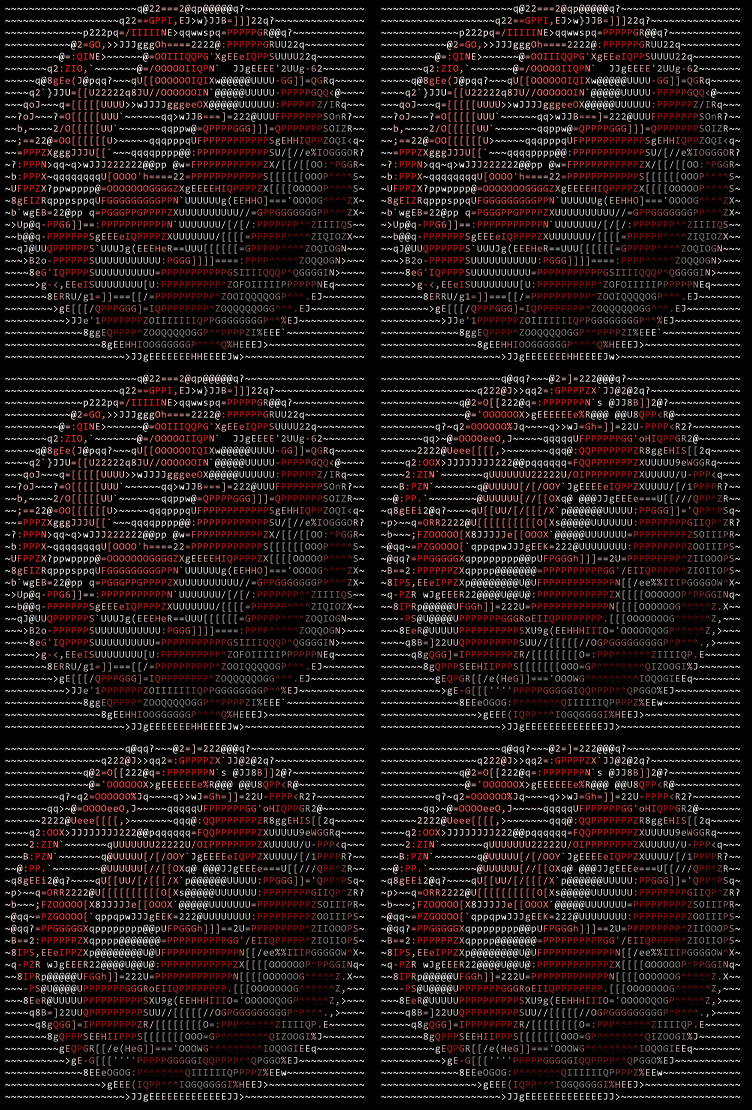
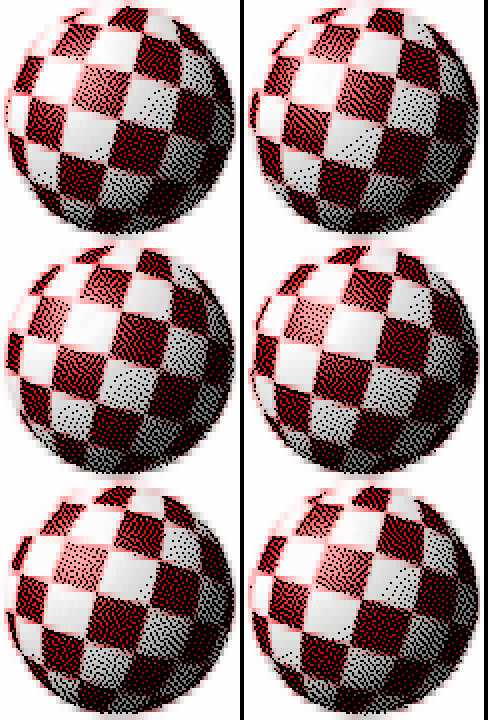
Spectre.Console integration for ConsoleImage - display ASCII art within Spectre layouts.


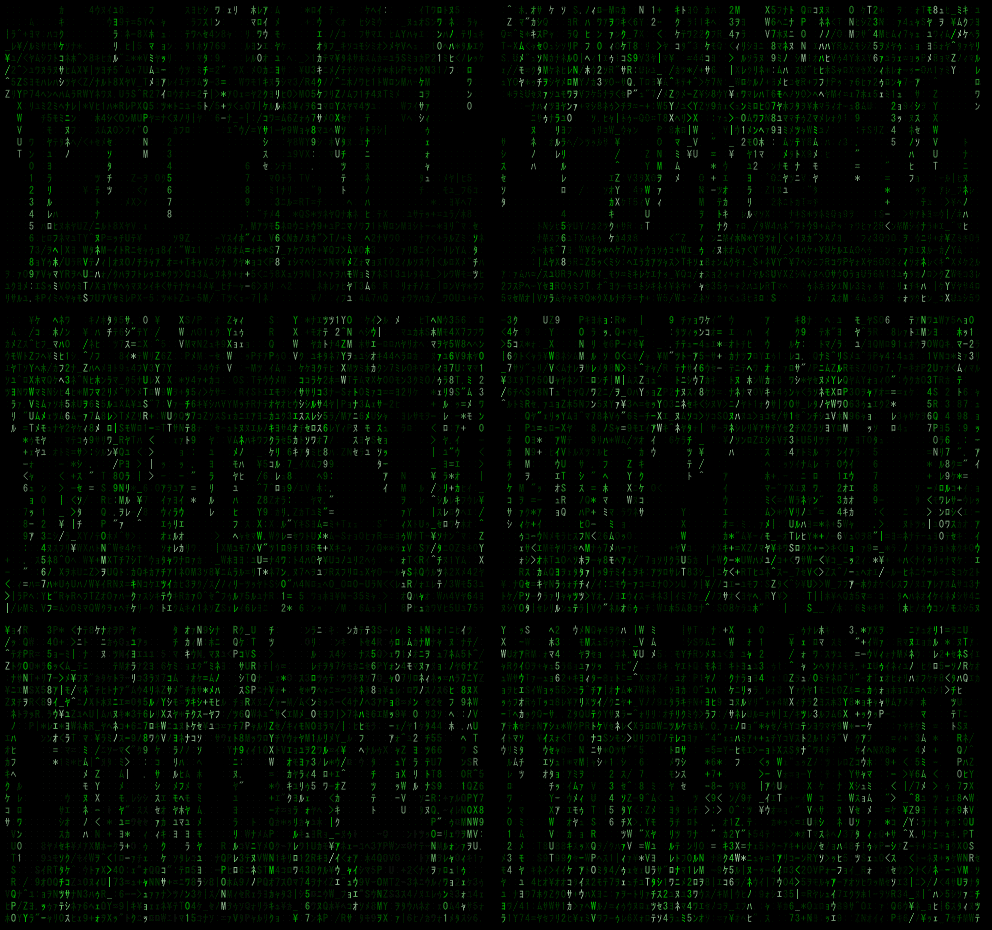
Render Modes
| ASCII | ColorBlocks | Braille | Matrix |
|---|---|---|---|
 |
 |
 |
 |
Features
- IRenderable implementations for all render modes
- Animated GIF support with Spectre's Live display
- Matrix digital rain effect with animations
- Composable with Spectre panels, tables, and layouts
Quick Start
using ConsoleImage.Spectre;
using Spectre.Console;

// Static images
AnsiConsole.Write(new AsciiImage("photo.jpg"));
AnsiConsole.Write(new ColorBlockImage("photo.jpg"));
AnsiConsole.Write(new BrailleImage("photo.jpg"));
AnsiConsole.Write(new MatrixImage("photo.jpg"));
Renderable Classes
AsciiImage
Shape-matched ASCII characters with optional color.
using ConsoleImage.Core;
using ConsoleImage.Spectre;

var options = new RenderOptions { MaxWidth = 80, UseColor = true };
var image = new AsciiImage("photo.jpg", options);
AnsiConsole.Write(image);

// Or from pre-rendered frame
using var renderer = new AsciiRenderer(options);
var frame = renderer.RenderFile("photo.jpg");
AnsiConsole.Write(new AsciiImage(frame));
ColorBlockImage
Unicode half-blocks for 2x vertical resolution.
var image = new ColorBlockImage("photo.jpg", new RenderOptions { MaxWidth = 80 });
AnsiConsole.Write(image);
BrailleImage
2x4 dot patterns for highest resolution.
var image = new BrailleImage("photo.jpg", new RenderOptions { MaxWidth = 80 });
AnsiConsole.Write(image);
MatrixImage
Digital rain effect overlay.
var matrixOpts = new MatrixOptions
{
    BaseColor = new Rgba32(0, 255, 0, 255),  // Classic green
    Density = 0.5f
};
var image = new MatrixImage("photo.jpg", matrixOptions: matrixOpts);
AnsiConsole.Write(image);
Animated GIFs
AnimatedImage
Plays GIFs with Spectre's Live display.
using ConsoleImage.Spectre;

// Play animated GIF (any mode)
var animation = new AnimatedImage("cat.gif", AnimationMode.Braille);
await animation.PlayAsync(cancellationToken);

// With loop control
await animation.PlayAsync(loopCount: 3);

// Manual frame control
await AnsiConsole.Live(animation)
    .StartAsync(async ctx =>
    {
        while (!token.IsCancellationRequested)
        {
            animation.TryAdvanceFrame();
            ctx.Refresh();
            await Task.Delay(16);
        }
    });
AnimatedMatrixImage
Continuous Matrix rain animation.
var animation = new AnimatedMatrixImage("photo.jpg", frameCount: 200);
await animation.PlayAsync(cancellationToken);
Animation Modes
public enum AnimationMode
{
    Ascii,       // Shape-matched characters
    ColorBlock,  // Unicode half-blocks
    Braille,     // 2x4 dot patterns
    Matrix       // Digital rain effect
}
Composing with Spectre Layouts
// In a panel
var panel = new Panel(new AsciiImage("photo.jpg"))
{
    Header = new PanelHeader("My Image"),
    Border = BoxBorder.Rounded
};
AnsiConsole.Write(panel);

// In a table
var table = new Table();
table.AddColumn("ASCII");
table.AddColumn("Blocks");
table.AddRow(
    new AsciiImage("photo.jpg", new RenderOptions { MaxWidth = 40 }),
    new ColorBlockImage("photo.jpg", new RenderOptions { MaxWidth = 40 })
);
AnsiConsole.Write(table);

// In columns
AnsiConsole.Write(new Columns(
    new AsciiImage("a.jpg"),
    new BrailleImage("b.jpg")
));
RenderOptions
var options = new RenderOptions
{
    MaxWidth = 80,           // Maximum width
    MaxHeight = 40,          // Maximum height
    UseColor = true,         // Enable ANSI colors
    CharacterAspectRatio = 0.5f,  // Terminal char width/height
    ContrastPower = 2.5f,    // Contrast enhancement
    Gamma = 0.65f            // Gamma correction
};
Related Packages
- mostlylucid.consoleimage - Core rendering (dependency)
- mostlylucid.consoleimage.video - Video playback
License
Public domain - UNLICENSE
| Product | Versions Compatible and additional computed target framework versions. |
|---|---|
| .NET | net10.0 is compatible. net10.0-android was computed. net10.0-browser was computed. net10.0-ios was computed. net10.0-maccatalyst was computed. net10.0-macos was computed. net10.0-tvos was computed. net10.0-windows was computed. |
Compatible target framework(s)
Included target framework(s) (in package)
Learn more about Target Frameworks and .NET Standard.
-
net10.0
- mostlylucid.consoleimage (>= 4.5.1)
- Spectre.Console (>= 0.54.0)
NuGet packages
This package is not used by any NuGet packages.
GitHub repositories
This package is not used by any popular GitHub repositories.
| Version | Downloads | Last Updated |
|---|---|---|
| 4.5.1 | 97 | 2/1/2026 |
| 4.5.0 | 91 | 2/1/2026 |
| 4.5.0-rc0 | 87 | 2/1/2026 |
| 4.5.0-alpha5 | 80 | 2/1/2026 |
| 4.5.0-alpha2 | 83 | 2/1/2026 |
| 4.5.0-alpha1 | 82 | 2/1/2026 |
| 4.5.0-alpha0 | 81 | 2/1/2026 |
| 4.1.2 | 98 | 1/26/2026 |
| 4.1.2-rc4 | 86 | 1/26/2026 |
| 4.1.2-rc3 | 82 | 1/26/2026 |
| 4.1.2-rc2 | 82 | 1/26/2026 |
| 4.1.2-rc1 | 82 | 1/26/2026 |
| 4.1.2-rc0 | 85 | 1/26/2026 |
| 4.1.1-alpha2 | 81 | 1/26/2026 |
| 4.1.1-alpha1 | 81 | 1/26/2026 |
| 4.1.1-alpha0 | 82 | 1/26/2026 |
| 4.1.0-alpha3 | 81 | 1/26/2026 |
| 4.1.0-alpha2 | 82 | 1/25/2026 |
| 4.1.0-alpha1 | 82 | 1/25/2026 |
| 4.1.0-alpha0 | 88 | 1/25/2026 |
Loading failed