XenoAtom.Terminal
2.2.0
Prefix Reserved
dotnet add package XenoAtom.Terminal --version 2.2.0
NuGet\Install-Package XenoAtom.Terminal -Version 2.2.0
<PackageReference Include="XenoAtom.Terminal" Version="2.2.0" />
<PackageVersion Include="XenoAtom.Terminal" Version="2.2.0" />
<PackageReference Include="XenoAtom.Terminal" />
paket add XenoAtom.Terminal --version 2.2.0
#r "nuget: XenoAtom.Terminal, 2.2.0"
#:package XenoAtom.Terminal@2.2.0
#addin nuget:?package=XenoAtom.Terminal&version=2.2.0
#tool nuget:?package=XenoAtom.Terminal&version=2.2.0
XenoAtom.Terminal 

<img align="right" width="256px" height="256px" src="https://raw.githubusercontent.com/XenoAtom/XenoAtom.Terminal/main/img/XenoAtom.Terminal.png">
XenoAtom.Terminal is a modern replacement for System.Console designed for TUI/CLI apps: serialized output, rich ANSI/markup rendering, unified input events, and deterministic tests.
🚀 Quick start
using XenoAtom.Terminal;

Terminal.WriteLine("Hello");
Terminal.WriteMarkup("[bold green]Hello[/] [gray]world[/]!");
✨ Features
- Console-compatible API surface: Title, cursor, window,
ReadKey/ReadLine-style workflows - Output (ANSI-safe):
- Serialized writers prevent interleaved escape sequences across threads
- Atomic writes for multi-step output without tearing
- Markup + ANSI styling (powered by XenoAtom.Ansi)
- Custom markup tokens via
Terminal.MarkupStyles/Terminal.SetMarkupStyle - Graphics capability detection via
Terminal.Graphicsand optional image output throughXenoAtom.Terminal.Graphics(Kitty, iTerm2, Sixel), including direct-output fallback text, optional cell reservation, encoded image caching, Sixel RGB332 fast palette mode, and real-time frame source notifications
- Input (unified events):
- Single event stream for keys, text, mouse, resize, signals
- Extended key modifiers through native Windows console input or probed Kitty keyboard protocol (
Terminal.Capabilities.SupportsExtendedKeys/ExtendedKeyProtocol) - Async + cancellation-friendly APIs for TUI loops
- Interactive ReadLine editor:
- Cursor movement, mid-line insert/delete, word navigation/delete
- Grapheme cluster-aware editing (emoji/ZWJ/combining sequences)
- Undo/redo + reverse incremental history search
- Selection by keyboard (Shift) and mouse click/drag
- History stored on the
TerminalReadLineOptionsinstance (shareable, not global) - Completion + extensibility via custom key/mouse handlers (
TerminalReadLineController) - Clipboard-friendly shortcuts (Ctrl+C/Ctrl+X/Ctrl+V) when available
- Readable control-char helpers via
TerminalChar(e.g.TerminalChar.CtrlC) - Gesture formatting/parsing via
TerminalKeyGesture(e.g.CTRL+R) - Styled prompt (
PromptMarkup) + custom line rendering (MarkupRenderer)
- Scopes + state management:
- Reliable scopes: alternate screen, raw/cbreak mode, bracketed paste, mouse reporting, hide cursor
- State tracking: style/colors/decorations, title, cursor position/visibility, window size
- Clipboard: cross-platform text plus named clipboard formats (for example PNG images), including OSC 52 text fallback for remote shells
- CI + testing:
- CI-aware backend keeps colors when output is redirected
- In-memory backend for deterministic tests (capture output + inject events)
- Cross-platform + AOT: Windows Console + Unix (Linux/macOS),
net10.0+ and NativeAOT-friendly design - Unix terminfo detection: uses terminfo + environment hints for colors (16/256/truecolor) and related capabilities (alternate screen/cursor visibility)
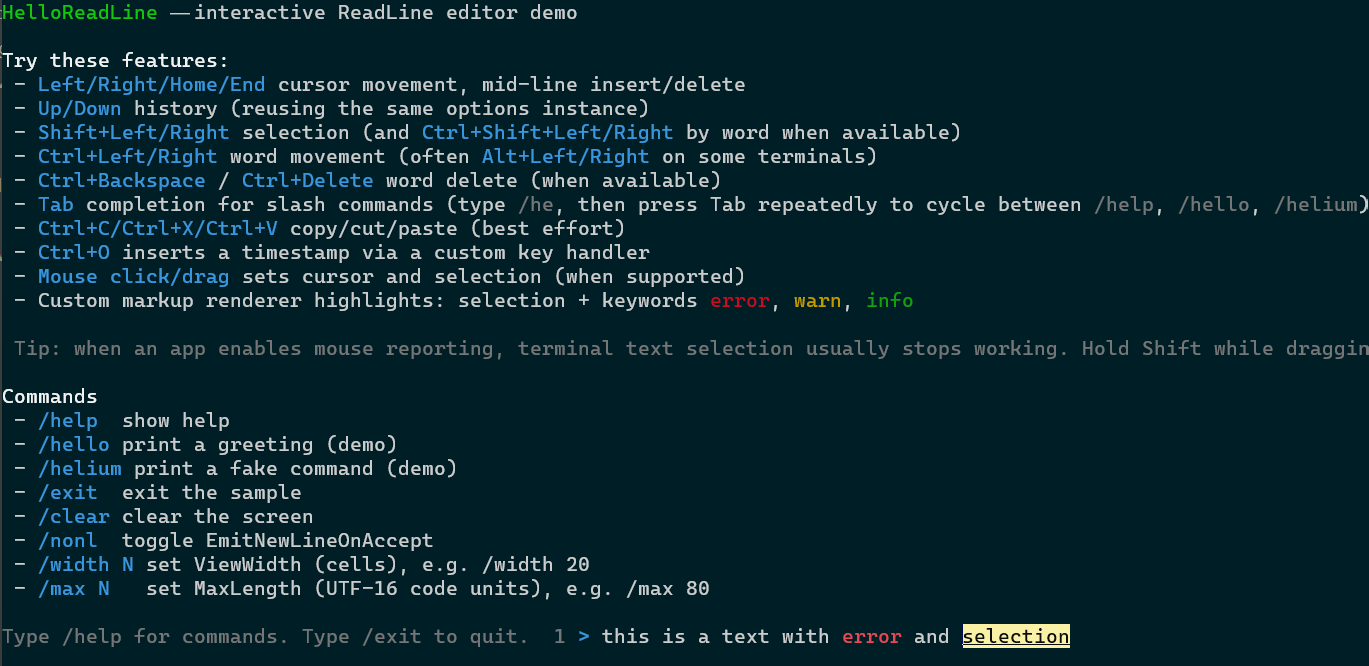
Screenshot of the interactive sample HelloReadLine demo:
XenoAtom.Terminal is a terminal API, not a widget/UI framework. It provides safe I/O, terminal state/scopes, and input events; higher-level libraries can build screen buffers, widgets, and layouts on top.
📖 User Guide
For more details on how to use XenoAtom.Terminal, please visit the user guide.
🧪 Sample
samples/HelloImagedisplays a small markup header and a sample image with terminal graphics.samples/HelloTerminalprints all input events (key/mouse/resize/text/signal) and demonstrates scopes.samples/HelloReadLinedemonstrates the interactiveReadLineeditor (history, selection, completion, and markup rendering).samples/LogTerminalprints colored pseudo log lines (timestamp/level/category/message) and is run in CI to validate ANSI output.
🪪 License
This software is released under the BSD-2-Clause license.
🤗 Author
Alexandre Mutel aka xoofx.
| Product | Versions Compatible and additional computed target framework versions. |
|---|---|
| .NET | net10.0 is compatible. net10.0-android was computed. net10.0-browser was computed. net10.0-ios was computed. net10.0-maccatalyst was computed. net10.0-macos was computed. net10.0-tvos was computed. net10.0-windows was computed. |
-
net10.0
- XenoAtom.Ansi (>= 1.7.0)
NuGet packages (6)
Showing the top 5 NuGet packages that depend on XenoAtom.Terminal:
| Package | Downloads |
|---|---|
|
XenoAtom.Terminal.UI
A modern, reactive retained-mode terminal UI framework for .NET |
|
|
XenoAtom.Terminal.UI.Extensions.Markdown
Markdown rendering for XenoAtom.Terminal.UI (powered by Markdig) |
|
|
XenoAtom.Terminal.UI.Extensions.Screenshot
Raster screenshot export for XenoAtom.Terminal.UI powered by SkiaSharp |
|
|
XenoAtom.Terminal.UI.Extensions.CodeEditor.TextMateSharp
TextMateSharp-backed syntax highlighting for XenoAtom.Terminal.UI CodeEditor and Markdown fenced code blocks. |
|
|
XenoAtom.Terminal.UI.Graphics
Terminal image controls and presenters for XenoAtom.Terminal.UI |
GitHub repositories (2)
Showing the top 2 popular GitHub repositories that depend on XenoAtom.Terminal:
| Repository | Stars |
|---|---|
|
xoofx/dotnet-releaser
Easily build, run tests and coverage, cross-compile, package and publish your .NET library or application to NuGet and GitHub.
|
|
|
XenoAtom/XenoAtom.Terminal.UI
XenoAtom.Terminal.UI is a modern, reactive retained-mode terminal UI framework for .NET
|
| Version | Downloads | Last Updated |
|---|---|---|
| 2.2.0 | 5,139 | 5/16/2026 |
| 2.1.1 | 1,270 | 5/14/2026 |
| 2.1.0 | 3,086 | 4/27/2026 |
| 2.0.1 | 842 | 4/25/2026 |
| 2.0.0 | 915 | 4/3/2026 |
| 1.8.0 | 1,831 | 3/6/2026 |
| 1.7.1 | 170 | 2/26/2026 |
| 1.7.0 | 1,400 | 2/14/2026 |
| 1.6.0 | 863 | 2/4/2026 |
| 1.5.1 | 242 | 1/25/2026 |
| 1.5.0 | 180 | 1/24/2026 |
| 1.4.0 | 139 | 1/24/2026 |
| 1.3.0 | 149 | 1/18/2026 |
| 1.2.0 | 154 | 1/16/2026 |
| 1.1.1 | 163 | 1/9/2026 |
| 1.1.0 | 164 | 1/7/2026 |
| 1.0.0 | 161 | 1/4/2026 |
| 1.0.0-preview.4 | 88 | 1/4/2026 |
| 1.0.0-preview.3 | 89 | 1/3/2026 |
| 1.0.0-preview.2 | 85 | 1/3/2026 |