XenoAtom.CommandLine.Terminal
2.0.2
Prefix Reserved
dotnet add package XenoAtom.CommandLine.Terminal --version 2.0.2
NuGet\Install-Package XenoAtom.CommandLine.Terminal -Version 2.0.2
<PackageReference Include="XenoAtom.CommandLine.Terminal" Version="2.0.2" />
<PackageVersion Include="XenoAtom.CommandLine.Terminal" Version="2.0.2" />
<PackageReference Include="XenoAtom.CommandLine.Terminal" />
paket add XenoAtom.CommandLine.Terminal --version 2.0.2
#r "nuget: XenoAtom.CommandLine.Terminal, 2.0.2"
#:package XenoAtom.CommandLine.Terminal@2.0.2
#addin nuget:?package=XenoAtom.CommandLine.Terminal&version=2.0.2
#tool nuget:?package=XenoAtom.CommandLine.Terminal&version=2.0.2
XenoAtom.CommandLine 
![coverage]()

<img align="right" width="256px" height="256px" src="https://raw.githubusercontent.com/XenoAtom/XenoAtom.CommandLine/main/img/icon.png">
XenoAtom.CommandLine is a lightweight, powerful and NativeAOT-friendly command-line parsing library for .NET
✨ Features
- Lightweight and NativeAOT-friendly (
net8.0+), with zero dependencies - Composition-first API: declare commands/options with collection initializers (no attributes, no base classes, no required "command classes")
- Auto-generated usage/help: "what you declare is what you get"
- Commands and sub-commands (e.g.
git commit -m "message") - Strict positional arguments by default (named args + remainder):
<arg>,<arg>?,<arg>*,<arg>+,<> - Fast parsing: optimized hot paths (no regex), low GC allocations
- Powerful option parsing
- Prefixes:
-,--,/(e.g.-v,--verbose,/v) - Aliases:
-v,--verbose - Bundled short options:
-abc==-a -b -c(tar/POSIX style) - Values: required
=/ optional:(e.g.-o,-oVALUE,-o:VALUE,-o=VALUE) - Multiple values:
-i foo -i bar - Key/value pairs:
-DMACRO=VALUE
- Prefixes:
- Built-ins:
--helpand--version - Environment variable fallbacks: bind options to env vars (with optional delimiter splitting)
- Option and argument validation: built-in validators (
Validate.Range,Validate.NonEmpty,Validate.OneOf, ...) - Option constraints: declare mutually-exclusive and requires relationships between options
- Test-friendly parse API: inspect parse results via
CommandApp.Parse(...)without invoking command actions - Pluggable output rendering: replace built-in help/error/version/license rendering via
CommandConfig.OutputFactory- Optional
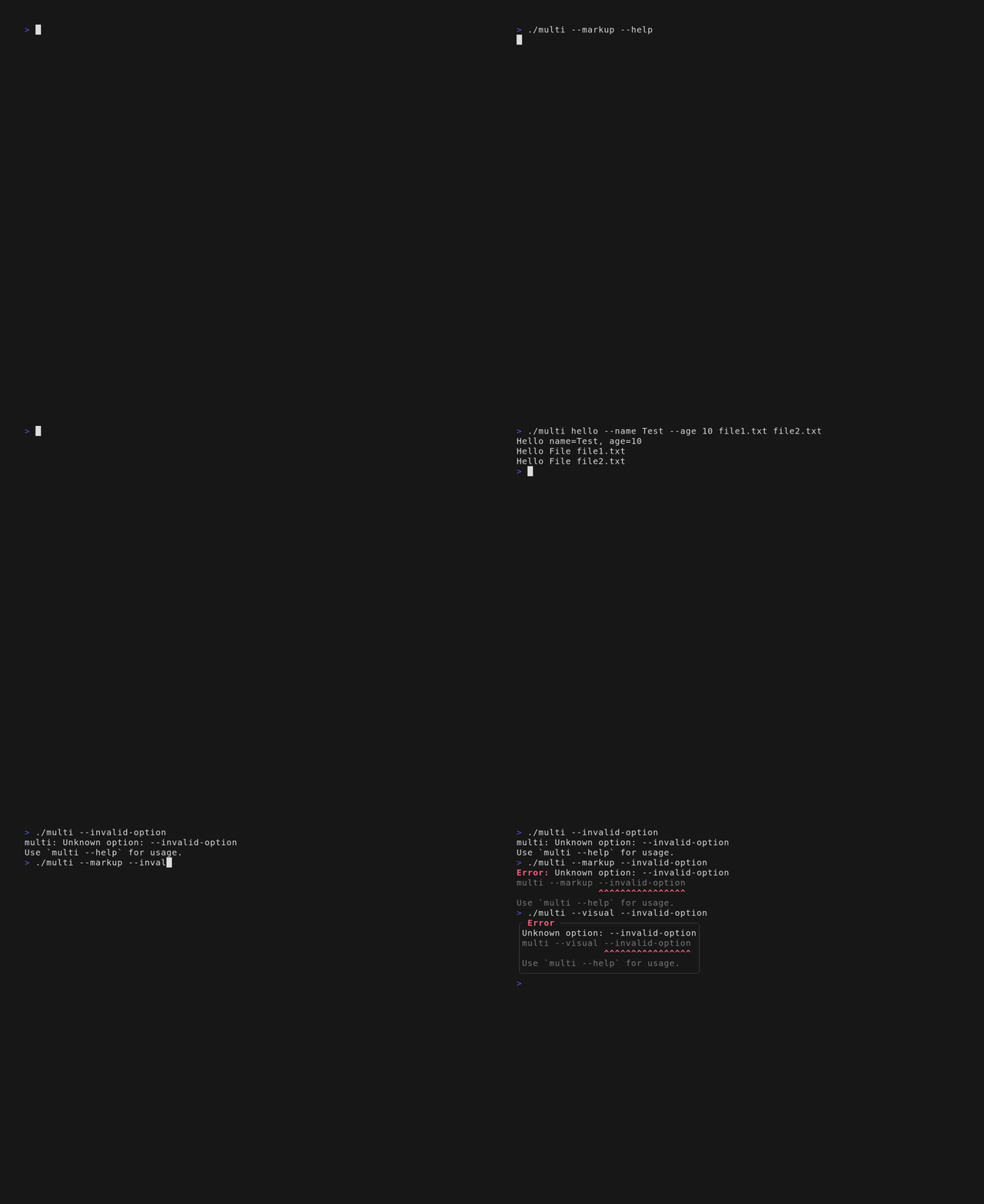
XenoAtom.CommandLine.Terminalpackage (net10.0) for colored markup output and Terminal.UI visual help (TerminalVisualCommandOutput,Command.ToHelpVisual()) - Inline Terminal.UI visuals can be declared directly in command initializers and are rendered by default, markup, and visual outputs
- Optional
- Better errors by default
- Strict unknown
-/--options (CommandConfig.StrictOptionParsing) - Helpful diagnostics: suggestions + "inactive in this context" hints
- Use
--to pass values starting with-(e.g.myexe -- -5);/mnt/homeis treated as a positional value (not an option)
- Strict unknown
- Response files:
@file.txt(supports quotes,#comments, and basic escaping on non-Windows) - Conditional groups: declare commands/options that are only active when a condition is met
- Shell completions: bash/zsh/fish/PowerShell via
CompletionCommands, token protocol, optional value completions (ValueCompleter)
🧪 Example
using System;
using XenoAtom.CommandLine;

const string _ = "";
string? name = null;
int age = 0;
List<(string, string?)> keyValues = new List<(string, string?)>();
List<string> messages = new List<string>();
List<string> commitFiles = new List<string>();

var commandApp = new CommandApp("myexe")
{
    new CommandUsage(),
    _,
    {"D:", "Defines a {0:name} and optional {1:value}", (key, value) =>
    {
        if (key is null) throw new CommandOptionException("The key is mandatory for a define", "D");
        keyValues.Add((key, value));
    }},
    {"n|name=", "Your {NAME}", v => name = v},
    {"a|age=", "Your {AGE}", (int v) => age = v},
    new HelpOption(),
    _,
    "Available commands:",
    new Command("commit")
    {
        _,
        "Options:",
        {"m|message=", "Add a {MESSAGE} to this commit", messages},
        new HelpOption(),
        _,
        "Arguments:",
        { "<files>*", "Files to commit", commitFiles },

        // Action for the commit command
        (ctx, _) =>
        {
            ctx.Out.WriteLine($"Committing with name={name}, age={age}");
            foreach (var message in messages)
            {
                ctx.Out.WriteLine($"Commit message: {message}");
            }
            foreach (var file in commitFiles)
            {
                ctx.Out.WriteLine($"Commit file: {file}");
            }
            return ValueTask.FromResult(0);
        }
    },
    // Default action if no command is specified
    (ctx, _) =>
    {
        ctx.Out.WriteLine($"Hello {name}! You are {age} years old.");
        if (keyValues.Count > 0)
        {
            foreach (var keyValue in keyValues)
            {
                ctx.Out.WriteLine($"Define: {keyValue.Item1} => {keyValue.Item2}");
            }
        }

        return ValueTask.FromResult(0);
    }
};

await commandApp.RunAsync(args);
Notes:
CommandUsage()defaults toUsage: {NAME} {SYNTAX}and{SYNTAX}is derived from your declared options/commands/arguments.- Positional arguments are strict by default: declare
<arg>/<arg>?/<arg>*/<arg>+, or declare<>to forward remaining arguments to the command action. - Convenience helpers are available when not using collection initializers:
AddRemainder(...),AddSection(...), andAddText(...). - A command graph instance is intended for one invocation at a time (
RunAsync/Parseare not concurrent-safe on the same graph).
Running myexe --help will output:
Usage: myexe [options] <command>

  -D[=name:value]            Defines a name and optional value
  -n, --name=NAME            Your NAME
  -a, --age=AGE              Your AGE
  -h, -?, --help             Show this message and exit

Available commands:
  commit
Running myexe --name John -a50 will output:
Hello John! You are 50 years old.
Running myexe --name John -a50 -DHello -DWorld=121 will output:
Hello John! You are 50 years old.
Define: Hello =>
Define: World => 121
Running myexe commit --help will output:
Usage: myexe commit [options] <files>*

Options:
  -m, --message=MESSAGE      Add a MESSAGE to this commit
  -h, -?, --help             Show this message and exit

Arguments:
  <files>*                   Files to commit
Running myexe --name John -a50 commit --message "Hello!" --message "World!" will output:
Committing with name=John, age=50
Commit message: Hello!
Commit message: World!
🎨 Terminal / Visual Output
For richer CLI output, use the optional XenoAtom.CommandLine.Terminal package:
using XenoAtom.CommandLine;
using XenoAtom.CommandLine.Terminal;
using XenoAtom.Terminal.UI;
using XenoAtom.Terminal.UI.Controls;
using XenoAtom.Terminal.UI.Figlet;
using XenoAtom.Terminal.UI.Styling;

var app = new CommandApp("myexe", config: new CommandConfig
{
    OutputFactory = _ => new TerminalVisualCommandOutput()
})
{
    new CommandUsage(),
    new TextFiglet("XenoAtom")
        .Font(FigletPredefinedFont.Standard)
        .LetterSpacing(1)
        .TextAlignment(TextAlignment.Left)
        .Style(TextFigletStyle.Default with
        {
            ForegroundBrush = Brush.LinearGradient(
                new GradientPoint(0f, 0f),
                new GradientPoint(1f, 0f),
                [
                    new GradientStop(0f, Colors.DodgerBlue),
                    new GradientStop(0.5f, Colors.White),
                    new GradientStop(1f, Colors.Orange),
                ],
                mixSpaceOverride: ColorMixSpace.Oklab),
        }),
    "Options:",
    { "n|name=", "Your {NAME}", _ => { } },
    new HelpOption(),
    (ctx, _) => ValueTask.FromResult(0)
};
This package also provides command.ToHelpVisual(...) for embedding help in Terminal.UI apps.
For one-shot rendering, Terminal.Write(...) is lazily initialized and does not require an explicit terminal session.
📃 Documentation
See the website for documentation, API reference, and examples.
🏗️ Build
You need to install the .NET 10 SDK. Then from the root folder:
$ dotnet build src -c Release
🪪 License
This software is released under the BSD-2-Clause license.
It is a fork of the excellent NDesk.Options/Mono.Options with significant improvements and new features.
The license also integrate the original MIT license from Mono.Options.
🤗 Author
Alexandre Mutel aka xoofx.
| Product | Versions Compatible and additional computed target framework versions. |
|---|---|
| .NET | net10.0 is compatible. net10.0-android was computed. net10.0-browser was computed. net10.0-ios was computed. net10.0-maccatalyst was computed. net10.0-macos was computed. net10.0-tvos was computed. net10.0-windows was computed. |
-
net10.0
- XenoAtom.CommandLine (>= 2.0.2)
- XenoAtom.Terminal.UI (>= 1.1.1)
NuGet packages
This package is not used by any NuGet packages.
GitHub repositories (1)
Showing the top 1 popular GitHub repositories that depend on XenoAtom.CommandLine.Terminal:
| Repository | Stars |
|---|---|
|
lunet-io/lunet
A fast, modular static website generator
|
| Version | Downloads | Last Updated |
|---|---|---|
| 2.0.2 | 237 | 2/14/2026 |
| 2.0.1 | 97 | 2/14/2026 |
| 2.0.0 | 112 | 2/13/2026 |
| 2.0.0-preview.1 | 53 | 2/12/2026 |