Our.Umbraco.TrueCopy
18.0.0
dotnet add package Our.Umbraco.TrueCopy --version 18.0.0
NuGet\Install-Package Our.Umbraco.TrueCopy -Version 18.0.0
<PackageReference Include="Our.Umbraco.TrueCopy" Version="18.0.0" />
<PackageVersion Include="Our.Umbraco.TrueCopy" Version="18.0.0" />
<PackageReference Include="Our.Umbraco.TrueCopy" />
paket add Our.Umbraco.TrueCopy --version 18.0.0
#r "nuget: Our.Umbraco.TrueCopy, 18.0.0"
#:package Our.Umbraco.TrueCopy@18.0.0
#addin nuget:?package=Our.Umbraco.TrueCopy&version=18.0.0
#tool nuget:?package=Our.Umbraco.TrueCopy&version=18.0.0
TrueCopy for Umbraco




Copy a section of your site and have the links come with it.
Umbraco's built-in Copy duplicates a document and its descendants, but it copies property values verbatim. Every Content Picker, Multinode Treepicker, Multi URL Picker and rich-text internal link in the new pages still points back at the originals. Copy a site section to build a new one and you get a set of pages that all link into the old section, to be found and fixed by hand, page by page.
TrueCopy adds a True Copy… item to the document's tree menu. It performs the copy Umbraco already performs, then walks the copies and repoints every internal link whose target was itself part of the copy.
Links that point outside the copy are left exactly as they are — they are still correct — but they are counted and listed in the summary afterwards, because "this copy still links into the old tree" is the one thing an editor cannot see for themselves.
Umbraco's own Copy is untouched and behaves exactly as before.
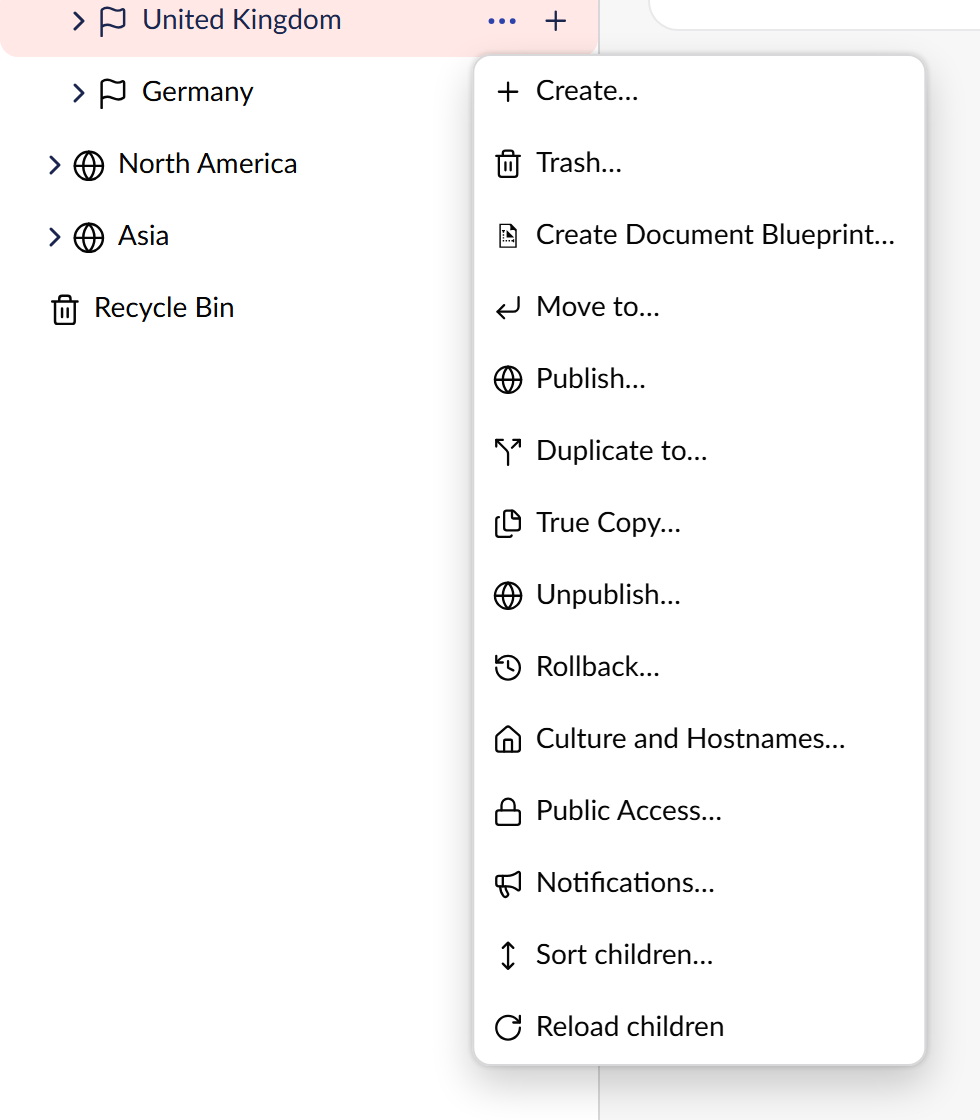
TrueCopy adds one item to the tree menu. Umbraco's built-in Duplicate to… stays exactly where it was, and keeps doing exactly what it did.
Requirements
- Umbraco 18.x (this package is deliberately pinned to
[18.2.0,19.0.0)) - .NET 10
Versions
The package major follows the Umbraco major, so the version tells you which one you need.
| Umbraco | Package | Branch |
|---|---|---|
| 18 | 18.x | main |
| 17 LTS | 17.x | v17/main |
1.0.0 was the first Umbraco 18 release, before this scheme; 18.0.0 is the same package.
Install
dotnet add package Our.Umbraco.TrueCopy
On Umbraco 17, ask for the 17.x line explicitly - a plain install picks the newest version, which targets Umbraco 18:
dotnet add package Our.Umbraco.TrueCopy --version "17.*"
No configuration, no composer to register, no appsettings section. Build and run; the action is there.
Using it
Hover a document in the Content tree, click its … button, and choose True Copy…. The dialog is Umbraco's own copy dialog — pick a destination, and choose whether to include descendants.
When it finishes you get a summary:
| Pages copied | how many documents the copy produced |
| Pages updated | how many of those had at least one link rewritten |
| Links repointed | how many individual references now point at a copy |
| Still pointing at the original | every link that targets a page outside the copy, with the page and property it lives on |
That last list is the point of the feature. It is not an error — a link out of the copied section is usually correct — but it is the thing you would otherwise have to go looking for.
Copies are saved as drafts, never published, so nothing goes live until you say so.
Permissions
TrueCopy authorizes per document, using the same permissions Umbraco's own copy uses: Duplicate on the source, and Create on the destination.
What it rewrites
| Property editor | What is repointed |
|---|---|
| Content Picker | the picked document |
| Multinode Treepicker | every document entry (media and member entries are left alone) |
| Multi URL Picker | internal links, including the legacy type/unique shape; external URLs untouched |
| Rich Text | {localLink:…} in all three historical forms — bare GUID, umb://document/… and the pre-v7 integer id |
| Block List / Block Grid / Single Block | recursively, into every nested block, including settings data |
Media links, member links, dictionary items and templates are out of scope.
A page that links to itself is repointed at its own copy — which means copying a single page on its own is a real operation, not a no-op.
Custom property editors
If you have a property editor that stores document references in its own shape, TrueCopy cannot rewrite it — and, because it cannot see inside it, cannot warn you about it either. Implementing one small interface fixes both:
public sealed class MyPickerRewriter : ILinkRewriter
{
    public bool CanRewrite(string propertyEditorAlias) => propertyEditorAlias == "My.Picker";

    public string? Rewrite(string value, RewriteContext context)
    {
        if (!DocumentUdi.TryParse(value, out Guid? target)) { return null; }

        Guid? copy = context.ResolveDocument(target.Value);
        return copy is null ? null : DocumentUdi.Format(copy.Value);
    }
}
Register it from your own composer:
builder.WithCollectionBuilder<LinkRewriterCollectionBuilder>().Append<MyPickerRewriter>();
See docs/extending.md for the full contract, including why Rewrite must
return null rather than the input when nothing changed, how to recurse into nested blocks, and how
to override a built-in rewriter.
Known limitations
- Copies are drafts. Nothing is published for you.
- Rewriting happens after the copy is committed. If a rewrite fails, the copy still exists; the failure is logged per property and the copy is left unchanged rather than half-written.
- A custom editor with no
ILinkRewriteris skipped silently — it cannot be reported, because nothing can see inside it. That is what the interface above is for. - Media, members, dictionary items and templates are not rewritten.
Documentation
- Development setup — clone, run, and work on the package
- How it works — the design, and the stored shape of every editor it touches
- Writing your own rewriter
- Changelog
License
MIT. See LICENSE.
| Product | Versions Compatible and additional computed target framework versions. |
|---|---|
| .NET | net10.0 is compatible. net10.0-android was computed. net10.0-browser was computed. net10.0-ios was computed. net10.0-maccatalyst was computed. net10.0-macos was computed. net10.0-tvos was computed. net10.0-windows was computed. |
-
net10.0
- Microsoft.AspNetCore.OpenApi (>= 10.0.12)
- Umbraco.Cms.Api.Common (>= 18.2.0 && < 19.0.0)
- Umbraco.Cms.Api.Management (>= 18.2.0 && < 19.0.0)
- Umbraco.Cms.Web.Common (>= 18.2.0 && < 19.0.0)
- Umbraco.Cms.Web.Website (>= 18.2.0 && < 19.0.0)
NuGet packages
This package is not used by any NuGet packages.
GitHub repositories
This package is not used by any popular GitHub repositories.
| Version | Downloads | Last Updated |
|---|---|---|
| 18.0.0 | 110 | 9/26/2026 |
| 17.0.0 | 98 | 9/26/2026 |
| 1.0.0 | 785 | 9/19/2026 |
| 1.0.0-rc.1 | 71 | 9/19/2026 |