Our.Umbraco.ErrorDashboard
18.0.0
dotnet add package Our.Umbraco.ErrorDashboard --version 18.0.0
NuGet\Install-Package Our.Umbraco.ErrorDashboard -Version 18.0.0
<PackageReference Include="Our.Umbraco.ErrorDashboard" Version="18.0.0" />
<PackageVersion Include="Our.Umbraco.ErrorDashboard" Version="18.0.0" />
<PackageReference Include="Our.Umbraco.ErrorDashboard" />
paket add Our.Umbraco.ErrorDashboard --version 18.0.0
#r "nuget: Our.Umbraco.ErrorDashboard, 18.0.0"
#:package Our.Umbraco.ErrorDashboard@18.0.0
#addin nuget:?package=Our.Umbraco.ErrorDashboard&version=18.0.0
#tool nuget:?package=Our.Umbraco.ErrorDashboard&version=18.0.0
Error Dashboard for Umbraco




The errors your visitors hit, not the ones your server noticed.
Server logs record what the server thinks it served. Error Dashboard asks visitors' browsers to report their own network failures, using the browser's built-in Network Error Logging. That moves the observation point into the browser, so it also catches failures your server never saw: certificate problems, connection resets, DNS failures, and errors on assets served from a CDN or edge.
It adds three dashboards to the Settings section, and emails subscribed users when a site's error volume goes abnormal.
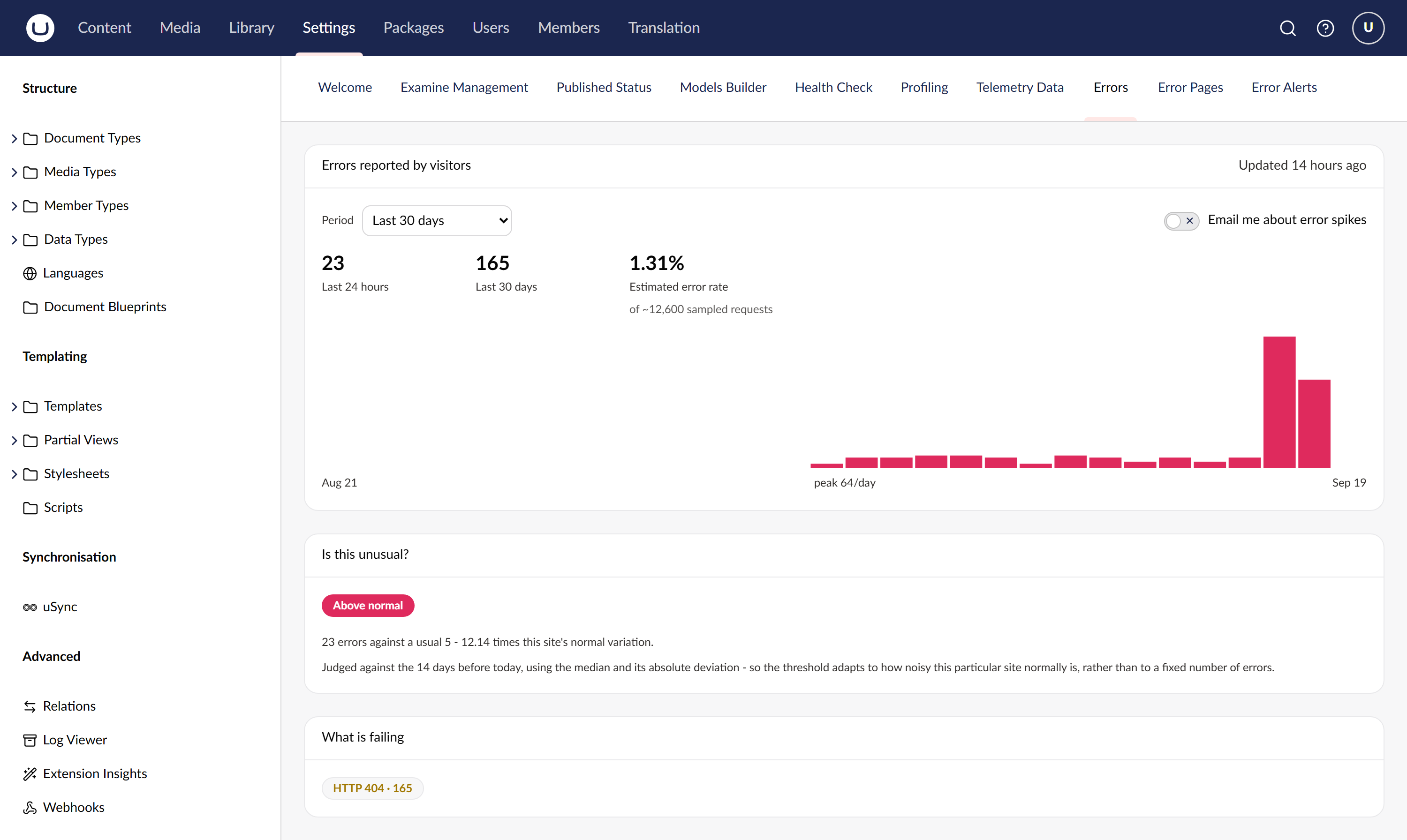
A fortnight of quiet days, then a spike — and underneath, whether that spike is actually unusual for this site, judged against its own history rather than a threshold you had to guess.
Read this before you trust the numbers
These are properties of Network Error Logging itself, not of this package, and they decide whether it is useful to you:
- Chromium only. Firefox and Safari send nothing, and neither do bots or non-browser clients. Every figure is a lower bound, not a count. The dashboards say so on their own faces.
- HTTPS only, with a valid certificate.
- Reports arrive late — seconds to minutes, occasionally longer.
- Soft 404s are invisible. A page returning
200with "not found" text produces no report. - Most real volume is missing assets, not missing pages.
If you need exact counts of every request, you want server-side logging. This is for seeing the failures that never reach your logs at all.
Requirements
- Umbraco 18.x (this package is deliberately pinned to
[18.2.0,19.0.0)) - .NET 10
- A site served over HTTPS with a valid certificate
- SQL Server or SQLite — both are supported, and no SQL is provider-specific
Versions
The package major follows the Umbraco major, so the version tells you which one you need.
| Umbraco | Package | Branch |
|---|---|---|
| 18 | 18.x | main |
| 17 LTS | 17.x | v17/main |
1.0.0 was the first Umbraco 18 release, before this scheme; 18.0.0 is the same package.
Install
dotnet add package Our.Umbraco.ErrorDashboard
On Umbraco 17, ask for the 17.x line explicitly - a plain install picks the newest version, which targets Umbraco 18:
dotnet add package Our.Umbraco.ErrorDashboard --version "17.*"
The five errorDashboard* tables are created on first boot by a package migration. That migration is
gated on Umbraco:CMS:Unattended:PackageMigrationsUnattended, which defaults to true — if your
environment turns it off, the tables are never created and the package silently collects nothing.
What you get
| Dashboard | What it shows |
|---|---|
| Overview | Errors per day and per hour, by host and error type, with the sampling caveats stated inline |
| Error Pages | The worst URLs, resolved back to the Umbraco content node where one exists, with the referring pages that led to them |
| Error Alerts | Alert history, and a self-service subscribe button so each user opts in for the hosts they care about |
Alerting
An alert fires when a host's daily error count is genuinely unusual against its own recent history — not when it crosses a number you had to guess.
The test uses the median and median absolute deviation of the trailing baseline rather than mean and standard deviation, because a mean is dragged around by exactly the spikes you are trying to detect. Several gates then suppress the alerts nobody wants: a minimum baseline length, a floor on the observed count (three errors after a fortnight of none is a statistical mountain and an operational non-event), a minimum ratio to the median, and a cooldown per host.
Email needs Umbraco:CMS:Global:Smtp configured with a From address and either a Host or a
PickupDirectoryLocation. Without it, Umbraco's sender quietly does nothing.
Configuration
Everything has a working default; the whole section is optional.
"ErrorDashboard": {
  "Enabled": true,
  "ReportPath": "/nel-report",
  "MaxAgeSeconds": 2592000,   // how long the browser caches the reporting policy
  "IncludeSubdomains": false,
  "FailureFraction": 1.0,     // share of failed requests reported
  "SuccessFraction": 0.0,     // >0 also samples successes, giving a traffic denominator
  "AllowedHosts": [],         // extra hosts whose reports are accepted; your own always are
  "MaxPayloadBytes": 65536,
  "MaxReportsPerPayload": 100,
  "RateLimitPerMinute": 60,
  "RawRetentionDays": 21,     // must exceed Alerts.BaselineDays
  "UrlStatRetentionDays": 90,
  "TopPathsPerDay": 200,
  "Alerts": {
    "Enabled": true,
    "BaselineDays": 14,
    "MinBaselineDays": 7,
    "ScoreThreshold": 3.5,
    "MinObserved": 10,        // ignore anything smaller, however anomalous
    "MinRatio": 2.0,
    "CooldownHours": 24
  }
}
Set SuccessFraction above zero if you want error rates rather than error counts — it samples
successful requests to give the denominator. It costs you extra reports from every visitor, so it is
off by default.
Privacy
The collector deliberately stores nothing identifying. There is no client IP and no user-agent; the
serverIp column is your address as the browser resolved it, not the visitor's. Query strings are
stripped from stored paths, because they are noisy and routinely carry personal data.
The reporting endpoint is public by necessity — browsers post to it unauthenticated — so it is rate limited, size capped, and accepts reports only for hosts Umbraco actually serves.
Documentation
- Development setup — clone, run, and seed the demo fixture
- How it works — the collector, the aggregation, and the alert statistics
- Changelog
License
MIT. See LICENSE.
| Product | Versions Compatible and additional computed target framework versions. |
|---|---|
| .NET | net10.0 is compatible. net10.0-android was computed. net10.0-browser was computed. net10.0-ios was computed. net10.0-maccatalyst was computed. net10.0-macos was computed. net10.0-tvos was computed. net10.0-windows was computed. |
-
net10.0
- Microsoft.AspNetCore.OpenApi (>= 10.0.12)
- Umbraco.Cms.Api.Common (>= 18.2.0 && < 19.0.0)
- Umbraco.Cms.Api.Management (>= 18.2.0 && < 19.0.0)
- Umbraco.Cms.Web.Common (>= 18.2.0 && < 19.0.0)
- Umbraco.Cms.Web.Website (>= 18.2.0 && < 19.0.0)
NuGet packages
This package is not used by any NuGet packages.
GitHub repositories
This package is not used by any popular GitHub repositories.
| Version | Downloads | Last Updated |
|---|---|---|
| 18.0.0 | 115 | 9/25/2026 |
| 17.0.0 | 103 | 9/25/2026 |
| 1.0.0 | 839 | 9/19/2026 |
| 1.0.0-rc.1 | 71 | 9/19/2026 |