Nullean.Argh.Hosting
0.16.0
dotnet add package Nullean.Argh.Hosting --version 0.16.0
NuGet\Install-Package Nullean.Argh.Hosting -Version 0.16.0
<PackageReference Include="Nullean.Argh.Hosting" Version="0.16.0" />
<PackageVersion Include="Nullean.Argh.Hosting" Version="0.16.0" />
<PackageReference Include="Nullean.Argh.Hosting" />
paket add Nullean.Argh.Hosting --version 0.16.0
#r "nuget: Nullean.Argh.Hosting, 0.16.0"
#:package Nullean.Argh.Hosting@0.16.0
#addin nuget:?package=Nullean.Argh.Hosting&version=0.16.0
#tool nuget:?package=Nullean.Argh.Hosting&version=0.16.0
Nullean.Argh
Build full-featured .NET CLIs without writing a parser.
Methods become commands, XML docs become help text, records become option sets. A Roslyn source generator emits parsing, routing, dispatch, and help into your assembly at build time — no reflection, no runtime overhead, trimming- and AOT-safe by default.
Write vanilla C# and get a fully functional CLI in return: rich --help output, shell tab-completions for bash, zsh, and fish, and a machine-readable JSON schema ready for agentic use cases — all without writing a single line of plumbing code for any of it.
Heavily Inspired by ConsoleAppFramework (Cysharp) — rewritten from scratch with a different feature set, but ConsoleAppFramework laid out the path for source-generated CLI's in .NET.
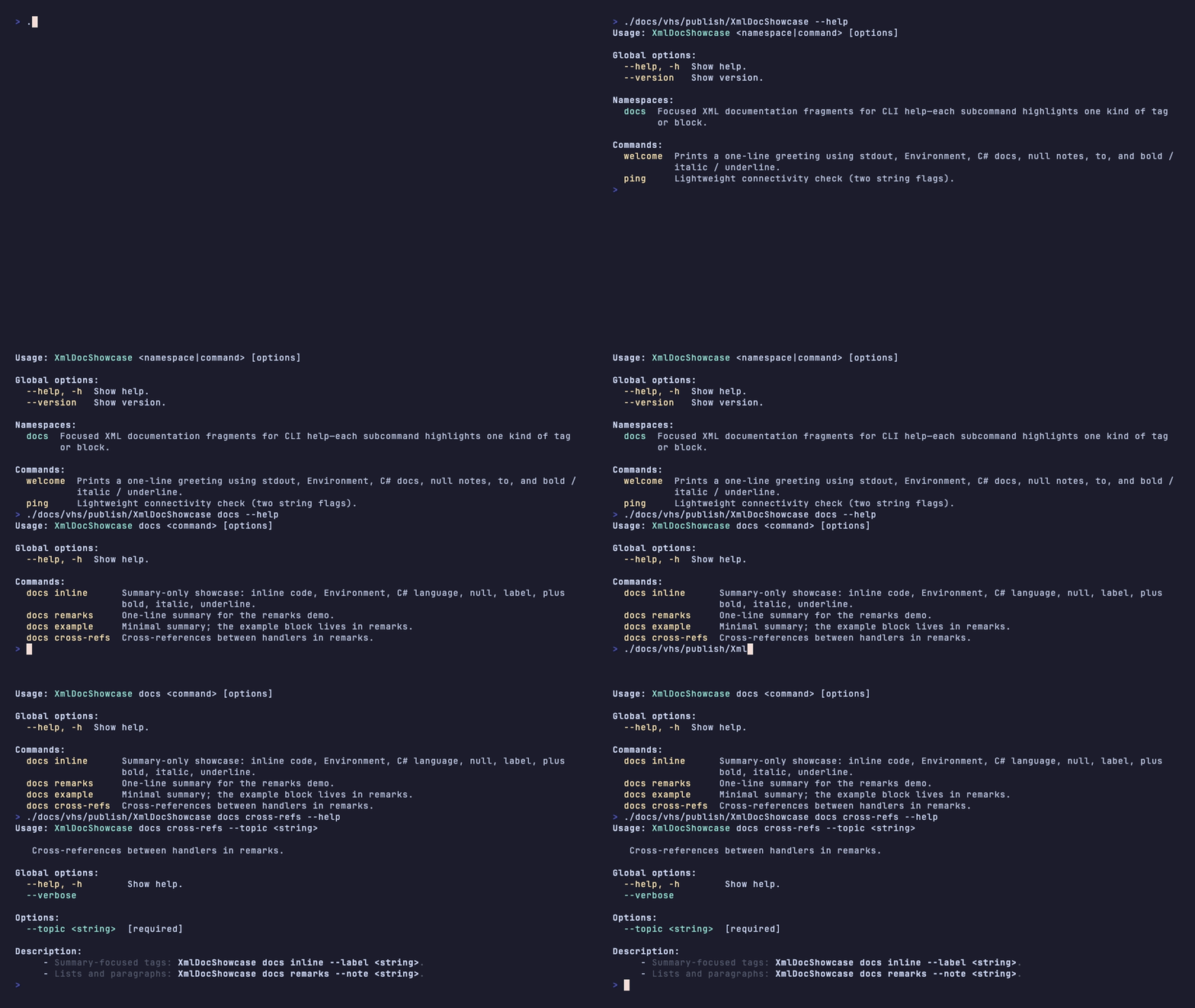
Table of contents
- Features
- Packages
- Quick start
- Registration model
- Namespaces
- Parameters and binding
- CancellationToken (Ctrl+C)
- Object binding
- Fuzzy matching
- Help and XML documentation
- Middleware
- Dependency injection
- Hosting
- Routing API
- Validation
- Shell completions
- Schema JSON
- License and links
Features
- XML docs are your help text
- Summaries, param descriptions, remarks, and
<example>blocks appear in--helpautomatically - No separate attribute layer, no string duplication
- Summaries, param descriptions, remarks, and
- Everything is generated C#
- Typed dispatch tree, option parsers, and help printers emitted directly into your assembly
- Read it, step through it in a debugger, ship it trimmed or AOT-compiled
MapGroup-style namespaces- Nested command groups with their own help pages and scoped option types
- Immediately familiar if you've used ASP.NET minimal APIs
- DTO binding with
[AsParameters]- Records and classes expand into flags without a custom bind loop
- Optional prefix (
[AsParameters("app")]) namespaces all long names
- Shell completions built-in
- Generated lookup tables for subcommands, namespaces, and flags — no extra package
- One install command per shell (bash, zsh, fish)
- Agent-ready schema
myapp __schemaemits a full JSON description of commands, options, summaries, and examples- Feed it to an LLM, a docs generator, or diff it in CI to catch breaking changes
- Fuzzy matching
- Typos produce actionable errors with the correct qualified path and a
--helpsuggestion - No silent no-match
- Typos produce actionable errors with the correct qualified path and a
- DataAnnotations validation
- Annotate parameters and DTO members with
[Range],[StringLength],[RegularExpression],[AllowedValues], and more [MinLength]/[MaxLength]on a collection validates item count; on a string validates string length- Constraints appear in
--help; violations print to stderr and exit with code 2 — no reflection, no runtime dependency
- Annotate parameters and DTO members with
- Filesystem path validation (for
FileInfo/DirectoryInfo)[Existing]/[NonExisting]— file vs. directory checks follow the parameter type (File.Exists/Directory.Exists, or both absent for non-existing)[ExpandUserProfile]— resolves~/beforeFileInfo/DirectoryInfoconstruction (Path.GetFullPathafter replacing the profile prefix)[RejectSymbolicLinks]— rejects symlink / reparse-point paths (combined with existence checks where needed)
- Cancellation on command handlers
- Add
CancellationTokento a handler signature — it is injected, not a flag; by default it tracks Ctrl+C (console cancel)
- Add
- Zero-dep or ME. native*
Nullean.Argh— noMicrosoft.Extensions.*dependencyNullean.Argh.Hosting— same registration surface, plugs intoIHostand DI
Packages
Which package do I need?
Nullean.Arghdependency free version.Nullean.Argh.Hostingisolated implementation of.Corethat fully integrates withMicrosoft.Extensions.*ecosystem.
Everything else is pulled in transitively, you do not reference .Core or .Interfaces manually for normal apps.
The two packages are isolated implementations and both only depend on .Core.
Nullean.Argh.CoreShared runtime pulled in by both user-facing packages. ContainsArghApp, runtime, help, and the embedded source generator. Not referenced directly in normal apps.Nullean.Argh.InterfacesReference directly only when building a shared library (e.g. reusable middleware or parsers) that other Argh-based apps will consume. Contains attributes,IArghBuilder, and middleware/parser contracts. Zero external dependencies.
Nullean.Argh.Generator is not a separate NuGet package — it ships embedded inside Nullean.Argh.Core under analyzers/dotnet/cs.
Console app
<ItemGroup>
  <PackageReference Include="Nullean.Argh" />
</ItemGroup>
Hosted app
<ItemGroup>
  <PackageReference Include="Nullean.Argh.Hosting" />
</ItemGroup>
Shared middleware / parser library
<ItemGroup>
  <PackageReference Include="Nullean.Argh.Interfaces" />
</ItemGroup>
Quick start
Console app (Nullean.Argh)
using Nullean.Argh;

var app = new ArghApp();
app.Map("hello", MyHandlers.SayHello);

return await app.RunAsync(args);
RunAsync dispatches into generated code in your assembly.
Hosted app (Nullean.Argh.Hosting)
Use when the app is already built on Microsoft.Extensions.Hosting and you want commands and middleware registered in DI with lifetimes, CancellationToken linked to the host, etc.
using Microsoft.Extensions.Hosting;
using Nullean.Argh.Hosting;

var builder = Host.CreateApplicationBuilder(args);

builder.Services.AddArgh(args, b =>
{
    b.Map("hello", MyHandlers.SayHello);
    // b.Map<MyCommandHandlers>(); b.UseGlobalOptions<MyGlobals>(); …
});

await builder.Build().RunAsync();
See AddArgh for exit behavior and hosted-service ordering.
Registration model
Three forms, same registration surface — all are fully supported. With class and method-group registration, XML doc comments on your handler methods flow directly into --help output. Lambdas skip that path.
// 1. Method group — direct typed dispatch.
app.Map("deploy", DeployHandlers.Run);

// 2. Lambda — convenient for simple one-liners.
app.Map("greet", (string name) => Console.WriteLine($"Hello, {name}!"));

// 3. Class — registers every public method on T as a command.
app.Map<StorageHandlers>();
| API | Purpose |
|---|---|
Map(name, handler) |
Bind a command name to a delegate. |
Map<T>() |
Register every public method on T as a command (typically a static class of handlers). |
MapRoot(handler) |
Default handler when no subcommand is given (at app root, or inside a MapNamespace callback for that namespace). |
Flat apps route app <command> …; hierarchical apps route app <namespace> … <command> …. The generator emits the switch/dispatch tree accordingly.
Namespaces
Group related commands under a shared path, scoped options, and their own help page — the same mental model as ASP.NET's MapGroup.
The idiomatic pattern is to put commands as methods on the class. Nested sub-groups are registered explicitly — there is no auto-discovery of nested types.
/// <summary>Commands under <c>storage</c>.</summary>
internal sealed class StorageCommands
{
    /// <summary>List objects in the bucket.</summary>
    public void List() => Console.WriteLine("storage:list");
}

/// <summary>Commands under <c>storage blob</c>.</summary>
internal sealed class BlobCommands
{
    /// <summary>Upload a file.</summary>
    /// <param name="path">-p,--path, Local file path.</param>
    public void Upload(string path) => Console.WriteLine($"storage:blob:upload:{path}");

    /// <summary>Download a file.</summary>
    /// <param name="key">-k,--key, Object key.</param>
    public void Download(string key) => Console.WriteLine($"storage:blob:download:{key}");
}

app.AddNamespace<StorageCommands>("storage", ns =>
{
    ns.AddNamespace<BlobCommands>("blob");
});
// Resulting paths:
//   storage list
//   storage blob upload --path ./file.txt
//   storage blob download --key backups/db.sql
The generator produces separate help printers for the namespace overview and each leaf command. Add CommandNamespaceOptions<T>() inside the callback to attach scoped options:
app.AddNamespace<StorageCommands>("storage", ns =>
{
    ns.CommandNamespaceOptions<StorageOptions>();
    ns.AddNamespace<BlobCommands>("blob");
});
Parameters and binding
Method parameters become CLI flags automatically. No attribute boilerplate for the common case.
Arguments (positional)
Mark a parameter with [Argument] to make it positional. Indices must start at 0 and be consecutive.
public static Task<int> Deploy([Argument] string environment) { … }
// myapp deploy production
Variadic positional — combine [Argument] with a T[] type (or params T[]) to collect all remaining tokens into an array. The variadic argument must be the last positional. Because C# requires params to be the last method parameter, a variadic positional can appear after flags:
// All remaining tokens become the array — zero items is valid.
public static void Copy([Argument] string dest, [Argument] params string[] files) { … }
// myapp copy ./out/ a.txt b.txt "path with spaces/c.txt"
// → dest="./out/", files=["a.txt", "b.txt", "path with spaces/c.txt"]

// Flags can appear before or after variadic tokens on the command line.
public static void Archive([Argument] params string[] files, bool verbose = false) { … }
// myapp archive a.zip b.zip --verbose   (verbose parsed as flag, the rest as files)

// Mixed: scalar positional first, then flags, then variadic (params must be last in C#).
public static void Tag([Argument] string target, bool force, [Argument] params string[] tags) { … }
// myapp tag main-branch --force tag1 tag2 tag3
Variadic positionals appear as <files...> / [<files...>] in --help and include a [variadic] annotation. Apply [MinLength(n)] or [MaxLength(n)] to validate the item count:
public static void Archive([Argument][MinLength(1)][MaxLength(20)] string[] files) { … }
// --help: <files...>   [variadic] [count: 1–20]
Flags (named options)
Parameters without [Argument] become --kebab-case long flags. A bool flag defaults to false; pass --flag to set it.
public static Task<int> Build(string outputDir, bool release = false) { … }
// myapp build --output-dir ./bin --release
Long name override
By default the CLI long name is derived from the C# parameter name (camelCase → kebab-case). Place a --long-name token before the description in an XML <param> tag to use a different primary name. Additional --names after the first become aliases. The derived name is dropped entirely once an explicit long name is specified.
/// <summary>Tag one or more resources.</summary>
/// <param name="tags">-t, --tag, Tags to apply.</param>
public static void Tag(string[] tags) { … }
// --tag a --tag b   (NOT --tags — derived name is dropped)
// -t a              (short opt also works)
/// <param name="outputDir">-o, --out, --output, Output directory.</param>
public static void Build(string outputDir) { … }
// --out ./bin        (primary)
// --output ./bin     (alias)
// -o ./bin           (short opt)
// --output-dir       (not recognized — derived name is dropped)
This also works on [AsParameters] properties, fields, and [AsParameters] primary-constructor parameters via their <summary> or <param> doc lines.
Supported types
| Category | Types |
|---|---|
| Primitives | string, int, long, double, float, decimal, bool, bool? |
| System | enum, FileInfo, DirectoryInfo, Uri |
| Collections | List<T>, T[] — repeated flag, [CollectionSyntax(Separator=",")] for a single comma-separated value, or [Argument] T[] / [Argument] params T[] for a variadic positional |
Collections accept the flag multiple times, or a single comma-separated value via [CollectionSyntax]:
public static Task<int> Deploy(string[] targets, [CollectionSyntax(Separator = ",")] string[] tags) { … }
// Repeated:   myapp deploy --targets web --targets api
// Separator:  myapp deploy --targets web,api --tags blue,green
Nullable bool — --flag / --no-flag pairs
A bool? flag generates both --flag (sets true) and --no-flag (sets false). Omitting either leaves the value null, letting you distinguish "not specified" from an explicit false. Help output shows --flag / --no-flag for nullable bools.
public static Task<int> Deploy(string env, bool? dryRun = null) { … }
// myapp deploy staging               → dryRun is null
// myapp deploy staging --dry-run     → dryRun is true
// myapp deploy staging --no-dry-run  → dryRun is false
DTO binding — [AsParameters]
A record or class parameter annotated with [AsParameters] expands its members into individual flags or positionals. Works with records (constructor parameters) and classes (public settable properties). Add a string argument to prefix all long names.
// Record — constructor parameters become flags
public record DeployOptions(string Environment, bool DryRun = false);

public static Task<int> Deploy([AsParameters] DeployOptions opts) { … }
// myapp deploy --environment staging --dry-run

// Class — public settable properties become flags
public class BuildOptions
{
    public string OutputDir { get; set; } = "";
    public bool Release { get; set; }
}

public static Task<int> Build([AsParameters] BuildOptions opts) { … }
// myapp build --output-dir ./bin --release

// Prefix — all long names get a common prefix
public record AppOptions(string Name, string Version = "");
public static Task<int> Configure([AsParameters("app")] AppOptions opts) { … }
// myapp configure --app-name foo --app-version 2
Custom parsing — IArgumentParser<T>
For types with no built-in support, implement IArgumentParser<T> and annotate the parameter:
public class SemVerParser : IArgumentParser<SemVer>
{
    public static bool TryParse(string value, out SemVer result) =>
        SemVer.TryParse(value, out result);
}

public static Task<int> Release([ArgumentParser(typeof(SemVerParser))] SemVer version) { … }
// myapp release 1.2.3
IArgumentParser<T> is in Nullean.Argh.Interfaces.
CancellationToken (Ctrl+C)
Add System.Threading.CancellationToken as a parameter of the command handler method (alongside flags and positionals). It is not parsed from the command line and does not appear in --help — the source generator injects the token the runtime uses for cooperative cancellation.
You can also add it on an [AsParameters] type as a primary constructor parameter or init property (same injection rules). Keep CLI-bound members first in declaration order: all [Argument] positionals must precede flags, and CancellationToken must not appear between a flag and a later positional (the usual pattern is to put the token last on the DTO).
- Console and
ArghApp: the token is cancelled when the user presses Ctrl+C (and on Windows, the console break signal). The process keeps running after cancel unless your handler exits; Argh only forwards cancellation to your code. Nullean.Argh.Hosting/AddArgh: the same console token is linked withIHostApplicationLifetime.ApplicationStopping, so the parameter also cancels when the host is shutting down.TryParseArgh/ generatedTryParseDto_*: injectedCancellationTokenmembers are set todefault— there is no host or console token in that API, so the value is non-cancellable.
public static async Task<int> Sync(
    string source,
    CancellationToken cancellationToken)
{
    await CopyTreeAsync(source, cancellationToken);
    return 0;
}
// myapp sync --source ./data   (CancellationToken is not a CLI option)

public record RunArgs(string Source, int Port, CancellationToken Ct);

public static async Task<int> Run([AsParameters] RunArgs args)
{
    await Task.Delay(1, args.Ct);
    return 0;
}
Object binding
Share state across commands without repeating parameters on every method signature.
Global options
public record GlobalOptions(bool Verbose = false);

app.UseGlobalOptions<GlobalOptions>();
app.Map("build", (GlobalOptions g) => { if (g.Verbose) … });
// myapp build --verbose
Globals are parsed before routing and available to every command.
Namespace options
Scoped to a namespace and its children. The options type must inherit the parent's options type — GlobalOptions at the root, or the enclosing namespace's options further down. The generator reports an error (AGH0004) if the chain is broken.
public record StorageOptions(string ConnectionString = "") : GlobalOptions;

app.MapNamespace<StorageHandlers>("storage", ns =>
{
    ns.UseNamespaceOptions<StorageOptions>();
    ns.Map("list", (StorageOptions o) => { … });
});
// myapp storage list --connection-string "…" --verbose
Parsing order in generated code: globals → namespace options along the path → command flags and positionals.
Combining with [AsParameters]
A command can extend a global or namespace options type and annotate it with [AsParameters] to inherit those flags alongside its own:
public record DeployOptions(string Environment, bool DryRun = false) : StorageOptions;

ns.Map("deploy", ([AsParameters] DeployOptions opts) => { … });
// myapp storage deploy --connection-string "…" --environment staging --dry-run
Note: commands under a namespace are required to declare the namespace options type as a parameter (enforced by analyzer AGH0021). Annotate the method with
[NoOptionsInjection]to opt out.
Fuzzy matching
Typos produce actionable errors with the correct qualified path and a --help suggestion:
$ myapp stoarge list
Error: unknown command or namespace 'stoarge'. Did you mean 'storage'?

Run 'myapp storage --help' for usage.
Run 'myapp --help' for usage.
Inside a namespace, the suggestion includes the full path (storage blob upload, not just upload).
Help and XML documentation
Write XML doc once; the generator reads it at build time and bakes the text into --help output. No .xml doc file is read at runtime — the generator accesses doc comments through the Roslyn compilation model, so GenerateDocumentationFile is not required for the usual developer inner loop or for routing/parsing/dispatch codegen.
Cross-assembly DTO types — if an
[AsParameters]DTO (record or class) lives in a separate project from the CLI entry point, the generator cannot access its source syntax at analysis time. It falls back to loading the companion.xmldocumentation file from disk. This means the DTO project must enable<GenerateDocumentationFile>true</GenerateDocumentationFile>for short-alias declarations (e.g./// <summary>-p, Path to the docs root.</summary>) and member descriptions to flow into--helpoutput and short-flag parsing. Without it, short aliases are silently ignored and help text is empty for that DTO's members. Handler parameters and[AsParameters]types defined in the same project as the CLI are always resolved from source and are not affected.
Test projects referencing Argh apps
If a test assembly uses InternalsVisibleTo to see internal members of a referenced CLI project, older stacks sometimes hit CS0436 because the same generated root type name could appear in more than one compilation. The generator emits a stable, per-assembly generated root type name so those collisions should not occur. If you must strip analyzers from a specific project (rare), use ExcludeAssets on the analyzer package reference or an MSBuild target that removes Nullean.Argh.Generator analyzers from that project only.
Commands
Document handler methods normally:
/// <summary>Deploy the application to the target environment.</summary>
/// <remarks>
/// Runs pre-flight checks before deploying. Pass <c>--dry-run</c> to
/// validate without making changes. See also <see cref="Rollback"/>.
/// </remarks>
/// <param name="environment">Target environment (staging, production).</param>
/// <param name="dryRun">Validate only — make no changes.</param>
public static Task<int> Deploy(string environment, bool dryRun = false) { … }
The generated myapp deploy --help output:
Usage: myapp deploy <environment> [options]

   Deploy the application to the target environment.

Global options:
  -h, --help              Show help.

Arguments:
  <environment>           Target environment (staging, production).

Options:
  --dry-run               Validate only — make no changes.

Notes:
  Runs pre-flight checks before deploying. Pass --dry-run to validate
  without making changes. See also: myapp rollback <args>
Namespaces
Put the <summary> (and optionally <remarks>) on the class T passed to MapNamespace<T>. The generator uses it as the namespace description in myapp storage --help and in the root command listing:
/// <summary>Manage blob and file storage resources.</summary>
/// <remarks>
/// Requires a storage connection string via <c>--connection-string</c>
/// or the <c>STORAGE_CONN</c> environment variable.
/// </remarks>
internal sealed class StorageCommands { … }

app.MapNamespace<StorageCommands>("storage", ns => { … });
Root app
The root myapp --help shows a description in two ways:
UseCliDescription — for apps with no default root command, set a plain one-liner shown beneath the Usage: line:
app.UseCliDescription("Manage and deploy your application's cloud resources.");
app.MapNamespace<StorageCommands>("storage", ns => { … });
UseCliDescription is on IArghRootBuilder (not IArghBuilder), so it is intentionally unavailable inside MapNamespace configure callbacks. It cannot be combined with MapRoot; the generator reports AGH0023 if both are present.
MapRoot — when you also want a default handler at the root, put the XML doc on that handler method. The summary and remarks become the app-level overview:
/// <summary>Manage and deploy your application's cloud resources.</summary>
/// <remarks>
/// Run <c>myapp <command> --help</c> for details on any command.
/// </remarks>
public static Task<int> Root() { … }
app.MapRoot(Root);
In remarks, <paramref> to a flag becomes --name; <see cref> to another handler becomes that command's usage synopsis. See examples/XmlDocShowcase for the full tag inventory.
Middleware
Cross-cutting logic — auth checks, logging, timing — lives in middleware and stays out of handler methods.
public class TimingMiddleware : ICommandMiddleware
{
    public async Task InvokeAsync(CommandContext ctx, Func<Task> next)
    {
        var sw = Stopwatch.StartNew();
        await next();
        Console.Error.WriteLine($"{ctx.CommandPath}: {sw.ElapsedMilliseconds}ms");
    }
}

// Global — runs for every command
app.UseMiddleware<TimingMiddleware>();

// Per-handler — attribute on the method
[MiddlewareAttribute<TimingMiddleware>]
public static Task<int> Deploy(string environment) { … }
ICommandMiddleware receives CommandContext with CommandPath, Args, ExitCode, and CancellationToken. Middleware does not run for --help, --version, __completion, __complete, or __schema. The pipeline is wired in generated code — not a runtime delegate chain. Each middleware call is emitted as a direct invocation in the generated dispatch method; there is no runtime list to build or iterate.
Dependency injection
When using Nullean.Argh.Hosting, DI integration is fully transparent — register your handler and middleware types in the service collection and the generated code resolves them automatically. No manual ServiceProvider wiring needed.
For advanced use or when not using Nullean.Argh.Hosting: ArghServices.ServiceProvider is typed as System.IServiceProvider and set when running under a host. For Map<T>() instance methods and UseMiddleware<T>() / [MiddlewareAttribute<T>], generated code resolves via GetService(typeof(T)) when a provider is present; otherwise it falls back to new T().
// Handler with an injected service
public class DeployCommands(IDeployService deployer)
{
    public async Task<int> Run(string environment)
    {
        await deployer.DeployAsync(environment);
        return 0;
    }
}

// Registration — service must be in the DI container
builder.Services.AddScoped<IDeployService, DeployService>();
builder.Services.AddArgh(args, b => b.Map<DeployCommands>());
For native AOT / trimming, register handler and middleware types explicitly in DI so required constructors are preserved.
Hosting
Nullean.Argh.Hosting plugs the same command registration model into IHost and Microsoft.Extensions.DependencyInjection — no custom bootstrapping or glue code needed.
services.AddArgh(args, b => { … }) (AddArgh) mirrors the same Map / Map<T> / UseGlobalOptions / UseNamespaceOptions / UseMiddleware / MapNamespace surface as ArghApp, and additionally lets you control DI lifetimes:
using Microsoft.Extensions.DependencyInjection;

builder.Services.AddArgh(args, b =>
{
    b.MapScoped<DeployCommands>();       // resolved per command invocation
    b.UseMiddleware<AuditMiddleware>(ServiceLifetime.Singleton);   // single instance for the process
    b.Map("ping", PingHandlers.Run);    // static method — no DI lifetime needed
    b.UseGlobalOptions<GlobalOptions>();
});
IArghHostingBuilder API |
Purpose |
|---|---|
Map<T>() |
Register T as transient and add all its public methods as commands. |
MapTransient<T>() / MapScoped<T>() / MapSingleton<T>() |
Same, with an explicit DI lifetime. |
UseGlobalOptions<T>() |
Register T as the global options type and add it to DI. |
UseMiddleware<TMiddleware>() |
Register middleware as transient. |
UseMiddleware<TMiddleware>(lifetime) |
Register middleware with an explicit DI lifetime. |
AddArgh registers a hosted service that runs ArghRuntime.RunAsync(args) and then calls Environment.Exit with the exit code — the host does not continue after the CLI completes.
CancellationToken on command handlers: see CancellationToken (Ctrl+C) — with hosting, the injected token is linked to Ctrl+C and IHostApplicationLifetime.ApplicationStopping.
Register AddArgh before other IHostedService registrations if you want the CLI (including --help) to run first and exit without starting later background work. Services registered before AddArgh still get StartAsync on every invocation.
Intrinsic commands and log suppression
When the host starts up, configuration providers, logging infrastructure, and other services initialize before the CLI runs. This means commands like --help or --version can be preceded by startup noise in the output.
AddArgh addresses this automatically: if the invocation is an intrinsic command — a built-in (--help, -h, --version, __schema, __completion, __complete) or a user-defined method marked [CommandIntrinsic] — it configures logging to suppress entries below Warning before the host builds. No configuration needed.
User-defined intrinsic commands — mark any handler method [CommandIntrinsic] to opt it into the same log suppression. These commands still run through the full host and DI because they may need services:
public class InfoCommands
{
    private readonly IVersionService _version;
    public InfoCommands(IVersionService version) => _version = version;

    /// <summary>Print runtime version and environment info.</summary>
    [CommandIntrinsic]
    [CommandName("info")]
    public void Info() => Console.WriteLine(_version.Current);
}

builder.Services.AddArgh(args, b => b.Map<InfoCommands>());
// dotnet run -- info  →  no startup log noise
Override the suppression threshold — the default minimum level is Warning (suppresses Information and below). Override it on the hosting builder:
builder.Services.AddArgh(args, b =>
{
    b.IntrinsicLogLevelMinimum(LogLevel.Trace);   // re-enable all logs for intrinsic commands
    b.Map<InfoCommands>();
});
Expert: pre-host fast path — if host startup is expensive and you want zero overhead for the built-in intrinsic commands, call ArghApp.TryArghIntrinsicCommand(args) before Host.CreateApplicationBuilder. If the invocation is a built-in, the command runs and the process exits immediately — the host is never constructed. For user-defined [CommandIntrinsic] commands (which need DI), log suppression is the right tool instead.
// Built-ins exit here with no host overhead: --help, --version, __schema, etc.
await ArghApp.TryArghIntrinsicCommand(args);

var builder = Host.CreateApplicationBuilder(args);
builder.Services.AddArgh(args, b => { b.Map<InfoCommands>(); });
await builder.Build().RunAsync();
If TryArghIntrinsicCommand is omitted, there is no breakage — the built-ins still work correctly; they are just handled inside the hosted service with log suppression active.
Routing API
ArghParser.Route(args) returns a RouteMatch (CommandPath, RemainingArgs) without invoking handlers — useful for tests and tooling.
Validation
Annotate parameters (or [AsParameters] members) with standard System.ComponentModel.DataAnnotations attributes, optionally combined with Nullean.Argh filesystem attributes where the parameter type is FileInfo, FileInfo?, DirectoryInfo, or DirectoryInfo?. The source generator reads the attributes at build time and emits inline validation checks — no reflection, no Validator.ValidateObject call, AOT-safe. Constraint hints appear in --help after the description; failures print to stderr and exit 2.
public static void Deploy(
    [Range(1, 65535)]                          int port,
    [StringLength(64, MinimumLength = 2)]      string name,
    [AllowedValues("dev", "staging", "prod")]  string env,
    [RegularExpression(@"^[a-z0-9\-]+$")]      string slug,
    [UriScheme("https")]                       Uri endpoint)
{ … }

// FileInfo / DirectoryInfo — compose DataAnnotations (e.g. [FileExtensions]) with Argh path traits:
public static Task<int> Lint(
    [Existing][FileExtensions(Extensions="json")][RejectSymbolicLinks] FileInfo manifest,
    [ExpandUserProfile][Existing] DirectoryInfo outDir)
{ … }
$ myapp deploy --port 99999
Error: --port: value must be between 1 and 65535.
Run 'myapp deploy --help' for usage.

$ myapp deploy --help
Options:
  --port <int>       [required] [range: 1–65535]
  --name <string>    [required] [length: 2–64]
  --env <string>     [required] [allowed: dev|staging|prod]
  --slug <string>    [required] [pattern: ^[a-z0-9\-]+$]
  --endpoint <uri>   [required] [schemes: https]
DataAnnotations
| Attribute | Applies to | Validates | Help token |
|---|---|---|---|
[Range(min, max)] |
numeric | numeric value is within bounds | [range: min–max] |
[StringLength(max)] / [StringLength(max, MinimumLength = min)] |
string |
string length | [max-length: n] / [length: min–max] |
[MinLength(n)] / [MaxLength(n)] on string |
string |
string length | [min-length: n] / [max-length: n] |
[MinLength(n)] / [MaxLength(n)] on a collection |
T[], List<T>, etc. |
item count | [min-count: n] / [max-count: n] |
[Length(min, max)] (.NET 8) on string |
string |
string length range | [length: min–max] |
[Length(min, max)] (.NET 8) on a collection |
T[], List<T>, etc. |
item count range | [count: min–max] |
[RegularExpression(pattern)] |
string |
value matches regex | [pattern: …] |
[AllowedValues(v1, v2, …)] (.NET 8) |
any | value is in the set | [allowed: v1\|v2\|…] |
[DeniedValues(v1, v2, …)] (.NET 8) |
any | value is not in the set | [denied: v1\|v2\|…] |
[EmailAddress] |
string |
basic user@host shape |
[email] |
[Url] on string |
string |
absolute URL (http/https/ftp) | [url] |
[Url] on Uri |
Uri |
scheme is http or https | [schemes: http\|https] |
[FileExtensions(Extensions="json,yaml")] |
FileInfo |
FileInfo extension |
[extensions: json\|yaml] |
[UriScheme("https")] (Argh-native) |
Uri |
Uri scheme is in the list |
[schemes: https] |
When [MinLength] / [MaxLength] / [Length] is applied to a collection parameter (T[], List<T>, IReadOnlySet<T>, etc.), it validates the number of items, not the length of a string. This applies to both repeatable flags and variadic positionals:
// Flag: must receive --file at least once, at most five times
public static void Process([MaxLength(5)] List<string> files) { … }

// Variadic positional: between 2 and 10 items required
public static void Archive([Argument][MinLength(2)][MaxLength(10)] string[] files) { … }
Enum parameters automatically show [allowed: Member1\|Member2] in help — the enum type itself enforces the constraint, no extra attribute needed.
Filesystem paths (FileInfo / DirectoryInfo)
These attributes apply to FileInfo / FileInfo? or DirectoryInfo / DirectoryInfo? (including on [AsParameters] members). Incompatible combinations (such as [Existing] with [NonExisting] on the same parameter) are diagnosed at compile time. [RejectSymbolicLinks] runs before existence checks — a symlink to a real path still fails when symlink rejection is enabled.
| Attribute | Applies to | Validates | Help token |
|---|---|---|---|
[Existing] |
FileInfo / FileInfo? |
File.Exists |
[existing] |
[Existing] |
DirectoryInfo / DirectoryInfo? |
Directory.Exists |
[existing] |
[NonExisting] |
FileInfo / FileInfo? or DirectoryInfo / DirectoryInfo? |
neither File.Exists nor Directory.Exists |
[unused path] |
[RejectSymbolicLinks] |
FileInfo/FileInfo? or DirectoryInfo/DirectoryInfo? |
not a symlink or reparse point | [no symlinks] |
[ExpandUserProfile] |
FileInfo or DirectoryInfo |
expands ~/, ~\, or bare ~ before binder constructs *Info, then Path.GetFullPath |
[expand ~ profile] |
Failures use stderr messages such as file does not exist, directory does not exist, path already exists…, or path must not be a symbolic link or reparse point. (exit code 2).
Schema (__schema): validations include JSON kind values such as existing, nonExisting, rejectSymbolicLinks, and expandUserProfile.
Validation also runs through the TryParseArgh static extension emitted for [AsParameters] DTOs, so unit tests can assert constraints without spawning a subprocess.
Shell completions
Tab completion for subcommands, namespaces, and flags is included out of the box: the source generator emits lookup tables at compile time (same model as routing and --help), and a small __complete handler answers the shell with one candidate per line. --completions is not reserved — use __completion / __complete only for Argh's integration.
| Command | Purpose |
|---|---|
myapp __completion bash\|zsh\|fish |
Print an install snippet from CompletionScriptTemplates (substitutes your executable name). |
myapp __complete <shell> -- <words...> |
Return completion candidates; words are argv after the program name (full line context for nested commands). |
Bash — eval "$(myapp __completion bash)" (add to ~/.bashrc to persist).
Zsh — source <(myapp __completion zsh) (add to ~/.zshrc to persist).
Fish (3.4+ for commandline -opc):
mkdir -p ~/.config/fish/completions
myapp __completion fish > ~/.config/fish/completions/myapp.fish
Details: CompletionProtocol.
Schema JSON
myapp __schema writes a JSON document to stdout describing your entire CLI — commands, namespaces, global and namespace options, summaries, remarks, usage, and examples. The output is generated at build time from the same source the generator uses for routing and help, so it is always in sync with your code.
myapp __schema > cli-schema.json
Use cases:
- LLM / agent tooling — feed the schema to a language model to give it accurate, structured knowledge of your CLI's commands and options.
- Generated documentation — pipe into a docs generator or templating step to keep reference docs in sync without manual maintenance.
- CI validation — diff
cli-schema.jsonacross commits to catch unintentional breaking changes to the CLI surface.
The shape is defined by ArghCliSchemaDocument and conforms to the cli-schema v1 specification. Output is indented camelCase JSON. Reserved meta-commands (__complete, __completion, __schema) appear under reservedMetaCommands.
Schema enrichment attributes
Add using Nullean.Argh.Documentation; to access the attributes below. They have no effect on parsing or validation — they only enrich the __schema output for agent tooling and documentation consumers.
Side-effect profile (intent object):
[CommandIntent(Intent.Destructive | Intent.RequiresConfirmation)]
[MutationScope(MutationScope.Global)]   // File | Directory | Global
[RequiresAuth]
public static Task Delete([ConfirmationSkip] bool yes = false, ...) { }
Intent is a flags enum — combine with |. MutationScope.Global means the command reaches beyond the local filesystem (cloud resources, databases, registries, etc.). [RequiresAuth] signals that an authenticated session is required. [ConfirmationSkip] on a flag parameter sets its schema role to "confirmationSkip" so agent consumers know to pass it automatically on destructive commands. [DryRun] sets role to "dryRun".
Output formats (output object):
// Enum parameter — formats and formatFlag inferred automatically
public static void Report([CommandOutput] OutputFormat? format = null) { }

// Explicit format list on a string parameter
public static void Export([CommandOutput("json", "table")] string? fmt = null) { }
Place [CommandOutput] on the parameter (or [AsParameters] DTO property, or GlobalOptions property) that selects the output format. The flag name and format list are derived from the parameter — no extra arguments needed for enum types.
Deprecated commands and parameters (deprecated object):
[Obsolete("Use new-cmd instead.")]
public static void OldCmd(...) { }
[Obsolete] on a handler method or an [AsParameters] DTO property emits a deprecated object in the schema. The message, if provided, appears as deprecated.message.
Environment variables and config files (environment object):
builder.DocumentEnvironmentVariables(
    variables:
    [
        new CliEnvVar("GITHUB_TOKEN", Description: "GitHub API token", Required: true),
        new CliEnvVar("XDG_CONFIG_HOME", Description: "Config directory override"),
    ],
    configFiles:
    [
        new CliConfigFile("~/.config/myapp/config.json", Description: "Main config"),
    ]);
Arguments must be new CliEnvVar(...) / new CliConfigFile(...) object creation expressions with string/bool literals so the source generator can extract them statically.
Native AOT in CI: The GitHub Actions workflow runs an aot-validate job that publishes examples/ArghAotSmoketest with Native AOT on Linux, macOS, and Windows and invokes __schema on the native binary. That sample uses Microsoft.Extensions.Hosting and AddArgh so Map / MapNamespace DI registration is included in the AOT publish. The repo uses the SDK unified artifacts layout (output under .artifacts/, gitignored).
License and links
- License: MIT
- Repository: github.com/nullean/argh
- Releases: GitHub releases
This README is the NuGet package readme for Nullean.Argh, Nullean.Argh.Core, Nullean.Argh.Interfaces, and Nullean.Argh.Hosting.
| Product | Versions Compatible and additional computed target framework versions. |
|---|---|
| .NET | net5.0 was computed. net5.0-windows was computed. net6.0 was computed. net6.0-android was computed. net6.0-ios was computed. net6.0-maccatalyst was computed. net6.0-macos was computed. net6.0-tvos was computed. net6.0-windows was computed. net7.0 was computed. net7.0-android was computed. net7.0-ios was computed. net7.0-maccatalyst was computed. net7.0-macos was computed. net7.0-tvos was computed. net7.0-windows was computed. net8.0 is compatible. net8.0-android was computed. net8.0-browser was computed. net8.0-ios was computed. net8.0-maccatalyst was computed. net8.0-macos was computed. net8.0-tvos was computed. net8.0-windows was computed. net9.0 is compatible. net9.0-android was computed. net9.0-browser was computed. net9.0-ios was computed. net9.0-maccatalyst was computed. net9.0-macos was computed. net9.0-tvos was computed. net9.0-windows was computed. net10.0 is compatible. net10.0-android was computed. net10.0-browser was computed. net10.0-ios was computed. net10.0-maccatalyst was computed. net10.0-macos was computed. net10.0-tvos was computed. net10.0-windows was computed. |
| .NET Core | netcoreapp2.0 was computed. netcoreapp2.1 was computed. netcoreapp2.2 was computed. netcoreapp3.0 was computed. netcoreapp3.1 was computed. |
| .NET Standard | netstandard2.0 is compatible. netstandard2.1 was computed. |
| .NET Framework | net461 was computed. net462 was computed. net463 was computed. net47 was computed. net471 was computed. net472 was computed. net48 was computed. net481 was computed. |
| MonoAndroid | monoandroid was computed. |
| MonoMac | monomac was computed. |
| MonoTouch | monotouch was computed. |
| Tizen | tizen40 was computed. tizen60 was computed. |
| Xamarin.iOS | xamarinios was computed. |
| Xamarin.Mac | xamarinmac was computed. |
| Xamarin.TVOS | xamarintvos was computed. |
| Xamarin.WatchOS | xamarinwatchos was computed. |
-
.NETStandard 2.0
- Microsoft.Extensions.DependencyInjection.Abstractions (>= 9.0.0)
- Microsoft.Extensions.Hosting.Abstractions (>= 9.0.0)
- Microsoft.Extensions.Logging (>= 9.0.0)
- Microsoft.Extensions.Logging.Abstractions (>= 9.0.0)
- Microsoft.Extensions.Options (>= 9.0.0)
- Nullean.Argh.Core (>= 0.16.0)
- Nullean.Argh.Interfaces (>= 0.16.0)
-
net10.0
- Microsoft.Extensions.DependencyInjection.Abstractions (>= 9.0.0)
- Microsoft.Extensions.Hosting.Abstractions (>= 9.0.0)
- Microsoft.Extensions.Logging (>= 9.0.0)
- Microsoft.Extensions.Logging.Abstractions (>= 9.0.0)
- Microsoft.Extensions.Options (>= 9.0.0)
- Nullean.Argh.Core (>= 0.16.0)
- Nullean.Argh.Interfaces (>= 0.16.0)
-
net8.0
- Microsoft.Extensions.DependencyInjection.Abstractions (>= 9.0.0)
- Microsoft.Extensions.Hosting.Abstractions (>= 9.0.0)
- Microsoft.Extensions.Logging (>= 9.0.0)
- Microsoft.Extensions.Logging.Abstractions (>= 9.0.0)
- Microsoft.Extensions.Options (>= 9.0.0)
- Nullean.Argh.Core (>= 0.16.0)
- Nullean.Argh.Interfaces (>= 0.16.0)
-
net9.0
- Microsoft.Extensions.DependencyInjection.Abstractions (>= 9.0.0)
- Microsoft.Extensions.Hosting.Abstractions (>= 9.0.0)
- Microsoft.Extensions.Logging (>= 9.0.0)
- Microsoft.Extensions.Logging.Abstractions (>= 9.0.0)
- Microsoft.Extensions.Options (>= 9.0.0)
- Nullean.Argh.Core (>= 0.16.0)
- Nullean.Argh.Interfaces (>= 0.16.0)
NuGet packages
This package is not used by any NuGet packages.
GitHub repositories
This package is not used by any popular GitHub repositories.
| Version | Downloads | Last Updated |
|---|---|---|
| 0.16.0 | 0 | 5/7/2026 |
| 0.15.4 | 0 | 5/7/2026 |
| 0.15.3 | 7 | 5/7/2026 |
| 0.15.2 | 5 | 5/7/2026 |
| 0.15.1 | 159 | 5/6/2026 |
| 0.15.0 | 58 | 5/6/2026 |
| 0.14.1 | 45 | 5/6/2026 |
| 0.14.0 | 56 | 5/6/2026 |
| 0.13.1 | 63 | 5/4/2026 |
| 0.13.0 | 129 | 4/30/2026 |
| 0.12.5 | 167 | 4/29/2026 |
| 0.12.4 | 105 | 4/29/2026 |
| 0.12.3 | 119 | 4/29/2026 |
| 0.12.2 | 88 | 4/29/2026 |
| 0.12.1 | 90 | 4/29/2026 |
| 0.12.0 | 145 | 4/29/2026 |
| 0.11.0 | 113 | 4/28/2026 |
| 0.10.0 | 95 | 4/28/2026 |
| 0.9.1 | 97 | 4/28/2026 |
| 0.9.0 | 96 | 4/28/2026 |