McpRazor 0.1.0-preview.2
dotnet add package McpRazor --version 0.1.0-preview.2
NuGet\Install-Package McpRazor -Version 0.1.0-preview.2
<PackageReference Include="McpRazor" Version="0.1.0-preview.2" />
<PackageVersion Include="McpRazor" Version="0.1.0-preview.2" />
<PackageReference Include="McpRazor" />
paket add McpRazor --version 0.1.0-preview.2
#r "nuget: McpRazor, 0.1.0-preview.2"
#:package McpRazor@0.1.0-preview.2
#addin nuget:?package=McpRazor&version=0.1.0-preview.2&prerelease
#tool nuget:?package=McpRazor&version=0.1.0-preview.2&prerelease
McpRazor
Build MCP Apps with Razor components. Write the interactive UI that Claude, VS Code and other MCP hosts show
inside the chat as ordinary .razor files, with @onclick, @bind and EditForm. The components run on your
server; the host only shows HTML and sends back what the user does.
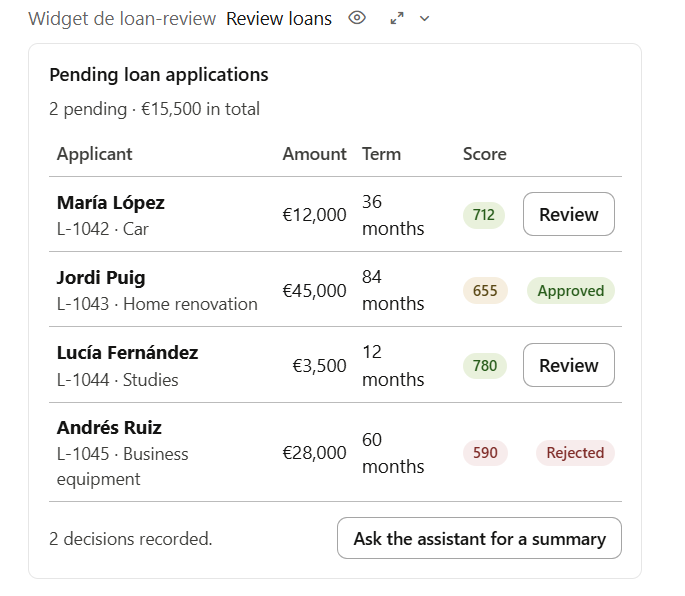
The LoanReview sample inside Claude Desktop. Two loans decided from the panel; every click ran a C# handler on the server.
Preview. McpRazor builds on the MCP Apps extension of the official C# SDK, which is still experimental (
MCPEXP003), and on the MCP Apps specification2026-01-26. Expect breaking changes before 1.0.
Why
MCP Apps let a tool return an interactive UI that the
host renders in a sandboxed iframe in the conversation. The official SDK takes care of the protocol metadata, but the
UI itself is still hand-written HTML and JavaScript that talks to the host over postMessage.
McpRazor lets a .NET team write that UI in C#:
- Razor components, not a separate front end. Data binding, validation with
DataAnnotations, child components, dependency injection and async lifecycle methods work as they do in Blazor. - Your server keeps the logic. Event handlers run on the server with your services, your authorization and your database. Nothing but HTML reaches the browser.
- One package, no front-end build. No WebAssembly, no npm, no bundler. The app shell, runtime included, is about 20 KB.
- Talks to the model. A component can update the model's context with what the user did, or post a message to the chat.
Install
dotnet add package McpRazor --prerelease
Requires .NET 10 and the ASP.NET Core shared framework (the components run on the Blazor renderer).
Quick start
1. A tool that returns structured content and points to a UI.
[McpServerToolType]
public sealed class LoanTools(LoanService loans)
{
    [McpServerTool(Name = "review_loans", UseStructuredContent = true)]
    [McpAppUi(ResourceUri = "ui://loans/review")]
    [Description("Shows the pending loan applications so the user can approve or reject them.")]
    public LoanQueue ReviewLoans() => new(loans.Pending());
}
2. A Razor component for that URI. Data receives the tool's structuredContent.
@attribute [McpApp("ui://loans/review", Name = "Loan review")]
@inherits McpAppComponent<LoanQueue>
@inject LoanService Loans

@foreach (var loan in Data.Loans)
{
    <p>
        @loan.Applicant · @loan.Amount.ToString("C0")
        <button @onclick="() => Approve(loan)">Approve</button>
    </p>
}

@code {
    private void Approve(LoanApplication loan)
    {
        Loans.Approve(loan.Id);
        Host.UpdateModelContext($"The user approved loan {loan.Id}.");
    }
}
3. Register the apps on the MCP server.
builder.Services.AddMcpServer()
    .WithHttpTransport()                 // or .WithStdioServerTransport()
    .WithTools<LoanTools>()
    .WithRazorApps(apps => apps.AddAppsFromAssembly(typeof(Program).Assembly));

var app = builder.Build();
app.MapMcp("/mcp");

if (app.Environment.IsDevelopment())
{
    app.MapMcpRazorPreview("/preview", mcpPath: "/mcp");   // a local MCP Apps host to try it
}
In a web project, add <RequiresAspNetWebAssets>false</RequiresAspNetWebAssets> to the .csproj: the Blazor browser
scripts are not used.
Try it
Two sample servers, each with two apps:
| Sample | Apps | Shows |
|---|---|---|
samples/LoanReview |
Loan review queue · New customer form | Decisions with a note, EditForm validation, model context, messages to the chat |
samples/SalesOps |
Sales dashboard · Price change review | SVG charts with no JavaScript, filters and drill-down, full screen; a human reviewing and applying what an agent proposes |
cd samples/LoanReview && dotnet run      # http://localhost:5180/preview
cd samples/SalesOps && dotnet run        # http://localhost:5181/preview
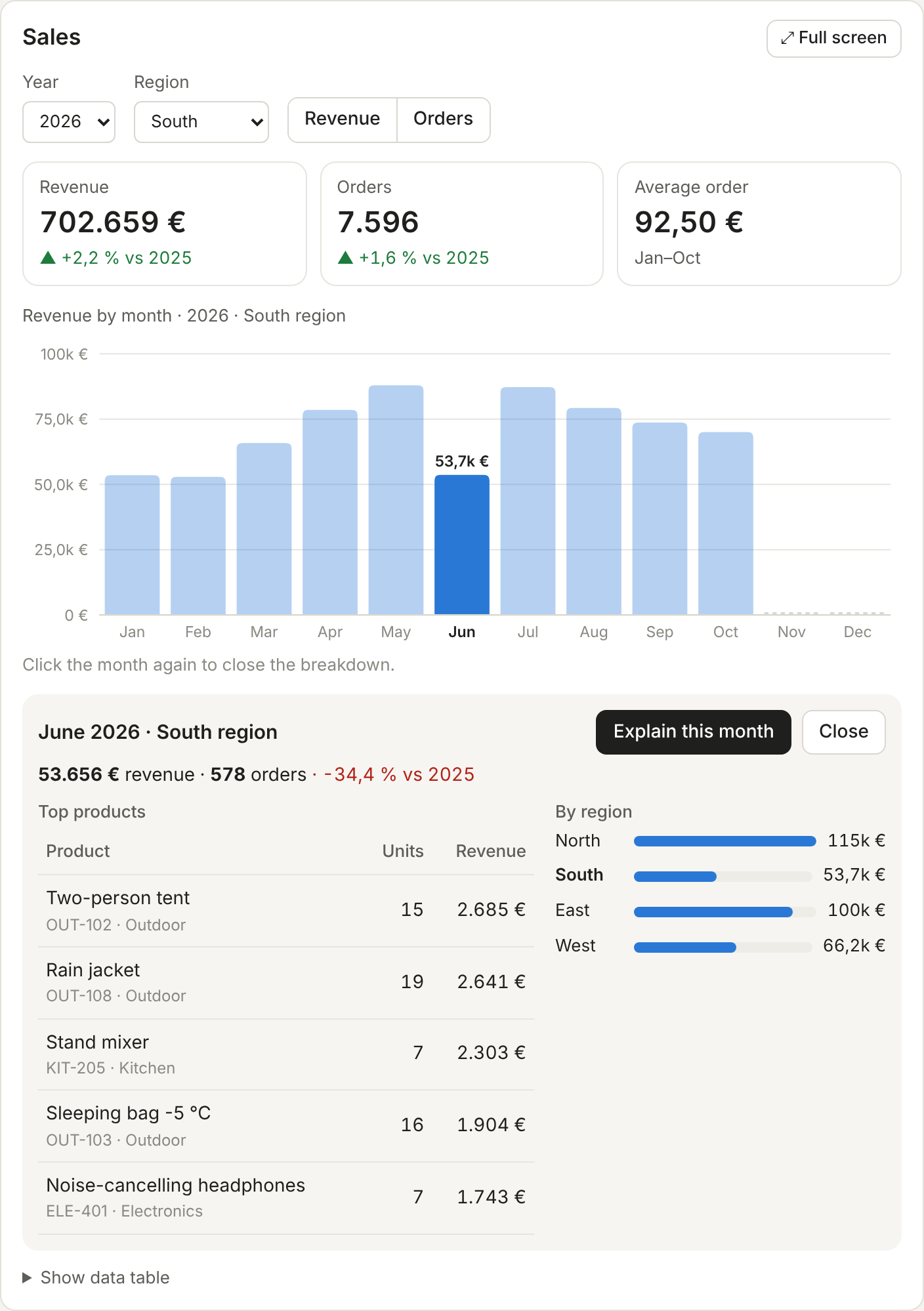
Sales dashboard. Revenue and orders by month for a shop, by region and year. The chart is SVG written in Razor: click a month to see its top products and regions, then Explain this month asks the assistant about it with the numbers attached.
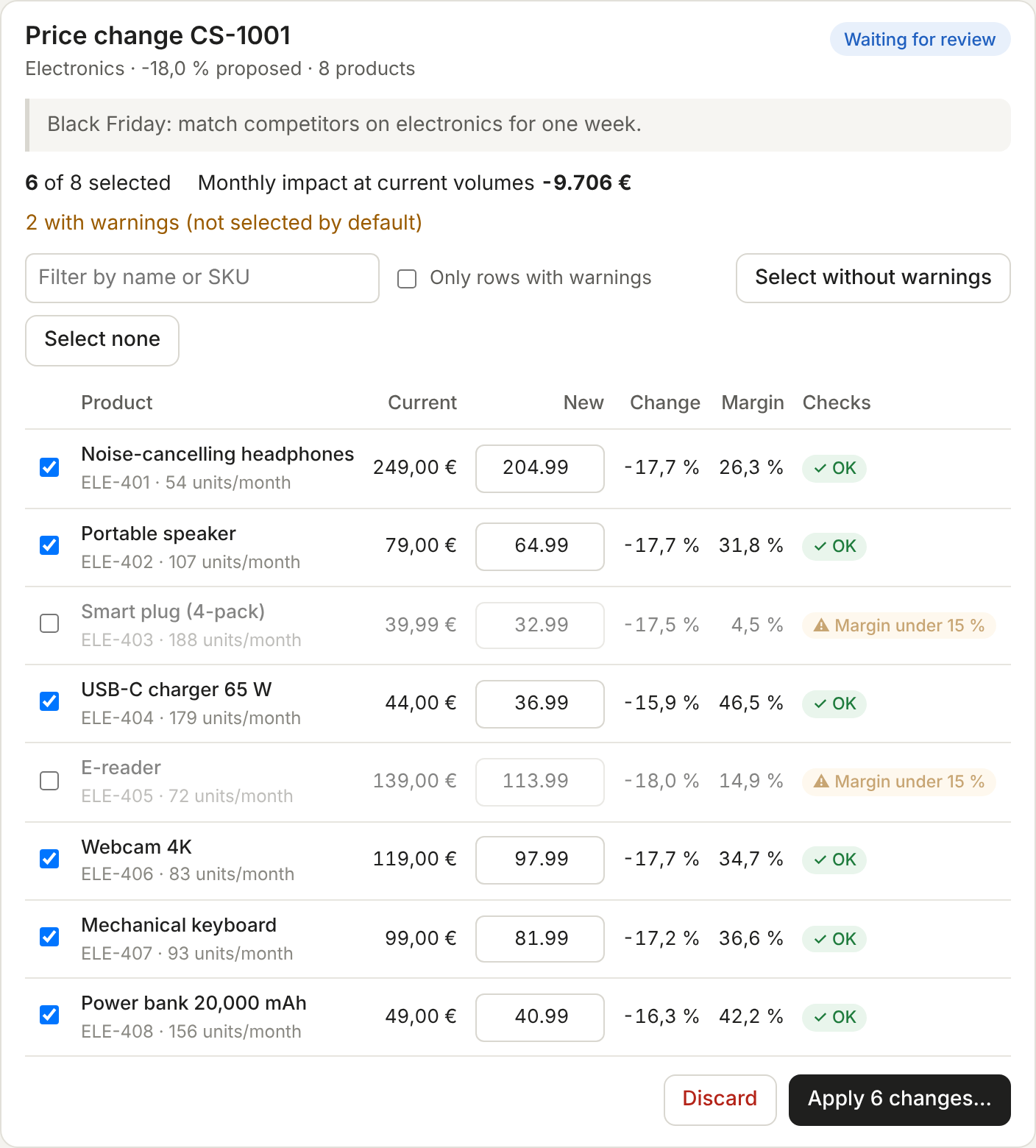
Price change review. The model proposes a change (propose_price_changes, for example "Black Friday: −18 % on
electronics"), but it cannot apply it: there is no tool for that. The panel lists every product with the new price,
margin and checks. Rows with warnings start unselected, prices can be adjusted, and nothing changes until the user
confirms. The server enforces the rules whatever the UI sends: a change set is applied once, only to its own
products, and never below cost.
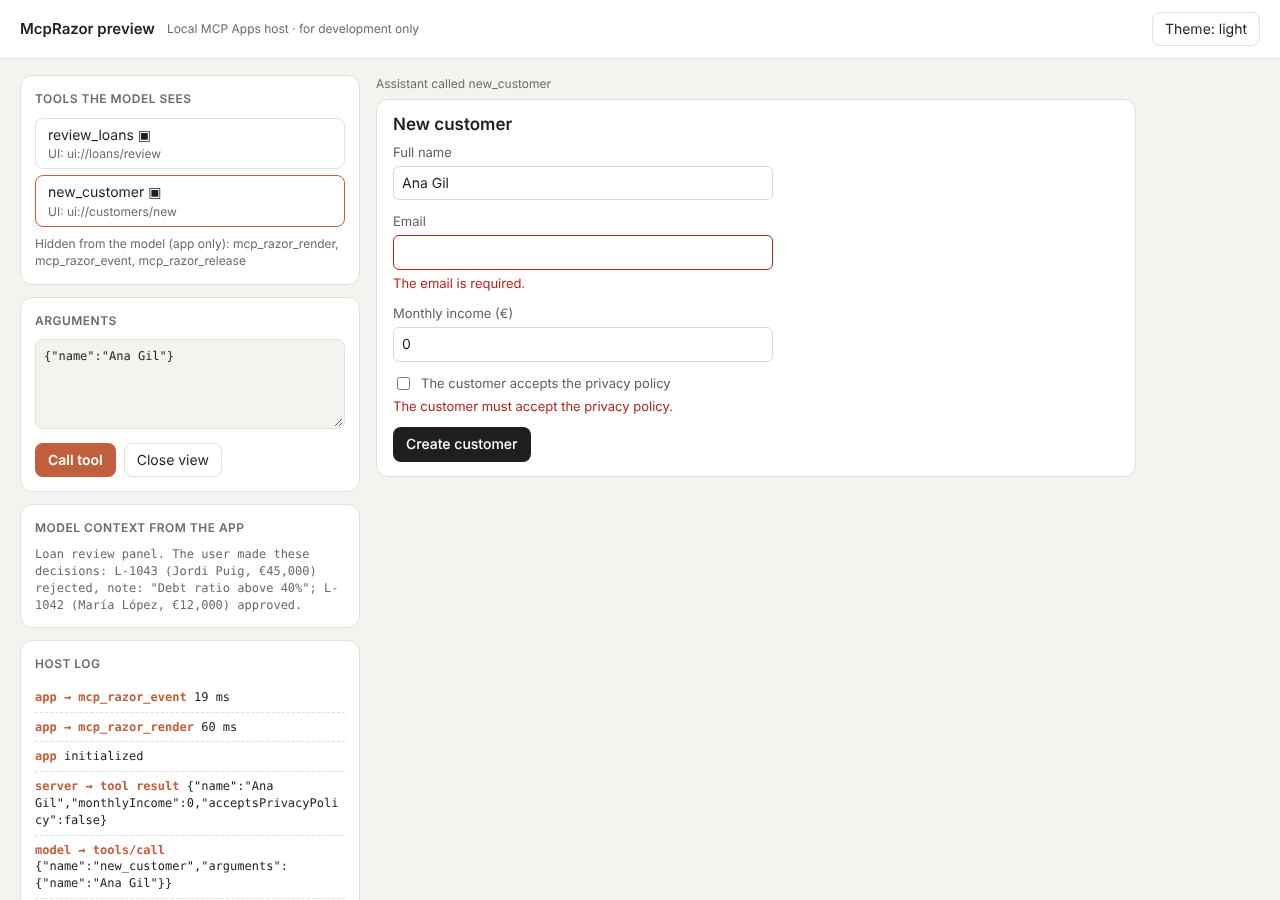
The preview page is a small MCP Apps host for development. It connects to /mcp, lists the tools the model would see,
calls one, and shows its app in a sandboxed iframe with the restrictive default CSP of the specification. It also shows
what the app sends to the host: messages to the chat and updates to the model context.
To use it from a real host, build the sample and run its DLL over stdio. Do not use dotnet run here: it writes
build output to stdout, which breaks the stdio channel. For example, in Claude Desktop's claude_desktop_config.json:
dotnet build samples/LoanReview
{
  "mcpServers": {
    "loan-review": {
      "command": "dotnet",
      "args": ["/path/to/mcp-razor/samples/LoanReview/bin/Debug/net10.0/LoanReview.dll", "--stdio"]
    },
    "sales-ops": {
      "command": "dotnet",
      "args": ["/path/to/mcp-razor/samples/SalesOps/bin/Debug/net10.0/SalesOps.dll", "--stdio"]
    }
  }
}
Host compatibility
What has been checked so far, with the LoanReview sample:
| Host | Shows the app | Interaction (clicks, forms) | Notes |
|---|---|---|---|
| Claude Desktop (Windows, stdio) | ✅ | ✅ | Approve and reject from the panel, checked by hand |
McpRazor preview (/preview) |
✅ | ✅ | Covered by the browser tests in CI |
| Hosts that do not forward app tool calls | ✅ | ❌ shows an error | Simulated with /preview?blockAppTools=1 |
| VS Code, claude.ai and other hosts | ❓ | ❓ | Not tested yet: please report what you see |
The first view travels inside the tool result, so it shows even when the host does not forward the app's own tool calls. Clicks need the host to forward them.
How it works
Model ──tools/call review_loans──▶ Host ──────────────────────────▶ MCP server
                                    │ resources/read ui://loans/review  (static shell + runtime)
                                    ▼
                              iframe (sandbox)
                     ui/initialize · tool-input · tool-result
                                    │
       tools/call mcp_razor_render  │  data = structuredContent
       ────────────────────────────▶│──▶ Blazor renderer on the server: creates the view,
       ◀──────── HTML + viewId ─────│◀── renders the component, returns HTML
                                    │
   click ─▶ tools/call mcp_razor_event (viewId, handler id, value)
       ────────────────────────────▶│──▶ runs the @onclick handler, renders again
       ◀── HTML + host requests ────│◀── (update model context, message, link…)
- A static shell. Each app is a
ui://resource with the same HTML on every read, so hosts can prefetch and cache it. It contains base styles that follow the host's theme variables and a small runtime (about 16 KB, no dependencies) that speaks the MCP Apps protocol. - Server-side rendering with live components. When the model calls a tool that points to an app, McpRazor
creates a view: a component instance with its own DI scope, rendered by a Blazor renderer that keeps the event
handler IDs of the render tree. The HTML carries them as
data-mcp-on-click="7". The first render travels in the tool result's_meta, so the app shows it with no extra round trip; if it is missing, the runtime asks for it with the app-only toolmcp_razor_render. That first render happens before the server knows the host's locale, theme and time zone, so once the host shares them the runtime renders the view again with them and swaps it in. If the host does not forward that call, the first view stays. - Events are tool calls. A click, a change or a form submission becomes a call to
mcp_razor_event. The handler runs on the server, the component renders again, and the runtime patches the DOM, keeping focus and what the user is typing. - Requests to the host queued by the component (
Host.UpdateModelContext,Host.SendMessage…) travel back with the HTML, and the runtime sends them to the host.
The three internal tools are marked visibility: ["app"], so hosts hide them from the model.
What a component can ask the host
McpAppComponent<TData> exposes Host (IMcpAppHost); other components can @inject IMcpAppHost.
| Member | MCP Apps message | Use |
|---|---|---|
Host.Context |
hostContext |
Theme, locale, time zone, display mode and platform of the host |
Host.Culture |
hostContext.locale |
The culture the app runs with (see below) |
Host.ToolInput |
ui/notifications/tool-input |
The arguments of the tool call |
Host.UpdateModelContext(text, json?) |
ui/update-model-context |
Tell the model what the user did, for its next turns |
Host.SendMessage(text) |
ui/message |
Post a message to the chat as the user |
Host.OpenLink(url) |
ui/open-link |
Open an http(s) URL |
Host.RequestDisplayMode(mode) |
ui/request-display-mode |
inline, fullscreen or pip |
The host decides what to do with each request and may ask the user first.
Culture. Components render and handle events with CultureInfo.CurrentCulture set to the host's locale, so
amount.ToString("C") follows the user's language. When the host does not send a locale, for example in the first
view, which is rendered before the host shares it, McpRazor uses McpRazorOptions.DefaultCulture, or the server's
culture if that is not set. The server logs the locale, theme and time zone each host sends.
As in any Blazor app, numbers in attributes are turned into text with the current culture: in es-ES,
<line y1="@y"> with y = 156.5 becomes y1="156,5", which is not a valid SVG length. Format coordinates and other
machine-readable numbers with CultureInfo.InvariantCulture (the SalesOps dashboard does it with a small N()
helper).
Options
.WithRazorApps(apps =>
{
    apps.AddAppsFromAssembly(typeof(Program).Assembly);     // components with [McpApp]
    apps.AddApp<Dashboard>("ui://sales/dashboard", app =>
    {
        app.PrefersBorder = true;
        app.Stylesheet = ".kpi { font-size: 2rem }";
        app.Csp = new() { ResourceDomains = ["https://cdn.example.com"] };
    });
    apps.Prerender = McpAppPrerender.WhenHostSupportsApps;   // first view inside the tool result (Always, Never)
    apps.DefaultCulture = CultureInfo.GetCultureInfo("es-ES"); // when the host sends no locale (default: the server's)
    apps.ViewIdleTimeout = TimeSpan.FromMinutes(30);         // release views without events
    apps.MaxViews = 500;                                     // least recently used views go first
    apps.DetailedErrors = false;                             // keep exception messages on the server
});
Supported today
@onclick,@onchange,@oninput, keyboard and focus events,@bind(inputs, checkboxes,textarea,select),@bind:event,@onclick:preventDefault/stopPropagation.EditForm,DataAnnotationsValidator,ValidationMessage,InputText,InputNumber,InputCheckboxand the other built-in inputs.- Child components,
[Inject],[Parameter],OnInitializedAsyncand async event handlers. <style>blocks inside components and an app-wideStylesheet.
Not supported (yet)
- JavaScript interop (
IJSRuntime) and component libraries that depend on it, such as MudBlazor or Radzen. - Updates the user did not trigger. A component cannot re-render on a timer or a background event: the view changes only in response to an event.
- CSS isolation (
.razor.cssfiles). Use a<style>block orMcpAppRegistration.Stylesheet. - Scripts inside components.
<script>tags in component markup are not executed. - Only the closest element with a handler receives an event; a click is not bubbled to every ancestor handler as in Blazor.
Security
- App-only does not mean trusted.
visibility: ["app"]is enforced by the host, not by the server. McpRazor treats every call to its tools as untrusted input: view IDs are random 144-bit values, a view only accepts event handler IDs that appear in the HTML it last sent, and errors are generic unlessDetailedErrorsis on. - Views are tied to the MCP session when the transport has one. Over a stateless transport they are only protected by their random ID: bind your own authorization to the data the handlers touch.
- Authorize in the handlers. A handler runs with your services, so check permissions there as in any API. Use your existing approval flows for destructive actions.
- Text is HTML-encoded like in Blazor.
MarkupStringis written as is: never build one from user input. - No external requests by default. Hosts apply a restrictive CSP. Declare origins in
Csponly when the app needs them.
Limits to keep in mind
- State lives in memory. Views are kept per server instance. With several instances behind a load balancer, use session affinity. A stateless mode is on the roadmap.
- Each interaction is a round trip through the host to your server. That suits forms, tables and approvals; it does not suit drag and drop or animations.
- Host support varies. MCP Apps is new and hosts implement it at different speeds. A host may show the app but
not forward its tool calls: the first view appears, and clicks show an error. Test in the hosts your users have;
/preview?blockAppTools=1simulates such a host. - The first view uses
DefaultCulture(or the server's culture) until the host shares its locale. With hosts that do not forward the app's tool calls, it keeps it.
Tests
dotnet test                                   # unit and MCP server tests
dotnet build
cd tests/e2e && npm ci && npm test            # browser tests: both samples in the preview host (needs Chrome)
The preview host validates the MCP Apps handshake and sizes iframes like real hosts, so the browser tests fail where
Claude or VS Code would. Options: ?locale=es-ES (or ?locale=none), ?timeZone=Europe/Madrid, ?blockAppTools=1.
Roadmap
- A stateless mode with signed state, for servers without session affinity.
- CSS isolation from
.razor.cssfiles. - A Roslyn analyzer: tool
ResourceUriwithout an app, or data types that do not match. - Testing helpers to render an app and fire events without a host.
License
MIT
| Product | Versions Compatible and additional computed target framework versions. |
|---|---|
| .NET | net10.0 is compatible. net10.0-android was computed. net10.0-browser was computed. net10.0-ios was computed. net10.0-maccatalyst was computed. net10.0-macos was computed. net10.0-tvos was computed. net10.0-windows was computed. |
-
net10.0
- ModelContextProtocol (>= 2.3.1)
- ModelContextProtocol.Extensions.Apps (>= 2.3.1)
NuGet packages
This package is not used by any NuGet packages.
GitHub repositories
This package is not used by any popular GitHub repositories.
| Version | Downloads | Last Updated |
|---|---|---|
| 0.1.0-preview.2 | 68 | 11/10/2026 |