Majorsoft.Blazor.Components.GdprConsent
1.6.1
dotnet add package Majorsoft.Blazor.Components.GdprConsent --version 1.6.1
NuGet\Install-Package Majorsoft.Blazor.Components.GdprConsent -Version 1.6.1
<PackageReference Include="Majorsoft.Blazor.Components.GdprConsent" Version="1.6.1" />
<PackageVersion Include="Majorsoft.Blazor.Components.GdprConsent" Version="1.6.1" />
<PackageReference Include="Majorsoft.Blazor.Components.GdprConsent" />
paket add Majorsoft.Blazor.Components.GdprConsent --version 1.6.1
#r "nuget: Majorsoft.Blazor.Components.GdprConsent, 1.6.1"
#:package Majorsoft.Blazor.Components.GdprConsent@1.6.1
#addin nuget:?package=Majorsoft.Blazor.Components.GdprConsent&version=1.6.1
#tool nuget:?package=Majorsoft.Blazor.Components.GdprConsent&version=1.6.1
Blazor GDPR Consent controls



About
Blazor injectable IGdprConsentService service and components that renders a customizable GDPR consent Banner or Popup witch Accept/Reject for cookie settings chosen value is persisted to Browser storage.
To initialize GDPR Consents use GdprBanner or GdprModal only once in your Blazor App MainLayout.razor page or any common place.
All components work with WebAssembly and Server hosted models. For code examples see usage.
NOTE: GDPR Consents components just prompting UI elements to ask user consents. Also stores chosen values only locally in order to not prompt always. But it does not block any Cookies or Tracking scripts! Blocking all technology which was not approved by user consent is responsibility of App developers!
You can try it out by using the demo app.
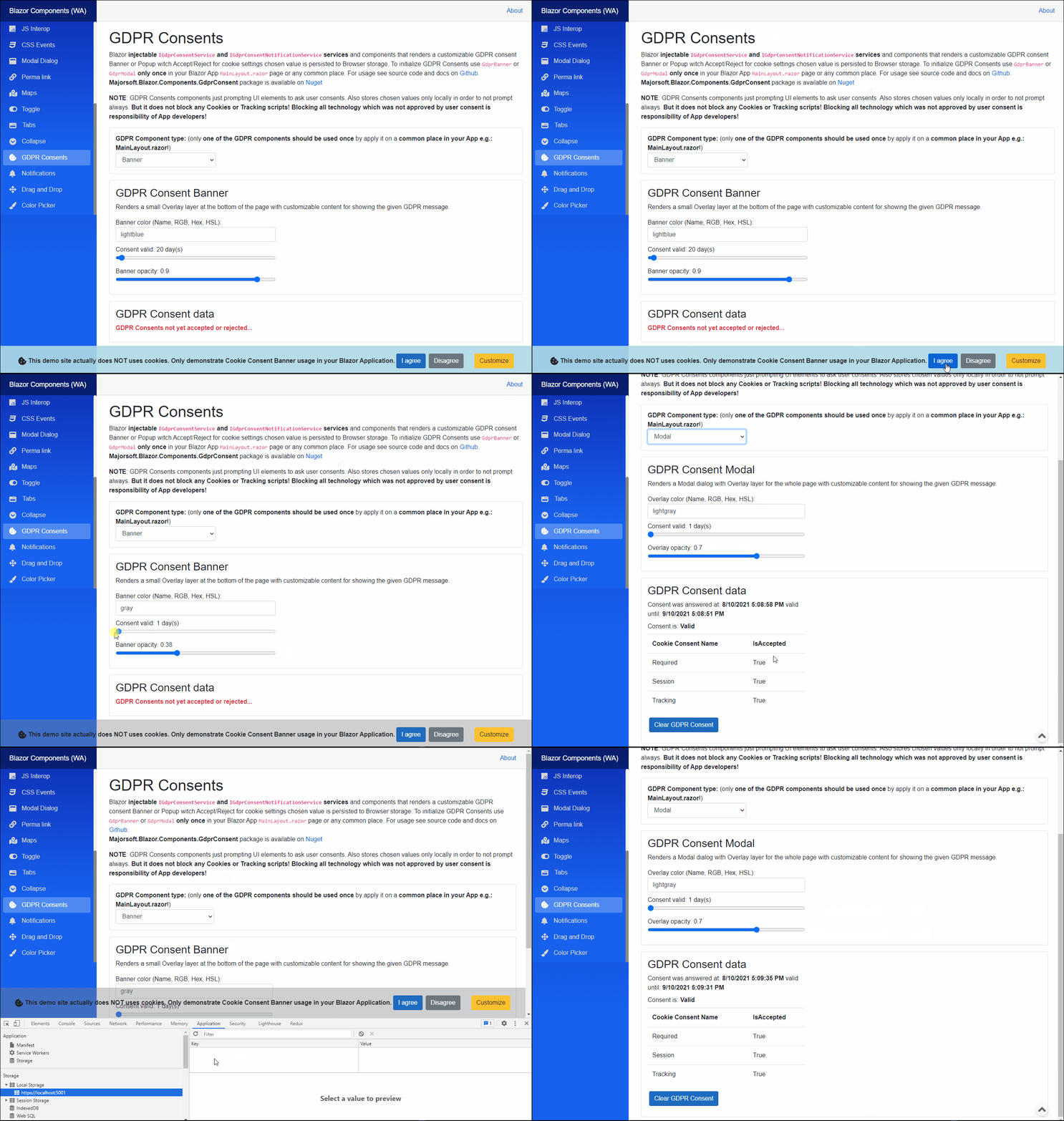
Components and Services
GdprBanner: renders a small Overlay layer at the bottom of the page with customizable content for showing the given GDPR message. Only one consent component allowed per Application.GdprModal: renders a Modal dialog with Overlay layer for the whole page with customizable content for showing the given GDPR message. Only one consent component allowed per Application.IGdprConsentService: injectable service to handle GDPR Consent actions.IGdprConsentNotificationService: injectable singleton service to handle GDPR Consent changes with events.
GdprBanner component
GdprBanner renders a small Overlay layer at the bottom of the page with customizable content for showing the given GDPR message.
Only one consent component allowed per Application.
Properties
Content:RenderFragmentHTML content - Required <br /> Required HTML content to show on the Modal dialog. Can be any valid HTML.BannerBackgroundColor:string { get; set; }(default: "gray") <br /> Sets thestyleof the HTML<div>background-color. Use HTML specified: Color Names, RGB or with HEX values.BannerOpacity:double { get; set; }(default: 0.9) <br /> Opacity of the overlay<div>. Value should be between 0..1. Where 0 means the overlay layer is not visible.ConsentDetails:IEnumerable<GdprConsentDetail> { get; set; }(default: new GdprConsentDetail[] { new GdprConsentDetail() { ConsentName = "Cookies.All" } }) <br /> GDPR Cookies consent details. An enumerable list of Cookie types with Accepted flag.AnswerValidUntil:DateTime { get; set; }(default: DateTime.Now.AddMonths(1)) <br /> Gets or Sets Consent choice validity date. After this date Consent will be asked again.InnerElementReference:ElementReference { get; }Exposes a BlazorElementReferenceof the wrapped around HTML element. It can be used e.g. for JS interop, etc.
Arbitrary HTML attributes e.g.: id="diag1" will be passed to the corresponding rendered root HTML element Overlay <div>.
Functions
AcceptAll():ValueTask AcceptAll()<br /> Accepting all GDPR Consents. It should beawait-ed.RejectAll():ValueTask RejectAll()<br /> Rejecting all GDPR Consents. It should beawait-ed.DisposeAsync():Task DisposeAsync()<br /> Component implementsIAsyncDisposableinterface Blazor framework will call it when parent removed from render tree.
GdprModal component
GdprModal renders a Modal dialog with Overlay layer for the whole page with customizable content for showing the given GDPR message.
Only one consent component allowed per Application.
Properties
Content:RenderFragmentHTML content - Required <br /> Required HTML content to show on the Modal dialog. Can be any valid HTML.Footer:RenderFragmentHTML content <br /> HTML content to show on the Modal footer (bottom). Can be any valid HTML but should be only custom action buttons. Must not be defined if you want to leave it out.OverlayBackgroundColor:string { get; set; }(default: "gray") <br /> Sets thestyleof the HTML<div>background-color. Use HTML specified: Color Names, RGB or with HEX values.OverlayOpacity:double { get; set; }(default: 0.9) <br /> Opacity of the overlay<div>. Value should be between 0..1. Where 0 means the overlay layer is not visible.Height:double { get; set; }(default: 0) <br /> Modal dialog window Height in px if set to 0 Height is set auto.Width:double { get; set; }(default: 0) <br /> Modal dialog window Width in px if set to 0 Width is set auto.MinHeight:double { get; set; }(default: 200) <br /> Modal dialog window minimum Height in px.MinWidth:double { get; set; }(default: 200) <br /> Modal dialog window minimum Width in px. WhentrueModal dialog will appear and disappear by using smooth CSS slide and fade transitions.Centered:bool { get; set; }(default: false) <br /> WhentrueModal dialog will be vertically centered, otherwise shown near to the top. Modal dialog horizontally always centered.ConsentDetails:IEnumerable<GdprConsentDetail> { get; set; }(default: new GdprConsentDetail[] { new GdprConsentDetail() { ConsentName = "Cookies.All" } }) <br /> GDPR Cookies consent details. An enumerable list of Cookie types with Accepted flag.AnswerValidUntil:DateTime { get; set; }(default: DateTime.Now.AddMonths(1)) <br /> Gets or Sets Consent choice validity date. After this date Consent will be asked again.
Arbitrary HTML attributes e.g.: id="diag1" will be passed to the corresponding rendered root HTML element Overlay <div>.
Functions
SaveChoice():ValueTask SaveChoice()<br /> Saves user chosen GDPR Consent details. It should beawait-ed.DisposeAsync():Task DisposeAsync()<br /> Component implementsIAsyncDisposableinterface Blazor framework will call it when parent removed from render tree.
IGdprConsentService
Injectable service to handle GDPR Consent actions.
Properties
ConsentStoreKeyName:string { get; }<br /> Gets GDPR Consent Browser local storage key name.ConsentNotificationService:IGdprConsentNotificationService { get; }<br /> Gets aIGdprConsentNotificationServiceto able to subscribe on Consent changed events.
Functions
GetGdprConsentDataAsync():ValueTask<GdprConsentData> GetGdprConsentDataAsync()<br /> Gets the GDPR Consent data from Browser local storage if any stored.SetGdprConsentDataAsync():ValueTask SetGdprConsentDataAsync(GdprConsentData gdprConsentData)<br /> Sets or overrides the given GDPR Consent data in Browser local storage.ClearGdprConsentDataAsync():ValueTask ClearGdprConsentDataAsync()<br /> Removes the GDPR Consent data from Browser local storage if any stored.
IGdprConsentNotificationService
Injectable singleton service to handle GDPR Consent changes with events.
This can be used to notify about User consent changes by subscribing to GdprConsentStateChanged event.
When event fired change can be detected by
Functions
GdprConsentStateChanged():event ConsentNotificationEventHandler GdprConsentStateChanged<br /> Event handler to subscribe for GDPR Consent changes.OnChange():void OnChange()<br /> Method called byIGdprConsentServiceto trigger Change event when GDPR Consent value was changed.
Configuration
Installation
Majorsoft.Blazor.Components.GdprConsent is available on NuGet.
dotnet add package Majorsoft.Blazor.Components.GdprConsent
Use the --version option to specify a preview version to install.
Usage
Use MainLayout.razor file for Blazor Apps to activate GDPR Consents only once! Only one of the GDPR component types should be used (active) at once not both. Only one consent component allowed per Application.
Add using statement to your Blazor <component/page>.razor file. Or globally reference it into _Imports.razor file.
@using Majorsoft.Blazor.Components.Toggle
@using Majorsoft.Blazor.Extensions.BrowserStorage
@using Majorsoft.Blazor.Components.Modal
@using Majorsoft.Blazor.Components.Common.JsInterop.Focus
@using Majorsoft.Blazor.Components.CssEvents
@using Majorsoft.Blazor.Components.GdprConsent
Dependences
Majorsoft.Blazor.Components.GdprConsent package depends on other Majorsoft Nuget packages:
- Majorsoft.Blazor.Components.CssEvents which handles CSS Transition and Animation events for the dialog animation.
- Majorsoft.Blazor.Components.Common.JsInterop which handles JS Interop for focusing previous elements.
- Majorsoft.Blazor.Components.CssEvents
which renders Model dialog window for
GdprModal. - Majorsoft.Blazor.Components.CssEvents which can be used to customize `` with ON/OFF switches to allow Cookie or not.
- Majorsoft.Blazor.Components.CssEvents which stores user provided Consents in the Browser's Local storage.
Register services
In case of WebAssembly project register services in your Program.cs file:
using Majorsoft.Blazor.Components.GdprConsent;
...
public static async Task Main(string[] args)
{
	var builder = WebAssemblyHostBuilder.CreateDefault(args);

	//Register dependencies
	builder.Services.AddCssEvents();
	builder.Services.AddJsInteropExtensions();
	builder.Services.AddBrowserStorage();
	builder.Services.AddGdprConsent();
}
In case of Server hosted project register services in your Startup.cs file:
using Majorsoft.Blazor.Components.GdprConsent;
...

public void ConfigureServices(IServiceCollection services)
{
	//Register dependencies
	services.AddCssEvents();
	services.AddJsInteropExtensions();
	services.AddBrowserStorage();
	services.AddGdprConsent();
}
GdprBanner usage
Renders a small Overlay layer at the bottom of the page with customizable content for showing the given GDPR message. Only one of the GDPR component types should be used (active) at once not both. Apply it on a common place in your App e.g.: MainLayout.razor!
@*THIS should be in a common part of your App e.g.: MainLayout.razor!!!*@
<style>
	.gdpr-banner {
		font-size: medium;
		font-weight: 500;
		padding: 16px 0;
		display: flex;
		-webkit-box-pack: center;
		-ms-flex-pack: center;
		justify-content: center;
		-webkit-box-align: center;
		-ms-flex-align: center;
		align-items: center;
		/*border: 1px solid #e0e0e0;*/
	}
</style>
<GdprBanner @ref="_gdprBanner"
			BannerOpacity="@(_bannerOpacity / 100)"
			BannerBackgroundColor="@_bannerColor"
			AnswerValidUntil="@DateTime.Now.AddDays(_bannerConsentValidDays)"
			ConsentDetails="@_gdprConsents">
	<Content>
		<div class="gdpr-banner">
			<span class="fa fa-lg fa-cookie-bite m-1" aria-hidden="true"></span>
			<strong>This demo site actually does NOT uses cookies. Only demonstrate Cookie Consent Banner usage in your Blazor Application.</strong>

			<button type="button" class="btn btn-primary m-1" @onclick="async () => await _gdprBanner.AcceptAll()">I agree</button>
			<button type="button" class="btn btn-secondary m-1" @onclick="async () => await _gdprBanner.RejectAll()">Disagree</button>

			<button type="button" class="btn btn-warning m-1 ml-4" @onclick='() => { _gdprControlType = "Modal"; }'>Customize</button>
		</div>
	</Content>
</GdprBanner>

@code {
	private List<GdprConsentDetail> _gdprConsents;
	protected override void OnInitialized()
	{
		_gdprConsents = new List<GdprConsentDetail>()
		{
			new GdprConsentDetail() { ConsentName = "Required", IsAccepted = true },
			new GdprConsentDetail() { ConsentName = "Session", IsAccepted = true },
			new GdprConsentDetail() { ConsentName = "Tracking", IsAccepted = true },
		};
	}

	//GDPR banner
	private GdprBanner _gdprBanner;
	private string _bannerColor = "lightblue";
	private int _bannerConsentValidDays = 20;
	private double _bannerOpacity = 90;
}
GdprModal usage
Renders a Modal dialog with Overlay layer for the whole page with customizable content for showing the given GDPR message. Only one of the GDPR component types should be used (active) at once not both. Apply it on a common place in your App e.g.: MainLayout.razor!
@*THIS should be in a common part of your App e.g.: MainLayout.razor!!!*@
<GdprModal @ref="_gdprModal"
			OverlayBackgroundColor="@_overlayColor"
			OverlayOpacity="@(_overlayOpacity /100)"
			ConsentDetails="@_gdprConsents"
			Centered="true">
	<Content>
		<div class="container-fluid p-3 mb-3">
			<div class="row">
				<div class="col-12">
					<h2 class="" style="justify-content: center;"><span class="fa fa-lg fa-cookie-bite m-1" aria-hidden="true"></span> Cookie Consent</h2>
				</div>
			</div>
			<div class="row mt-3 mb-4">
				<div class="col-12">
					<strong>This demo site actually does NOT uses cookies. Only demonstrate Cookie Consent Modal usage in your Blazor Application.</strong>
				</div>
			</div>
			<div class="row mb-2">
				<div class="col-10">
					Required Cookies:
				</div>
				<div class="col-2">
					<ToggleSwitch Checked="_gdprConsents[0].IsAccepted" Disabled="true" Width="60" Height="25" />
				</div>
				<hr />
			</div>
			<div class="row mb-1">
				<div class="col-10">
					Session all Cookies:
				</div>
				<div class="col-2">
					<ToggleSwitch @bind-Checked="_gdprConsents[1].IsAccepted" @bind-Checked:event="OnToggleChanged" Width="60" Height="25" />
				</div>
			</div>
			<div class="row  mb-1">
				<div class="col-10">
					Tracking all Cookies:
				</div>
				<div class="col-2">
					<ToggleSwitch @bind-Checked="_gdprConsents[2].IsAccepted" @bind-Checked:event="OnToggleChanged" Width="60" Height="25" />
				</div>
			</div>
		</div>
	</Content>
	<Footer>
		<button type="button" class="btn btn-primary m-1" @onclick="async () => await _gdprModal.SaveChoice()">Confirm my choice</button>
		<button type="button" class="btn btn-secondary m-1"
				@onclick="async () => { _gdprConsents.ForEach(f => f.IsAccepted = true); await _gdprModal.SaveChoice(); }">Accept all</button>
	</Footer>
</GdprModal>

@code {
	private List<GdprConsentDetail> _gdprConsents;
	protected override void OnInitialized()
	{
		_gdprConsents = new List<GdprConsentDetail>()
		{
			new GdprConsentDetail() { ConsentName = "Required", IsAccepted = true },
			new GdprConsentDetail() { ConsentName = "Session", IsAccepted = true },
			new GdprConsentDetail() { ConsentName = "Tracking", IsAccepted = true },
		};
	}

	//GDPR popup
	private GdprModal _gdprModal;
	private string _overlayColor = "lightgray";
	private double _overlayOpacity = 70;
}
| Product | Versions Compatible and additional computed target framework versions. |
|---|---|
| .NET | net5.0 is compatible. net5.0-windows was computed. net6.0 was computed. net6.0-android was computed. net6.0-ios was computed. net6.0-maccatalyst was computed. net6.0-macos was computed. net6.0-tvos was computed. net6.0-windows was computed. net7.0 was computed. net7.0-android was computed. net7.0-ios was computed. net7.0-maccatalyst was computed. net7.0-macos was computed. net7.0-tvos was computed. net7.0-windows was computed. net8.0 was computed. net8.0-android was computed. net8.0-browser was computed. net8.0-ios was computed. net8.0-maccatalyst was computed. net8.0-macos was computed. net8.0-tvos was computed. net8.0-windows was computed. net9.0 was computed. net9.0-android was computed. net9.0-browser was computed. net9.0-ios was computed. net9.0-maccatalyst was computed. net9.0-macos was computed. net9.0-tvos was computed. net9.0-windows was computed. net10.0 was computed. net10.0-android was computed. net10.0-browser was computed. net10.0-ios was computed. net10.0-maccatalyst was computed. net10.0-macos was computed. net10.0-tvos was computed. net10.0-windows was computed. |
-
net5.0
- Majorsoft.Blazor.Components.Common.JsInterop (>= 1.6.1)
- Majorsoft.Blazor.Components.CssEvents (>= 1.6.1)
- Majorsoft.Blazor.Components.Modal (>= 1.6.1)
- Majorsoft.Blazor.Components.Toggle (>= 1.6.1)
- Majorsoft.Blazor.Extensions.BrowserStorage (>= 1.6.1)
- Microsoft.AspNetCore.Components.Web (>= 5.0.3)
NuGet packages
This package is not used by any NuGet packages.
GitHub repositories
This package is not used by any popular GitHub repositories.