Fredayddd321ewq.ScenePatching
1.0.1
dotnet add package Fredayddd321ewq.ScenePatching --version 1.0.1
NuGet\Install-Package Fredayddd321ewq.ScenePatching -Version 1.0.1
<PackageReference Include="Fredayddd321ewq.ScenePatching" Version="1.0.1" />
<PackageVersion Include="Fredayddd321ewq.ScenePatching" Version="1.0.1" />
<PackageReference Include="Fredayddd321ewq.ScenePatching" />
paket add Fredayddd321ewq.ScenePatching --version 1.0.1
#r "nuget: Fredayddd321ewq.ScenePatching, 1.0.1"
#:package Fredayddd321ewq.ScenePatching@1.0.1
#addin nuget:?package=Fredayddd321ewq.ScenePatching&version=1.0.1
#tool nuget:?package=Fredayddd321ewq.ScenePatching&version=1.0.1
ScenePatching
A super simple library that allows you to extremely simply edit scenes and such via your mods, made for ULTRAKILL.
This is A LIBRARY it does not do anything by itself.
How to use the library
-- IMPORTANT --
It's super important to call this line anywhere in your mod ONCE before loading the game.
SceneModding.PatchAll()
so your patches actually work :3
Making a ScenePatch
Make a new static class/method and add the [ScenePatch] attribute to it
In the class make a new method with [ScenePatch("TARGET_SCENE")] and set target to the desired scene (Level 1-4, CreditsMuseum2, uk_construct, Endless, etc)
Example:
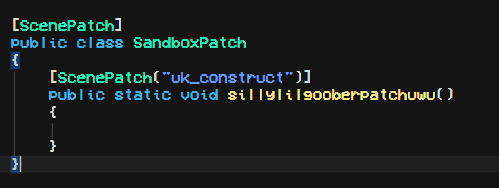
this will be ran on scene load, you can find objects and blah blah with the GameObject.FindObject extension or...
TargetObjects
The [ScenePatch] attribute also has a targetObject's parameter,
using this u can add a GameObject or any other component(Transform, Door, Light, etc) parameter(s) to your method and the GameObject/a component off of the GameObject will be passed along.

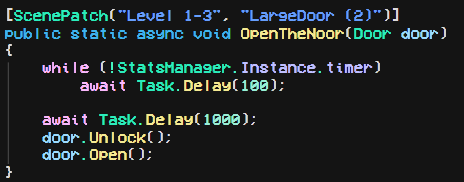
You can also add multiple targetObject's and itll run the patch multiple times for all of them :3
UnityExtensions
oki so this isnt like the main part of the library but its coolio to me so :3
check out ScenePatching.UnityExtensions
here, it itself has documentation in the file so :P
| Product | Versions Compatible and additional computed target framework versions. |
|---|---|
| .NET | net5.0 was computed. net5.0-windows was computed. net6.0 was computed. net6.0-android was computed. net6.0-ios was computed. net6.0-maccatalyst was computed. net6.0-macos was computed. net6.0-tvos was computed. net6.0-windows was computed. net7.0 was computed. net7.0-android was computed. net7.0-ios was computed. net7.0-maccatalyst was computed. net7.0-macos was computed. net7.0-tvos was computed. net7.0-windows was computed. net8.0 was computed. net8.0-android was computed. net8.0-browser was computed. net8.0-ios was computed. net8.0-maccatalyst was computed. net8.0-macos was computed. net8.0-tvos was computed. net8.0-windows was computed. net9.0 was computed. net9.0-android was computed. net9.0-browser was computed. net9.0-ios was computed. net9.0-maccatalyst was computed. net9.0-macos was computed. net9.0-tvos was computed. net9.0-windows was computed. net10.0 was computed. net10.0-android was computed. net10.0-browser was computed. net10.0-ios was computed. net10.0-maccatalyst was computed. net10.0-macos was computed. net10.0-tvos was computed. net10.0-windows was computed. |
| .NET Core | netcoreapp3.0 was computed. netcoreapp3.1 was computed. |
| .NET Standard | netstandard2.1 is compatible. |
| MonoAndroid | monoandroid was computed. |
| MonoMac | monomac was computed. |
| MonoTouch | monotouch was computed. |
| Tizen | tizen60 was computed. |
| Xamarin.iOS | xamarinios was computed. |
| Xamarin.Mac | xamarinmac was computed. |
| Xamarin.TVOS | xamarintvos was computed. |
| Xamarin.WatchOS | xamarinwatchos was computed. |
-
.NETStandard 2.1
- BepInEx.Core (>= 5.4.21)
- UnityEngine.Modules (>= 2022.3.29)
NuGet packages
This package is not used by any NuGet packages.
GitHub repositories
This package is not used by any popular GitHub repositories.