AurorisNet.Umbraco.AppBlocks
0.1.0-alpha.6
dotnet add package AurorisNet.Umbraco.AppBlocks --version 0.1.0-alpha.6
NuGet\Install-Package AurorisNet.Umbraco.AppBlocks -Version 0.1.0-alpha.6
<PackageReference Include="AurorisNet.Umbraco.AppBlocks" Version="0.1.0-alpha.6" />
<PackageVersion Include="AurorisNet.Umbraco.AppBlocks" Version="0.1.0-alpha.6" />
<PackageReference Include="AurorisNet.Umbraco.AppBlocks" />
paket add AurorisNet.Umbraco.AppBlocks --version 0.1.0-alpha.6
#r "nuget: AurorisNet.Umbraco.AppBlocks, 0.1.0-alpha.6"
#:package AurorisNet.Umbraco.AppBlocks@0.1.0-alpha.6
#addin nuget:?package=AurorisNet.Umbraco.AppBlocks&version=0.1.0-alpha.6&prerelease
#tool nuget:?package=AurorisNet.Umbraco.AppBlocks&version=0.1.0-alpha.6&prerelease
AppBlocks
AppBlocks adds forms, reports and database-backed blocks to the pages of an existing Umbraco site.



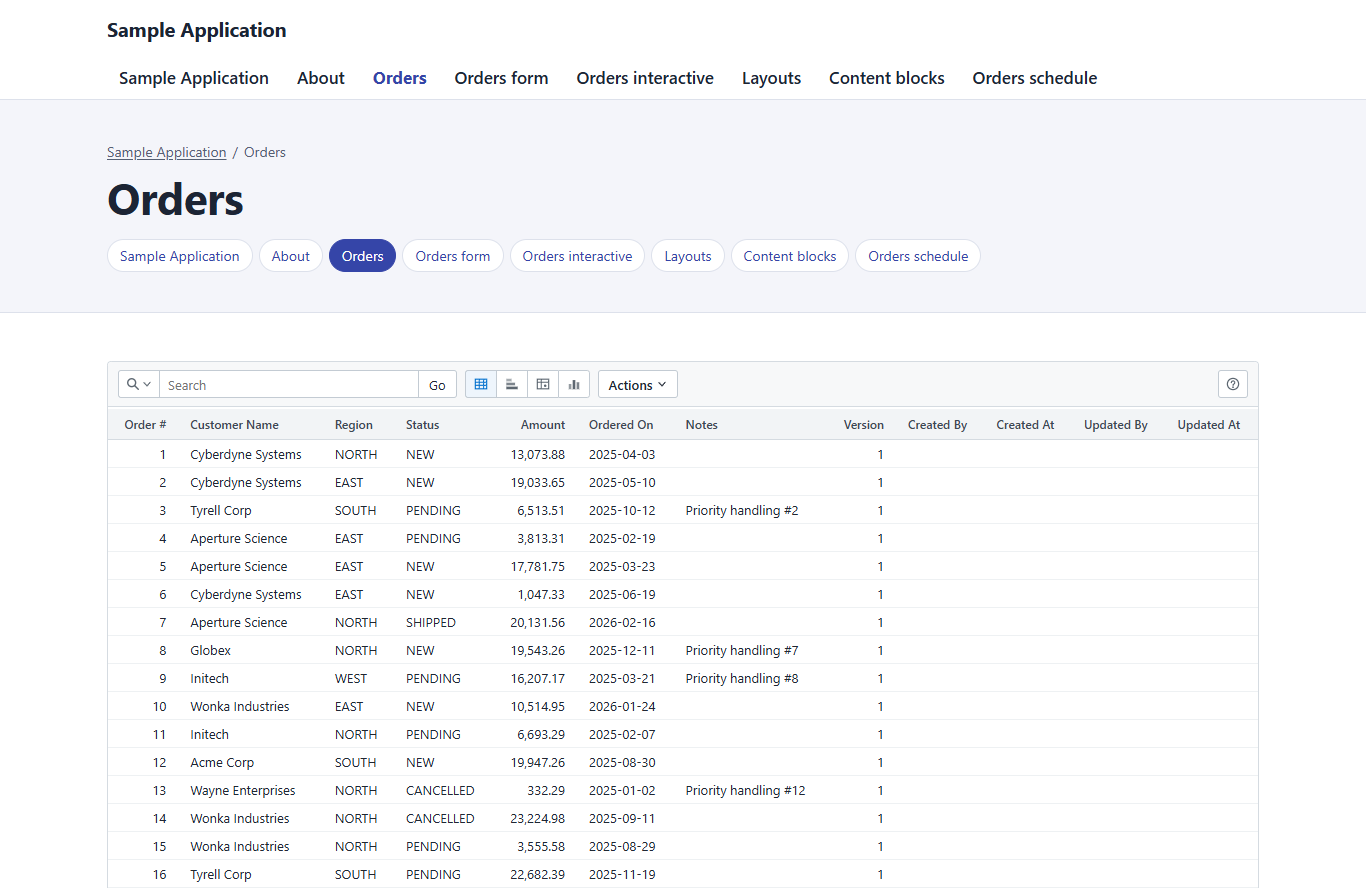
Editors add AppBlocks blocks to the Block Grid or Block List a site already has, beside its other content. The site keeps its page types, templates, layout and sign-in. The blocks read and write the application's own database tables:
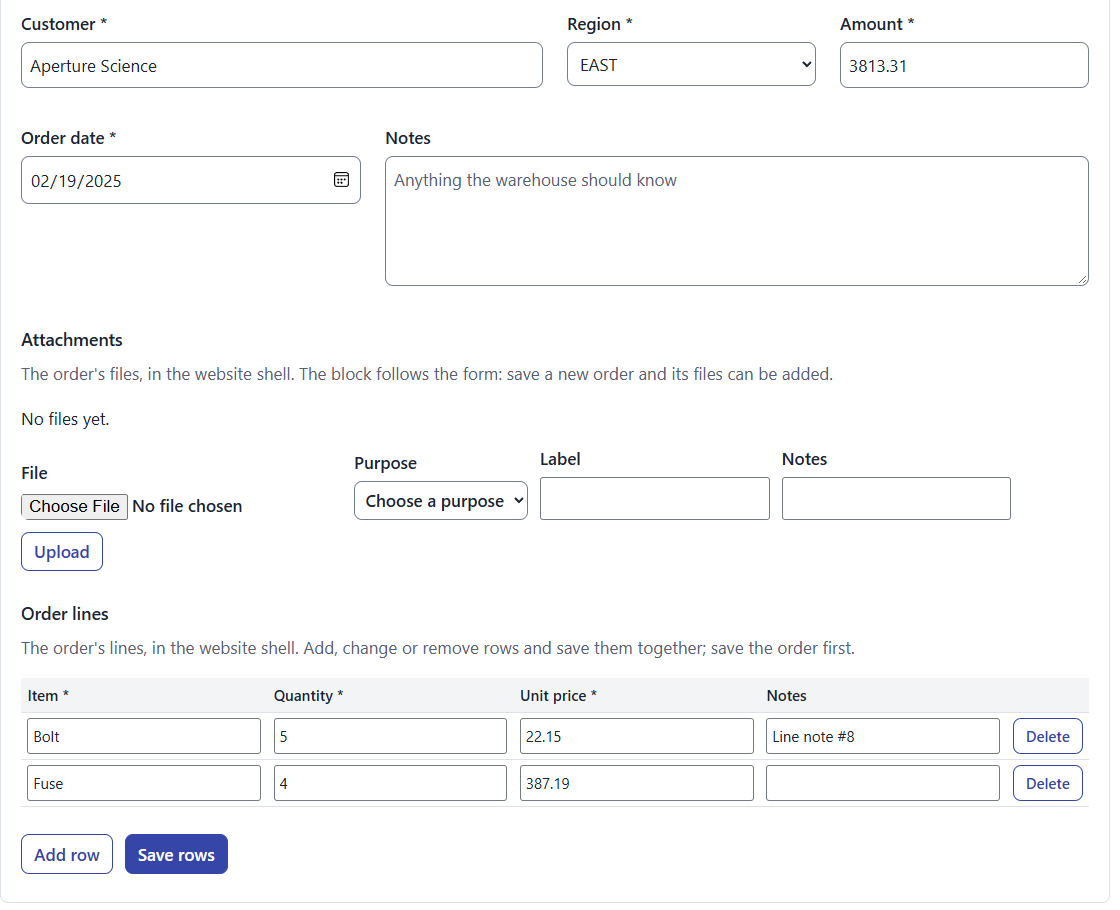
- Forms bound to a C# class you register, or to a SQL data source an editor publishes. Field blocks, file attachments and editable tables of related rows are included.
- Schedules that draw the rows of one data source against time, with the rows of another as bars.
- Anti-spam for public forms: Turnstile, reCAPTCHA, hCaptcha or a honeypot, checked on the server.
- API endpoints that serve a data source's rows as JSON at a route an editor defines.
- Interactive reports over a table or a SELECT, from the
AurorisNet.Umbraco.AppBlocks.InteractiveReportspackage. - HTML and PDF documents from Razor templates, from the
AurorisNet.Umbraco.AppBlocks.Documentspackage.
Blocks follow the Public Access of their page. Data source groups, row restrictions and C# policies narrow access further. Application data goes in a separate SQLite file by default, and the backoffice connects SQL Server, PostgreSQL and Oracle databases.
Install
| Package | Adds |
|---|---|
AurorisNet.Umbraco.AppBlocks |
Forms, field blocks, attachments, tabular forms, schedules, anti-spam, SQL data sources, API endpoints and connections |
AurorisNet.Umbraco.AppBlocks.InteractiveReports |
The Interactive Report block and saved views. Depends on AppBlocks |
AurorisNet.Umbraco.AppBlocks.Documents |
Documents as HTML or PDF, and printing through Pressroom. Depends on AppBlocks |
AurorisNet.Umbraco.AppBlocks.Testing |
HTTP clients that drive the blocks' endpoints from a site's tests |
The assemblies, namespaces and settings use the name AppBlocks.
AppBlocks is an alpha, version 0.1.0-alpha.1, and is not on nuget.org yet. Until it is, reference the project from a checkout of this repository, or build the packages and install them from a local folder:
# In this repository
dotnet pack src/AppBlocks -c Release -o artifacts/packages

# In the site's project folder
dotnet nuget add source <path to artifacts/packages> --name appblocks-local
dotnet add package AurorisNet.Umbraco.AppBlocks --version 0.1.0-alpha.1
Each package registers itself through an Umbraco composer. When the site restarts, AppBlocks adds its services, routes and backoffice screens, and installs its element types and data types through Umbraco's package importer. The types appear in AppBlocks folders in the backoffice trees, and Settings → AppBlocks opens the administration screens.
Quick start
- In Settings → Data Types, add Forms container to the allowed blocks of the site's Block Grid or Block List. Add Interactive Report when its package is installed. A site or package can also allow a block from code.
- Create the application's tables in the AppBlocks database (
AppBlocksDb), or add another database under Settings → AppBlocks → Connections. - Give a form something to read and write. Register a C# class with
services.AddScoped<IFormResource, YourFormClass>(), or publish a SQL data source node under Data sources in the content tree. - Add a Forms container to a page and add a Form to it. Select the class or the data source in the form's Form Interface, then add field blocks and bind each to a field. Use Field rules for conditional visibility, required fields and validation. To edit report rows in place, turn on Form is a sidebar and configure the report’s Form links.
- For a report, add an Interactive Report block and choose a table or enter a SELECT.
A site that renders blocks with Umbraco's blockgrid/Components or blocklist/Components partials shows the blocks with no template change. Adding AppBlocks to a site covers other rendering conventions, styling and caching.
Check each form class before it goes on a public page. On a page without Public Access, an anonymous visitor reaches the class, so a class with no check of its own is public. The business rules guide has the checks.
Settings
AppBlocks runs with no configuration. Adding AppBlocks to a site lists every setting of the AppBlocks and Attachments sections with its default. The Interactive Reports and Documents guides list the settings of those packages.
Supported versions
| Umbraco | Supported releases | Runtime |
|---|---|---|
| 18 | 18.3.1 to 18.3.2 | .NET 10 |
The packages reference Umbraco.Cms 18.3.1, the release the tests run on.
| Database | Driver |
|---|---|
| SQLite, SQL Server | Comes with Umbraco |
| PostgreSQL | The site installs Npgsql |
| Oracle 11.2, and 12c or later | The site installs Oracle.ManagedDataAccess.Core |
Documentation
| Guide | What it covers |
|---|---|
| Adding AppBlocks to a site | Rendering, styling, backoffice previews, access and caching, every setting, and the extension points for companion packages |
| Business rules | Identity, groups, data source access, backing classes, attachments, validation and concurrency. Also shown under Settings → AppBlocks → Business rules |
| Connections | The default database, extra connections, application databases with schema scripts, upload storage and database drivers |
| Database setup | The tables AppBlocks creates, and what to do when the database account may not create them |
| API endpoints | Rows of a data source as JSON over GET: routes, parameters, access and the browser client |
| Backing Classes | Writing form classes and backing classes in the backoffice of a development site |
| Anti-spam | The Anti-spam block and its keys |
| Display value | Read-only values, and values shown as links |
| Shuttle field | Ordered selections stored as one line of CSV |
| Color picker | Hex color fields |
| Schedule block | Rows, bars and markers from two data sources |
| Localisation | The blocks' texts in the site's languages, and every text id |
| Worked example | A multi-tenant activity schedule: pages, tables, data sources, blocks and C# |
| Interactive Reports package | Report blocks, saved views, printing and report access |
| Documents package | Document nodes, templates, Pressroom configurations and the output service |
| Testing package | The endpoint clients and the helpers for running Umbraco in a test process |
| Developing AppBlocks | Building, testing, the demo site and how definitions change between versions |
Developing
Building needs the .NET 10 SDK. The clean-install test also needs PowerShell 7 and Node.js.
dotnet build AppBlocks.slnx
dotnet run --project tests/AppBlocks.Tests -- -noLogo
dotnet run --project tests/AppBlocks.InteractiveReports.Tests -- -noLogo
dotnet run --project tests/AppBlocks.Documents.Tests -- -noLogo
dotnet pack src/AppBlocks -c Release -o artifacts/packages
The three test projects and tests/clean-install/Invoke-CleanInstall.ps1 together are the full test run. Run them on a developer's machine before a release that changes the code. Developing AppBlocks describes each of them, the live database tests and the demo site.
Releases
AppBlocks follows Umbraco. umbraco-releases.yml tests each new Umbraco 18 release with the three test projects. When they pass, it commits the release to UmbracoReleases in Directory.Build.props and starts release.yml. Dependabot covers the other packages.
Versions are MAJOR.MINOR.PATCH with a prerelease series: 0.1.0-alpha.1, then 0.1.0-alpha.2. The four packages publish together under one version. The first release is started by hand, because there is no release tag to raise yet.
The release guide describes the workflows.
License
| Product | Versions Compatible and additional computed target framework versions. |
|---|---|
| .NET | net10.0 is compatible. net10.0-android was computed. net10.0-browser was computed. net10.0-ios was computed. net10.0-maccatalyst was computed. net10.0-macos was computed. net10.0-tvos was computed. net10.0-windows was computed. |
-
net10.0
- Microsoft.Extensions.FileProviders.Embedded (>= 10.0.15)
- Umbraco.Cms (>= 18.3.2)
NuGet packages (4)
Showing the top 4 NuGet packages that depend on AurorisNet.Umbraco.AppBlocks:
| Package | Downloads |
|---|---|
|
AurorisNet.Umbraco.AppBlocks.InteractiveReports
Optional Interactive Reports companion for AppBlocks on Umbraco. Requires AppBlocks. |
|
|
AurorisNet.Umbraco.AppBlocks.Documents
Generate templated HTML and PDF documents from AppBlocks data sources. PDF conversion optionally uses Pressroom. |
|
|
AurorisNet.Umbraco.AppBlocks.Testing
HTTP clients that drive AppBlocks' forms, attachments, tabular, report and paper-report endpoints the way the browser runtime does, and helpers for running Umbraco in a test process. No test framework dependency; failures throw TestSiteException. |
|
|
AurorisNet.Umbraco.AppHost
A shared base for Umbraco sites: single sign-on and account policy, application blocks and Interactive Reports, website and application themes, virtual-path hosting, and the workarounds for upstream Umbraco gaps. |
GitHub repositories
This package is not used by any popular GitHub repositories.
| Version | Downloads | Last Updated |
|---|---|---|
| 0.1.0-alpha.6 | 0 | 11/20/2026 |
| 0.1.0-alpha.5 | 12 | 11/19/2026 |
| 0.1.0-alpha.4 | 38 | 11/19/2026 |
| 0.1.0-alpha.3 | 45 | 11/19/2026 |
| 0.1.0-alpha.2 | 45 | 11/18/2026 |
| 0.1.0-alpha.1 | 73 | 11/18/2026 |